
python 3.6 +pyMysql 操作mysql数据库
版本信息:python:3.6 mysql:5.7 pyMysql:0.7.11
#################################################################
#author: 陈月白
#_blogs: http://www.cnblogs.com/chenyuebai/
#################################################################
# -*- coding: utf-8 -*-

class MysqlTools():

    """

    连接mysql
    库、表操作

    """

    def __init__(self,host,dbname,user,passwd,charset="utf8"):

        self.host = host

        self.dbname = dbname

        self.user = user

        self.passwd = passwd

        self.charset = charset

    def connectMysqlDatabase(self):

        """连接db"""

        try:

            #连接db

            connect = pymysql.connect(host=self.host,user=self.user,passwd=self.passwd,db=self.dbname,charset=self.charset)

            cursor = connect.cursor()

            databaseConnectInfo = self.user + "@" + "self.host" + "/" +  self.dbname

            print("INFO:connect database %s success."%databaseConnectInfo)

            return connect,cursor

        except:

            traceback.print_exc()

            print("ERROR:FUNCTION connectMysqlDatabase connect mysql database failed.")

    def executeSqlLine(self,sqlLine):

        """执行单条sql语句"""

        if sqlLine and isinstance(sqlLine,str):

            print("INFO:now start connect mysql dababase.")

            connect,cursor = self.connectMysqlDatabase()

            executeResult = ""

            try:

                #游标执行sql

                cursor.execute(sqlLine)

                executeResult = cursor.fetchall()       #获取所有执行结果

                cursor.close()                          #关闭游标

                connect.commit()                        #确认提交

                print("INFO:execute sql sucess. sqlLine = ", sqlLine)

            except Exception as e:

                print("ERROR:execute sql failed.errorInfo =",e)

                print("ERROR:FUNCTION executeSql execute failed.sqlLine =",sqlLine)

                connect.rollback()                      #回滚db

                return str(e) + "    sqlLine = " + sqlLine

            #断开连接

            connect.close()

            print("INFO:connect closed.\n")

            return executeResult

        else:

            print("ERROR:param sqlLine is empty or type is not str.sqlLine = ",sqlLine)

    def executeBatchSql(self,sqlList):

        """

        批量执行sql

        exp:    executeBatchSql([sql_1,

                                sql_2,

                                sql_3,

                                ......

                                ])

        """

        finalResultList = []

        if sqlList:

            for sql in sqlList:

                executeResult = self.executeSqlLine(sql)

                finalResultList.append(executeResult)

        else:

            print("ERROR:param sqlList is empty.")

        return finalResultList
测试代码:
# -*- coding: utf-8 -*-

from my_code.work_tools import WorkTools

mysql = WorkTools.MysqlTools("localhost","testdbname","rootuername","passwd")

#执行单行sql

ret1 = mysql.executeSqlLine("show databases")

#批量执行

ret2 = mysql.executeBatchSql([

                            "show databases",

                            "show tables",

                            "update students_info set name = '王大花D' where id = 2",

                            "select * from students_info",

                            "error sql test"  #异常sql测试

                              ])

print("ret1 = ",ret1)

print("---------------------")

for i in ret2:

    print(i)
测试表:
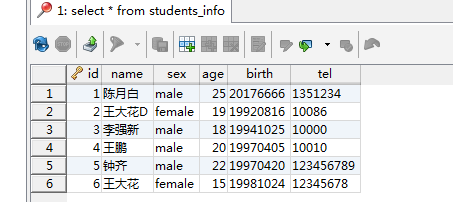
执行结果:
ret1 = (('information_schema',), ('mysql',), ('performance_schema',), ('sakila',), ('sys',), ('testdb',), ('world',))
---------------------
(('information_schema',), ('mysql',), ('performance_schema',), ('sakila',), ('sys',), ('testdb',), ('world',))
(('students_info',),)
()
((1, '陈月白', 'male', 25, '20176666', '1351234'), (2, '王大花D', 'female', 19, '19920816', '10086'), (3, '李强新', 'male', 18, '19941025', '10000'), (4, '王鹏', 'male', 20, '19970405', '10010'), (5, '钟齐', 'male', 22, '19970420', '123456789'), (6, '王大花', 'female', 15, '19981024', '12345678'))
(1064, "You have an error in your SQL syntax; check the manual that corresponds to your MySQL server version for the right syntax to use near 'error sql test' at line 1") sqlLine = error sql test
python 3.6 +pyMysql 操作mysql数据库的更多相关文章
- Python MySQLdb模块连接操作mysql数据库实例_python
mysql是一个优秀的开源数据库,它现在的应用非常的广泛,因此很有必要简单的介绍一下用python操作mysql数据库的方法.python操作数据库需要安装一个第三方的模块,在http://mysql ...
- python使用pymysql操作mysql数据库
1.安装pymysql pip install pymysql 2.数据库查询示例 import pymysql # 连接database conn =pymysql.connect(user=' , ...
- flask + pymysql操作Mysql数据库
安装flask-sqlalchemy.pymysql模块 pip install flask-sqlalchemy pymysql ### Flask-SQLAlchemy的介绍 1. ORM:Obj ...
- python学习笔记之——操作mysql数据库
Python 标准数据库接口为 Python DB-API,Python DB-API为开发人员提供了数据库应用编程接口. Python 数据库接口支持非常多的数据库,你可以选择适合你项目的数据库: ...
- 使用pymysql操作mysql数据库
PyMySQL的安装和连接 PyMySQL的安装 python3. -m pip install pymysql python连接数据库 import pymysql # 创建连接 conn = py ...
- 用pymysql操作MySQL数据库
工具库安装 pip install pymysql 连接关闭数据库与增删改查操作 # 导入pymysql库 import pymysql # 打开数据库连接 # 参数1:数据库服务器所在的主机+端口号 ...
- PyMySQL操作mysql数据库(py3必学)
一,安装PyMySQL Python是编程语言,MySQL是数据库,它们是两种不同的技术:要想使Python操作MySQL数据库需要使用驱动.这里选用PyMySQL驱动. 安装方式还是使用pip命令. ...
- pymysql操作mysql数据库
1.建库 import pymysql # 建库 try: conn=pymysql.connect( host='127.0.0.1', port=3306, user='root', passwd ...
- 使用pymysql 操作MySQL数据库
安装 pip install pymysql 注:连接前要有可使用的账户及有权限.可操作的数据库 先来一个栗子: import pymysql # 连接database conn = pymysql. ...
随机推荐
- VS2012环境下C#调用C++生成的DLL
1.VS2012 C++生成DLL 这个过程仿照http://www.cnblogs.com/LCCRNblog/p/3625200.html创建DLL即可,暂时不用创建测试工程,因为下面有测试工程的 ...
- Codeforces Round #431 (Div. 1)
A. From Y to Y time limit per test 1 second memory limit per test 256 megabytes input standard input ...
- Problem I
Problem Description Queues and Priority Queues are data structures which are known to most computer ...
- John
John Time Limit: 5000/1000 MS (Java/Others) Memory Limit: 65535/32768 K (Java/Others) Total Submissi ...
- jQuery基础应用
什么是 jQuery ? jQuery是一个JavaScript函数库. jQuery是一个轻量级的"写的少,做的多"的JavaScript库. jQuery库包含以下功能: HT ...
- Tomcat请求头过大
今天开发反应Tomcat的请求头过大 <Connector port="8280" protocol="HTTP/1.1" connectionTimeo ...
- Problem B: 点之间的距离
#include <iostream> #include <vector> #include <cmath> #include <algorithm> ...
- 03.javabean
一.javabean简介 1, 作用:一个可重用组件,在jsp开发中可减少重复代码,使HTML与JAVA代码分离便于日后维护. 2, javabean类要求: 所有类必须放在包中,且为public ...
- python3 多线程获取数据实例
import requestsimport jsonfrom retrying import retryfrom lxml import etreefrom queue import Queueimp ...
- 在ASP.NET Core Web API中为RESTful服务增加对HAL的支持
HAL(Hypertext Application Language,超文本应用语言)是一种RESTful API的数据格式风格,为RESTful API的设计提供了接口规范,同时也降低了客户端与服务 ...