
4.docker学习之镜像
镜像
获取镜像
[root@206 ~]# systemctl start docker
下载镜像
[root@206 ~]# docker pull ubuntu:17.10

17.10: Pulling from library/ubuntu

06d6d7dd14f0: Pull complete

7afd309907db: Pull complete

151009f8900b: Pull complete

36547d3d8f4e: Pull complete

320476e1abe2: Pull complete

Digest: sha256:0fda3973dca01bb6797c8f84f7728730e3760fff0360b213bb1a8f2a65492967

Status: Downloaded newer image for ubuntu:17.10
搜索镜像
[root@206 ~]# docker search python

NAME                           DESCRIPTION                                     STARS     OFFICIAL   AUTOMATED

python                         Python is an interpreted, interactive, obj...   1843      [OK]

kaggle/python                  Docker image for Python scripts run on Kaggle   62                   [OK]

google/python                  Please use gcr.io/google-appengine/python ...   35                   [OK]

vimagick/python                mini python                                     3                    [OK]

dockershelf/python             Repository for docker images of Python. Te...   3                    [OK]

pandada8/alpine-python         An alpine based python image                    3                    [OK]

beevelop/nodejs-python         Node.js with Python                             2                    [OK]

lucidfrontier45/python-uwsgi   Python with uWSGI                               2                    [OK]

tsuru/python                   Image for the Python platform in tsuru PaaS.    2                    [OK]

colstrom/python                Docker on Python, with pip!                     1                    [OK]

webhippie/python               Docker images for python                        1                    [OK]

lcgc/python                    The base image for applications written in...   1                    [OK]

orbweb/python                  Python image                                    1                    [OK]

1science/python                Python Docker images based on Alpine Linux      1                    [OK]

allanlei/python                Python Images                                   0                    [OK]

croscon/python                 Python image for Croscon                        0                    [OK]

kirigamico/python              Base Docker image which contains Python, G...   0                    [OK]

ceecko/python                  Python image                                    0                    [OK]

bynd/python                    Debian-based Python image                       0                    [OK]

samtayuk/python                Python with bower, less and sass                0                    [OK]

funkygibbon/python             Minimal python based on funkygibbon/ubuntu      0                    [OK]

1maa/python                    Python images                                   0                    [OK]

panubo/python                  Latest python versions built from source        0                    [OK]

mediadesignpractices/python    Base python build with useful preinstalls       0                    [OK]

codekoalas/python              Runs python scripts every 5 minutes after ...   0                    [OK]
筛选可以自动化构建的
[root@206 ~]# docker search --automated python
筛选收藏数3以上的
[root@206 ~]# docker search -s 3 python
筛选级别为2以上的
[root@206 ~]# docker search --stars=2 python
显示完整描述信息
[root@206 ~]# docker search --no-trunc python
创建镜像
[root@206 ~]# docker images

REPOSITORY          TAG                 IMAGE ID            CREATED             SIZE

ubuntu              17.10               073e7b409b9b        36 hours ago        89.6 MB
[root@206 ~]# docker run -ti ubuntu:17.10 /bin/bash

root@23a9ebc23cc5:/#
23a9ebc23cc5是容器的id
我们在运行的这个容器中进行修改
root@23a9ebc23cc5:/# mkdir test
然后退出
root@23a9ebc23cc5:/# exit
[root@206 ~]# docker commit -m "this is a new images" -a "root" 23a9ebc23cc5 newubuntu:8888
查看镜像,发现多了一个
[root@206 ~]# docker images

REPOSITORY          TAG                 IMAGE ID            CREATED             SIZE

newubuntu           8888                036d21b62a12        2 minutes ago       89.6 MB

ubuntu              17.10               073e7b409b9b        37 hours ago        89.6 MB
方法二:本地模板中导入镜像
[root@206 ~]# wget http://download.openvz.org/template/precreated/suse-13.1-x86-minimal.tar.gz
生成镜像
[root@206 ~]# cat suse-13.1-x86-minimal.tar.gz | docker import - newsuse:99999
看一下,又多了一个
[root@206 ~]# docker images

REPOSITORY          TAG                 IMAGE ID            CREATED             SIZE

newsuse             99999               7e4ff5f67461        4 seconds ago       156 MB

newubuntu           8888                036d21b62a12        19 minutes ago      89.6 MB

ubuntu              17.10               073e7b409b9b        37 hours ago        89.6 MB
方法三:使用Dockerfile
[root@206 test]# pwd

/test

[root@206 test]# touch Dockerfile

FROM newubuntu:8888

MAINTAINER root

RUN touch a.txt

RUN mkdir test1
[root@206 test]# docker build -t="newubuntuutu1" /test
[root@206 test]# docker images

REPOSITORY          TAG                 IMAGE ID            CREATED             SIZE

newubuntuutu1       latest              3d077336fcf6        5 seconds ago       89.6 MB

newsuse             99999               7e4ff5f67461        16 minutes ago      156 MB

newubuntu           8888                036d21b62a12        36 minutes ago      89.6 MB

ubuntu              17.10               073e7b409b9b        37 hours ago        89.6 MB
删除镜像
[root@206 test]# docker rmi newubuntuutu1
没有指定tag的时候,删除的是tag为latest的镜像,如果有个名为newubuntuutu1但是tag是其他的时候,这个镜像是不能删除的,除非删除的时候指定tag
[root@206 test]# docker rmi newsuse:99999
[root@206 test]# docker run -ti newubuntuutu1:latest /bin/bash
然后删除这个镜像,提示不能删除
[root@206 test]# docker rmi  newubuntuutu1:latest

Error response from daemon: conflict: unable to remove repository reference "newubuntuutu1:latest" (must force) - container e9a6eeb12f6e is using its referenced image 3d077336fcf6
我们需要先关闭容器 容器id为e9a6eeb12f6e我们只需要写前四位
[root@206 test]# docker rm e9a6
然后再执行docker rmi newubuntuutu1:latest即可
镜像信息的查看
[root@206 test]# docker images

REPOSITORY          TAG                 IMAGE ID            CREATED             SIZE

<none>              <none>              cbf64eb48a64        18 minutes ago      89.6 MB

newsuse             99999               7e4ff5f67461        32 minutes ago      156 MB

newubuntu           8888                036d21b62a12        52 minutes ago      89.6 MB

ubuntu              17.10               073e7b409b9b        37 hours ago        89.6 MB
镜像的存出与载入
备份
[root@206 test]# docker save -o ubuntu-bak.tar ubuntu:17.10

[root@206 test]# ls

Dockerfile  ubuntu-bak.tar
删除这个镜像
[root@206 test]# docker rmi ubuntu:17.10
载入
[root@206 test]# docker load --input ubuntu-bak.tar

Loaded image: ubuntu:17.10
写时复制机制
写时复制机制(copy-on-write),是一种在Linux中引入的只有进程空间的各段内容要发生变化时,才把父进程的内容复制给子进程的一种处理机制。
要创建一个子进程,通常的做法是
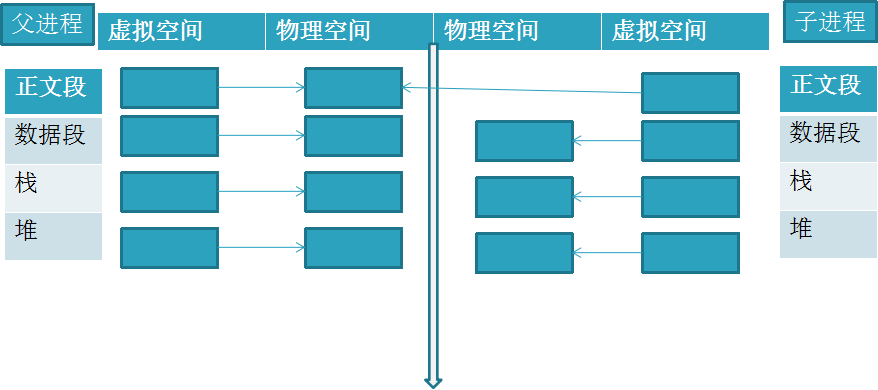
写时复制机制(copy-on-write)中,通常情况的做法是(只要父进程相应段不改变,就这么做):
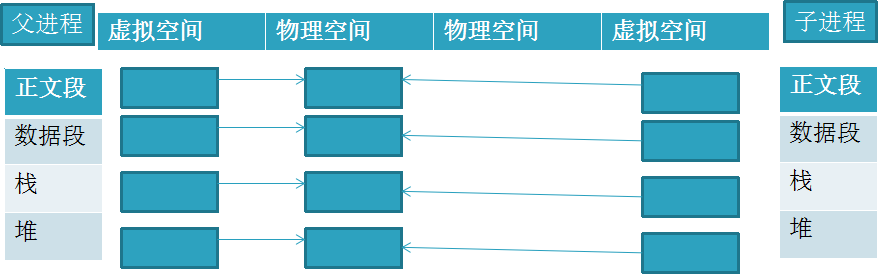
写时复制机制(copy-on-write)中,当父进程相应段要更改,才:
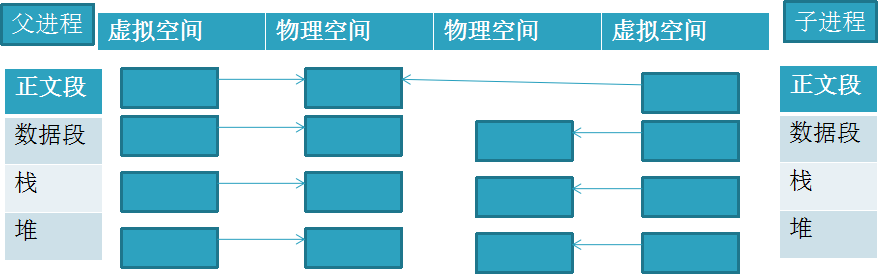
Docker中,采用写时复制机制来创建根文件系统,这样的话不会导致庞大的内存的开销,所以可以节省大量内存和硬盘空间,可以让Docker的部署更方便快捷。
docker hub

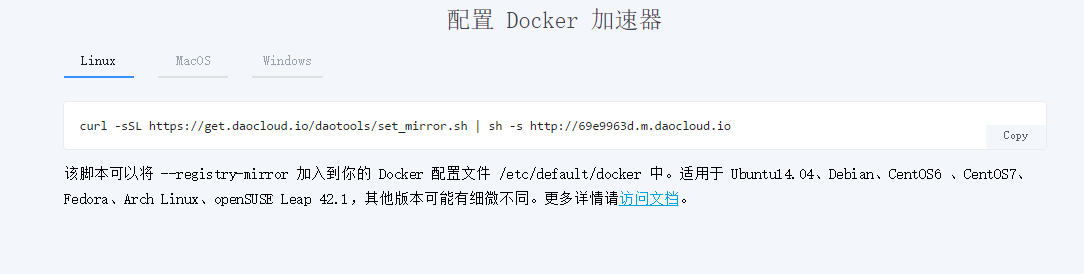
[root@206 test]# curl -sSL https://get.daocloud.io/daotools/set_mirror.sh | sh -s http://69e9963d.m.daocloud.io
镜像分发
安装git,并配置密钥
[root@206 test]# yum -y install git

[root@206 test]# ssh-keygen -t rsa -C "centos"

[root@206 test]# cd ~/.ssh/

[root@206 .ssh]# ls

id_rsa  id_rsa.pub
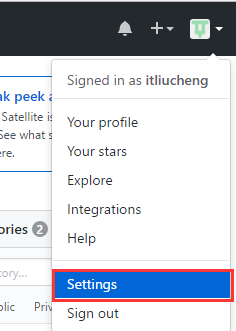
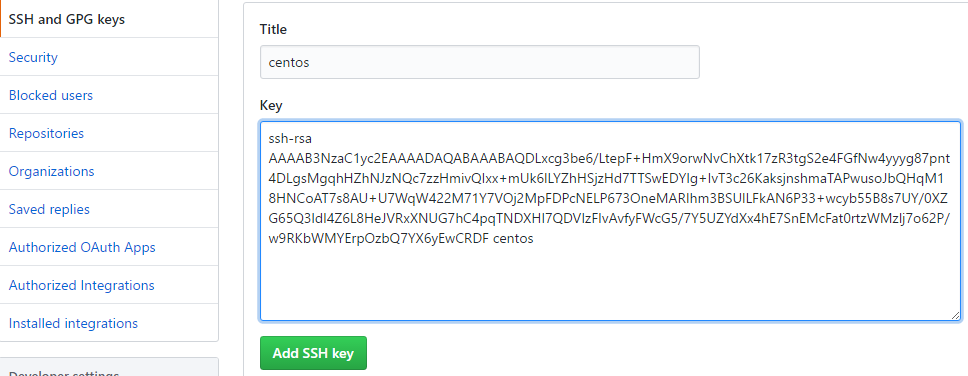
复制id_rsa.pub的内容,并打开github 的setting配置
github新建一个仓库,拉取到本地
[root@206 /]# git clone git@github.com:itliucheng/docker-test1.git
将之前save的tar文件放入
[root@206 /]# cp /test/ubuntu-bak.tar docker-test1/
提交到github
[root@206 docker-test1]# git add ubuntu-bak.tar

[root@206 docker-test1]# git commit -m "add a images"

[root@206 docker-test1]# git push origin master
之后别人可以下载该文件并恢复为镜像
4.docker学习之镜像的更多相关文章
- Docker 学习之镜像导入导出及推送阿里云服务器(三)
在前面两节里主要就是记录一些docker的基本的操作,包括搜索镜像,拉取镜像,根据镜像创建容器等等,在这一节主要就是记录Docker对于镜像文件的导入导出,及推送到阿里云再从阿里云获取镜像. 一.镜像 ...
- docker学习构建镜像---第三章节
一.docker镜像使用 运行docker容器时,使用的镜像如果在本地不存在,docker会自动从docker镜像仓库中下载,默认是从docker hub公共镜像源下载 在这里,我们需要了解:管理和使 ...
- Docker学习以及镜像制作流程
一.何为Docker Docker 是一个开源的应用容器引擎,基于 Go 语言 并遵从Apache2.0协议开源. Docker 可以让开发者打包他们的应用以及依赖包到一个轻量级.可移植的容器中,然后 ...
- Docker学习之镜像操作
使用Docker镜像 以下都是Docker镜像的一系列重要名操作,包括获取.查看.搜索.删除.创建.存出或载入.上传等.可使用docker image help命令查看帮助. 1.获取镜像(pull) ...
- Docker学习笔记之通过 Dockerfile 创建镜像
0x00 概述 由于 Docker 镜像的结构优势,使它的占用空间远小于普通的虚拟机镜像,而这就大幅减少了 Docker 镜像在网络或者其他介质中转移所花费的时间,进而提高了我们进行迁移部署的效率.不 ...
- Docker学习之Docker镜像基本使用
Docker学习之Docker镜像基本使用 获取镜像 命令格式:docker pull [选项] [Docker Registry 地址[:端口号]/]仓库名[:标签] 例如: docker pull ...
- Docker学习(二): 镜像的使用与构建
特别声明: 博文主要是学习过程中的知识整理,以便之后的查阅回顾.部分内容来源于网络(如有摘录未标注请指出).内容如有差错,也欢迎指正! =============系列文章============= 1 ...
- Docker学习(二)docker镜像操作
上一篇:docker学习(一)在centos7上安装docker 列出所有docker镜像 docker images 拉取镜像 docker pull 镜像名 我这里一Tomact为例 首先在Doc ...
- Docker学习(六)Dockerfile构建自定义镜像
Docker学习(六)Dockerfile构建自定义镜像 前言 通过前面一篇文章可以知道怎么去使用一个镜像搭建服务,但是,如何构造自己的一个镜像呢,docker提供了dockerfile可以让我们自己 ...
随机推荐
- yii2 创建ActiveForm(表单)
表单的生成表单中的方法 ActiveForm::begin()方法 ActiveForm::end()方法 getClientOptions()方法 其它方法:errorSum ...
- 对Qt下对话服务器客户端的总结(MyTcpServer与MyTcpClient)
在汇文培训老师给讲了这个例子.讲的挺好的 Qt编写聊天服务器与客户端主要用到下面两个类: QTcpSocket --- 处理连接的 QTcpServer --- 处理服务器,对接入进行响应,创建每个链 ...
- Linux轻松使用vim
VIM命令---Vi IMproved, a programmers text editor文本编辑 1>gedit 图形文本编辑工具 2>vim 字符界面的编辑工具 写脚本 ...
- 使用JSONObject生成和解析json
1. json数据类型 类型 描述 Number 数字型 String 字符串型 Boolean 布尔型 Array 数组,以"[]"括起来 Object 对象,类似于C中的结构体 ...
- 简单聊聊Storm的流分组策略
简单聊聊Storm的流分组策略 首先我要强调的是,Storm的分组策略对结果有着直接的影响,不同的分组的结果一定是不一样的.其次,不同的分组策略对资源的利用也是有着非常大的不同,本文主要讲一讲loca ...
- 项目中如何使用babel6详解
由于浏览器的版本和兼容性问题,很多es6,es7的新的方法都不能使用,等到可以使用的时候,可能已经过去了很多年.Babel可以把es6,es7的新代码编译成兼容绝大多数的主流浏览器的代码. 本篇文章主 ...
- uiautomator+cucumber实现自动化测试
前提 由于公司业务要求,所以自动化测试要达到以下几点: 跨应用的测试 测试用例可读性强 测试报告可读性强 对失败的用例有截图保存并在报告中体现 基于以上几点,在对自动化测试框架选型的时候就选择了uia ...
- ArrayList 线程安全
都说ArrayList是线程不安全的,那为什么不安全呢.根据官方提供的源码, 我是这样理解的,ArrayList的成员方法都不是原子操作的,比如add(E)方法,该方法是在集合的尾部加入一个一个元素. ...
- java获得路径的多种方式
本文讲解java语言中获得运行时路径的多种方式,包括java项目.java web项目.jar.weblogic等多种场景. 一.this.getClass().getClassLoader().ge ...
- easyUI中datagrid的使用
easyUI中的datagrid数据表格经常被用到,结合项目中的使用情况,总结一下datagrid使用中需要注意的一些问题.使用datagrid展示数据,需要在html.css.js中都要编写代码,h ...