
iOS学习之Map,定位,标记位置的使用
iOS上使用地图比Android要方便,只需要新建一个MKMapView,addSubView即可。这次要实现的效果如下:
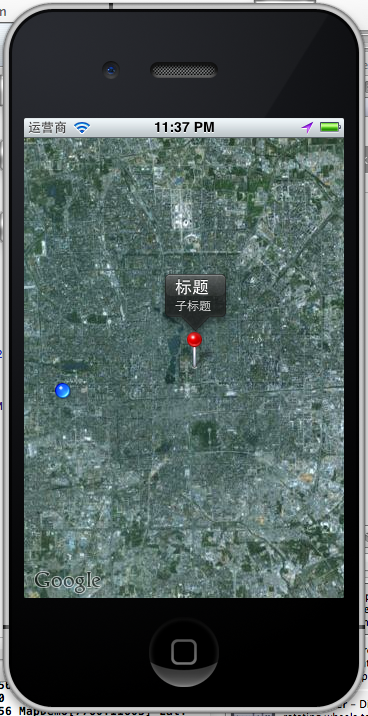
有标注(大头针),定位,地图。
1、添加地图
1.1 新一个Single View app ,选择默认项,创建后,在ViewController.h
- #import <UIKit/UIKit.h>
- #import <MapKit/MapKit.h>
- #import <CoreLocation/CoreLocation.h>
- @interface ViewController : UIViewController
- <MKMapViewDelegate, CLLocationManagerDelegate> {
- MKMapView *map;
- CLLocationManager *locationManager;
- }
- @end
1.2在ViewController.m中添加
- - (void)viewDidLoad
- {
- map = [[MKMapView alloc] initWithFrame:[self.view bounds]];
- map.showsUserLocation = YES;
- map.mapType = MKMapTypeSatellite;
- [self.view addSubview:map];
- [super viewDidLoad];
- // Do any additional setup after loading the view, typically from a nib.
- }
运行:
OMG,看到的是世界地图。怎么定位到指定的位置呢?比如定位回来伟大的祖国首都?
这里map.mapType =MKMapTypeSatellite;我用到是卫星地图,可以使用标准的地图,
map.mapType =MKMapTypeStandard;

注意,如果此时你编译有错误,请拉到博客最后查看 :5、 遇到的问题
2、定位到指定经纬度
- CLLocationCoordinate2D coords = CLLocationCoordinate2DMake(39.915352,116.397105);
- float zoomLevel = 0.02;
- MKCoordinateRegion region = MKCoordinateRegionMake(coords, MKCoordinateSpanMake(zoomLevel, zoomLevel));
- [map setRegion:[map regionThatFits:region] animated:YES];
这样,就我们就定位的了故宫了。

3、添加标注大头针
3.1 新建一个标注类:CustomAnnotation
按Command+N,继承NSObject。在CustomAnnotation.h 和CustomAnnotation.m文件添加如下代码:
- #import <Foundation/Foundation.h>
- #import <MapKit/MapKit.h>
- @interface CustomAnnotation : NSObject
- <MKAnnotation>
- {
- CLLocationCoordinate2D coordinate;
- NSString *title;
- NSString *subtitle;
- }
- -(id) initWithCoordinate:(CLLocationCoordinate2D) coords;
- @property (nonatomic, readonly) CLLocationCoordinate2D coordinate;
- @property (nonatomic, retain) NSString *title;
- @property (nonatomic, retain) NSString *subtitle;
- @end
- #import "CustomAnnotation.h"
- @implementation CustomAnnotation
- @synthesize coordinate, title, subtitle;
- -(id) initWithCoordinate:(CLLocationCoordinate2D) coords
- {
- if (self = [super init]) {
- coordinate = coords;
- }
- return self;
- }
- @end
3.1 使用大头针,
新建个方法添加大头针的
- -(void)createAnnotationWithCoords:(CLLocationCoordinate2D) coords {
- CustomAnnotation *annotation = [[CustomAnnotation alloc] initWithCoordinate:
- coords];
- annotation.title = @"标题";
- annotation.subtitle = @"子标题";
- [map addAnnotation:annotation];
- }
调用
- CLLocationCoordinate2D coords = CLLocationCoordinate2DMake(39.915352,116.397105);
- float zoomLevel = 0.02;
- MKCoordinateRegion region = MKCoordinateRegionMake(coords, MKCoordinateSpanMake(zoomLevel, zoomLevel));
- [map setRegion:[map regionThatFits:region] animated:YES];
- [self createAnnotationWithCoords:coords];
这样我们就把大头针定位在故宫了
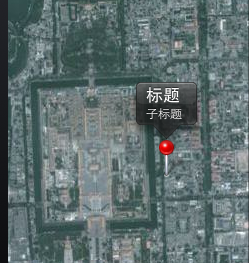
4、定位到当前位置并获取当前经纬度
前面我们已经添加了locationManager,现在在DidViewLoad里直接调用
- locationManager = [[CLLocationManager alloc] init];
- locationManager.delegate = self;
- [locationManager startUpdatingLocation];
实现协议方法收到定位成功后的经纬度
- - (void)locationManager:(CLLocationManager *)manager didUpdateToLocation:(CLLocation *)newLocation fromLocation:(CLLocation *)oldLocation {
- [locationManager stopUpdatingLocation];
- NSString *strLat = [NSString stringWithFormat:@"%.4f",newLocation.coordinate.latitude];
- NSString *strLng = [NSString stringWithFormat:@"%.4f",newLocation.coordinate.longitude];
- NSLog(@"Lat: %@ Lng: %@", strLat, strLng);
- }
- - (void)locationManager:(CLLocationManager *)manager didFailWithError:(NSError *)error {
- NSLog(@"locError:%@", error);
- }

运行,允许获取当前位置,打印log
- 2012-06-28 23:58:32.237 MapDemo[8202:11603] Lat: 39.9011 Lng: 116.3000
如果不允许:打印出错误日志
- 2012-06-28 23:25:03.109 MapDemo[7531:11603] locError:Error Domain=kCLErrorDomain Code=1 "The operation couldn’t be completed. (kCLErrorDomain error 1.)"
定位后,移动到当前位置:
- - (void)locationManager:(CLLocationManager *)manager didUpdateToLocation:(CLLocation *)newLocation fromLocation:(CLLocation *)oldLocation {
- [locationManager stopUpdatingLocation];
- NSString *strLat = [NSString stringWithFormat:@"%.4f",newLocation.coordinate.latitude];
- NSString *strLng = [NSString stringWithFormat:@"%.4f",newLocation.coordinate.longitude];
- NSLog(@"Lat: %@ Lng: %@", strLat, strLng);
- CLLocationCoordinate2D coords = CLLocationCoordinate2DMake(newLocation.coordinate.latitude,newLocation.coordinate.longitude);
- float zoomLevel = 0.02;
- MKCoordinateRegion region = MKCoordinateRegionMake(coords,MKCoordinateSpanMake(zoomLevel, zoomLevel));
- [map setRegion:[map regionThatFits:region] animated:YES];
- }
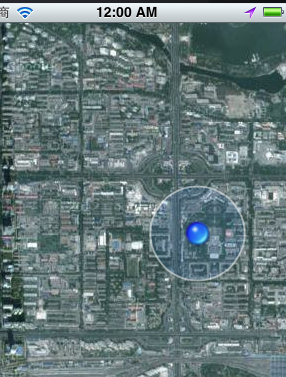
定位到了当前位置。
5、会遇到的问题:
运行是发现了编译错误:
Undefined symbols for architecture i386:
"_CLLocationCoordinate2DMake", referenced from:
-[ViewController viewDidLoad] in ViewController.o
-[ViewController locationManager:didUpdateToLocation:fromLocation:] in ViewController.o
"_OBJC_CLASS_$_MKMapView", referenced from:
objc-class-ref in ViewController.o
"_OBJC_CLASS_$_CLLocationManager", referenced from:
objc-class-ref in ViewController.o
ld: symbol(s) not found for architecture i386
clang: error: linker command failed with exit code 1 (use -v to see invocation)
这是为什么呢?没有添加对应的FrameWork。我使用的是4.3.2版本的XCode,添加方法如下:
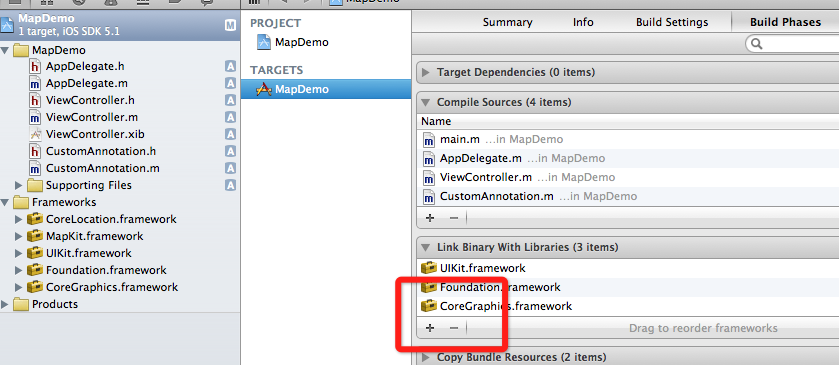
选择项目,TARGETS ,点加号,添加两个framework
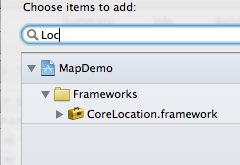
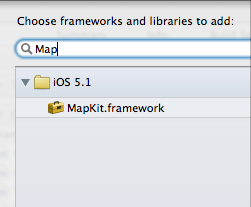
就好了。
如何发送IOS模拟器经纬度?
5.0以上的模拟器才能用这个功能,打开模拟:
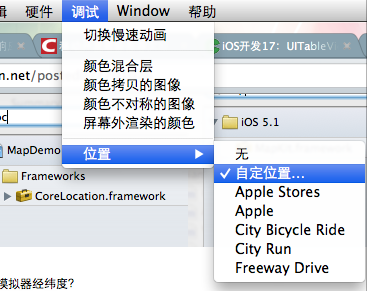
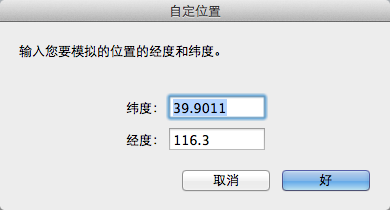
这样就能发送模拟的当前位置了。
例子代码:http://download.csdn.net/detail/totogo2010/4400001点击打开链接
https://github.com/schelling/YcDemo/tree/master/MapDemo
iOS学习之Map,定位,标记位置的使用的更多相关文章
- 小程序map学习:使用map获取当前位置并显示出来
在小程序开发的过程中,我碰到过一个做map的需求,在我开发的时候我碰到了一些问题,这里总结出来,给大家一些解决方法. 简易小程序dome下载 代码片段分享: js部分: var amapFile = ...
- 【iOS】7.4 定位服务->2.1.2 定位 - 官方框架CoreLocation: CLLocationManager(位置管理器)
本文并非最终版本,如果想要关注更新或更正的内容请关注文集,联系方式详见文末,如有疏忽和遗漏,欢迎指正. 本文相关目录: ================== 所属文集:[iOS]07 设备工具 === ...
- iOS学习笔记-地图MapKit入门
代码地址如下:http://www.demodashi.com/demo/11682.html 这篇文章还是翻译自raywenderlich,用Objective-C改写了代码.没有逐字翻译,如有错漏 ...
- iOS 学习资源
这份学习资料是为 iOS 初学者所准备的, 旨在帮助 iOS 初学者们快速找到适合自己的学习资料, 节省他们搜索资料的时间, 使他们更好的规划好自己的 iOS 学习路线, 更快的入门, 更准确的定位的 ...
- Windows phone 8 学习笔记(8) 定位地图导航
原文:Windows phone 8 学习笔记(8) 定位地图导航 Windows phone 8 已经不使用自家的bing地图,新地图控件可以指定制图模式.视图等.bing地图的定位误差比较大,在模 ...
- 【原】iOS学习48地图
一.地图的简介 在移动互联网时代,移动app能解决用户的很多生活琐事,比如 导航:去任意陌生的地方 周边:找餐馆.找酒店.找银行.找电影院 手机软件:微信摇一摇.QQ附近的人.微博.支付宝等 在上述应 ...
- iOS学习——iOS项目Project 和 Targets配置详解
最近开始学习完整iOS项目的开发流程和思路,在实际的项目开发过程中,我们通常需要对项目代码和资料进行版本控制和管理,一般比较常用的SVN或者Github进行代码版本控制和项目管理.我们iOS项目的开发 ...
- iOS学习——键盘弹出遮挡输入框问题解决方案
在iOS或Android等移动端开发过程中,经常遇到很多需要我们输入信息的情况,例如登录时要输入账号密码.查询时要输入查询信息.注册或申请时需要填写一些信息等都是通过我们键盘来进行输入的,在iOS开发 ...
- iOS学习——UIView的研究
在iOS开发中,我们知道有一个共同的基类——NSObject,但是对于界面视图而言,UIView是非常重要的一个类,UIView是很多视图控件的基类,因此,对于UIView的学习闲的非常有必要.在iO ...
随机推荐
- Django__RBAC
RBAC : 基于角色的权限访问控制(Role-Based Access Control) RBAC 模型作为目前最为广泛接受的权限模型 角色访问控制(RBAC)引入了Role的概念,目的是为了隔离U ...
- Head First设计模式之适配器模式
一.定义 适配器模式把一个类的接口,变换成客户端所期待的另一种接口,使原本因接口不匹配的两个类能够在一起工作. 二.结构 角色: Client:用户类,使用新接口Target来完成某些特定的需求. T ...
- Head First设计模式之命令模式
一.定义 定义:将一个请求封装成一个对象,从而使您可以用不同的请求对客户进行参数化.对请求排队或记录请求日志,以及支持可撤消的操作. 主要解决:在软件系统中,行为请求者与行为实现者通常是一种紧耦合的关 ...
- DBA 优化法则
硬件资源是根本,DBA是为了充分利用硬件资源:(更新中--) 统一SQL语句: 减少SQL嵌套: 执行计划返回结果集(决定计划走向): 合理使用临时表: tempdb分多文件: OLTP 条件使用变量 ...
- 企业网盘: Owncloud 搭建
说明:搭建很简单,就是一个lamp环境,但是最新的owncloud 9.x版本对php的版本需求不能低于5.4, 所以需要下载yum源来进行安装. 搭建过程 1)配置yum源 rpm -Uvh htt ...
- Linux系统编程:简单文件IO操作
使用Linux的文件API,经常看见一个东西,叫做文件描述符. 什么是文件描述符? (1)文件描述符其实实质是一个数字,这个数字在一个进程中表示一个特定的含义,当我们open打开一个文件时,操作系统在 ...
- TSLint提示错误
要成为优秀的TS开发人员,必须直接禁用TS的不良特性. 为此,道爷亲自操刀编写了TSLint工具,用来分析我们的TS代码,把潜在的Bug和不良代码全部找出来. 目的是为了保证TS的质量,但是存在的问题 ...
- Python2和Python3中的字符串编码问题解决
Python2和Python3在字符串编码上是有明显的区别. 在Python2中,字符串无法完全地支持国际字符集和Unicode编码.为了解决这种限制,Python2对Unicode数据使用了单独的字 ...
- JQuery 网页瞄点
$("html,body").animate({ scrollTop: $("#Content1").offset().top }, 3000); 代码说明:h ...
- blog建表操作
表思维导图: 数据库:表 from django.db import modelsfrom django.conf import settingsfrom django.contrib.auth. ...