
QtGui.QBrush
The QtGui.QBrush is an elementary graphics object. It is used to paint the background of graphics shapes, such as rectangles, ellipses, or polygons. A brush can be of three different types: a predefined brush, a gradient, or a texture pattern.
#!/usr/bin/python

# -*- coding: utf-8 -*-

"""

ZetCode PyQt4 tutorial

This example draws 9 rectangles in different

brush styles.

author: Jan Bodnar

website: zetcode.com

last edited: September 2011

"""

import sys

from PyQt4 import QtGui, QtCore

class Example(QtGui.QWidget):

    def __init__(self):

        super(Example, self).__init__()

        self.initUI()

    def initUI(self):

        self.setGeometry(300, 300, 355, 280)

        self.setWindowTitle('Brushes')

        self.show()

    def paintEvent(self, e):

        qp = QtGui.QPainter()

        qp.begin(self)

        self.drawBrushes(qp)

        qp.end()

    def drawBrushes(self, qp):

        brush = QtGui.QBrush(QtCore.Qt.SolidPattern)

        qp.setBrush(brush)

        qp.drawRect(10, 15, 90, 60)

        brush.setStyle(QtCore.Qt.Dense1Pattern)

        qp.setBrush(brush)

        qp.drawRect(130, 15, 90, 60)

        brush.setStyle(QtCore.Qt.Dense2Pattern)

        qp.setBrush(brush)

        qp.drawRect(250, 15, 90, 60)

        brush.setStyle(QtCore.Qt.Dense3Pattern)

        qp.setBrush(brush)

        qp.drawRect(10, 105, 90, 60)

        brush.setStyle(QtCore.Qt.DiagCrossPattern)

        qp.setBrush(brush)

        qp.drawRect(10, 105, 90, 60)

        brush.setStyle(QtCore.Qt.Dense5Pattern)

        qp.setBrush(brush)

        qp.drawRect(130, 105, 90, 60)

        brush.setStyle(QtCore.Qt.Dense6Pattern)

        qp.setBrush(brush)

        qp.drawRect(250, 105, 90, 60)

        brush.setStyle(QtCore.Qt.HorPattern)

        qp.setBrush(brush)

        qp.drawRect(10, 195, 90, 60)

        brush.setStyle(QtCore.Qt.VerPattern)

        qp.setBrush(brush)

        qp.drawRect(130, 195, 90, 60)

        brush.setStyle(QtCore.Qt.BDiagPattern)

        qp.setBrush(brush)

        qp.drawRect(250, 195, 90, 60)

def main():

    app = QtGui.QApplication(sys.argv)

    ex = Example()

    sys.exit(app.exec_())

if __name__ == '__main__':

    main()
In our example, we draw nine different rectangles.
brush = QtGui.QBrush(QtCore.Qt.SolidPattern)

qp.setBrush(brush)

qp.drawRect(10, 15, 90, 60)
We define a brush object. We set it to the painter object and draw the rectangle by calling thedrawRect() method.
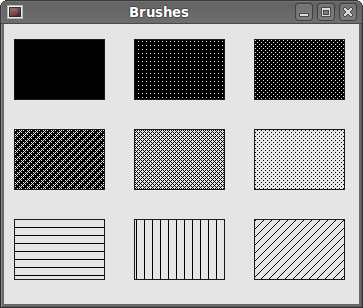 Figure: Brushes
QtGui.QBrush的更多相关文章
- 【转载】Pyqt 编写的俄罗斯方块
#!/usr/bin/env python # -*- coding: utf-8 -*- from __future__ import print_function from __future__ ...
- Python win32api提取exe图标icon
转载地址: http://blog.csdn.net/gumanren/article/details/6129416 代码如下: # -*- coding: utf-8 -*- import sys ...
- Pyqt 窗体间传值
窗体间传值网上有好多方法,比如新建文件,先将子类窗体的数据传到文件中,父窗体读取文件. Signal&Slot机制进行传值 等等 在这里,我们就举个采用apply方法:Signal& ...
- Pyqt 打包资源文件
用打包工具将做好的Pyqt程序打包成exe后发现引用的资源图片都显示不了? 是否遇到了和我一样的问题呢.google之后找到了方法,一种方法是在程序中引用外部资源,另外一种方法是将资源文件转换为py文 ...
- Pyqt 设置 背景颜色和背景图片、 QPalette 调色板 与QPainter 画板区别 、 不规则图片
设置 背景颜色和背景图片 首先设置autoFillBackground属性为真然后定义一个QPalette对象设置QPalette对象的背景属性(颜色或图片)最后设置QWidget对象的Palette ...
- pyqt4制作透明无边框窗体
用PyQt做了一个无边框登陆窗口,效果如下: 下面是代码: # -*- coding: utf-8 -*- from PyQt4 import QtGui ,Qt ,QtCore image=QtGu ...
- pyqt记录内容(音乐播放器)
#这是UI文件 # -*- coding: utf-8 -*- # Form implementation generated from reading ui file 'AudioPlayerDia ...
- PyQt:个性化登录界面模仿QQ登录
写在前面 写了一个登录界面的demo,类似QQ的,写的自己喜欢的样式,贴一下代码,先上效果,如下 陈述 PyQt5+Python3.5.2 login.py是里登录的主界面loginWnd类,Head ...
- pyqt5_eric6_Qt desinger
麦子学院视频教程day1 1.创建pushbutton 绑定信号和槽 Ui_mainWindow.py 1 from PyQt5 import QtCore, QtGui, QtWidgets cla ...
随机推荐
- codevs 1102 采药 2005年NOIP全国联赛普及组
1102 采药 2005年NOIP全国联赛普及组 时间限制: 1 s 空间限制: 128000 KB gold 题目描述 Description 辰辰是个天资聪颖的孩子,他的梦想是成为世界上最 ...
- Codeforces 160 D. Edges in MST
\(>Codeforces \space 160 D. Edges in MST<\) 题目大意 : 给出一张带权无向图,求对于这张图上的每一条边,其是必然存在于每一种最小生成树中,还是至 ...
- 51nod1218 最长递增子序列 V2
看见标签推荐顺便就做了吧 记$f[i], g[i]$为$i$的含$i$的前缀最长递增子序列和后缀递增子序列 只要满足$f[i] + g[i] == LIS + 1$,那么$i$就是可能的 对于$i$而 ...
- [bzoj1021][SHOI2008]Debt 循环的债务 (动态规划)
Description Alice. Bob和Cynthia总是为他们之间混乱的债务而烦恼,终于有一天,他们决定坐下来一起解决这个问题.不过,鉴别钞票的真伪是一件很麻烦的事情,于是他 们决定要在清还债 ...
- hdu 1569 最小割
和HDU 1565是一道题,只是数据加强了,貌似轮廓线DP来不了了. #include <cstdio> #include <cstring> #include <que ...
- Educational Codeforces Round 10 C. Foe Pairs 水题
C. Foe Pairs 题目连接: http://www.codeforces.com/contest/652/problem/C Description You are given a permu ...
- Codeforces Round #304 (Div. 2) Break the Chocolate 水题
Break the Chocolate Time Limit: 20 Sec Memory Limit: 256 MB 题目连接 http://codeforces.com/contest/546/ ...
- 点广告获取一些BTC(比特币)的网站
免费获取比特币:http://freebtc.qiniudn.com/freebtc.html free btc:http://freebtc.qiniudn.com/freebtc.html ...
- ASCII表 基本记忆 -- C
/* ASCII表规则记忆 我们仅仅要记住了一个字母或数字的 ASCII 码 (比如记住 A 为 65 , 0 的 ASCII 码为 48 ), 知道对应的大写和小写字母之间差 32. 0 -- 32 ...
- Tasker 中文版(4.6u2)
http://www.anzhi.com/soft_1868913.html Tasker绝对称得上是Android系统的神器之一,与Auto Memory Manager不同,Tasker不是加速型 ...