
python开发_difflib字符串比较
在python的difflib中
HtmlDiff:比较后以html方法展示
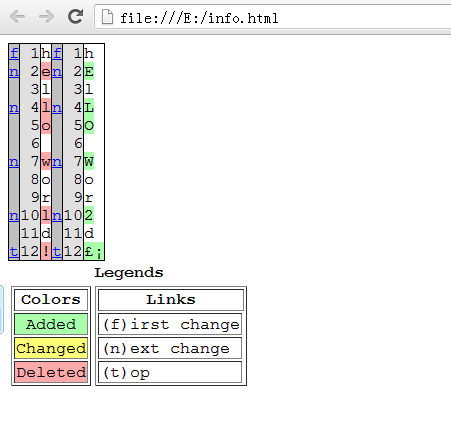
我们比较的是字符串:
'hello world!' 和 'hElLO Wor2d!'
具体代码:
 from difflib import *

 import os

 def write():

      if os.path.exists('E:\\info.html'):

          with open('E:\\info.html','w+') as fp:

              test = HtmlDiff.make_file(HtmlDiff(), 'hello world!', 'hElLO Wor2d!')

              fp.write(test)

              print('生成文件成功!')

              fp.close()

 def main():

     write()

 if __name__ == '__main__':

     main()
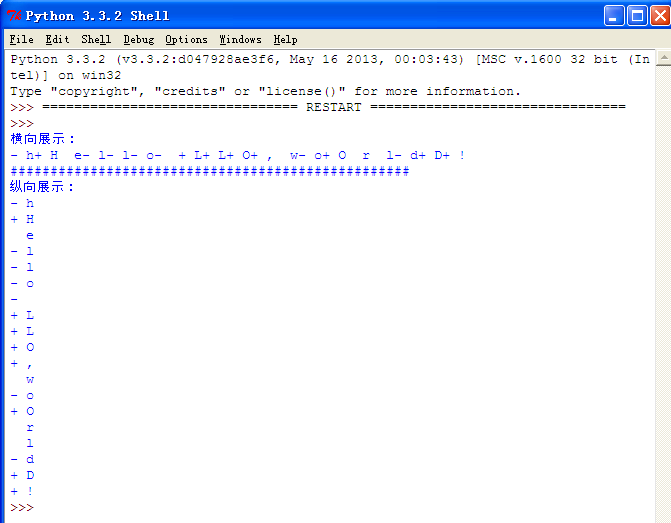
运行代码:
 import difflib

 test = difflib.Differ().compare('hello world', 'HeLLO,wOrlD!')

 print('横向展示:')

 print(''.join(list(test)))

 print('#' * 50)

 test = difflib.Differ().compare('hello world', 'HeLLO,wOrlD!')

 print('纵向展示:')

 print('\n'.join(list(test)))
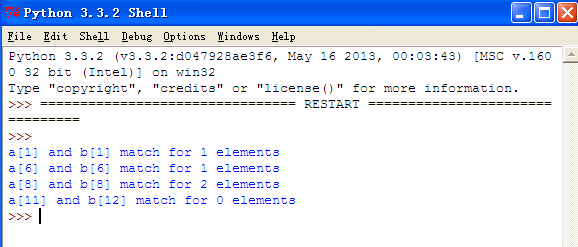
运行代码:
 import difflib

 def test():

     test = difflib.SequenceMatcher(lambda x: x == " ", 'hello world', 'HeLLO,wOrlD!')

     for block in test.get_matching_blocks():

         print("a[%d] and b[%d] match for %d elements" % block)

 def main():

     test()

 if __name__ == '__main__':

     main()
python开发_difflib字符串比较的更多相关文章
- Python 开发基础-字符串类型讲解(字符串方法)-2
s = 'Hello World!'print(s.index('W',0,9))#返回某个字母的索引值,本例返回6.没有该字母会报错,和FIND比较像,find不会报错,没找到会返回-1print( ...
- Python 开发基础-字符串类型讲解(字符串方法)-1
s = 'Hello World!' print(s.capitalize()) #第一个字母大写,其余小写# 输出:Hello world!print(s.swapcase())#大写变小写,小写变 ...
- Python开发【字符串格式化篇】
1.百分号 __author__ = "Tang" # + 号 拼接 msg = "i am " + " tang" print(msg) ...
- python开发学习-day01 (python安装与版本、字符串、字典、运算符、文件)
*:first-child { margin-top: 0 !important; } body>*:last-child { margin-bottom: 0 !important; } /* ...
- python开发_python中字符串string操作
在python中,对于字符串string的操作,我们有必要了解一下,这样在我们的以后的开发中会给我们带来很多方便 下面是我学习的笔记: #python-string #python中的字符串用单引号' ...
- python开发:python字符串操作方法
name = "my \tname is {name} and i am {year} old" capitalize:第一个单词的首字母大写的方法 print(name.capi ...
- Python开发【第五篇】字符串
字符串 作用:用来记录文字信息 例子: 空字符串 '' #单引号空字符串 "" #双引号空字符串 ''' ''' #三单引号空字符串 """ &quo ...
- Python 开发轻量级爬虫07
Python 开发轻量级爬虫 (imooc总结07--网页解析器BeautifulSoup) BeautifulSoup下载和安装 使用pip install 安装:在命令行cmd之后输入,pip i ...
- Python 开发轻量级爬虫06
Python 开发轻量级爬虫 (imooc总结06--网页解析器) 介绍网页解析器 将互联网的网页获取到本地以后,我们需要对它们进行解析才能够提取出我们需要的内容. 也就是说网页解析器是从网页中提取有 ...
随机推荐
- SpringMVC可以配置多个拦截后缀*.action和.do等
首先介绍一下.do和.action的区别: struts早期的1版本,以.do为后缀. 同时spring的MVC也是以.do为后缀. 几年前struts收购鼎鼎大名的webwork2和开发团队后,将w ...
- JSON.parse()——json字符串转JS
JSON 通常用于与服务端交换数据. 在接收服务器数据时一般是字符串. 我们可以使用 JSON.parse() 方法将数据转换为 JavaScript 对象. 语法 JSON.parse(text[, ...
- jQuery的validation插件(验证表单插件)
更完整的参考:http://www.runoob.com/jquery/jquery-plugin-validate.html 验证隐藏字段的使用(验证通过后ajax提交表单):http://www. ...
- tomcat+java的web程序持续占cpu高问题调试【转】
转自 tomcat+java的web程序持续占cpu问题调试 - 像风一样的自由 - CSDN博客http://blog.csdn.net/five3/article/details/28416771 ...
- curl错误码77 及 升级libcurl
今天碰到一个问题,curl请求返回错误码77错误 还给出了官网地址,网上查到77对应的是CURLE_SSL_CACERT_BADFILE 想起了刚默认更新了libcurl,于是有手工安装了一下c ...
- static变量和final变量
1.static变量 按照是否静态的对类成员变量进行分类可分两种:一种是被static修饰的变量,叫静态变量或类变量:另一种是没有被static修饰的变量,叫实例变量.两者的区别是: 对于静态变量在内 ...
- hive学习(六) 参数和动态分区
1.hive 参数.变量 1.1hive的命名空间: hive当中的参数.变量,都是以命名空间开头
- Linux 进程间通信(一)(经典IPC:管道、FIFO)
管道 管道是Unix系统IPC的最古老方式,有两种局限性: (1) 历史上它们是半双工的(即数据只能在一个方向上流动),虽然现在某些系统提供了全双工管道,但是为了可移植性,不要抱有绝对的全双工假设 ...
- Fedora下rstudio-server安装
安装 sudo yum install openssl sudo yum install mysql-server wget https://download2.rstudio.org/rstudio ...
- 用JDK自带的监控工具jconsole来监控程序运行
工具目录:C:\Program Files\Java\jdk1.6.0_06\bin\jconsole.exe 效果如下:监控类ThreadPoolExecutorTest 的运行 选择我们运行的程序 ...