
Eclipse下使用Stanford CoreNLP的方法
源码下载地址:CoreNLP官网。
目前release的CoreNLP version 3.5.0版本仅支持java-1.8及以上版本,因此有时需要为Eclipse添加jdk-1.8配置,配置方法如下:
- 首先,去oracle官网下载java-1.8,下载网址为:java下载,安装完成后。
- 打开Eclipse,选择Window -> Preferences -> Java –> Installed JREs 进行配置:
点击窗体右边的“add”,然后添加一个“Standard VM”(应该是标准虚拟机的意思),然后点击“next”;在”JRE HOME”那一行点击右边的“Directory…”找到你java 的安装路径,比如“C:Program Files/Java/jdk1.8”
这样你的Eclipse就已经支持jdk-1.8了。
1. 新建java工程,注意编译环境版本选择1.8

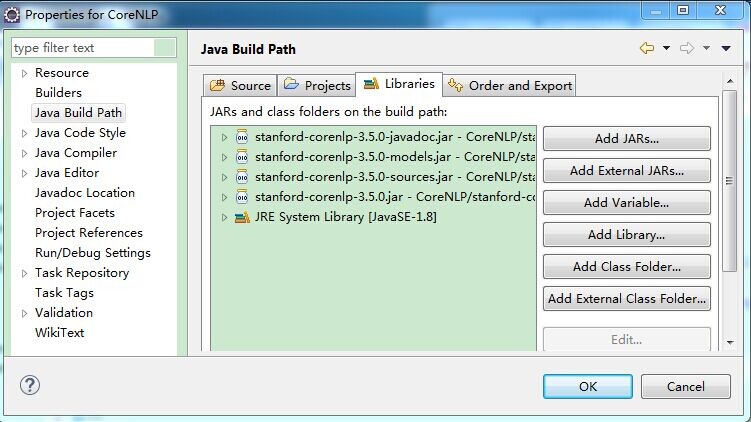
2. 将官网下载的源码解压到工程下,并导入所需jar包
如导入stanford-corenlp-3.5.0.jar、stanford-corenlp-3.5.0-javadoc.jar、stanford-corenlp-3.5.0-models.jar、stanford-corenlp-3.5.0-sources.jar、xom.jar等
导入jar包过程为:项目右击->Properties->Java Build Path->Libraries,点击“Add JARs”,在路径中选取相应的jar包即可。
3. 新建TestCoreNLP类,代码如下
 package Test;

 import java.util.List;

 import java.util.Map;

 import java.util.Properties;

 import edu.stanford.nlp.dcoref.CorefChain;

 import edu.stanford.nlp.dcoref.CorefCoreAnnotations.CorefChainAnnotation;

 import edu.stanford.nlp.ling.CoreAnnotations.LemmaAnnotation;

 import edu.stanford.nlp.ling.CoreAnnotations.NamedEntityTagAnnotation;

 import edu.stanford.nlp.ling.CoreAnnotations.PartOfSpeechAnnotation;

 import edu.stanford.nlp.ling.CoreAnnotations.SentencesAnnotation;

 import edu.stanford.nlp.ling.CoreAnnotations.TextAnnotation;

 import edu.stanford.nlp.ling.CoreAnnotations.TokensAnnotation;

 import edu.stanford.nlp.ling.CoreLabel;

 import edu.stanford.nlp.pipeline.Annotation;

 import edu.stanford.nlp.pipeline.StanfordCoreNLP;

 import edu.stanford.nlp.semgraph.SemanticGraph;

 import edu.stanford.nlp.semgraph.SemanticGraphCoreAnnotations.CollapsedCCProcessedDependenciesAnnotation;

 import edu.stanford.nlp.sentiment.SentimentCoreAnnotations;

 import edu.stanford.nlp.trees.Tree;

 import edu.stanford.nlp.trees.TreeCoreAnnotations.TreeAnnotation;

 import edu.stanford.nlp.util.CoreMap;

 public class TestCoreNLP {

     public static void main(String[] args) {

         // creates a StanfordCoreNLP object, with POS tagging, lemmatization, NER, parsing, and coreference resolution

         Properties props = new Properties();

         props.put("annotators", "tokenize, ssplit, pos, lemma, ner, parse, dcoref");

         StanfordCoreNLP pipeline = new StanfordCoreNLP(props);

         // read some text in the text variable

         String text = "Add your text here:Beijing sings Lenovo";

         // create an empty Annotation just with the given text

         Annotation document = new Annotation(text);

         // run all Annotators on this text

         pipeline.annotate(document);

         // these are all the sentences in this document

         // a CoreMap is essentially a Map that uses class objects as keys and has values with custom types

         List<CoreMap> sentences = document.get(SentencesAnnotation.class);

         System.out.println("word\tpos\tlemma\tner");

         for(CoreMap sentence: sentences) {

              // traversing the words in the current sentence

              // a CoreLabel is a CoreMap with additional token-specific methods

             for (CoreLabel token: sentence.get(TokensAnnotation.class)) {

                 // this is the text of the token

                 String word = token.get(TextAnnotation.class);

                 // this is the POS tag of the token

                 String pos = token.get(PartOfSpeechAnnotation.class);

                 // this is the NER label of the token

                 String ne = token.get(NamedEntityTagAnnotation.class);

                 String lemma = token.get(LemmaAnnotation.class);

                 System.out.println(word+"\t"+pos+"\t"+lemma+"\t"+ne);

             }

             // this is the parse tree of the current sentence

             Tree tree = sentence.get(TreeAnnotation.class);

             // this is the Stanford dependency graph of the current sentence

             SemanticGraph dependencies = sentence.get(CollapsedCCProcessedDependenciesAnnotation.class);

         }

         // This is the coreference link graph

         // Each chain stores a set of mentions that link to each other,

         // along with a method for getting the most representative mention

         // Both sentence and token offsets start at 1!

         Map<Integer, CorefChain> graph = document.get(CorefChainAnnotation.class);

     }

 }
PS:该代码的思想是将text字符串交给Stanford CoreNLP处理,StanfordCoreNLP的各个组件(annotator)按“tokenize(分词), ssplit(断句), pos(词性标注), lemma(词元化), ner(命名实体识别), parse(语法分析), dcoref(同义词分辨)”顺序进行处理。
处理完后List<CoreMap> sentences = document.get(SentencesAnnotation.class);中包含了所有分析结果,遍历即可获知结果。
这里简单的将单词、词性、词元、是否实体打印出来。其余的用法参见官网(如sentiment、parse、relation等)。
4. 执行结果:

Eclipse下使用Stanford CoreNLP的方法的更多相关文章
- eclipse下添加viplugin插件的方法
http://www.viplugin.com/ 在eclipse根目录下建立文件:viplugin2.lic,然后在里面添加以下字符串: nd4UFjUMBADcUSeSW8ocLKoGP3lpbW ...
- eclipse下修改项目名导致tomcat内发布名不一致的解决方法 .
eclipse下修改项目名导致tomcat内发布名不一致的解决方法 . ------------------------------------------------------- 解决方案: 直接 ...
- eclipse下java中凝视字体太小和xml中中文字体太小问题解决方法
我们在win7下进行android应用开发.须要搭建对应的开发环境.如今普遍基本上都是eclipse+adt+sdk,在本人搭建完环境后,发现eclipse下.java中的凝视和xml中的中文字体变得 ...
- eclipse下使用cygwin的方法(Windows下用eclipse玩gcc/g++和gdb)
明天就回国了,今晚回国前写写如何配置eclipse和CDT.这个配置方法网上讨论不是很多,可能用的人少,毕竟Windows上写C++程序多数喜欢VS,即使写的是Linux程序,很多人仍然会用VS(说只 ...
- eclipse下Android工程名称的修改方法
eclipse下Android工程名称的修改方法 对于已经建立的工程,如果发现原来的工程名不合适,此时若想彻底更改工程名,需要三个步骤: 1.更改工程名 选中工程名,右键-->Refactor- ...
- stanford corenlp的TokensRegex
最近做一些音乐类.读物类的自然语言理解,就调研使用了下Stanford corenlp,记录下来. 功能 Stanford Corenlp是一套自然语言分析工具集包括: POS(part of spe ...
- Stanford CoreNLP 3.6.0 中文指代消解模块调用失败的解决方案
当前中文指代消解领域比较活跃的研究者是Chen和Vincent Ng,这两个人近两年在AAAI2014, 2015发了一些相关的文章,研究领域跨越零指代.代词指代.名词指代等,方法也不是很复杂,集中于 ...
- stanford corenlp自定义切词类
stanford corenlp的中文切词有时不尽如意,那我们就需要实现一个自定义切词类,来完全满足我们的私人定制(加各种词典干预).上篇文章<IKAnalyzer>介绍了IKAnalyz ...
- Eclipse下配置javaweb项目快速部署到tomcat
用惯了VS,再用Eclipse,完全有一种从自动挡到手动挡的感觉啊. 很多同学在Eclipse下开发web项目,每一次修改代码,看效果的时候都有右键项目->Run as -> Run on ...
随机推荐
- 在C++11中实现监听者模式
参考文章:https://coderwall.com/p/u4w9ra/implementing-signals-in-c-11 最近在完成C++大作业时,碰到了监听者模式的需求. 尽管C++下也可以 ...
- 【洛谷 P3648】 [APIO2014]序列分割 (斜率优化)
题目链接 假设有\(3\)段\(a,b,c\) 先切\(ab\)和先切\(bc\)的价值分别为 \(a(b+c)+bc=ab+bc+ac\) \((a+b)c+ab=ab+bc+ac\) 归纳一下可以 ...
- 【leetcode 简单】第二十七题 二叉树的最小深度
给定一个二叉树,找出其最小深度. 最小深度是从根节点到最近叶子节点的最短路径上的节点数量. 说明: 叶子节点是指没有子节点的节点. 示例: 给定二叉树 [3,9,20,null,null,15,7], ...
- Impala笔记之通用命令
help help命令用于查询其它命令的用法 [quickstart.cloudera:21000] > help select; Executes a SELECT... query, fet ...
- input只读属性readonly和disabled的区别
主要区别: 参考: http://bbs.html5cn.org/forum.php?mod=viewthread&tid=84113&highlight=input http://b ...
- 2、java语言基础
1.关键字 被Java语言赋予特定含义的单词被称为关键字关键字都是小写的在Java开发工具中,针对关键字有特殊颜色的标记 2.标识符 Java标识符命名规则 ·标识符是由,数字,字母,下划线和美元符号 ...
- jq时间日期插件的使用-datetimepicker
分三步 首先引入各种包 然后搞哥容器用id 然后加入一段js 实例: 下载:http://files.cnblogs.com/files/wordblog/datetimepicker-maste ...
- inet_addr_onlink
/* 根据指定设备的ip配置块,判断地址a,b是否在同一子网 */ /* --邻居项要求,在同一子网中的两个设备, 至少有一个接口有相同的子网配置, --也就是说对端的in_dev->ifa_l ...
- UNIX环境高级编程学习笔记(十)为何 fork 函数会有两个不同的返回值【转】
转自:http://blog.csdn.net/fool_duck/article/details/46917377 以下是基于 linux 0.11 内核的说明. 在init/main.c第138行 ...
- python基础===python自带idle的快捷键
Ctrl + [ Ctrl + ] 缩进代码Alt+3 Alt+4 注释.取消注释代码行Alt+5 Alt+6 切换缩进方式 空格<=>TabAlt+/ 单词完成,只要文中出现过,就可 ...