
Eclipse下使用Stanford CoreNLP的方法
源码下载地址:CoreNLP官网。
目前release的CoreNLP version 3.5.0版本仅支持java-1.8及以上版本,因此有时需要为Eclipse添加jdk-1.8配置,配置方法如下:
- 首先,去oracle官网下载java-1.8,下载网址为:java下载,安装完成后。
- 打开Eclipse,选择Window -> Preferences -> Java –> Installed JREs 进行配置:
点击窗体右边的“add”,然后添加一个“Standard VM”(应该是标准虚拟机的意思),然后点击“next”;在”JRE HOME”那一行点击右边的“Directory…”找到你java 的安装路径,比如“C:Program Files/Java/jdk1.8”
这样你的Eclipse就已经支持jdk-1.8了。
1. 新建java工程,注意编译环境版本选择1.8

2. 将官网下载的源码解压到工程下,并导入所需jar包
如导入stanford-corenlp-3.5.0.jar、stanford-corenlp-3.5.0-javadoc.jar、stanford-corenlp-3.5.0-models.jar、stanford-corenlp-3.5.0-sources.jar、xom.jar等
导入jar包过程为:项目右击->Properties->Java Build Path->Libraries,点击“Add JARs”,在路径中选取相应的jar包即可。
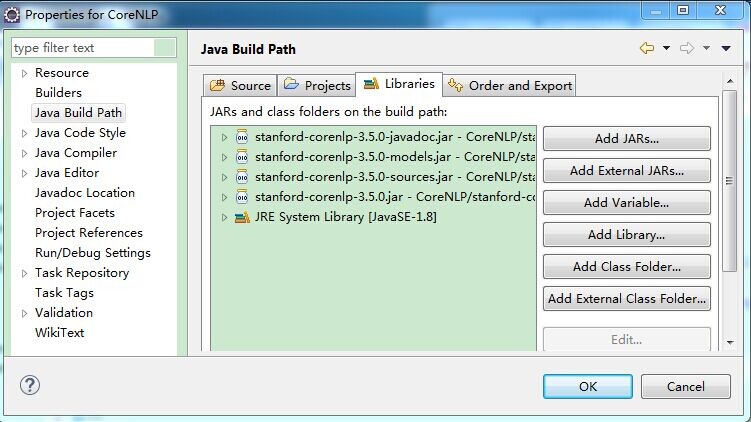
3. 新建TestCoreNLP类,代码如下
 package Test;

 import java.util.List;

 import java.util.Map;

 import java.util.Properties;

 import edu.stanford.nlp.dcoref.CorefChain;

 import edu.stanford.nlp.dcoref.CorefCoreAnnotations.CorefChainAnnotation;

 import edu.stanford.nlp.ling.CoreAnnotations.LemmaAnnotation;

 import edu.stanford.nlp.ling.CoreAnnotations.NamedEntityTagAnnotation;

 import edu.stanford.nlp.ling.CoreAnnotations.PartOfSpeechAnnotation;

 import edu.stanford.nlp.ling.CoreAnnotations.SentencesAnnotation;

 import edu.stanford.nlp.ling.CoreAnnotations.TextAnnotation;

 import edu.stanford.nlp.ling.CoreAnnotations.TokensAnnotation;

 import edu.stanford.nlp.ling.CoreLabel;

 import edu.stanford.nlp.pipeline.Annotation;

 import edu.stanford.nlp.pipeline.StanfordCoreNLP;

 import edu.stanford.nlp.semgraph.SemanticGraph;

 import edu.stanford.nlp.semgraph.SemanticGraphCoreAnnotations.CollapsedCCProcessedDependenciesAnnotation;

 import edu.stanford.nlp.sentiment.SentimentCoreAnnotations;

 import edu.stanford.nlp.trees.Tree;

 import edu.stanford.nlp.trees.TreeCoreAnnotations.TreeAnnotation;

 import edu.stanford.nlp.util.CoreMap;

 public class TestCoreNLP {

     public static void main(String[] args) {

         // creates a StanfordCoreNLP object, with POS tagging, lemmatization, NER, parsing, and coreference resolution

         Properties props = new Properties();

         props.put("annotators", "tokenize, ssplit, pos, lemma, ner, parse, dcoref");

         StanfordCoreNLP pipeline = new StanfordCoreNLP(props);

         // read some text in the text variable

         String text = "Add your text here:Beijing sings Lenovo";

         // create an empty Annotation just with the given text

         Annotation document = new Annotation(text);

         // run all Annotators on this text

         pipeline.annotate(document);

         // these are all the sentences in this document

         // a CoreMap is essentially a Map that uses class objects as keys and has values with custom types

         List<CoreMap> sentences = document.get(SentencesAnnotation.class);

         System.out.println("word\tpos\tlemma\tner");

         for(CoreMap sentence: sentences) {

              // traversing the words in the current sentence

              // a CoreLabel is a CoreMap with additional token-specific methods

             for (CoreLabel token: sentence.get(TokensAnnotation.class)) {

                 // this is the text of the token

                 String word = token.get(TextAnnotation.class);

                 // this is the POS tag of the token

                 String pos = token.get(PartOfSpeechAnnotation.class);

                 // this is the NER label of the token

                 String ne = token.get(NamedEntityTagAnnotation.class);

                 String lemma = token.get(LemmaAnnotation.class);

                 System.out.println(word+"\t"+pos+"\t"+lemma+"\t"+ne);

             }

             // this is the parse tree of the current sentence

             Tree tree = sentence.get(TreeAnnotation.class);

             // this is the Stanford dependency graph of the current sentence

             SemanticGraph dependencies = sentence.get(CollapsedCCProcessedDependenciesAnnotation.class);

         }

         // This is the coreference link graph

         // Each chain stores a set of mentions that link to each other,

         // along with a method for getting the most representative mention

         // Both sentence and token offsets start at 1!

         Map<Integer, CorefChain> graph = document.get(CorefChainAnnotation.class);

     }

 }
PS:该代码的思想是将text字符串交给Stanford CoreNLP处理,StanfordCoreNLP的各个组件(annotator)按“tokenize(分词), ssplit(断句), pos(词性标注), lemma(词元化), ner(命名实体识别), parse(语法分析), dcoref(同义词分辨)”顺序进行处理。
处理完后List<CoreMap> sentences = document.get(SentencesAnnotation.class);中包含了所有分析结果,遍历即可获知结果。
这里简单的将单词、词性、词元、是否实体打印出来。其余的用法参见官网(如sentiment、parse、relation等)。
4. 执行结果:

Eclipse下使用Stanford CoreNLP的方法的更多相关文章
- eclipse下添加viplugin插件的方法
http://www.viplugin.com/ 在eclipse根目录下建立文件:viplugin2.lic,然后在里面添加以下字符串: nd4UFjUMBADcUSeSW8ocLKoGP3lpbW ...
- eclipse下修改项目名导致tomcat内发布名不一致的解决方法 .
eclipse下修改项目名导致tomcat内发布名不一致的解决方法 . ------------------------------------------------------- 解决方案: 直接 ...
- eclipse下java中凝视字体太小和xml中中文字体太小问题解决方法
我们在win7下进行android应用开发.须要搭建对应的开发环境.如今普遍基本上都是eclipse+adt+sdk,在本人搭建完环境后,发现eclipse下.java中的凝视和xml中的中文字体变得 ...
- eclipse下使用cygwin的方法(Windows下用eclipse玩gcc/g++和gdb)
明天就回国了,今晚回国前写写如何配置eclipse和CDT.这个配置方法网上讨论不是很多,可能用的人少,毕竟Windows上写C++程序多数喜欢VS,即使写的是Linux程序,很多人仍然会用VS(说只 ...
- eclipse下Android工程名称的修改方法
eclipse下Android工程名称的修改方法 对于已经建立的工程,如果发现原来的工程名不合适,此时若想彻底更改工程名,需要三个步骤: 1.更改工程名 选中工程名,右键-->Refactor- ...
- stanford corenlp的TokensRegex
最近做一些音乐类.读物类的自然语言理解,就调研使用了下Stanford corenlp,记录下来. 功能 Stanford Corenlp是一套自然语言分析工具集包括: POS(part of spe ...
- Stanford CoreNLP 3.6.0 中文指代消解模块调用失败的解决方案
当前中文指代消解领域比较活跃的研究者是Chen和Vincent Ng,这两个人近两年在AAAI2014, 2015发了一些相关的文章,研究领域跨越零指代.代词指代.名词指代等,方法也不是很复杂,集中于 ...
- stanford corenlp自定义切词类
stanford corenlp的中文切词有时不尽如意,那我们就需要实现一个自定义切词类,来完全满足我们的私人定制(加各种词典干预).上篇文章<IKAnalyzer>介绍了IKAnalyz ...
- Eclipse下配置javaweb项目快速部署到tomcat
用惯了VS,再用Eclipse,完全有一种从自动挡到手动挡的感觉啊. 很多同学在Eclipse下开发web项目,每一次修改代码,看效果的时候都有右键项目->Run as -> Run on ...
随机推荐
- 面试整理(2)跨域:jsonp与CORS
问题:跨域有哪些方法?jsonp的原理是什么? jsonp: 先说jsonp,jsonp的主要原理是利用script标签的src可以跨域请求,据说有src属性的都可以跨域请求,但script标签返回的 ...
- windows和linux修改python的pip源
python的pip安装包非常方便,然而其默认的镜像源在国外,下载的速度非常慢,推荐改成国内的镜像源. window平台修改pip源 找到系统盘下C:\C:\Users\用户名\AppData\Roa ...
- Django框架<一>
Django框架 Python的WEB框架有Django.Tornado.Flask 等多种,Django相较与其他WEB框架其优势为:大而全,框架本身集成了ORM.模型绑定.模板引擎.缓存.Sess ...
- go语言基本介绍
Golang发展历史 1. 诞生历史a. 诞生与2006年1月2号下午15点4分5秒b. 2009发布并正式开源c. 2012年第一个正式版本Go 1.0发布d. 截至到2017年8月24号Go 1. ...
- 01布尔模型&倒排索引
原文链接: http://www.cnblogs.com/jacklu/p/8379726.html 博士一年级选了这门课 SEEM 5680 Text Mining Models and Appli ...
- uboot makefile构建分析-续
前言 这篇博文是 uboot makefile构建分析的续篇,继续分析uboot构建u-boot.bin的过程 构建u-boot.bin过程分析 makefile一开始,就是确定链接脚本.在构建ubo ...
- 在Linux(CentOS)中安装.netcore SDK
官方链接 :https://dotnet.microsoft.com/download/linux-package-manager/centos/sdk-current 可以直接根据官方链接,选择Li ...
- myeclipse/eclipse安装反编译插件jadclipse
jad是一个使用比较广泛的Java反编译软件,jadClipse是jad在eclipse下的插件,下面像大家介绍下如何将jadclipse加入到myeclipse/eclipse中. 文件下载 (1) ...
- Apache虚拟主机配置(多个域名访问多个目录)(转)
Apache虚拟主机配置(多个域名访问多个目录) 为了方便管理虚拟主机,我决定使用一种方法,那就是修改httpd-vhosts.conf文件. 第一步首先要使扩展文件httpd-vhosts.conf ...
- 如何优雅地使用vim编辑器
如何优雅地使用vim编辑器大赞..原文链接:http://jackiekuo.com/code/2014/05/07/use-vim-the-pragmatic-way/ 接上篇如何优雅地使用Vim? ...