
运行python时提示:ImportError: No module named plyvel ,ImportError No module named irc 解决过程:
(当前python版本:2.7)
1.在git下载electrum-server:
cd /
git clone https://github.com/spesmilo/electrum-server.git
cd /electrum-server #electrum-server可安装在任意路径下
在python2.7中输入命令:python run_electrum_server.py回车后,提示:
Traceback (most recent call last):
File "run_electrum_server.py", line 37, in <module>
imp.load_module('electrumserver', *imp.find_module('src'))
File "/root/electrum-server/src/__init__.py", line 2, in <module>
import storage
File "/root/electrum-server/src/storage.py", line 24, in <module>
import plyvel
ImportError: No module named plyvel
这个是由于缺少plyvel模块造成的。网上找了很多方法,已解决。
过程如下:
1.下载setuptools包并安装:
wget --no-check-certificate https://pypi.python.org/packages/source/s/setuptools/setuptools-19.6.tar.gz#md5=c607dd118eae682c44ed146367a17e26
tar -xzf setuptools-19.6.tar.gz && cd setuptools-19.6
python setup.py build
python setup.py install
2.安装pip:
wget --no-check-certificate https://pypi.python.org/packages/source/p/pip/pip-8.0.2.tar.gz#md5=3a73c4188f8dbad6a1e6f6d44d117eeb
tar -xzf pip-8.0.2.tar.gz && cd pip-8.0.2
python setup.py build
python setup.py install
pip install --upgrade pip #升级pip到新版
尝试运行electrum-server:
cd /root/electrum-server && python run_electrum_server.py
报错:ImportError: No module named argparse,执行以下命令解决:
pip install argparse
3.通过pip安装plyvel(目前是1.0.4版)
pip install plyvel
再次执行:python run_electrum_server.py
回车后又报错了:缺少irc模块
ImportError No module named irc

继续解决:
4.下载irc模块
cd /usr/local/src
wget https://jaist.dl.sourceforge.net/project/python-irclib/irc-2.0.4.zip
unzip irc-2.0.4.zip
cd irc-2.0.4
unzip paver-minilib.zip
python setup.py install
假如安装irc时报错,提示找不到paver-minilib.zip,则在setup.py文件中将该zip文件名加上全路径即可安装成功:
vim setup.py
try:
import paver.tasks
except ImportError:
from os.path import exists
if exists("/usr/local/src/irc-2.0.4/paver-minilib.zip"):
import sys
sys.path.insert(0, "/usr/local/src/irc-2.0.4/paver-minilib.zip")
保存退出
python setup.py install
cd /electrum-server/
cp electrum.conf.sample electrum.conf
electrum要运行在非root用户:
useradd run_electrum && echo "12345678" | passwd --stdin run_electrum #用户名任意
chown -R run_electrum. /electrum-server
su - run_electrum
cd /electrum-server
python run_electrum_server.py & #正式运行electrum-server
搞定。
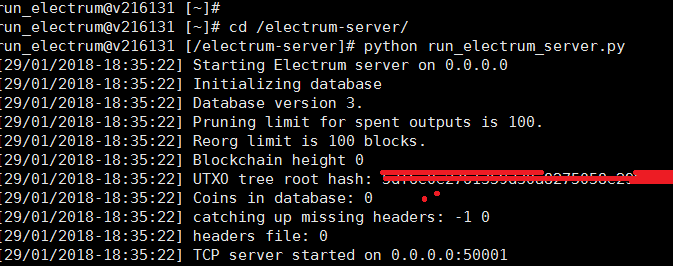

附:
cat electrum.conf
[server]
# username for running the daemon
username = root
# hostname. set it to a FQDN in order to be reached from outside
host = 0.0.0.0
# ports
electrum_rpc_port = 8000
stratum_tcp_port = 50001
#stratum_tcp_ssl_port = 50002
#report_host =
#report_stratum_tcp_port = 50001
#report_stratum_tcp_ssl_port = 50002
banner = Welcome to Electrum!
banner_file = /etc/electrum.banner
#irc = no
#irc_nick = <yournickname>
#irc_bind_ip = <external ip address>
#ssl_certfile = /path/to/electrum-server.crt
#ssl_keyfile = /path/to/electrum-server.key
logfile = ./electrum.log
donation_address =
[leveldb]
# path to your database
path = ./path001
# for each address, history will be pruned if it is longer than this limit
pruning_limit = 100
# cache sizes in bytes, the default is optimized for ~4 GB RAM setups to run bitcoind alongside
# If you have lots of RAM increase up to 16 times for best performance
#hist_cache = 67108864
#utxo_cache = 134217728
#addr_cache = 16777216
## Bitcoin network parameters
[network]
# Change type to bitcoin_test to enable testnet
type = bitcoin_main
# Advanced, manually change the network parameters
pubkey_address = 65
script_address = 5
genesis_hash = 000000002eadfb5640e8ad074e83acf1f2addccacbdb32fac8f0b08005c6f860
[bitcoind]
bitcoind_host = localhost
bitcoind_port = 8292
bitcoind_user = user
bitcoind_password =123456
运行python时提示:ImportError: No module named plyvel ,ImportError No module named irc 解决过程:的更多相关文章
- Python--Cmd窗口运行Python时提示Fatal Python error: Py_Initialize: can't initialize sys standard streams LookupError: unknown encoding: cp65001
源地址连接: http://www.tuicool.com/articles/ryuaUze 最近,我在把一个 Python 2 的视频下载工具 youku-lixian 改写成 Python 3,并 ...
- 解决安装vc2005运行库时提示Command line option syntax error.Type Command/?for Help
安装vc2005运行库时提示 这是因为它要自解压到用户的临时文件夹下,如果用户名中带中文,就会报错. 简单的解决方法是,手动解压之,再安装 当然,你也可以修改用户名或者再新建个用户.
- LoadRunner中运行场景时提示"You do not have a license for this Vuser type."
LoadRunner中运行场景时提示"You do not have a license for this Vuser type." 2012-06-15 17:09:07| 分 ...
- 解决 VS Code「Code Runner」插件运行 python 时的中文乱码问题
描述 这里整理了两种 VS Code「Code Runner」插件运行 python 时乱码的解决方案.至于设置「Auto Guess Encoding」为 true 的操作这里就不多描述了. 乱码截 ...
- 解决Docker运行命令时提示"Got permission denied while trying to connect to the Docker daemon socket"类情况
Docker安装命令: 解决Docker运行命令时提示"Got permission denied while trying to connect to the Docker daemon ...
- 使用IDEA运行项目时提示:Warning:java: 源值1.5已过时, 将在未来所有发行版中删除
如图 在使用IDEA运行项目时,在下方提示:Warning:java: 源值1.5已过时, 将在未来所有发行版中删除 这是因为JDK版本问题 解决方法如下:左上角 file ——> Projec ...
- IE浏览器下载文件保存时提示:“你没有权限在此位置中保存文件”解决办法
E浏览器下载文件保存时提示 解决办法: 1.Win + R,打开运行命令,输入gpedit.msc,如图所示 2.打开计算机本地组策略编辑器:选择计算机配置-windows设置-安全设置-本地策略-安 ...
- VS2010 F5调试时出现:“ 尝试运行项目时出错:未捕获通过反射调用的方法引发的异常”解决
VS2010 F5调试时出现 尝试运行项目时出错:未捕获通过反射调用的方法引发的异常 两个解决方法:1) 打开项目属性,选择调试选项卡,将“启用非托管代码调试”一项钩上.2) 打开项目属性,选择调试选 ...
- py2exe生成exe后,运行exe时提示No module named * 的解决办法
一个pymssql 的程序在解释器上运行正常,但是用py2exe打包后,提示 ImportError: No module named _mssql 百度了半天无果,然后bing,结果bing还是比百 ...
随机推荐
- CS231n assignment2
preparation: solve the problem of `from builtins import rang` pip install future update_rule
- PKI(Public Key Infrastucture)介绍
PKI(Public Key Infrastucture)介绍 根据Wikipedia PKI词条整理. PKI(Public Key Infrastucture)是一系列的规则.策略以及过程,可以用 ...
- python循环结构
while循环 while 条件表达式: 语句块 while语句的条件表达式是循环条件,常用的是关系表达式或者逻辑表达式,语句块是循环执行的语句. n=1 p=1 num=int(input(&quo ...
- USACO 1.3.3 Calf Flac(Manacher算法)
Description 据说如果你给无限只母牛和无限台巨型便携式电脑(有非常大的键盘),那么母牛们会制造出世上最棒的回文.你的工作就是去寻找这些牛制造的奇观(最棒的回文). 在寻找回文时不用理睬那些标 ...
- 20170928-3 四则运算psp
1.本周psp: 2.本周进度条: 3.累计进度图(折线图): 4.psp饼状图:
- 一个整数N中的1的个数
设计思想: 通过大量数据分解找规律 abcd 从d开始若d=0则count(1的个数)=左边的abc *d的位值(1.10.100..) 若等欲1则count=左边的abc*d的位值(1.10.100 ...
- Traffic Steering for Service Function Chaining
Introduction 目前通过vlan标签来把流量引向对应的sfc 以前的sfc静态(SFs相邻组成SFC),有了sdn之后具有动态性.(SFs不需要彼此相邻.将流量动态地导向所需的SFs.) 流 ...
- myeclipse和ecplise中安装git插件的问题
我的myeclipse10.7和ecplise helis一直安装不了git插件,myeclipse中details说我的myeclipse少了team_features等之类文件,helis的情况大 ...
- TCP系列41—拥塞控制—4、Linux中的慢启动和拥塞避免(一)
一.Linux中的慢启动和拥塞避免 Linux中采用了Google论文的建议把IW初始化成了10了.在linux中一般有三种场景会触发慢启动过程 1.连接初始建立发送数据的时候,此时cwnd初始化为1 ...
- bash编程2
bash基础编程 前言:条件测试语法有两种书写模式,一种时[expression] ,另外一种是[[exprssion]] ,为了在书写条件测试的过程中,不让大家将两种格式互相混淆,那么在这里只讲一种 ...