
AngularJS filter:search 是如何匹配的 ng-repeat filter:search ,filter:{$:search},只取repeat的item的value 不含label
1. filter可以接收参数,参数用 : 进行分割,如下:
{{ expression | filter:argument1:argument2:... }}
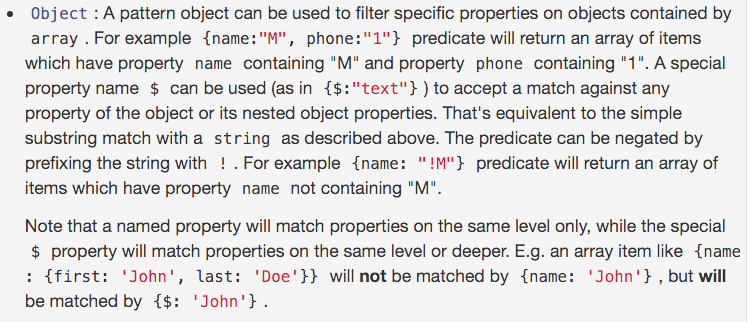
2. filter参数是 对象 ,匹配属性中含有value的
$scope.childrenArray = [

        {name:'kimi',age:3},

        {name:'cindy',age:4},

        {name:'anglar',age:4},

        {name:'shitou',age:6},

        {name:'tiantian',age:5}

    ];

{{ childrenArray | filter : {name : 'i'} }} //参数是对象,匹配name属性中含有i的
示例:angular filter多个字段搜索
<input type="text" ng-model="search ">

<!--<li ng-repeat="user in data.users | filter:{name:search}>  -->

<!--此时只搜索了name字段-->

<!--搜索name字段、account字段-->

<li ng-repeat="user in data.users | filter:{name:search}:{account:search}>

<span ng-bind="user.name"></span>

<span ng-bind="user.account"></span>

</li>
3. 没有指定过滤哪个字段的情况下,默认filter会匹配所有字段(name、account)的值,类似 多个字段搜索
ng-repeat="user in data.users | filter:search
4. $ 匹配 对象 所有属性 和 嵌套对象属性
<li ng-repeat="user in data.users | filter:{$:search}>
5. bind ng-model to the “value” of selected item instead of item for ui-select
  <ui-select ng-model="fm.countryCode" id="countryCode">

      <ui-select-match placeholder="Select a country...">{{$select.selected.label}}</ui-select-match>

      <ui-select-choices repeat="item in countries | filter: $select.search" value="{{$select.selected.value}}">

          <div ng-bind-html="item.label | highlight: $select.search"></div>

          <small ng-bind-html="item.value | highlight: $select.search"></small>

      </ui-select-choices>

  </ui-select>
Currently it's just setting fm.countryCode to the whole country item.
For example if I select Afghanistan, fm.countryCode will be set to {"value":"AF","label":"Afghanistan"}.
What I want is "AF".
so change the repeat part
<ui-select-choices repeat="item in countries | filter: $select.search" value="{{$select.selected.value}}">
to
<ui-select-choices repeat="item.value as item in countries | filter: $select.search" value="{{$select.selected.value}}">
示例:
                                            <ui-select ng-model="networkDefaultValue.resourceId" name="networkname" theme="bootstrap" ng-change="setInputDefaultValue(['resource_id'],networkDefaultValue.resourceId,networkDefaultValue.isResourceIdInput)">

                                                <ui-select-match allow-clear="true" placeholder="{{'Select an option'|translate}}">{{$select.selected.name + ' - ' + $select.selected.properties.datacentername}}</ui-select-match>

                                                <ui-select-choices repeat="resource.id as resource in totalNetworks | filter: { $ : $select.search}">

                                                    <div ng-bind-html="resource.name + ' - ' + resource.properties.datacentername | highlight: $select.search"></div>

                                                </ui-select-choices>

                                            </ui-select>
参考网址:
走进AngularJs(七) 过滤器(filter)
AngularJS filter:search 是如何匹配的 ng-repeat filter:search
AngularJS filter:search 是如何匹配的 ng-repeat filter:search ,filter:{$:search},只取repeat的item的value 不含label的更多相关文章
- Python: re.compile最短匹配模式,只取双引号内的值\“
用正则表达式匹配某个文本模式 1.只取双引号内的值 2.长短匹配模式对比 贪婪模式: 模式r'\"(.*)\" '的意图是匹配被双引号包含的文本,但是这个表达式中*是贪婪的 ...
- Web.xml中设置Servlet和Filter时的url-pattern匹配规则
一.servlet容器对url的匹配过程: 当一个请求发送到servlet容器的时候,容器先会将请求的url减去当前应用上下文的路径作为servlet的映射url,比如我访问的是http://loca ...
- 四十七.iptables防火墙 filter表控制 扩展匹配 nat表典型应用
1.iptables基本管理 关闭firewalld,开启iptables服务 查看防火墙规则 追加.插入防火墙规则 删除.清空防火墙规则 1.1 关闭firewalld,启动iptables服务 ...
- Python:正则表达式(二):如何使用re.search()返回的匹配对象中的具体内容呢??
在上一篇中讲述了re.seach()会返回一个对象格式的数据,如下:<_sre.SRE_Match object; span=(16, 24), match='${phone}'> 那么问 ...
- AngularJS中angular.min.js:80 Error: [ng:areq] http://errors.angularjs.org/1.2.9/ng/areq
报出来的时候,出现这种错误,是因为在引入控制器的时候没有引入成功,我遇到这个错误是在因为没有将父控制器引入到子控制器中.
- C#中正则表达式只取前N个匹配结果
用Regex.Matches方法可以得到同指定正则表达式对应的所有匹配结果.有时,所有匹配结果可能有成千上万个,考虑到性能效率的因素,只需要取出前N个匹配结果.下面的代码演示了做法: 需求:取字符串中 ...
- filter 死循环(tomcat 启动完成 ,自动执行filter.dofilter,导致tomcat 启动超时) , tomcat 启动和 servers 启动 不同
package com.diancai.interceptor; import java.io.IOException; import javax.servlet.Filter; import jav ...
- dubbo白名单通过filter,spring web通过拦截器或者filter即可
在开发中,有时候需要限制访问的权限,白名单就是一种方法.对于Java Web应用,Spring的拦截器可以拦截Web接口的调用:而对于dubbo接口,Spring的拦截器就不管用了. dubbo提供了 ...
- 'org.springframework.web.filter.CharacterEncodingFilter' is not assignable to 'javax.servlet.Filter,This inspection lets you spot the following problems that might occur in descriptors that are used t
1.jar包导入错误,因为maven下载的原因: 删除这样的包,然后让maven重新下载,问题就会解决
随机推荐
- 设计模式 ( 十二 ) 职责链模式(Chain of Responsibility)(对象行为)
设计模式(十二)职责链模式(Chain of Responsibility)(对象行为型) 1.概述 你去政府部门求人办事过吗?有时候你会遇到过官员踢球推责,你的问题在我这里能解决就解决.不能解决就 ...
- 关于Unity屏幕分辨率的比例
1.Free Aspect任意窗口大小 2.16:9是1920*1080的手机 3.4:3是1024*768ipad 4.3:2是960*640,iPhone4手机屏幕 5.480*800,竖屏手机游 ...
- linux文件目录连接
linux系统下提供ln指令来进行文件链接.文件链接主要分为硬链接和软链接. 硬链接:由于linux下的文件是通过索引节点(Inode)来识别文件,硬链接可以认为是一个指针,指向文件索引节点的指针,系 ...
- 整理:java定时器。
本文纯属个人思路,如有错误,请指正. java的Timer依赖Thread,每一个Timer实际上都是一个Thread. import java.util.TimerTask; /** * 本类仅为实 ...
- PHPMailer发送邮箱(ThinkPHP实战篇)
1.下载phpmailer文件库 2.引用文件,此处将代码放到 :函数库中,function.php function sendConsultantMessage($sendData){ Vendor ...
- Hibernate_day04--QBC查询
QBC查询 1 使用hql查询需要写hql语句实现,但是使用qbc时候,不需要写语句了,使用方法实现 2 使用qbc时候,操作实体类和属性 3 使用qbc,使用Criteria对象实现 查询所有 1 ...
- shell脚本学习总结10--系统函数调用
1.打印出彩色的格式 [root@new sbin]# cat demo.sh #/bin/bash . /etc/init.d/functions read -p "Pleas input ...
- HTML5游戏制作完全指南
简介 创建画布 游戏循环 Hello world 创建player 键盘控制 a:使用jQuery Hotkeys b:移动player 添加更多游戏元素 炮弹 敌人 使用图片 碰撞检测 声音 简介 ...
- 控制iOS 7中的状态栏
本文转载至:http://blog.csdn.net/pucker/article/details/12112105 苹果终于发布了iOS 7正式版,大批的用户都已经纷纷进行了升级.如果App是由Xc ...
- Win7下搭建安卓android开发环境
本文出自 “孤狼” 博客,请务必保留此出处http://332374363.blog.51cto.com/5262696/1310882 另外,在搭建android开发环境时,还参考了http://w ...