
Table 分页处理
介绍两种table分页处理:PHP分页 和 js(jquery.table)分页。
一:jquery.table:
1:下载两个文件:table_jui.css 和 jquery.dataTables.min.js(当然前面的加载 jquery.js文件);将其拉入html 前面。
table_jui.css 和 jquery.dataTables.min.js
2:建表:
  <table style="width: 100%; margin-bottom:8px; " class="dataTables_wrapper table" id="tablemsg">

                 <thead style="font-size: 15px; font-weight: 800; background-color: #E7E5DA;">

                     <tr>

                         <td>用户ID</td>

                         <td>反馈问题</td>

                         <td>设备类型</td>

                         <td>应用版本</td>

                         <td>系统版本</td>

                         <td>反馈时间</td>

                         <td>最后回复</td>

                     </tr>

                 </thead>

                 <tbody id="tablelise" style="table-layout: fixed; word-wrap: break-word;">

                     <tr>

                         <td></td>

                         <td></td>

                         <td></td>

                         <td></td>

                         <td></td>

                         <td></td>

                         <td></td>

                     </tr>

                 </tbody>

             </table>
3:js插入数据:
 function showGcmList() {

             var datable = $('#tablemsg').dataTable({ "bDestroy": true});

             datable.fnClearTable();

             for (var i = 0; i < data.length; i++) {

                 $tr = $('<tr>' +

                        '<td>' + data[i].userid + '</td>' +

                        '<td>' + msg + '</td>' +

                         '<td >' + data[i].devicetype + '</td>' +

                         '<td >' + data[i].appver + '</td>' +

                         '<td >' + data[i].osver + '</td>' +

                         '<td >' + data[i].msgtime + '</td>' +

                         '<td>'+ data[i].id + '</td>' +

              '</tr>')

                 $('#tablelise').append($tr);

             }

             $("#tablelise tr:odd").addClass("tabEven");

             tableui();

         }
注: var datable = $('#tablemsg').dataTable({ "bDestroy": true}); datable.fnClearTable(); 是对table中的数据清空(同$('#tablelise').empty();).
4:tableui() 函数就是对table表的渲染(每个属性,下面会有详细介绍):
 function tableui() {

     $(function () {

     $("#tablemsg").dataTable({ //表的ID

     "bDestroy": true,

     "bPaginate": true, //开关,是否显示分页器

     "bJQueryUI": false, //开关,是否启用JQueryUI风格

     "bAutoWidth": false, //自适应宽度

     "bFilter": true,         //是否显示模糊查询

     "bProcessing": false,

     "bStateSave": true,     //是否开启cookie,当需要对table的数据处理后,依然停留在该页数据。

     "bSort": true,              //是否排序

     "bLengthChange": true, //开关,是否显示每页大小的下拉框

     "aLengthMenu": [30, 50, 60],//下拉框的值

     "iDisplayLength": 30,  //下拉框的初始值

     "aaSorting": [[5, "desc"]],      //当bSort为true是起作用,即table的第6行按降序排。

     "sPaginationType": "full_numbers", //table脚标显示

     "aoColumns": [                           //每列的宽度(可省略)

       { sWidth: '80px' },

       { sWidth: '23%' },

       { sWidth: '80px' },

       { sWidth: '80px' },

       { sWidth: '80px' },

       { sWidth: '100px' },

       { sWidth: '23%' },

     ],

     "oLanguage": {

     "sProcessing": "正在加载中......",

     "sLengthMenu": "每页显示 _MENU_ 条记录",

     "sZeroRecords": "对不起,查询不到相关数据!",

     "sEmptyTable": "表中无数据存在!",

     "sInfo": "当前显示 _START_ 到 _END_ 条,共 _TOTAL_ 条记录",

     "sInfoFiltered": "数据表中共为 _MAX_ 条记录",

     "sSearch": "模糊搜索",

     "oPaginate": {

     "sFirst": "首页",

     "sPrevious": "上一页",

     "sNext": "下一页",

     "sLast": "末页"

     }

     }

   });

   });

 }
5:效果:
"bFilter" : true 属性是否显示搜索: 
"bLengthChange": true 属性是否显示每页的显示值: 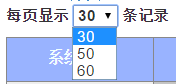 其中 aLengthMenu 的值为下拉框的各个值,iDisplayLength 为初始值。
"sPaginationType": "full_numbers" 属性设置分页脚的显示样式 
最终显示效果:

二:PHP分页(ThinkPHP):
1:准备分页类文件 Page.class.php (类位于 /ThinkPHP/Library/Org/Util/ 文件夹下,如果没有,可在网上下载)。
2:后台PHP代码 function showTable():
     function showTable(){

         $table = M ( 'msg', '', 'DB_CONFIG' );

         if(isset($_GET['p'])){

             $p=$_GET['p'];

         }else{

             $p=1;

         }

         import("Org.Util.Page");//加载分页类

         $countaql='select count(1) as count from fb_msg_android where userfeedback <> 0';

         $count = $table->query($countaql);   //查询数据

         $page=new \Page(intval($count[0]['count']),8);    //第一个参数是 数据总数,第二个参数是  每页显示的数据个数

         $sqlstrmsg="select * from fb_msg_android where userfeedback <> 0 limit $page->firstRow,$page->listRows";

         $data = $table->query($sqlstrmsg);      //查询数据,从第一条到第8条

         $page->setConfig('header','条记录');    //分页脚标设置

         $page->setConfig('prev',"上一页");

         $page->setConfig('next','下一页');

             $page->setConfig('first','首页');

         $page->setConfig('last','末页');

         $show=$page->show();        //显示分页(必写)

         $this->assign('select',$data);    //查询数据渲染模板

         $this->assign('page',$show);       //渲染分页table

         $this->display();         //显示面板

     }
3:添加模板(html表):
 <table class="table" border="1" style="width:100%;border-collapse:collapse;border:2px solid #000;text-align:center;">

         <tr>

             <th>系统ID</th>

             <th>用户ID</th>

             <th>信息</th>

             <th>信息发布时间</th>

             <th>操作数</th>

         </tr>

         <foreach name='select' item='b'>   <-- 后台的 $this->assign('select',$data); 的查询数据-->

             <tr>

                 <td>{$b.id}</td>

                 <td>{$b.uid}</td>

                 <td>{$b.msg}</td>

                 <td>{$b.msgtime}</td>

                 <td>{$b.userfeedback}</td>

             </tr>

         </foreach>

         <tfoot>                                <-- 必须有 tfoot 用于显示分页脚标 -->

             <tr style="background-color:#000;color:#ffffff;">

                 <td colspan='5' align='right'>

                     {$page}

                 </td>

             </tr>

         </tfoot>

     </table>
4:效果:

参考链接:http://blog.163.com/john_pei/blog/static/2046000172014270125286/
http://www.thinkphp.cn/info/192.html
http://blog.csdn.net/xiaojun1288/article/details/6861501
Table 分页处理的更多相关文章
- JQuery实现table分页
1.直接贴代码: ; //每页显示的记录条数 ; //显示第curPage页 var len; //总行数 var page; //总页数 $(function(){ len =$(; //去掉表头 ...
- html 布局;css3+jq 下拉菜单;table分页动态添加行;html5本地存储;简单易用的html框架
简单好用的html框架,预览图见最后: 源码: 1.页面布局使用table: table 嵌套 +iframe 布局: 2.下拉菜单为jq+css3 动画; css input 无边框,select下 ...
- 项目总结17-使用layui table分页表格
项目总结17-使用layui table分页表格总结 前言 在项目中,需要用到分页的表格来展示数据,发现layui的分页表格,是一个很好的选择:本文介绍layui table分页表格的前后端简单使用 ...
- Layui Table 分页记忆选中
Layui Table 分页记忆选中 挺好的功能,之前为什么放弃了,哈哈哈! 在最早的版本中,layui 的 table 会记录每页的勾选状态,但很多用户反馈这是 bug,因为当他们获取选中数据时,其 ...
- Table分页显示调整
这是table分页显示的代码,下面是对应调整的代码 /*分页调整*/ .fenye .dataTables_info{ line-height: 28px; } .fenye .pagination{ ...
- Bootstrap table分页问题汇总
首先非常感谢作者针对bootstrap table分页问题进行详细的整理,并分享给了大家,希望通过这篇文章可以帮助大家解决Bootstrap table分页的各种问题,谢谢大家的阅读. 问题1 :服务 ...
- bootstrap table分页(前后端两种方式实现)
bootstrap table分页的两种方式: 前端分页:一次性从数据库查询所有的数据,在前端进行分页(数据量小的时候或者逻辑处理不复杂的话可以使用前端分页) 服务器分页:每次只查询当前页面加载所需要 ...
- layui table 分页 序号始终从”1“开始解决方法
在用Layui table 分页显示数据,用 type:"numbers" 进行显示序号有以下的问题 1.表格自带的分页,page:true 这种分页,在切换页面的时候序号可以正常 ...
- 利用js制作html table分页示例(js实现分页)
有时候table的列数太长,不利于使用者查询,所以利用JS做了一个table的分页,以下为相关代码 一.JS代码 <script type="text/javascript" ...
随机推荐
- Gym - 100221D 一题一直没过的dfs,,应该是纯手动码?
不写了,10年以后再回来写. http://codeforces.com/gym/100221/attachments H题
- URAL 2080 Wallet
找规律发现只要找到两个相同数字之间,有多少个不同的数字,即为答案. 可以用树状数组离线处理. 坑点是卡有很多张,没用完的情况,后面的卡直接放在哪里, 就是 10 5 1 2 3 4 5 这样 开始数据 ...
- Postman安装步骤
Postman是一种网页调试与发送网页http请求的chrome插件. 我们可以用来很方便的模拟get或者post或者其他方式的请求来调试接口. 1.Postman_v4.1.3下载地址: http: ...
- ASP.NET相关
1.委托:把一个方法当作参数传到另一个方法中 扩展方法:1.静态类 2.静态方法 3.this关键字 using System; using System.Collections.Generic; u ...
- Linux上的errno和strerror
部分内容参考:https://www.douban.com/note/165931644/ 在Linux的api中: errno 是记录系统的最后一次错误代码.代码是一个int型的值,在errno.h ...
- Spring Cloud微服务初探
学习初衷 因为加了不少优秀的知识星球,结交了更多的小伙伴,加了更多的群,每每在自我介绍的时候,都说自己是Android & Java攻城狮. 然鹅,有的小伙伴就来问了,你是搞Java的,那对S ...
- postgresql安装,java简单使用postgresql
一 整合 由于本人的学过的技术太多太乱了,于是决定一个一个的整合到一个springboot项目里面. 附上自己的github项目地址 https://github.com/247292980/spri ...
- 阿里云部署安装redis无法访问
ps:我在linux上安装redis后发现一直端口不通连接不上,折腾一晚上.后来在阿里云官方回复(机器人)中看到下面的回复: 2019/02/28 22:50 自己一试,过完是端口监听是本 ...
- hadoop集群搭建简要记录
2019/03/09 21:46 准备4台服务器或者虚拟机[centos7],分别设置好静态ip[之所以设置静态ip主要就是为了省心!!!][ centos7下面配置静态IP 参考地址: https ...
- [转]Tomcat日志详解
Tomcat下相关的日志文件: 1.Cataline引擎的日志文件,文件名为catalina.{date}.log 2.Tomcat下内部代码丢出的日志,文件名为localhost.{date}.lo ...