
java(itext) 一个很简单的PDF表格生成工具
先上个效果图
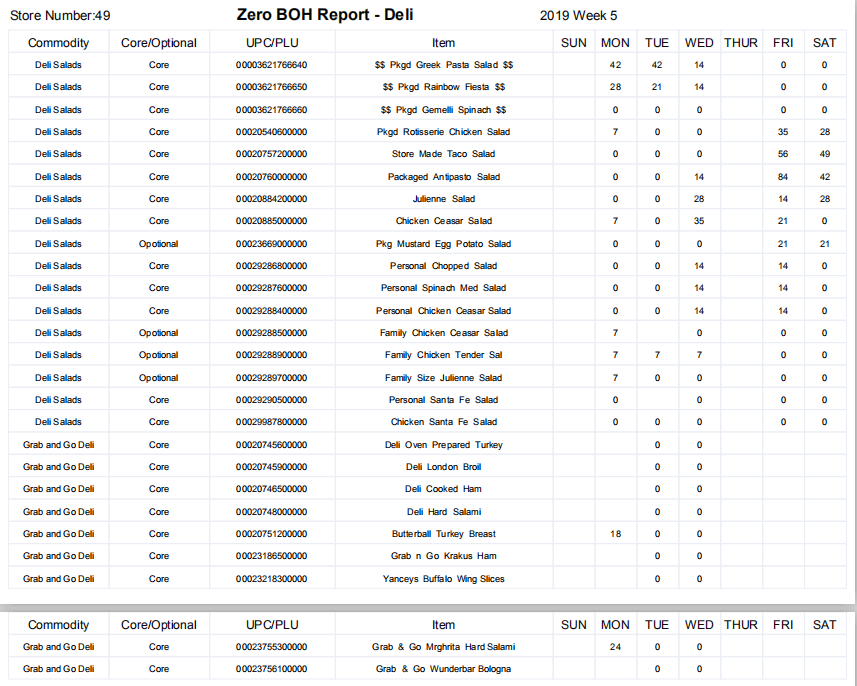
因为做的项目涉及到数据预测,其中有大量打印业务来支撑实体店的运营,因为注重的是数据,要求简洁,清晰,所以写了个很简单也很实用的工具类。
如果需要编写样式或者插入背景,都可以查阅itex官方文档,进行扩展。
这个工具是基于 itext 写的,主要作用是生成最简洁的表格,选用的jar包版本是:
<dependency>

    <groupId>com.lowagie</groupId>

    <artifactId>itext</artifactId>

    <version>2.1.7</version>

</dependency>
废话就不多说了,直接贴代码 PDFConstants.class
import java.awt.Color;

import java.util.List;

import com.lowagie.text.Element;

import com.lowagie.text.Font;

import com.lowagie.text.Paragraph;

import com.lowagie.text.pdf.PdfPCell;

import com.lowagie.text.pdf.PdfPTable;

public class PDFConstants {

    /**

     * PDF大标题字体

     */

    public static Font PDFTITLEFONT = new Font(null, 16, Font.BOLD);

    /**

     * PDF小标题字体

     */

    public static Font PDFTITLEFONT1 = new Font(null, 13, Font.NORMAL);

    /**

     * 表格宽度百分比

     */

    public static Integer WIDTHPERCENTAGE = 98;

    /**

     * 表格标题字体

     */

    public static Font TITLEFONT = new Font(null, 12, Font.COURIER);

    /**

     * 翻页加载表头

     */

    public static Integer HEADERROWS = 1;

    /**

     * 翻页不加载表头

     */

    public static Integer NOHEADERROWS = 0;

    /**

     * 表格内容字体

     */

    public static Font CONTENTFONT = new Font(null, 9, Font.NORMAL);

    /**

     * PDF表格样式

     */

    private static PdfPCell cell = new PdfPCell();

    /**

     * 获取表格

     */

    public static PdfPCell getCell() {

    // 水平居中

    cell.setHorizontalAlignment(Element.ALIGN_CENTER);

    // 垂直居中

    cell.setVerticalAlignment(Element.ALIGN_MIDDLE);

    // 边距

    cell.setPadding(1);

    // 行高

    cell.setMinimumHeight(22);

    // 不换行

    // cell.setNoWrap(true);

    // 颜色淡化

    cell.setBorderColor(Color.decode("#EBEEF5"));

    return cell;

    }

    /**

     * 获取表格并赋值

     */

    public static PdfPCell getCell(Paragraph content) {

    cell = getCell();

    // 设置内容

    cell.setPhrase(content);

    return cell;

    }

    /**

     * @Description 生成PDF表格

     * @param titleNum

     *            列数

     * @param tableWidth

     *            列宽

     * @param titles

     *            标题集合

     * @param contents

     *            内容集合

     * @param headerRows

     *            是否再次加载表头

     * @return

     * @throws Exception

     */

    public static PdfPTable getPDFTable(int titleNum, int[] tableWidth, String[] titles, List<String> contents, int headerRows) throws Exception {

    // 创建表格对象

    // 列数

    PdfPTable table = new PdfPTable(titleNum);

    //表格宽度百分比

    table.setWidthPercentage(WIDTHPERCENTAGE);

    // 列宽百分比

    if (tableWidth != null)

        table.setWidths(tableWidth);

    // 翻页加载表头

    if (headerRows == HEADERROWS)

        table.setHeaderRows(HEADERROWS);

    // 标题集合

    String[] pdfTitles = titles;

    if (pdfTitles != null && pdfTitles.length > 0) {

        // 标题

        for (String pdfTitle : pdfTitles) {

        PdfPCell title = getCell(new Paragraph(pdfTitle, TITLEFONT));

        table.addCell(title);

        }

    }

    // 内容集合

    List<String> pdfContents = contents;

    if (pdfContents != null && pdfContents.size() > 0) {

        // 内容

        for (String pdfContent : pdfContents) {

        PdfPCell content = getCell(new Paragraph(pdfContent, CONTENTFONT));

        table.addCell(content);

        }

    }

    // 撑行数,否则最后一行会消失
    table.addCell("");
    table.completeRow();

    return table;

    }

}
分页工具类 PDFMaker.class
import com.lowagie.text.pdf.BaseFont;

import com.lowagie.text.pdf.PdfContentByte;

import com.lowagie.text.pdf.PdfPageEventHelper;

import com.lowagie.text.pdf.PdfTemplate;

import com.lowagie.text.pdf.PdfWriter;

/**

 * @Description 分页工具

 * @author ry

 * @date 2019年7月12日

 */

public class PDFMaker extends PdfPageEventHelper {

    /** 这个PdfTemplate实例用于保存总页数 */

    public PdfTemplate tpl;

    /** 页码字体 */

    public BaseFont helv;

    @Override

    public void onCloseDocument(PdfWriter writer, com.lowagie.text.Document arg1) {

    tpl.beginText();

    tpl.setFontAndSize(helv, 12);

    tpl.setTextMatrix(0, 0);

    tpl.showText("" + (writer.getPageNumber() - 1));

    tpl.endText();

    }

    /*

     * (non-Javadoc)

     *

     * @see

     * com.lowagie.text.pdf.PdfPageEventHelper#onEndPage(com.lowagie.text.pdf

     * .PdfWriter, com.lowagie.text.Document)

     */

    @Override

    public void onEndPage(PdfWriter writer, com.lowagie.text.Document document) {

    PdfContentByte cb = writer.getDirectContent();

    cb.saveState();

    String text = " Page " + writer.getPageNumber() + " of ";

    float textSize = helv.getWidthPoint(text, 9);

    float textBase = document.bottom();

    cb.beginText();

    cb.setFontAndSize(helv, 9);

    // for odd pagenumbers, show t

    cb.setTextMatrix(document.left(), textBase);

    cb.showText(text);

    cb.endText();

    cb.addTemplate(tpl, document.left() + textSize, textBase);

    cb.restoreState();

    }

    /*

     * (non-Javadoc)

     *

     * @see

     * com.lowagie.text.pdf.PdfPageEventHelper#onOpenDocument(com.lowagie.text

     * .pdf.PdfWriter, com.lowagie.text.Document)

     */

    @Override

    public void onOpenDocument(PdfWriter writer, com.lowagie.text.Document arg1) {

    try {

        // initialization of the template

        tpl = writer.getDirectContent().createTemplate(100, 100);

        // tpl.setBoundingBox(new Rectangle(0, 0, 10, 10));

        // initialization of the font

        helv = BaseFont.createFont("Helvetica", BaseFont.WINANSI, false);

    } catch (Exception e) {

    }

    }

}
注意:网上大部分此工具类都会报错,生成PDF失败 Unbalanced save/restore state operators,这是因为调用了saveState()但是没调用restoreState(),这里我已经修正了
拿出部分业务代码做例子,使用这个工具是很简单的
首先打开一个文档
  // 定义文件路径 你可以完成过程后删掉这个临时文件 或者存在tmp里
  File f = new File("xxxx/xxx.pdf");

  FileOutputStream output = new FileOutputStream(f);

  // 实例化文档对象

  Document document = new Document(PageSize.A4, 0, 0, 0, 0);

  // 创建 PdfWriter 对象 文件的输出路径+文件的实际名称

  PdfWriter writer = PdfWriter.getInstance(document, output);
  // 设置分页
  writer.setPageEvent(new PDFMaker());

  document.open();// 打开文档
Document有横向属性 使用方法是 PageSize.A4.rotate()这个rotate方法是个神奇的方法
后面四个数字对应的是边距 分别是 左,右,上,下
生成table几个传参的例子
  // 标题

  String[] title = { "Min.", "SUN", "MON", "TUE", "WED", "THUR", "FRI", "SAT" };

  // 列数

  Integer titleNum = 8;

  // 列宽

  int tableWidth[] = { 15, 15, 15, 10, 10, 12, 12, 11 };

  //内容

  List<String> contents = new ArrayList<String>();

  //TODO 业务代码填充contens

  // 获取PDFTable

  PdfPTable table = PDFConstants.getPDFTable(titleNum, tableWidth, title, contents, 0);

  //表格上间距

  table.setSpacingBefore(0);

  //添加进文档
  document.add(table);
  //关闭文档
  document.close();
如果大家有什么不解,或意见,欢迎在下方留言,楼主看到就会回复的,谢谢。
java(itext) 一个很简单的PDF表格生成工具的更多相关文章
- (二)一个很好用的自动生成工具——mybatis generator
mybatis generator-自动生成代码 准备材料: 一个文件夹,一个数据库的驱动包,mybatis-generator-core-1.3.5.jar,一条生成语句 如图:(我用的是derby ...
- [.NET] 打造一个很简单的文档转换器 - 使用组件 Spire.Office
打造一个很简单的文档转换器 - 使用组件 Spire.Office [博主]反骨仔 [原文]http://www.cnblogs.com/liqingwen/p/6024827.html 序 之前,& ...
- 一个最简单 node.js 命令行工具
一个最简单 node.js 命令行工具 node.js cli $ node cli.js xyz # OR $ node cli xyz 接受参数 process.argv js "use ...
- 一个很简单的jQuery插件实例教程(菜鸟级)
很多公司的前端设计开发人员都是女孩子,而这些女孩子很多JavaScript技能都不是很好.而前端开发过程中,JavaScript技能又是必不可少的.所以,如果前端小MM正在为某个JavaScript效 ...
- 一个很简单的SqlServer生成常用C#语句工具的诞生
前言: 这个文章只要是记录一下,这个工具的诞生过程.作用.其中的技术实在是太简单可以说没有什么技术~主要是锻炼一下写文章的能力! 正文: 在开发项目的时,常常会要维护或变更一些老项目,涉及到简单的几张 ...
- 一个很简单的php留言板。。。。搭建在sae上的。。。
我在sae上搭建了一个个人简历的页面: 有兴趣的可以访问 http://671coder.sinaapp.com/ 在做下面一个简单的留言板的时候,卡了我很久,虽然完全没用过php..但是还是最后勉 ...
- java实现一个最简单的tomcat服务
在了解tomcat的基本原理之前,首先要了解tomcatt最基本的运行原理. 1.如何启动? main方法是程序的入口,tomcat也不例外,查看tomcat源码,发现main是在Bootstrap ...
- 『NYIST』第八届河南省ACM竞赛训练赛[正式赛一]-CodeForces 236A,虽然很水,但有一个很简单的函数用起来方便
A. Boy or Girl time limit per test 1 second memory limit per test 256 megabytes input standard input ...
- 一个很简单的SpringCloud项目,集成Feign、Hystrix
Feign的功能:这是个消费者,根据服务注册在Eureka的ID去找到该服务,并调用接口Hystrix的功能:熔断器,假如A服务需要调用B服务的/cities接口获取数据,那就在A服务的control ...
随机推荐
- Math类简介
Math abs max min 分别是绝对值 最大值,最小值 round 四舍五入 ceil ceil(32.6) 33.0 ceil(32.2) 33.0 返回大于该数值的较大的整数 与之相对 ...
- sell01 环境搭建、编写持久层并进行测试
1 环境配置 JDK 1.8 MAVEN 3.5 MYSQL 5.7 VirtualBox 5.1 2 搭建MYSQL环境 下载 VM 和 虚拟镜像文件 虚拟镜像文件:点击前往 技巧01:安装完vir ...
- 9、par画图参数
转载:http://blog.sina.com.cn/s/blog_8f5b2a2e0102v0tf.html 1. 函数par()的使用格式如下: par(..., no.readonly = FA ...
- JavaScript学习系列8 - JavaScript中的关系运算符
JavaScript中有8个关系运算符,分别是 ===, !===, ==, !=, <, <=, >, >= 1. 恒等运算符 (===) ===也叫做 严格相等运算符,它要 ...
- C#中的?问号用法总结
在C#中有个较为重要,而常被一些人忽视的符号——问号(?).在这里整理一下它在C#的几种情况: 可空类型修饰符“T?”:可空类型的基础类型可以是任何非可空值类型或任何具有struct约束的类型参数,但 ...
- 7.31实习培训日志-docker sql
docker mysql docker问题 今天问了老师有关docker的问题,entrypoint和cmd的区别,两者同时存在cmd的执行结果会被当做参数传入entrypoint. dockerfi ...
- ADO.Net事务处理
SQL Server中的事务可以将多个数据库增删改查操作合并为单个工作单元,在操作过程中任何部分出错都可以滚回已经执行的所有更改.ADO.Net中也提供了事务处理功能,通过ADO.net事务,可以将多 ...
- hdu6055(求正方形个数)
题目链接: http://acm.hdu.edu.cn/showproblem.php?pid=6055 题意: 给出 n 组坐标 x, y, 输出其中的正多边形个数 . 其中 x, y 均为整数. ...
- 清北刷题冲刺 10-29 p.m
洗澡 /* 这个题不能单纯判断左括号和右括号的多少,而应该从左到右扫一遍,看应该如何配对 */ #include<iostream> #include<cstdio> #inc ...
- Fiddler 基础教程详解
Fiddler是最强大最好用的Web调试工具之一,它能记录所有客户端和服务器的http和https请求,允许你监视,设置断点,甚至修改输入输出数据. 使用Fiddler无论对开发还是测试来说,都有很大 ...