
Silverlight TreeView 带 checkbox和图片
前段时间做Silverlight TreeView 控件,但是要带checkbox和图片,在网上到处找相关的例子,效果图如下
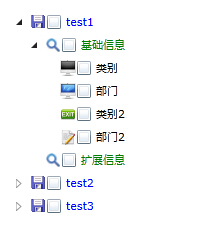
xaml代码
<UserControl x:Class="SlmenuTest.Tree"

    xmlns="http://schemas.microsoft.com/winfx/2006/xaml/presentation"

    xmlns:x="http://schemas.microsoft.com/winfx/2006/xaml"

    xmlns:d="http://schemas.microsoft.com/expression/blend/2008"

    xmlns:mc="http://schemas.openxmlformats.org/markup-compatibility/2006"

    xmlns:common="clr-namespace:System.Windows;assembly=System.Windows.Controls"

    mc:Ignorable="d"

    d:DesignHeight="300" d:DesignWidth="400" xmlns:sdk="http://schemas.microsoft.com/winfx/2006/xaml/presentation/sdk">

    <UserControl.Resources>

        <common:HierarchicalDataTemplate x:Key="Level3Template">

            <StackPanel Orientation="Horizontal">

                <Image Source="{Binding Icon}" Width="16" Height="16"/>

                <CheckBox />

                <TextBlock Text="{Binding Name}"  Foreground="Black" />

            </StackPanel>

        </common:HierarchicalDataTemplate>

        <common:HierarchicalDataTemplate x:Key="Level2Template" ItemsSource="{Binding Level3s}" ItemTemplate="{StaticResource Level3Template}">

            <StackPanel Orientation="Horizontal">

                <Image Source="{Binding Icon}" Width="16" Height="16"/>

                <CheckBox />

                <TextBlock Text="{Binding Name}" Foreground="Green"/>

            </StackPanel>

        </common:HierarchicalDataTemplate>

        <common:HierarchicalDataTemplate x:Key="Level1Template" ItemsSource="{Binding Level2s}" ItemTemplate="{StaticResource Level2Template}">

            <StackPanel  Orientation="Horizontal">

                <Image Source="{Binding Icon}" />

                <CheckBox />

                <TextBlock Foreground="Blue" Text="{Binding Name}"/>

            </StackPanel>

        </common:HierarchicalDataTemplate>

    </UserControl.Resources>
后台代码
using System;

using System.Collections.Generic;

using System.Linq;

using System.Net;

using System.Windows;

using System.Windows.Controls;

using System.Windows.Documents;

using System.Windows.Input;

using System.Windows.Media;

using System.Windows.Media.Animation;

using System.Windows.Shapes;

using System.Collections.ObjectModel;

namespace SlmenuTest

{

    public partial class Tree : UserControl

    {

        public Tree()

        {

            InitializeComponent();

            InitTreeData();

        }

        #region Data

        private void InitTreeData()

        {

            myTree.ItemsSource = new ObservableCollection<Level1>

            {

                new Level1

                {

                    Name = "test1",

                    Icon="../images/default.png",

                    Level2s =

                    {

                        new Level2

                        {

                            Name="基础信息",

                            Icon = "../images/search.png",

                            Level3s =

                            {

                                new Level3 { Name = "类别" ,Icon = "../images/computer.png"},

                                new Level3 { Name = "部门" ,Icon = "../images/computer_on.png"},

                                new Level3 { Name = "类别2" ,Icon = "../images/exit.png"},

                                new Level3 { Name = "部门2" ,Icon = "../images/edit.png"}

                            }

                        },

                        new Level2

                        {

                            Name="扩展信息",

                            Icon="../images/search.png"

                        }

                    }

                },

                new Level1

                {

                    Name="test2",

                    Icon="../images/default.png",

                    Level2s=

                    {

                        new Level2

                        {

                            Name="报表管理",

                            Icon = "../images/search.png",

                            Level3s =

                            {

                                new Level3 { Name = "报表1" ,Icon = "../images/default.png"},

                                new Level3 { Name = "报表2" ,Icon = "../images/default.png"},

                                new Level3 { Name = "报表3" ,Icon = "../images/default.png"},

                                new Level3 { Name = "报表4",Icon="../images/default.png"}

                            }

                        }

                    }

                },

                new Level1

                {

                    Name="test3",

                    Icon="../images/default.png",

                    Level2s=

                    {

                        new Level2

                        {

                            Name="系统管理",

                            Icon = "../images/search.png",

                            Level3s =

                            {

                                new Level3 { Name = "权限设置" ,Icon = "../images/default.png"},

                                new Level3 { Name = "用户管理" , Icon = "../images/default.png"}

                            }

                        }

                    }

                }

            };

        }

        #endregion

        private void myTree_SelectedItemChanged(object sender, RoutedPropertyChangedEventArgs<object> e)

        {

            TreeViewItem item = e.NewValue as TreeViewItem;

        }

    }

    public class Level1

    {

        public Level1()

        {

            Level2s = new ObservableCollection<Level2>();

        }

        public string Name { get; set; }

        public string Icon { get; set; }

        public ObservableCollection<Level2> Level2s { get; set; }

    }

    public class Level2

    {

        public Level2()

        {

            Level3s = new ObservableCollection<Level3>();

        }

        public string Name { get; set; }

        public string Icon { get; set; }

        public ObservableCollection<Level3> Level3s { get; set; }

    }

    public class Level3

    {

        public string Name { get; set; }

        public string Icon { get; set; }

        //public event EventHandler click;

    }

}
第二种效果图如下

xaml代码如下
<UserControl x:Class="SLColorPickerDemo.Tree"

    xmlns="http://schemas.microsoft.com/winfx/2006/xaml/presentation"

    xmlns:x="http://schemas.microsoft.com/winfx/2006/xaml"

    xmlns:d="http://schemas.microsoft.com/expression/blend/2008"

    xmlns:mc="http://schemas.openxmlformats.org/markup-compatibility/2006"

    mc:Ignorable="d"

    d:DesignHeight="300" d:DesignWidth="400" xmlns:sdk="http://schemas.microsoft.com/winfx/2006/xaml/presentation/sdk">

    <UserControl.Resources>

        <Style x:Key="RedItemStyle" TargetType="sdk:TreeViewItem">

            <Setter Property="HeaderTemplate">

                <Setter.Value>

                    <DataTemplate>

                        <StackPanel Orientation="Horizontal">

                            <Image Source="images/default.png"/>

                            <CheckBox />

                            <TextBlock Text="{Binding}" Foreground="Red" FontStyle="Italic" />

                        </StackPanel>

                    </DataTemplate>

                </Setter.Value>

            </Setter>

            <Setter Property="IsExpanded" Value="False" />

        </Style>

    </UserControl.Resources>

    <Grid x:Name="LayoutRoot" Background="White">

        <sdk:TreeView Margin="5" Grid.Column="0" Grid.Row="1" Name="tvTree" SelectedItemChanged="tvTree_SelectedItemChanged" />

        <Border BorderBrush="Gray" BorderThickness="1" Padding="8" Margin="5">

            <StackPanel x:Name="DetailsPanel" Margin="4" Width="155">

                <StackPanel Orientation="Horizontal">

                    <TextBlock Text="版块ID: " FontWeight="Bold"  />

                    <TextBlock Text="{Binding ForumID}" />

                </StackPanel>

                <StackPanel Orientation="Horizontal">

                    <TextBlock Text="版块名称: " FontWeight="Bold"  />

                    <TextBlock Text="{Binding ForumName}" />

                </StackPanel>

                <StackPanel Orientation="Horizontal">

                    <TextBlock Text="版块信息: " FontWeight="Bold" />

                    <TextBlock x:Name="DetailText" TextWrapping="Wrap" Text="{Binding ForumName}"/>

                </StackPanel>

            </StackPanel>

        </Border>

    </Grid>

</UserControl>
后台代码
using System;

using System.Net;

using System.Windows;

using System.Windows.Controls;

using System.Windows.Documents;

using System.Windows.Ink;

using System.Windows.Input;

using System.Windows.Media;

using System.Windows.Media.Animation;

using System.Windows.Shapes;

using System.ComponentModel;

namespace SLColorPickerDemo

{

    public class ForumInfo : INotifyPropertyChanged

    {

        public int ForumID { get; set; }

        public int ParendID { get; set; }

        public string ForumName { get; set; }

        #region INotifyPropertyChanged 成员

        public event PropertyChangedEventHandler PropertyChanged;

        private void PropertyChaged(string propertyName)

        {

            PropertyChangedEventHandler handle = PropertyChanged;

            if (handle != null)

                handle.Invoke(this, new PropertyChangedEventArgs(propertyName));

        }

        #endregion

    }

}
using System;

using System.Collections.Generic;

using System.Linq;

using System.Net;

using System.Windows;

using System.Windows.Controls;

using System.Windows.Documents;

using System.Windows.Input;

using System.Windows.Media;

using System.Windows.Media.Animation;

using System.Windows.Shapes;

using System.Collections.ObjectModel;

namespace SLColorPickerDemo

{

    public partial class Tree : UserControl

    {

        List<ForumInfo> forumList = new List<ForumInfo>();

        public Tree()

        {

            InitializeComponent();

            forumList = GetForumData();

            AddTreeNode(, null);

        }

        private void AddTreeNode(int parentID, TreeViewItem treeViewItem)

        {

            List<ForumInfo> result = (from forumInfo in forumList

                                      where forumInfo.ParendID == parentID

                                      select forumInfo).ToList<ForumInfo>();

            if (result.Count > )

            {

                foreach (ForumInfo foruminfo in result)

                {

                    TreeViewItem objTreeNode = new TreeViewItem();

                    objTreeNode.Header = foruminfo.ForumName;

                    objTreeNode.DataContext = foruminfo;

                    objTreeNode.ItemContainerStyle = this.Resources["RedItemStyle"] as Style;

                    //添加根节点

                    if (treeViewItem == null)

                    {

                        tvTree.Items.Add(objTreeNode);

                        //tvTree.ItemContainerStyle = this.Resources["TreeStyle"] as Style;

                    }

                    else

                    {

                        treeViewItem.Items.Add(objTreeNode);

                    }

                    AddTreeNode(foruminfo.ForumID, objTreeNode);

                }

            }

        }

        public List<ForumInfo> GetForumData()

        {

            List<ForumInfo> forumList = new List<ForumInfo>();

            forumList.Add(new ForumInfo() { ForumID = , ParendID = , ForumName = "笔记本版块" });

            forumList.Add(new ForumInfo() { ForumID = , ParendID = , ForumName = "台式机版块" });

            forumList.Add(new ForumInfo() { ForumID = , ParendID = , ForumName = "Dell笔记本" });

            forumList.Add(new ForumInfo() { ForumID = , ParendID = , ForumName = "IBM笔记本" });

            forumList.Add(new ForumInfo() { ForumID = , ParendID = , ForumName = "IBM-T系列" });

            forumList.Add(new ForumInfo() { ForumID = , ParendID = , ForumName = "IBM-R系列" });

            forumList.Add(new ForumInfo() { ForumID = , ParendID = , ForumName = "联想台式机" });

            forumList.Add(new ForumInfo() { ForumID = , ParendID = , ForumName = "方正台式机" });

            forumList.Add(new ForumInfo() { ForumID = , ParendID = , ForumName = "HP台式机" });

            forumList.Add(new ForumInfo() { ForumID = , ParendID = , ForumName = "联想家悦H系列" });

            forumList.Add(new ForumInfo() { ForumID = , ParendID = , ForumName = "联想IdeaCentre系列" });

            return forumList;

        }

        private void tvTree_SelectedItemChanged(object sender, RoutedPropertyChangedEventArgs<object> e)

        {

            TreeViewItem item = e.NewValue as TreeViewItem;

            ForumInfo fi = item.DataContext as ForumInfo;

            DetailsPanel.DataContext = fi;

        }

    }

}
时间比较长了参考的文章找不到,找到了再把链接贴上。
Silverlight TreeView 带 checkbox和图片的更多相关文章
- WPF 带CheckBox、图标的TreeView
WPF 带CheckBox.图标的TreeView 在WPF实际项目开发的时候,经常会用到带CheckBox的TreeView,虽然微软在WPF的TreeView中没有提供该功能,但是微软在WPF中提 ...
- WPF 带CheckBox、图标的TreeView(转)
在WPF实际项目开发的时候,经常会用到带CheckBox的TreeView,虽然微软在WPF的TreeView中没有提供该功能,但是微软在WPF中提供强大的ItemTemplate模板功能和自定义样式 ...
- 潜移默化学会WPF(难点控件treeview)--改造TreeView(CheckBox多选择版本),递归绑定数据
原文:潜移默化学会WPF(难点控件treeview)--改造TreeView(CheckBox多选择版本),递归绑定数据 目前自己对treeview的感慨很多 今天先讲 面对这种 表结构的数据 的其中 ...
- Android开发学习之路-带文字的图片分享
有用过微信分享SDK的都应该知道,微信分享到朋友圈的时候是不能同时分享图片和文字的,只要有缩略图,那么文字就不会生效.那么问题就来了,如果我们想把APP内的某些内容连带图片一起分享到微信,是不是没办法 ...
- Android实现自定义带文字和图片的Button
Android实现自定义带文字和图片的Button 在Android开发中经常会需要用到带文字和图片的button,下面来讲解一下常用的实现办法. 一.用系统自带的Button实现 最简单的一种办法就 ...
- WPF中Expander控件样式,ListBox的样式(带checkbox)恢复
Expander控件样式: <ControlTemplate x:Key="ExpanderToggleButton" TargetType="ToggleButt ...
- 【转】带checkbox的ListView实现(二)——自定义Checkable控件的实现方法
原文网址:http://blog.csdn.net/harvic880925/article/details/40475367 前言:前一篇文章给大家展示了传统的Listview的写法,但有的时候我们 ...
- 基于jQuery带标题的图片3D切换焦点图
今天给大家分享一款基于jQuery带标题的图片3D切换焦点图.这款焦点图适用浏览器:IE8.360.FireFox.Chrome.Safari.Opera.傲游.搜狗.世界之窗. 实现的代码. htm ...
- [TFRecord格式数据]利用TFRecords存储与读取带标签的图片
利用TFRecords存储与读取带标签的图片 原创文章,转载请注明出处~ 觉得有用的话,欢迎一起讨论相互学习~Follow Me TFRecords其实是一种二进制文件,虽然它不如其他格式好理解,但是 ...
随机推荐
- Luogu 4514 上帝造题的七分钟
二维差分+树状数组. 定义差分数组$d_{i, j} = a_{i, j} + a_{i - 1, j - 1} - a_{i, j - 1} - a_{i - 1, j}$,有$a_{i, j} = ...
- Luogu 1357 花园
发现$m$很小,直接状压起来,可以处理出一开始的合法的状态. 对于每一个合法的状态,可以处理出它的转移方向,即在后面填一个$1$或者填一个$0$,反着处理比较方便. 考虑一下环的情况,在这题中有一个小 ...
- linux环境启动django项目
BBS部署步骤 安装python3.6(如已安装无需重复) install python3.6 把BBS项目传上来 rz 选择文件 BBS.tar 解压文件 tar -xvf BBS.tar 安装my ...
- web.xml中url-pattern匹配规则.RP
一.url-pattern的三种写法 精确匹配.以"/"开头,加上servlet名称. /ad 路径匹配.以"/"开头,加上通配符"*" ...
- Struts2返回JSON数据的具体应用范例
早在我刚学Struts2之初的时候,就想写一篇文章来阐述Struts2如何返回JSON数据的原理和具体应用了,但苦于一直忙于工作难以抽身,渐渐的也淡忘了此事.直到前两天有同事在工作中遇到这个问题,来找 ...
- Unknown storage engine 'InnoDB'
报错情况:在导入数据时候发现找不到InnoDB这个错误,之前查看博客时候明白了IsAsm数据库和InnoDB这两个的区别了. 解决方案: 尝试一:将my.ini配置文件的isasm改成InnoDB.这 ...
- 解决批处理命令执行完毕后自动关闭cmd窗口方法
问题描述: 日常开发工作中,为了节省多余操作导致浪费时间,我们经常会自己建一些批处理脚本文件(xx.bat),文件中包含我们需要执行的命令,有时候我们希望执行完毕后看一下执行的结果,但是窗口执行完毕后 ...
- 【AutoResetEvent】
AutoResetEvent用于线程间的同步 Test.cs代码: class Test { //构造函数,用一个指示是否将初始状态设置为终止的布尔值初始化该类的新实例. //false:无信号,子线 ...
- 【C#】EF学习<一> CodeFist
[第一篇]ASP.NET MVC快速入门之数据库操作(MVC5+EF6) 目录 [第一篇]ASP.NET MVC快速入门之数据库操作(MVC5+EF6) http://www.cnblogs.com/ ...
- 使用metasploit进行栈溢出攻击-1
攻击是在bt5下面进行,目标程序是在ubuntu虚拟机上运行. 首先,需要搞明白什么是栈溢出攻击,详细内容请阅读 http://blog.csdn.net/cnctloveyu/article/det ...