
Android服务之bindService源代码分析
上一篇分析startService时没有画出调用ActivityManagerService之前的时序图,这里画出bindService的时序图。它们的调用流程是一致的。
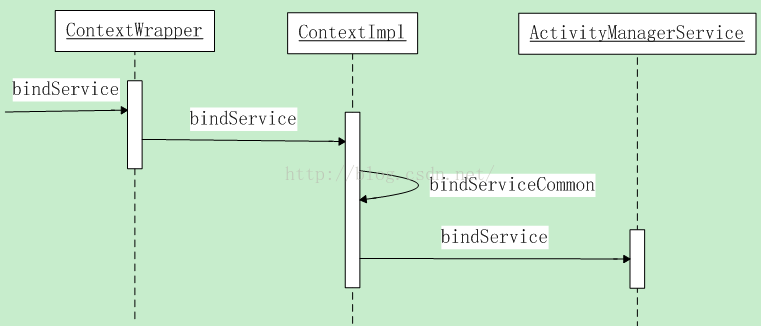
先看ContextWrapper的bindService方法:
@Override

public boolean bindService(Intent service, ServiceConnection conn,

        int flags) {

    return mBase.bindService(service, conn, flags);

}
调用ContextImpl类的bindService方法:
@Override

public boolean bindService(Intent service, ServiceConnection conn,

        int flags) {

    // 假设是系统进程调用会打印一个log。

warnIfCallingFromSystemProcess();

    return bindServiceCommon(service, conn, flags, Process.myUserHandle());

}

private boolean bindServiceCommon(Intent service, ServiceConnection conn, int flags,

        UserHandle user) {

    IServiceConnection sd;

    if (conn == null) {

        throw new IllegalArgumentException("connection is null");

    }

    // mPackageInfo是LoadedApk类的实例,在构造方法中赋值

    if (mPackageInfo != null) {

        // mMainThread是一个ActivityThread实例。调用getHandler()方法获取到一个Handler对象。

        // 这个Handler对象就是ActivityThread内部类H的实例,这里把它保存在ServiceDispatcher中了

        sd = mPackageInfo.getServiceDispatcher(conn, getOuterContext(),

                mMainThread.getHandler(), flags);

    } else {

        throw new RuntimeException("Not supported in system context");

    }

    // 验证service的有效性,Android5.1之后不同意使用隐式调用

    validateServiceIntent(service);

    try {

        IBinder token = getActivityToken();

        if (token == null && (flags&BIND_AUTO_CREATE) == 0 && mPackageInfo != null

                && mPackageInfo.getApplicationInfo().targetSdkVersion

                < android.os.Build.VERSION_CODES.ICE_CREAM_SANDWICH) {

            flags |= BIND_WAIVE_PRIORITY;

        }

        // 准备离开应用程序进程。进人ActivityManagerService进程

        service.prepareToLeaveProcess();

        // 调用ActivityManagerProxy类的bindService方法。ActivityManagerProxy是

        // 一个Binder对象的远程接口。而这个Binder对象就是ActivityManagerService

        int res = ActivityManagerNative.getDefault().bindService(

            mMainThread.getApplicationThread(), getActivityToken(), service,

            service.resolveTypeIfNeeded(getContentResolver()),

            sd, flags, getOpPackageName(), user.getIdentifier());

        if (res < 0) {

            throw new SecurityException(

                    "Not allowed to bind to service " + service);

        }

        return res != 0;

    } catch (RemoteException e) {

        throw new RuntimeException("Failure from system", e);

    }

}
LoadedApk类的getServiceDispatcher方法返回一个IServiceConnection对象,它是一个Binder对象,后面传递给了ActivityManagerService。ActivityManagerService兴许就是要通过这个Binder对象和ServiceConnection通信的。
ActivityManagerNative类的getDefault()方法上一篇已经解说过。就是通过一个懒载入的单例模式得到一个ActivityManagerProxy代理对象。
这里不再具体解说。
ActivityManagerProxy类的bindService方法把传递进来的參数写入到data本地变量中,接着通过mRemote.transact方法进入到Binder驱动程序,然后Binder驱动程序唤醒正在等待Client请求的ActivityManagerService进程,最后进入到ActivityManagerService的bindService方法中。这里先看下时序图:
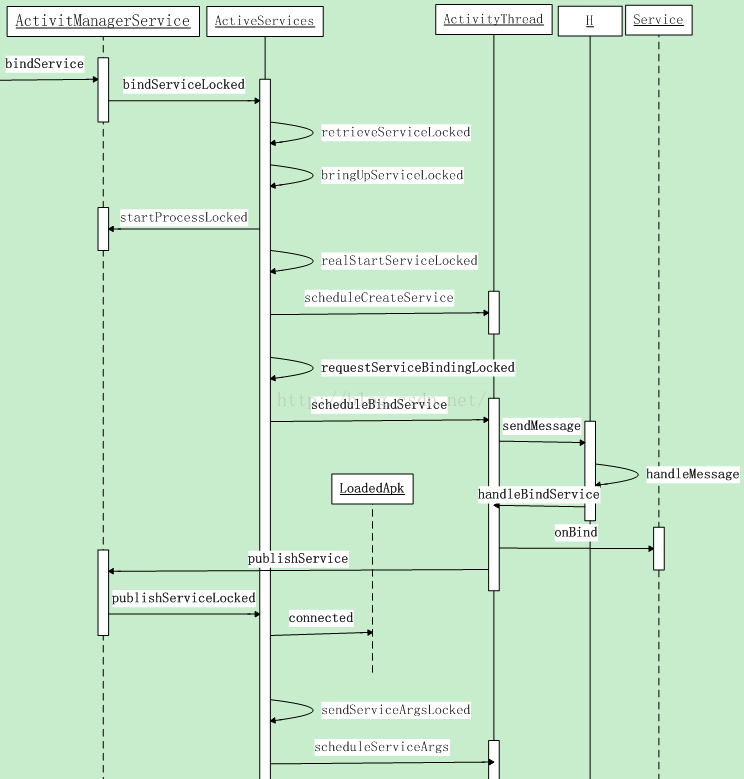
ActivityManagerService类中的bindService方法:
public int bindService(IApplicationThread caller, IBinder token, Intent service,

        String resolvedType, IServiceConnection connection, int flags, String callingPackage,

        int userId) throws TransactionTooLargeException {

    // 运行依据调用者uid推断调用者不是独立进程的操作

    enforceNotIsolatedCaller("bindService");

    // Refuse possible leaked file descriptors

    if (service != null && service.hasFileDescriptors() == true) {

        throw new IllegalArgumentException("File descriptors passed in Intent");

    }

    if (callingPackage == null) {

        throw new IllegalArgumentException("callingPackage cannot be null");

    }

    synchronized(this) {

        // mServices是ActiveServices的实例,在构造方法中完毕初始化

        return mServices.bindServiceLocked(caller, token, service,

                resolvedType, connection, flags, callingPackage, userId);

    }

}
运行到ActiveServices类中的bindServiceLocked方法:
int bindServiceLocked(IApplicationThread caller, IBinder token, Intent service,

        String resolvedType, IServiceConnection connection, int flags,

        String callingPackage, int userId) throws TransactionTooLargeException {

    if (DEBUG_SERVICE) Slog.v(TAG_SERVICE, "bindService: " + service

            + " type=" + resolvedType + " conn=" + connection.asBinder()

            + " flags=0x" + Integer.toHexString(flags));

    // mAm是ActivityManagerService对象,在构造方法中完毕初始化操作

    // 通过ApplicationThread对象从ActivityManagerService的成员变量mLruProcesses

    // 列表中查找启动服务的进程(调用者)在ActivityManagerService中的ProcessRecord对象

    final ProcessRecord callerApp = mAm.getRecordForAppLocked(caller);

    if (callerApp == null) {

        throw new SecurityException(

                "Unable to find app for caller " + caller

                + " (pid=" + Binder.getCallingPid()

                + ") when binding service " + service);

    }

    ActivityRecord activity = null;

    if (token != null) {

        // 通过token将代表调用者的ActivityRecord取出

        activity = ActivityRecord.isInStackLocked(token);

        if (activity == null) {

            Slog.w(TAG, "Binding with unknown activity: " + token);

            return 0;

        }

    }

    int clientLabel = 0;

    PendingIntent clientIntent = null;

    if (callerApp.info.uid == Process.SYSTEM_UID) {

        // Hacky kind of thing -- allow system stuff to tell us

        // what they are, so we can report this elsewhere for

        // others to know why certain services are running.

        try {

            clientIntent = service.getParcelableExtra(Intent.EXTRA_CLIENT_INTENT);

        } catch (RuntimeException e) {

        }

        if (clientIntent != null) {

            clientLabel = service.getIntExtra(Intent.EXTRA_CLIENT_LABEL, 0);

            if (clientLabel != 0) {

                // There are no useful extras in the intent, trash them.

                // System code calling with this stuff just needs to know

                // this will happen.

                service = service.cloneFilter();

            }

        }

    }

    if ((flags&Context.BIND_TREAT_LIKE_ACTIVITY) != 0) {

        mAm.enforceCallingPermission(android.Manifest.permission.MANAGE_ACTIVITY_STACKS,

                "BIND_TREAT_LIKE_ACTIVITY");

    }

    final boolean callerFg = callerApp.setSchedGroup != Process.THREAD_GROUP_BG_NONINTERACTIVE;

    // 调用retrieveServiceLocked方法解析service。将解析结果保存在res.record中

    // 调用该方法后,为被调用者构造了相应的ServiceRecord对象

    ServiceLookupResult res =

        retrieveServiceLocked(service, resolvedType, callingPackage,

                Binder.getCallingPid(), Binder.getCallingUid(), userId, true, callerFg);

    if (res == null) {

        return 0;

    }

    if (res.record == null) {

        return -1;

    }

    ServiceRecord s = res.record;

    /*能够加入关联唤醒的推断逻辑:如依据被调用者包名/类名前缀推断是否属于第三方push平台在开启服务,假设是则直接返回0*/

    /*能够加入自启动的推断逻辑:如被调用者包名在禁止自启动的列表中,则直接返回0*/

    /*另外:syncManager和JobScheduler都能够通过系统调用bindServiceAsUser把自己拉起来,故这里能够添加*/

    /*对调用者是系统uid时候的推断逻辑:推断被调用者包名是否在禁止自启动列表中。假设在则直接返回0*/

    final long origId = Binder.clearCallingIdentity();

    try {

        if (unscheduleServiceRestartLocked(s, callerApp.info.uid, false)) {

            if (DEBUG_SERVICE) Slog.v(TAG_SERVICE, "BIND SERVICE WHILE RESTART PENDING: "

                    + s);

        }

        if ((flags&Context.BIND_AUTO_CREATE) != 0) {

            s.lastActivity = SystemClock.uptimeMillis();

            if (!s.hasAutoCreateConnections()) {

                // This is the first binding, let the tracker know.

                ProcessStats.ServiceState stracker = s.getTracker();

                if (stracker != null) {

                    stracker.setBound(true, mAm.mProcessStats.getMemFactorLocked(),

                            s.lastActivity);

                }

            }

        }

        mAm.startAssociationLocked(callerApp.uid, callerApp.processName,

                s.appInfo.uid, s.name, s.processName);

        AppBindRecord b = s.retrieveAppBindingLocked(service, callerApp);

        // 将传进来的參数封装成ConnectionRecord对象。connection是一个Binder对象

        ConnectionRecord c = new ConnectionRecord(b, activity,

                connection, flags, clientLabel, clientIntent);

        IBinder binder = connection.asBinder();

        ArrayList<ConnectionRecord> clist = s.connections.get(binder);

        if (clist == null) {

            clist = new ArrayList<ConnectionRecord>();

            s.connections.put(binder, clist);

        }

        // 多种方式保存ConnectionRecord对象c,都是为了兴许用到时方便取出

        clist.add(c);

        b.connections.add(c);

        if (activity != null) {

            if (activity.connections == null) {

                activity.connections = new HashSet<ConnectionRecord>();

            }

            activity.connections.add(c);

        }

        b.client.connections.add(c);

        if ((c.flags&Context.BIND_ABOVE_CLIENT) != 0) {

            b.client.hasAboveClient = true;

        }

        if (s.app != null) {

            updateServiceClientActivitiesLocked(s.app, c, true);

        }

        clist = mServiceConnections.get(binder);

        if (clist == null) {

            clist = new ArrayList<ConnectionRecord>();

            mServiceConnections.put(binder, clist);

        }

        clist.add(c);

        if ((flags&Context.BIND_AUTO_CREATE) != 0) {

            s.lastActivity = SystemClock.uptimeMillis();

            // 參数为BIND_AUTO_CREATE时。启动服务,兴许流程和startService一致,这里不再解说

            if (bringUpServiceLocked(s, service.getFlags(), callerFg, false) != null) {

                return 0;

            }

        }

        if (s.app != null) {

            if ((flags&Context.BIND_TREAT_LIKE_ACTIVITY) != 0) {

                s.app.treatLikeActivity = true;

            }

            // This could have made the service more important.

            mAm.updateLruProcessLocked(s.app, s.app.hasClientActivities

                    || s.app.treatLikeActivity, b.client);

            mAm.updateOomAdjLocked(s.app);

        }

        if (DEBUG_SERVICE) Slog.v(TAG_SERVICE, "Bind " + s + " with " + b

                + ": received=" + b.intent.received

                + " apps=" + b.intent.apps.size()

                + " doRebind=" + b.intent.doRebind);

        if (s.app != null && b.intent.received) {

            // Service is already running, so we can immediately

            // publish the connection.

            try {

                // 假设服务已经在运行,则直接运行连接成功的回调

                c.conn.connected(s.name, b.intent.binder);

            } catch (Exception e) {

                Slog.w(TAG, "Failure sending service " + s.shortName

                        + " to connection " + c.conn.asBinder()

                        + " (in " + c.binding.client.processName + ")", e);

            }

            // If this is the first app connected back to this binding,

            // and the service had previously asked to be told when

            // rebound, then do so.

            if (b.intent.apps.size() == 1 && b.intent.doRebind) {

                requestServiceBindingLocked(s, b.intent, callerFg, true);

            }

        } else if (!b.intent.requested) {

            // 绑定该Service

            requestServiceBindingLocked(s, b.intent, callerFg, false);

        }

        getServiceMap(s.userId).ensureNotStartingBackground(s);

    } finally {

        Binder.restoreCallingIdentity(origId);

    }

    return 1;

}
bringUpServiceLocked方法后的运行流程跟startService一致,这里不再解说。具体能够參考上一篇文章。服务运行完onCreate方法之后才干绑定。以下解说绑定服务的过程:
private final boolean requestServiceBindingLocked(ServiceRecord r, IntentBindRecord i,

        boolean execInFg, boolean rebind) throws TransactionTooLargeException {

    if (r.app == null || r.app.thread == null) {

        // If service is not currently running, can't yet bind.

        return false;

    }

    if ((!i.requested || rebind) && i.apps.size() > 0) {

        try {

            bumpServiceExecutingLocked(r, execInFg, "bind");

            r.app.forceProcessStateUpTo(ActivityManager.PROCESS_STATE_SERVICE);

            // 调用ActivityThread类的scheduleBindService方法

            r.app.thread.scheduleBindService(r, i.intent.getIntent(), rebind,

                    r.app.repProcState);

            if (!rebind) {

                i.requested = true;

            }

            i.hasBound = true;

            i.doRebind = false;

        } catch (TransactionTooLargeException e) {

            // Keep the executeNesting count accurate.

            if (DEBUG_SERVICE) Slog.v(TAG_SERVICE, "Crashed while binding " + r, e);

            final boolean inDestroying = mDestroyingServices.contains(r);

            serviceDoneExecutingLocked(r, inDestroying, inDestroying);

            throw e;

        } catch (RemoteException e) {

            if (DEBUG_SERVICE) Slog.v(TAG_SERVICE, "Crashed while binding " + r);

            // Keep the executeNesting count accurate.

            final boolean inDestroying = mDestroyingServices.contains(r);

            serviceDoneExecutingLocked(r, inDestroying, inDestroying);

            return false;

        }

    }

    return true;

}
通过Binder驱动程序调用ActivityThread类中的scheduleBindService方法:
public final void scheduleBindService(IBinder token, Intent intent,

        boolean rebind, int processState) {

    updateProcessState(processState, false);

    BindServiceData s = new BindServiceData();

    s.token = token;

    s.intent = intent;

    s.rebind = rebind;

    if (DEBUG_SERVICE)

        Slog.v(TAG, "scheduleBindService token=" + token + " intent=" + intent + " uid="

                + Binder.getCallingUid() + " pid=" + Binder.getCallingPid());

    sendMessage(H.BIND_SERVICE, s);

}

private class H extends Handler {

    . . .

    public static final int BIND_SERVICE            = 121;

    . . .

    public void handleMessage(Message msg) {

        switch (msg.what) {

            . . .

            case BIND_SERVICE:

                Trace.traceBegin(Trace.TRACE_TAG_ACTIVITY_MANAGER, "serviceBind");

                handleBindService((BindServiceData)msg.obj);

                Trace.traceEnd(Trace.TRACE_TAG_ACTIVITY_MANAGER);

                break;

            . . .

        }

    }

}

private void handleBindService(BindServiceData data) {

    // 前面在运行handleCreateService方法时。通过mServices.put(data.token, service);

    // 方法保存了起来,如今取出

    Service s = mServices.get(data.token);

    if (DEBUG_SERVICE)

        Slog.v(TAG, "handleBindService s=" + s + " rebind=" + data.rebind);

    if (s != null) {

        try {

            data.intent.setExtrasClassLoader(s.getClassLoader());

            data.intent.prepareToEnterProcess();

            try {

                if (!data.rebind) {

                    // 回调Service的onBind方法

                    IBinder binder = s.onBind(data.intent);

                    // 通知ActivityManagerService服务已经连接成功

                    ActivityManagerNative.getDefault().publishService(

                            data.token, data.intent, binder);

                } else {

                    // 回调Service的onRebind方法

                    s.onRebind(data.intent);

                    // 通知ActivityManagerService。当前Service创建完毕

                    ActivityManagerNative.getDefault().serviceDoneExecuting(

                            data.token, SERVICE_DONE_EXECUTING_ANON, 0, 0);

                }

                ensureJitEnabled();

            } catch (RemoteException ex) {

            }

        } catch (Exception e) {

            if (!mInstrumentation.onException(s, e)) {

                throw new RuntimeException(

                        "Unable to bind to service " + s

                        + " with " + data.intent + ": " + e.toString(), e);

            }

        }

    }

}
以下看服务连接成功的ActivityManagerService类中的publicService方法:
public void publishService(IBinder token, Intent intent, IBinder service) {

    // Refuse possible leaked file descriptors

    if (intent != null && intent.hasFileDescriptors() == true) {

        throw new IllegalArgumentException("File descriptors passed in Intent");

    }

    synchronized(this) {

        if (!(token instanceof ServiceRecord)) {

            throw new IllegalArgumentException("Invalid service token");

        }

        mServices.publishServiceLocked((ServiceRecord)token, intent, service);

    }

}
调用ActiveServices类中的publishServiceLocked方法:
void publishServiceLocked(ServiceRecord r, Intent intent, IBinder service) {

    final long origId = Binder.clearCallingIdentity();

    try {

        if (DEBUG_SERVICE) Slog.v(TAG_SERVICE, "PUBLISHING " + r

                + " " + intent + ": " + service);

        if (r != null) {

            Intent.FilterComparison filter

                    = new Intent.FilterComparison(intent);

            IntentBindRecord b = r.bindings.get(filter);

            if (b != null && !b.received) {

                b.binder = service;

                b.requested = true;

                b.received = true;

                for (int conni=r.connections.size()-1; conni>=0; conni--) {

                    ArrayList<ConnectionRecord> clist = r.connections.valueAt(conni);

                    for (int i=0; i<clist.size(); i++) {

                        ConnectionRecord c = clist.get(i);

                        if (!filter.equals(c.binding.intent.intent)) {

                            if (DEBUG_SERVICE) Slog.v(

                                    TAG_SERVICE, "Not publishing to: " + c);

                            if (DEBUG_SERVICE) Slog.v(

                                    TAG_SERVICE, "Bound intent: " + c.binding.intent.intent);

                            if (DEBUG_SERVICE) Slog.v(

                                    TAG_SERVICE, "Published intent: " + intent);

                            continue;

                        }

                        if (DEBUG_SERVICE) Slog.v(TAG_SERVICE, "Publishing to: " + c);

                        try {

                            // 运行连接成功的回调,c.conn是IServiceConnection类型

                            // 这里会运行LoadedApk.ServiceDispatcher.InnerConnection.connected方法

                            c.conn.connected(r.name, service);

                        } catch (Exception e) {

                            Slog.w(TAG, "Failure sending service " + r.name +

                                  " to connection " + c.conn.asBinder() +

                                  " (in " + c.binding.client.processName + ")", e);

                        }

                    }

                }

            }

            serviceDoneExecutingLocked(r, mDestroyingServices.contains(r), false);

        }

    } finally {

        Binder.restoreCallingIdentity(origId);

    }

}
LoadedApk.ServiceDispatcher.InnerConnection类中的connected方法:
static final class ServiceDispatcher {

    private final ServiceDispatcher.InnerConnection mIServiceConnection;

    private final ServiceConnection mConnection;

    private final Context mContext;

    private final Handler mActivityThread;

    private final ServiceConnectionLeaked mLocation;

    private final int mFlags;

    private RuntimeException mUnbindLocation;

    private boolean mDied;

    private boolean mForgotten;

    private static class ConnectionInfo {

        IBinder binder;

        IBinder.DeathRecipient deathMonitor;

    }

    private static class InnerConnection extends IServiceConnection.Stub {

        final WeakReference<LoadedApk.ServiceDispatcher> mDispatcher;

        InnerConnection(LoadedApk.ServiceDispatcher sd) {

            mDispatcher = new WeakReference<LoadedApk.ServiceDispatcher>(sd);

        }

        public void connected(ComponentName name, IBinder service) throws RemoteException {

            LoadedApk.ServiceDispatcher sd = mDispatcher.get();

            if (sd != null) {

                // 调用ServiceDispatcher的connected方法

                sd.connected(name, service);

            }

        }

    }

    private final ArrayMap<ComponentName, ServiceDispatcher.ConnectionInfo> mActiveConnections

        = new ArrayMap<ComponentName, ServiceDispatcher.ConnectionInfo>();

    ServiceDispatcher(ServiceConnection conn,

            Context context, Handler activityThread, int flags) {

        mIServiceConnection = new InnerConnection(this);

        mConnection = conn;

        mContext = context;

        mActivityThread = activityThread;

        mLocation = new ServiceConnectionLeaked(null);

        mLocation.fillInStackTrace();

        mFlags = flags;

    }

    public void connected(ComponentName name, IBinder service) {

        if (mActivityThread != null) {

            // mActivityThread是一个Handler实例。它是通过ActivityThread.getHandler方法得到的

            // 调用它的post方法后,就会把一个消息放到ActivityThread的消息队列中了

            mActivityThread.post(new RunConnection(name, service, 0));

        } else {

            doConnected(name, service);

        }

    }

    public void doConnected(ComponentName name, IBinder service) {

        ServiceDispatcher.ConnectionInfo old;

        ServiceDispatcher.ConnectionInfo info;

        synchronized (this) {

            if (mForgotten) {

                // We unbound before receiving the connection; ignore

                // any connection received.

                return;

            }

            old = mActiveConnections.get(name);

            if (old != null && old.binder == service) {

                // Huh, already have this one.  Oh well!

                return;

            }

            if (service != null) {

                // A new service is being connected... set it all up.

                mDied = false;

                info = new ConnectionInfo();

                info.binder = service;

                info.deathMonitor = new DeathMonitor(name, service);

                try {

                    // 给service设置死亡代理

                    service.linkToDeath(info.deathMonitor, 0);

                    mActiveConnections.put(name, info);

                } catch (RemoteException e) {

                    // This service was dead before we got it...  just

                    // don't do anything with it.

                    mActiveConnections.remove(name);

                    return;

                }

            } else {

                // The named service is being disconnected... clean up.

                mActiveConnections.remove(name);

            }

            if (old != null) {

                // service死亡时通知死亡代理

                old.binder.unlinkToDeath(old.deathMonitor, 0);

            }

        }

        // If there was an old service, it is not disconnected.

        if (old != null) {

            // 回调ServiceConnection的onServiceConnected方法

            mConnection.onServiceDisconnected(name);

        }

        // If there is a new service, it is now connected.

        if (service != null) {

            // 回调ServiceConnection的onServiceConnected方法

            mConnection.onServiceConnected(name, service);

        }

    }

    private final class RunConnection implements Runnable {

        RunConnection(ComponentName name, IBinder service, int command) {

            mName = name;

            mService = service;

            mCommand = command;

        }

        public void run() {

            if (mCommand == 0) {

                // 运行连接成功的操作

                doConnected(mName, mService);

            } else if (mCommand == 1) {

                doDeath(mName, mService);

            }

        }

        final ComponentName mName;

        final IBinder mService;

        final int mCommand;

    }

    。。。

}
到这里bindService的启动过程就分析完了。因为在bindServiceLocked方法中添加了对SyncManager和JobScheduler的推断,兴许会具体解说SyncManager和JobScheduler的运行流程。
Android服务之bindService源代码分析的更多相关文章
- android4.4组件分析--service组件-bindService源代码分析
6.1.1. bindService 由于有前面分析startService的代码实现过程,则对于bindService的代码分析就不用那么具体介绍,在介绍流程的同一时候更关注一些细节上的部分. ...
- Android事件分发机制源代码分析
小小感慨一下,做android有一段时间了,一直以来都是习惯整理笔记存到有道笔记上,没有写博客的习惯. 以后逐步分类整理出来,也算"复习"一遍了 - _ - . android的事 ...
- android服务的bindService/startService
1,高版本android已经不允许只通过action来bindService/startService,可以通过: intent.setPackage("XXXX"); 来指定服务 ...
- MonkeyRunner源代码分析之启动
在工作中由于要追求完毕目标的效率,所以很多其它是强调实战.注重招式.关注怎么去用各种框架来实现目的.可是假设一味仅仅是注重招式.缺少对原理这个内功的了解,相信自己非常难对各种框架有更深入的理解. 从几 ...
- Android应用程序绑定服务(bindService)的过程源代码分析
文章转载至CSDN社区罗升阳的安卓之旅,原文地址:http://blog.csdn.net/luoshengyang/article/details/6745181 Android应用程序组件Serv ...
- Android应用程序绑定服务(bindService)的过程源码分析
Android应用程序组件Service与Activity一样,既能够在新的进程中启动,也能够在应用程序进程内部启动:前面我们已经分析了在新的进程中启动Service的过程,本文将要介绍在应用程序内部 ...
- Android应用Activity、Dialog、PopWindow、Toast窗体加入机制及源代码分析
[工匠若水 http://blog.csdn.net/yanbober 转载烦请注明出处.尊重劳动成果] 1 背景 之所以写这一篇博客的原因是由于之前有写过一篇<Android应用setCont ...
- Android系统进程Zygote启动过程的源代码分析
文章转载至CSDN社区罗升阳的安卓之旅,原文地址:http://blog.csdn.net/luoshengyang/article/details/6768304 在Android系统中,所有的应用 ...
- Android系统默认Home应用程序(Launcher)的启动过程源代码分析
在前面一篇文章中,我们分析了Android系统在启动时安装应用程序的过程,这些应用程序安装好之后,还需要有一个 Home应用程序来负责把它们在桌面上展示出来,在Android系统中,这个默认的Home ...
随机推荐
- [AGC005D] ~K Perm Counting [dp]
题面 传送门 思路 首先可以明确的一点是,本题中出现不满足条件的所有的数,都是分组的 只有模$K$意义下相同的数之间才会出现不满足条件的情况,而且仅出现在相邻的情况 那么我们考虑把这个性质利用起来 我 ...
- IE6对!important单个的类是支持的
"!important"是什么? 第一个,是设置样式的优先级,设了!important的样式的属性优先于id选择器和class选择器.,比如id为"Main"的 ...
- POJ1386 Play on Words
Time Limit: 1000MS Memory Limit: 10000KB 64bit IO Format: %I64d & %I64u Description Some of ...
- for...in与点语法
语法 for...in语句循环一个指定的变量来循环一个对象所有可枚举的属性.如下所示 for (variable in object){ statements } 问题 在实际的使用过程中发现,在fo ...
- 获得NOTEPAD++ Download Manager的所有下载列表的内容的au3脚本
;~ 获得NOTEPAD++ Download Manager的所有下载列表的内容的au3脚本 ;~ 作者: 鹏程万里 ;~ Email:aprial@163.com ;~ 创建日期: 2014年11 ...
- Linux内核之页面换出详解
kswap线程主要用于页面的定期换出,接下来说说kswap线程的实现 首先kswap线程的初始化时,需要根据物理内存的大小设置一个page_cluster变量的值,这个值表示预读数目 (比如本来只读一 ...
- linux系统查看主机序列号
#dmidecode -t 1 System Information Manufacturer: IBM Product Name: System x3650 M3 -[7 ...
- 【转载】Java文件编码自动转换工具类
本篇随笔主要介绍了一个用java语言写的将一个文件编码转换为另一个编码并不改变文件内容的工具类: 通过读取源文件内容,用URLEncoding重新编码解码的方式实现. 1 public class C ...
- Javascript报错Converting circular structure to JSON 错误排解
在运行nodejs程序的时候报出以下的错误: 2017-11-20 17:44 +08:00: TypeError: Converting circular structure to JSON at ...
- 使用 JavaScript 将网站后台的数据变化实时更新到前端-【知乎总结】
问: 难道只能设置定时器每隔一秒通过 Ajax 向后台请求数据来实现吗? 答: 1. nodejs的 http://socket.io 支持上述 李宏训 所说的三种方式,另外还支持 Flash Soc ...