
linu samba服务
yum install samba samba-client samba-commmon -y
systemctl start smb
pdbedit -L 显示smb用户
smbpasswd -a student 添加smb用户 只能添加系统上已经存在的
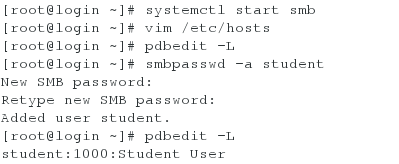
[root@localhost ~]# pdbedit -L

ls 与 !ls ls为列出共享目录的文件,!ls为列出,所在所在目录里的文件
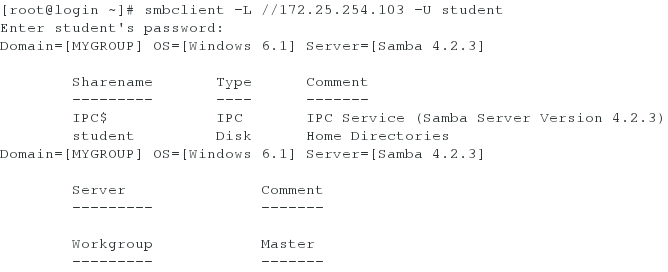
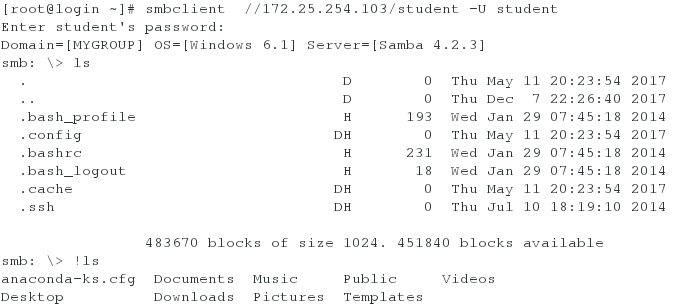
mount //172.25.254.103/student /mnt/ -o username=student,password=111 挂载共享文件目录到mnt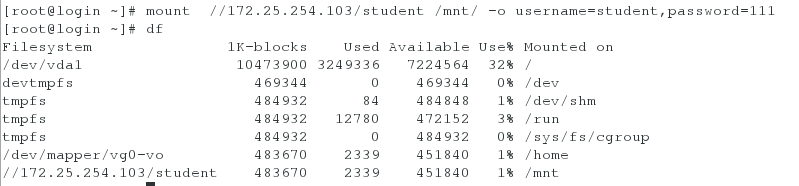
cd /mnt
touch westos{1..9}

smbclient //172.25.254.103/student -U student
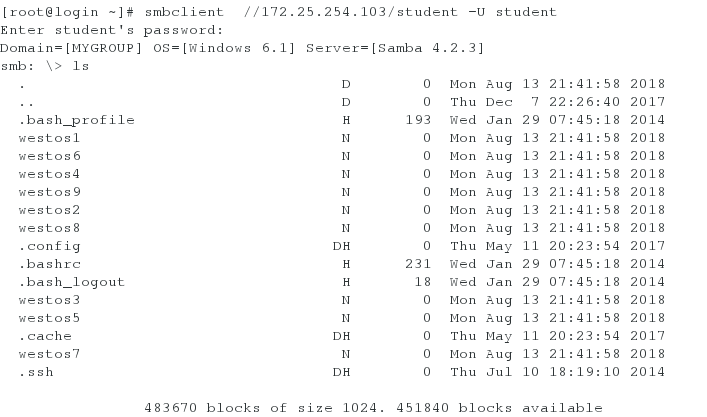
vim /etc/fstab 设置开机挂载
此时把文件系统挂载在mnt目录下.这样就可以向共享文件系统里写文件了。
改成enforcing
重新启动系统
此时访问不了共享目录关闭火墙 打开smb
smbclient //172.25.254.104/student -U student
Enter student's password:
Connection to 172.25.254.104 failed (Error NT_STATUS_CONNECTION_REFUSED) //当selinux开启时,不能和查看共享文 件系统
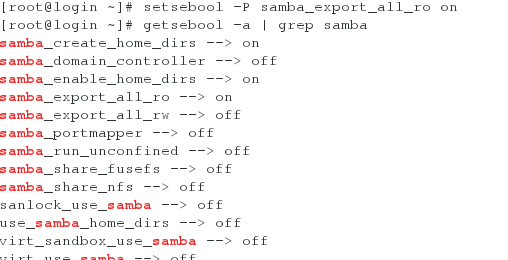
[root@localhost ~]# setsebool -P samba_create_home_dirs on
[root@localhost ~]# setsebool -P samba_enable_home_dirs on //打开创建目录查看目录的权限
[root@localhost ~]# vim /etc/samba/smb.conf 创建共享目录,并指定路径
[linux]
comment = dir from westos
path = /westos
[root@localhost ~]# mkdir /westos/file{1..3}
[root@localhost ~]# systemctl start samb 重新启动
[root@localhost ~]# smbclient //172.25.254.104/student -U student 发现查看不了文件
setenforce 0 把selinux变为警告模式
[root@localhost ~]# smbclient //172.25.254.104/student -U student 可以查看
[root@localhost ~]# semanage fcontext -a -t samba_share_t '/westos(/.*)?' // 查看配置文件后发现安全上下文不一致,生成安全上下文
[root@localhost ~]# serenforce 1 //此时开启selinux
[root@localhost ~]# smbclient //172.25.254.104/student -U student //可以查看
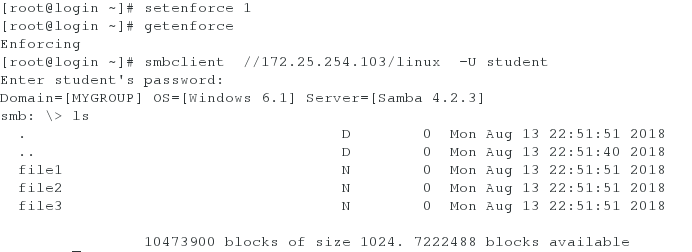
[linux]
comment = dir from westos
path = /westos
[mnt]
comment = dir from westos
path = /mnt //设置系统共享目录
rm -rf /westos
mkdir /westos
touch /westos/file1
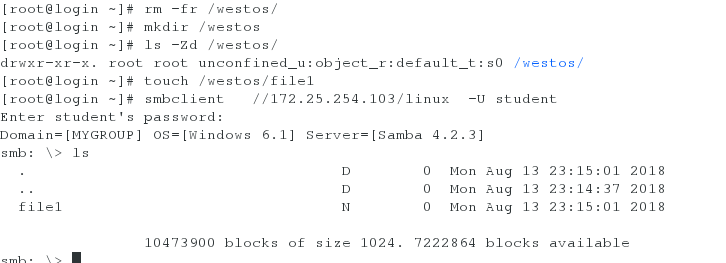
此时查看就不需要改安全上下文
showmount -e 172.25.254.103

/westos *(sync) /以sync的方式共享/westos上的文件
exportfs -rv 重载,这个文件不能通过重启来生效
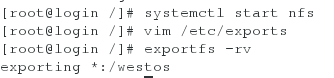
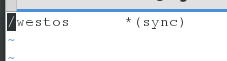
自动化挂载:
systemctl start autofs
vim /etc/sysconfig/autofs 配置文件可以更改停止时间
systemctl restart autofs.service

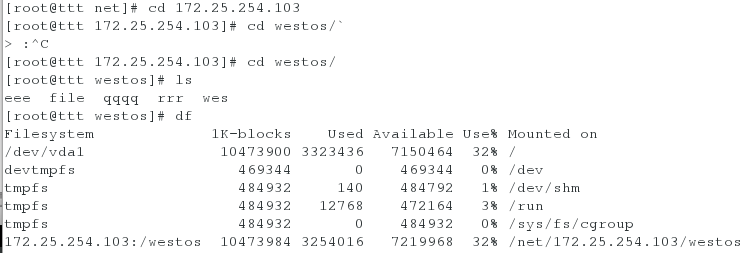
实际挂载目录为 /net/172.25.254.103/westos/
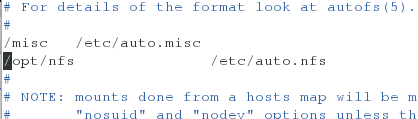
vim /etc/auto.nfs
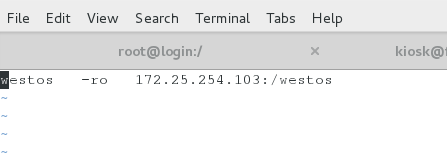
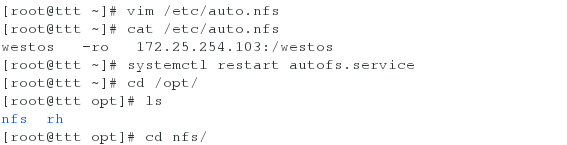

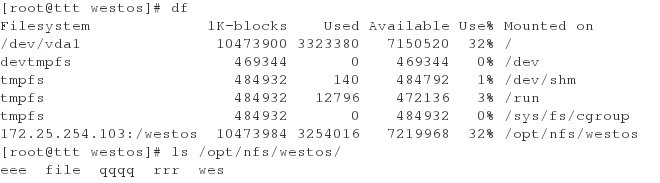
vim /etc/auto.nfs
/westos *(rw,sync) 使文件具有可写的权限
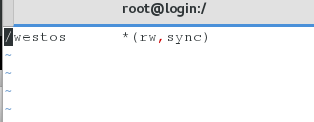
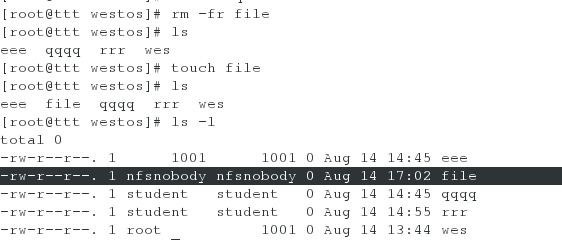
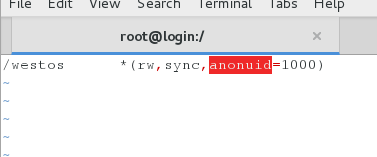
/westos *(rw,sync,anonuid=1001) 指定文件产生的所有人

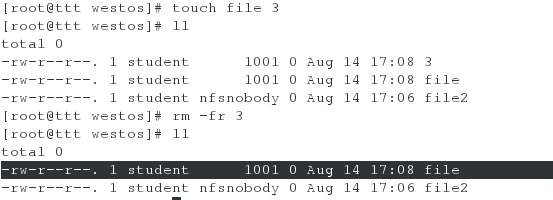
/westos *(ew,sync,anonuid=1001,anongid=1000)指定文件所有组所有人
/westos *(rw,sync,no_root_squash) 默认所有组所有人为root

/westos *(ro) 172.25.254(rw,sync,no_rooot_squash)除了这个ip外的所有主机都仅仅有只读权限
linu samba服务的更多相关文章
- samba服务
安装samba服务步骤ps -e 查看进程ps -e | grep 文件名 管道符的使用rpm -qa 安装包的查看rpm -qa | grep samba 抓Samba安装包 注释:包与包之间有依赖 ...
- OpenWrt中开启usb存储和samba服务
在从官网安装的WNDR3800 15.05.1版本OpenWrt中, 不带usb存储支持以及samba, 需要另外安装 1. 启用usb支持 USB Basic Support https://wik ...
- 虚拟机利用Host-only实现在不插网线的情况下,虚拟机与主机实现双向通信,实现ssh连接以及samba服务实现共享
为了不影响其他的虚拟网卡,我们在VMware下在添加一块虚拟网卡: 然后点击Next,选择连接方式: 点击Finish即可. 重新启动虚拟机,如果这是你手动添加的第一块虚拟网卡,那么应该是eth1. ...
- Samba服务配置简明笔记
内部服务器之间拷贝数据,用root账号访问,没有做更复杂的设置. 1.用YUM安装samba服务器端及客户端: [root@tenjs05 init.d]# yum install samba sam ...
- 部署samba服务之后,在客户端用挂载访问的方式,错误信息:mount: block device //192.168.1.108/mysqldata is write-protected, mounting read-only mount: cannot mount block device //192.168.1.108/mysqldata read-only
部署samba服务之后,在客户端用挂载访问的方式,错误信息:mount: block device //192.168.1.108/mysqldata is write-protected, moun ...
- (转)CentOs上配置samba服务
前 言 在我们使用 Windows 作为客户机的时候,通常有文件.打印共享的需求.作为Windows 网络功能之一,通常可以在 Windows 客户机之间通过 Windows Network 固有的功 ...
- linux基础-第十七单元 Samba服务
Samba的功能 Samba的安装 Samba服务的启动.停止.重启 Samba服务的配置 Samba服务的主配置文件 samba服务器配置实例 Samba客户端设置 windows客户端 Linux ...
- 配置samba服务一例
问题: 在/data/share目录下建立三个子目录public.training.devel用途如下 public目录用于存放公共数据,如公司的规章制度 training目录用于存放公司的技术培训资 ...
- samba服务搭建及管理
关闭防火墙 # /etc/init.d/iptables stop # chkconfig --level iptables off 关闭SELINUX # vim /etc/sysconfig/se ...
随机推荐
- 使用Javascript Ajax 通信操作JSON数据 [下]
上一篇文章我们获得后台数据库的数据后转换成json格式然后返回到前台,但只是返回的一位数组,这次我们返回二维和三维数组和对象. 前台代码shizhan.html: <!DOCTYPE html& ...
- c#基础 函数
函数 就是方法 独立完成某项功能的一个个体 函数的的三个好处:1.提高代码的重用性.2.提高功能开发的效率,3.提高代码的可维护性. 函数也分为 固定功能函数, 高度抽象函数.高度抽象函数应 ...
- C++ 面向对象: I/O对象的应用
1. 补充完整从text.txt文件读取数据后,再写入in.txt文件.2. 完成从text.txt文件读取数据后,进行排序,再写入in.txt文件.数据量自行设定.3. 请解决在主程序文件中加载多个 ...
- [转]CSS块级元素和行内元素
原地址:http://www.studyofnet.com/news/398.html 本文导读:HTML中的元素可分为两种类型:块级元素和行级元素.这些元素的类型是通过文档类型定义(DTD)来指明. ...
- Opencv中Rect_类
Rect_类有些意思,成员变量x.y.width.height,分别为左上角点的坐标和矩形的宽和高.常用的成员函数有Size()返回值为一个Size,area()返回矩形的面积,contains(Po ...
- Siemens3508手机AT指令发送短信的实验
凡夫 最近利用Siemens3508旧手机做了AT指令发送短信的实验.有人可能认为我费那么大劲折腾累不累,告诉你这可是废物再利用,可以利用旧手机里的GSM/GPRS模块做无线远程多点分布数据采集.监控 ...
- 解决java.lang.IllegalStateException: BeanFactory not initialized or already closed - call 'refresh' before accessing beans via the ApplicationContext问题
使用ClassPathXmlApplicationContext加载项目时, ClassPathXmlApplicationContext context = new ClassPathXmlAppl ...
- Vue国际化的使用
首先是是在main.js文件中把国际化引入进来 import Vue from 'vue' import App from './App' import router from './router' ...
- 【Arcgis for android】相关教程收集自网络
请加入qq群:143501213 一起交流和学习 推荐博客: 张云飞VIR http://www.cnblogs.com/vir56k/tag/arcgis%20for%20android/ arcg ...
- 【C#】如何打开Model Browser(实体数据模型浏览器)
Visual Studio 2017 如何打开Model Browser(实体数据模型浏览器) 2017-10-11 十有三 2 浏览:4956 开发工具 Visual Studio 做个笔记,记录下 ...