
World Wind Java开发之十——AnalyticSurface栅格渲染(转)
http://blog.csdn.net/giser_whu/article/details/43017881
1、AnalyticSurfaceDemo
ArcGIS下对栅格的各种分级渲染效果是非常好的,可以做出很漂亮的图,现在在WW下也可以做出同样的效果了,看到这里是不是有点小兴奋呢。先看下WW自带的AnalyticSurfaceDemo的运行效果图:
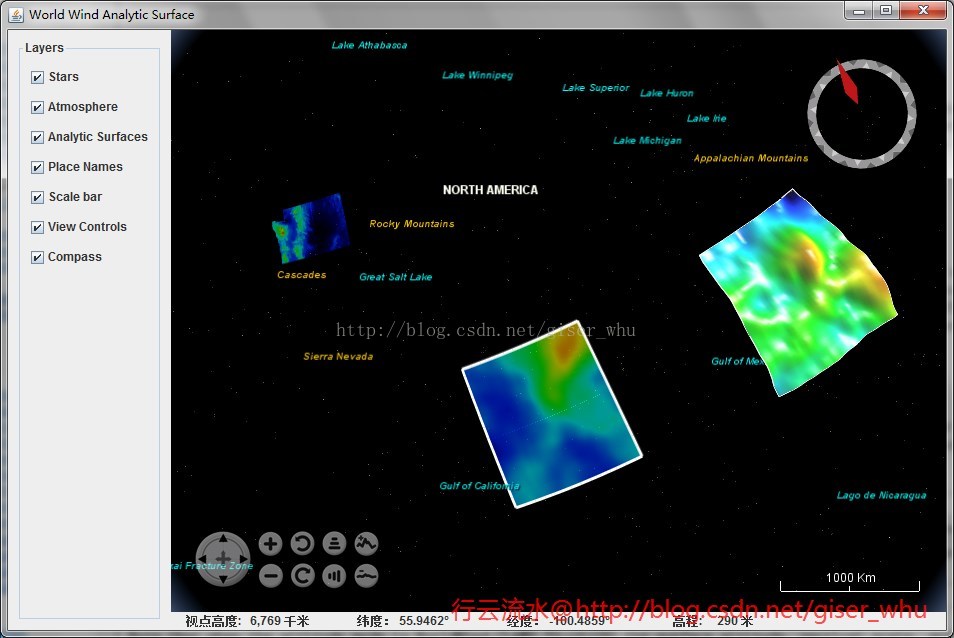
通过看源代码可以知道给出了三种渲染示例,其中两种是动态的,这里我需要的是对dem数据或者是单波段影像的渲染,也就是左上方的渲染效果。
2、AnalyticSurface类
下面来看下主要用到的类:

主要用到的方法:
- // 创建AnalyticSurface并设置其属性
- final AnalyticSurface surface = new AnalyticSurface();
- surface.setSector(raster.getSector());
- surface.setDimensions(raster.getWidth(), raster.getHeight());
- surface.setValues(AnalyticSurface.createColorGradientValues(
- raster.getBuffer(), raster.getTransparentValue(), extremes[0],
- extremes[1], minHue, maxHue));
- // surface.setVerticalScale(5e3);
- // 设置表面渲染方式为 CLAMP_TO_GROUND
- surface.setAltitudeMode(WorldWind.CLAMP_TO_GROUND);
根据自己的需要可以查阅开发文档设置其他属性。
3、DEM渲染实例
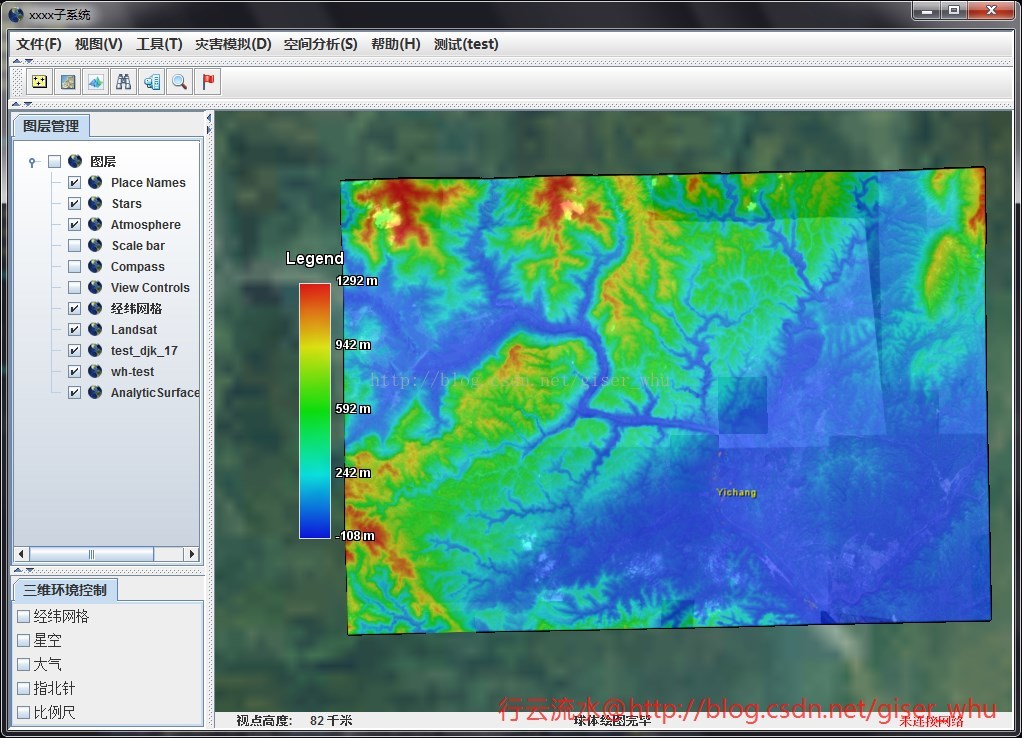
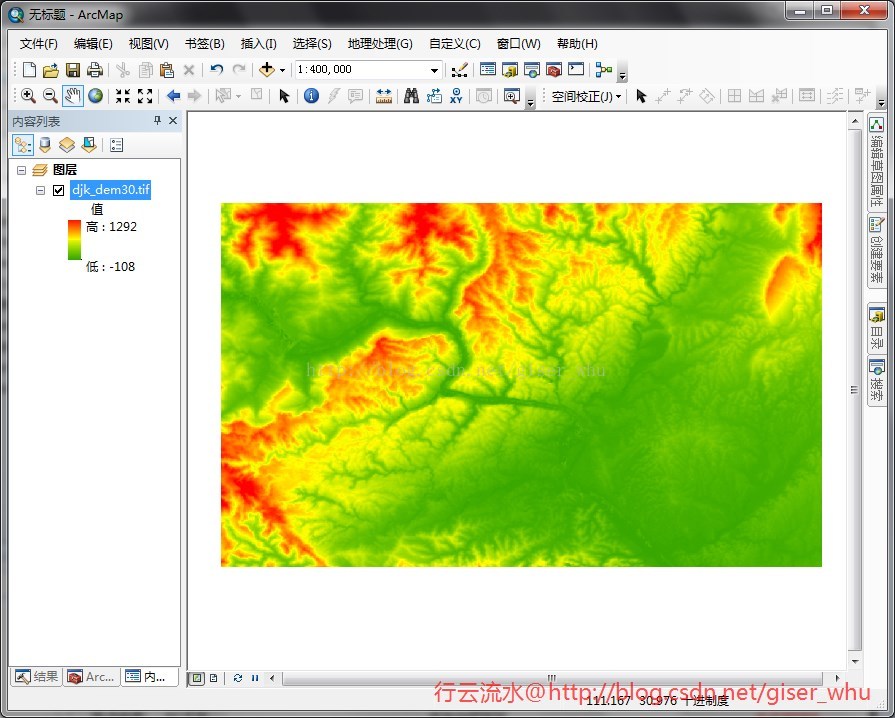
可以看到WW下渲染的效果丝毫不逊色,图是不是很漂亮呢。
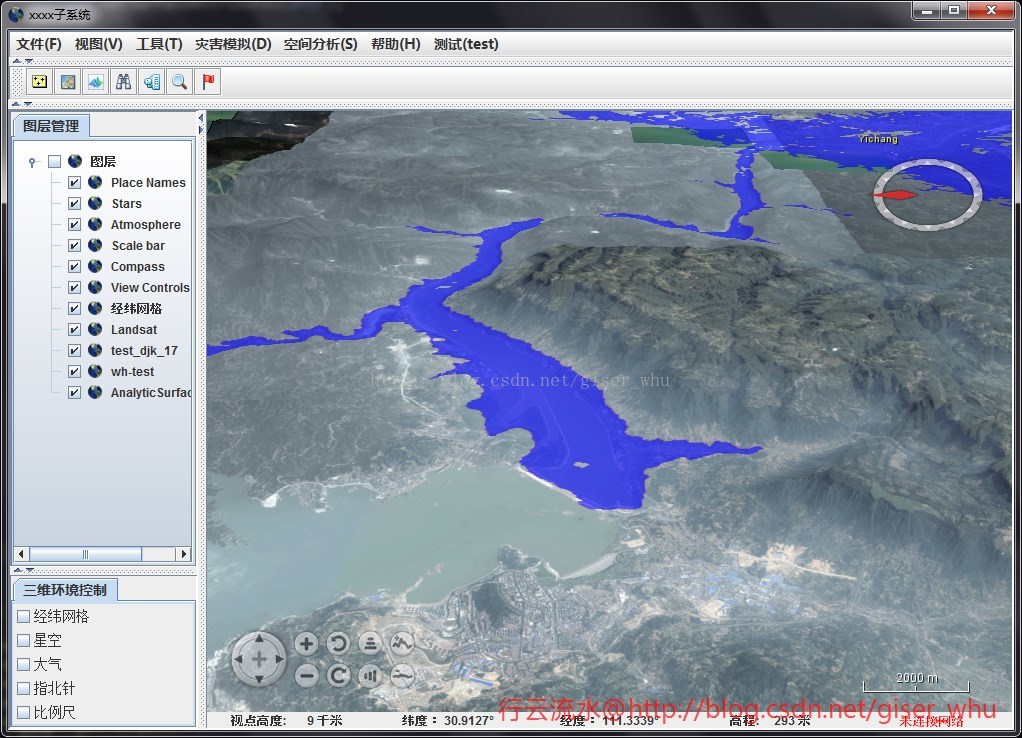
4、洪涝模拟渲染
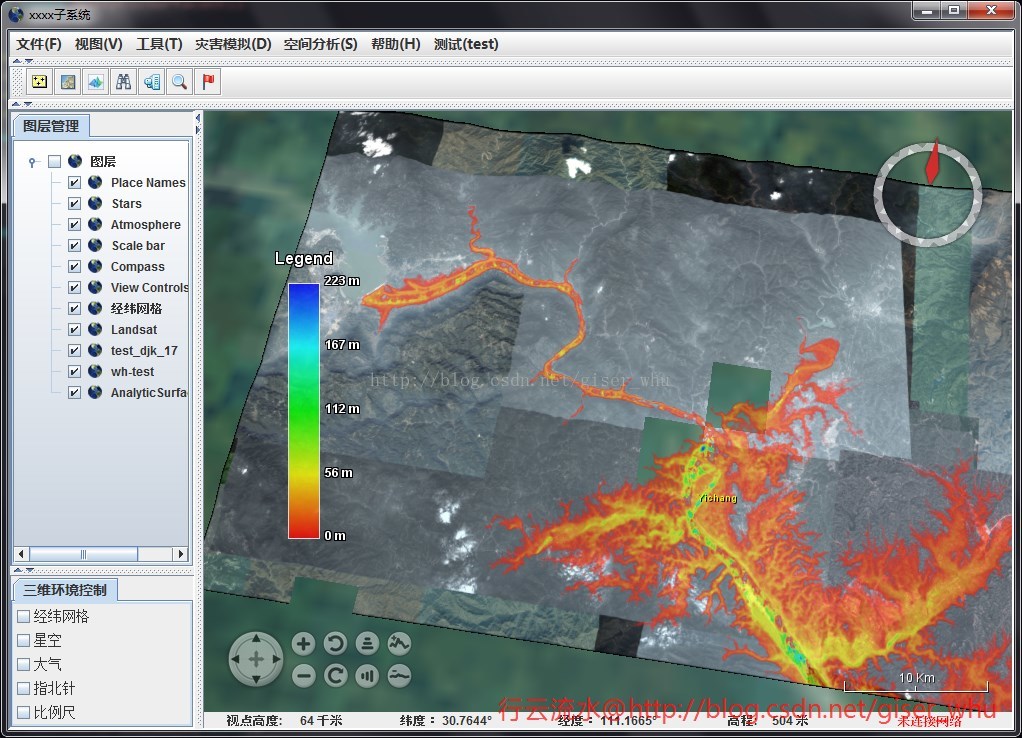
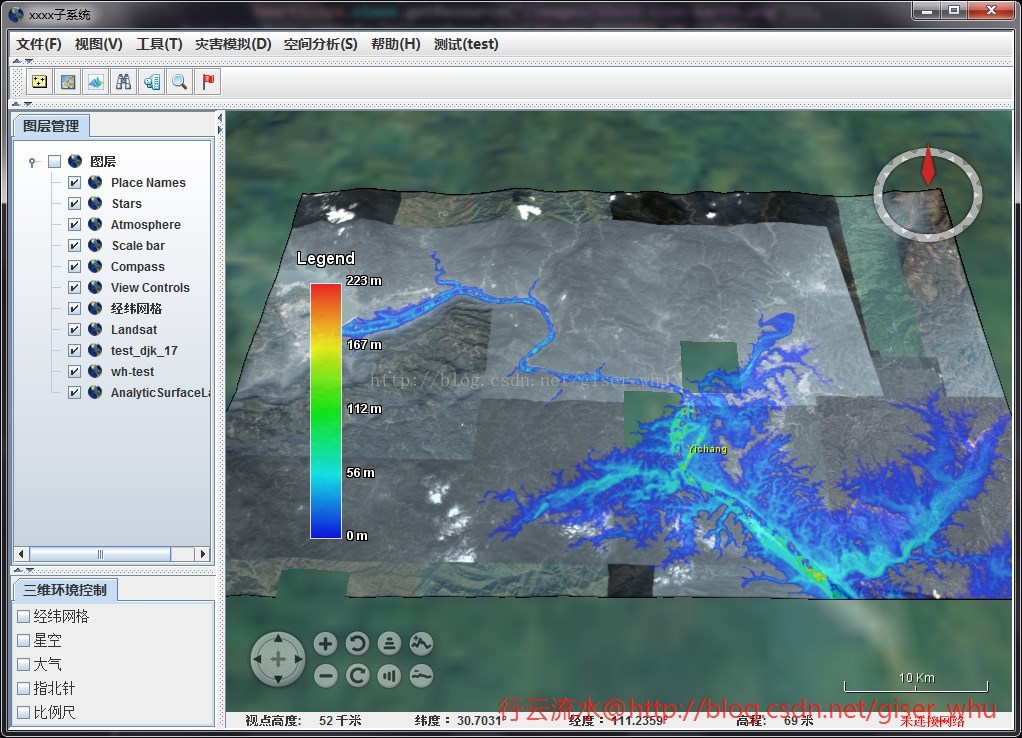
5、源码。
- /**
- * @Copyright 2014-2020 @刘硕
- **/
- package edu.whu.vge.util;
- import gov.nasa.worldwind.WorldWind;
- import gov.nasa.worldwind.avlist.AVKey;
- import gov.nasa.worldwind.avlist.AVList;
- import gov.nasa.worldwind.data.BufferWrapperRaster;
- import gov.nasa.worldwind.data.DataRaster;
- import gov.nasa.worldwind.data.DataRasterReader;
- import gov.nasa.worldwind.data.DataRasterReaderFactory;
- import gov.nasa.worldwind.exception.WWRuntimeException;
- import gov.nasa.worldwind.geom.Extent;
- import gov.nasa.worldwind.geom.Sector;
- import gov.nasa.worldwind.layers.RenderableLayer;
- import gov.nasa.worldwind.render.DrawContext;
- import gov.nasa.worldwind.render.Renderable;
- import gov.nasa.worldwind.util.Logging;
- import gov.nasa.worldwind.util.WWBufferUtil;
- import gov.nasa.worldwind.util.WWIO;
- import gov.nasa.worldwind.util.WWMath;
- import gov.nasa.worldwindx.examples.analytics.AnalyticSurface;
- import gov.nasa.worldwindx.examples.analytics.AnalyticSurfaceAttributes;
- import gov.nasa.worldwindx.examples.analytics.AnalyticSurfaceLegend;
- import gov.nasa.worldwindx.examples.util.ExampleUtil;
- import java.awt.Point;
- import java.io.File;
- import java.text.DecimalFormat;
- import java.text.FieldPosition;
- import java.text.Format;
- import javax.swing.SwingUtilities;
- /**
- * @项目名称:SmartScope
- * @类名称:AnalyticSurfaceUtil
- * @类描述:
- * @创建人:刘硕
- * @创建时间:2015-1-21 下午3:40:54
- * @修改备注:
- * @版本:
- */
- public class AnalyticSurfaceUtil
- {
- /**
- * 创建一个新的实例 AnalyticSurfaceUtil.
- *
- */
- public AnalyticSurfaceUtil()
- {
- // TODO Auto-generated constructor stub
- }
- public static void createPrecipitationSurface(double minHue, double maxHue,
- final RenderableLayer outLayer)
- {
- String DATA_PATH = "J:/data/wwj/FloodDepth.tif";
- BufferWrapperRaster raster = loadRasterElevations(DATA_PATH);
- if (raster == null)
- return;
- // 获取像元最大值与最小值
- double[] extremes = WWBufferUtil.computeExtremeValues(
- raster.getBuffer(), raster.getTransparentValue());
- if (extremes == null)
- return;
- // 创建AnalyticSurface并设置其属性
- final AnalyticSurface surface = new AnalyticSurface();
- surface.setSector(raster.getSector());
- surface.setDimensions(raster.getWidth(), raster.getHeight());
- surface.setValues(AnalyticSurface.createColorGradientValues(
- raster.getBuffer(), raster.getTransparentValue(), extremes[0],
- extremes[1], minHue, maxHue));
- // surface.setVerticalScale(5e3);
- // 设置表面渲染方式为 CLAMP_TO_GROUND
- surface.setAltitudeMode(WorldWind.CLAMP_TO_GROUND);
- AnalyticSurfaceAttributes attr = new AnalyticSurfaceAttributes();
- attr.setDrawOutline(false);
- attr.setDrawShadow(false);
- attr.setInteriorOpacity(0.6);
- surface.setSurfaceAttributes(attr);
- // 设置图例样式
- Format legendLabelFormat = new DecimalFormat("# m")
- {
- public StringBuffer format(double number, StringBuffer result,
- FieldPosition fieldPosition)
- {
- double valueInFeet = number;
- return super.format(valueInFeet, result, fieldPosition);
- }
- };
- // 创建图例
- final AnalyticSurfaceLegend legend = AnalyticSurfaceLegend.fromColorGradient(
- extremes[0], extremes[1], minHue, maxHue,
- AnalyticSurfaceLegend.createDefaultColorGradientLabels(
- extremes[0], extremes[1], legendLabelFormat),
- AnalyticSurfaceLegend.createDefaultTitle("Legend"));
- legend.setOpacity(0.8);
- legend.setScreenLocation(new Point(100, 300));
- SwingUtilities.invokeLater(new Runnable()
- {
- public void run()
- {
- surface.setClientLayer(outLayer);
- outLayer.addRenderable(surface);
- outLayer.addRenderable(createLegendRenderable(surface, 600,
- legend));
- }
- });
- }
- /**
- *
- * @方法名称: loadRasterElevations ;
- * @方法描述: 读取数据(单波段) ;
- * @参数 :@param path
- * @参数 :@return
- * @返回类型: BufferWrapperRaster ;
- * @创建人:刘硕;
- * @创建时间:2015-1-22 上午11:25:40;
- * @throws
- */
- public static BufferWrapperRaster loadRasterElevations(String path)
- {
- // Download the data and save it in a temp file.
- File file = ExampleUtil.saveResourceToTempFile(path,
- "." + WWIO.getSuffix(path));
- // Create a raster reader for the file type.
- DataRasterReaderFactory readerFactory = (DataRasterReaderFactory) WorldWind.createConfigurationComponent(AVKey.DATA_RASTER_READER_FACTORY_CLASS_NAME);
- DataRasterReader reader = readerFactory.findReaderFor(file, null);
- try
- {
- // Before reading the raster, verify that the file contains
- // elevations.
- AVList metadata = reader.readMetadata(file, null);
- if (metadata == null
- || !AVKey.ELEVATION.equals(metadata.getStringValue(AVKey.PIXEL_FORMAT)))
- {
- String msg = Logging.getMessage(
- "ElevationModel.SourceNotElevations",
- file.getAbsolutePath());
- Logging.logger().severe(msg);
- throw new IllegalArgumentException(msg);
- }
- // Read the file into the raster.
- DataRaster[] rasters = reader.read(file, null);
- if (rasters == null || rasters.length == 0)
- {
- String msg = Logging.getMessage(
- "ElevationModel.CannotReadElevations",
- file.getAbsolutePath());
- Logging.logger().severe(msg);
- throw new WWRuntimeException(msg);
- }
- // Determine the sector covered by the elevations. This
- // information
- // is in the GeoTIFF file or auxiliary
- // files associated with the elevations file.
- Sector sector = (Sector) rasters[0].getValue(AVKey.SECTOR);
- if (sector == null)
- {
- String msg = Logging.getMessage("DataRaster.MissingMetadata",
- AVKey.SECTOR);
- Logging.logger().severe(msg);
- throw new IllegalArgumentException(msg);
- }
- // Request a sub-raster that contains the whole file. This step
- // is
- // necessary because only sub-rasters
- // are reprojected (if necessary); primary rasters are not.
- int width = rasters[0].getWidth();
- int height = rasters[0].getHeight();
- DataRaster subRaster = rasters[0].getSubRaster(width, height,
- sector, rasters[0]);
- // Verify that the sub-raster can create a ByteBuffer, then
- // create
- // one.
- if (!(subRaster instanceof BufferWrapperRaster))
- {
- String msg = Logging.getMessage(
- "ElevationModel.CannotCreateElevationBuffer", path);
- Logging.logger().severe(msg);
- throw new WWRuntimeException(msg);
- }
- return (BufferWrapperRaster) subRaster;
- }
- catch (Exception e)
- {
- e.printStackTrace();
- return null;
- }
- }
- /**
- *
- * @方法名称: createLegendRenderable ;
- * @方法描述: 创建图例 ;
- * @参数 :@param surface
- * @参数 :@param surfaceMinScreenSize
- * @参数 :@param legend
- * @参数 :@return
- * @返回类型: Renderable ;
- * @创建人:刘硕;
- * @创建时间:2015-1-22 上午11:26:07;
- * @throws
- */
- protected static Renderable createLegendRenderable(
- final AnalyticSurface surface, final double surfaceMinScreenSize,
- final AnalyticSurfaceLegend legend)
- {
- return new Renderable()
- {
- public void render(DrawContext dc)
- {
- Extent extent = surface.getExtent(dc);
- if (!extent.intersects(dc.getView().getFrustumInModelCoordinates()))
- return;
- if (WWMath.computeSizeInWindowCoordinates(dc, extent) < surfaceMinScreenSize)
- return;
- legend.render(dc);
- }
- };
- }
- }
目前还很不完善,后面有需要的话打算做一个类似于ArcGIS的分级渲染工具,对于降雨量蒸散发量等数据都可以很方便的进行渲染。
World Wind Java开发之十——AnalyticSurface栅格渲染(转)的更多相关文章
- World Wind Java开发之十五——载入三维模型
之前的一篇博客是关于载入粗三维模型的,见http://blog.csdn.net/giser_whu/article/details/43452703,这个地方还存在着不能载入纹理的问题,一直没呢解决 ...
- World Wind Java开发之十五——加载三维模型(转)
之前的一篇博客是关于加载粗三维模型的,见http://blog.csdn.net/giser_whu/article/details/43452703,这个地方还存在着不能加载纹理的问题,一直没呢解决 ...
- World Wind Java开发之十四——添加WMS地图服务资源(转)
数据是GIS的核心,没有数据一切无从谈起,Internet上有很多在线WMS地图服务资源,我们可以好好利用这些数据资源,比如天地图.必应地图.NASA.OGC数据服务等等. 在我们国家常用的还是天地图 ...
- World Wind Java开发之七——读取本地栅格文件(影像+高程)构建三维场景(转)
http://blog.csdn.net/giser_whu/article/details/41679515 首先,看下本篇博客要达到的效果图: 下面逐步分析如何加载影像及高程文件. 1.World ...
- World Wind Java开发之十二——加载粗制三维模型(ExtrudedPolygon)(转)
ww可以根据DLG图批量生成假三维模型,这对于小区等特征相似的建筑物模型的构建是非常有用的.下面来看如何一步步实现假三维模型的加载: 1.Shp文件的制作 首先在arcmap下数字化几个建筑物,并新建 ...
- [转]World Wind Java开发之四——搭建本地WMS服务器
在提供地理信息系统客户端时,NASA还为用户提供了开源的WMS Server 服务器应用:World Wind WMS Server.利用这个应用,我们可以架设自己的WMS服务并使用自己的数据(也支持 ...
- World Wind Java开发之六——解析shape文件(转)
http://blog.csdn.net/giser_whu/article/details/41647117 最近一直忙于导师项目的事情了,几天没更新了,昨天和今天研究了下WWJ解析shp文件的源代 ...
- World Wind Java开发之一(转)
http://blog.csdn.net/giser_whu/article/details/40477235 参照<World wind Java三维地理信息系统开发指南随书光盘>以及官 ...
- [转]World Wind Java开发之五——读取本地shp文件
World Wind Java 使用IconLayer图层类表现点和多点数据,使用RenderableLayer图层表现线和面数据,一个图层只能对应一组shape文件.World Wind Java首 ...
随机推荐
- 采用DCT进行图像压缩
一.实验目的:熟悉变换编码的图像压缩方法 二.实验内容:以所给图像为例,采用dct进行图像压缩编码,通过改变模板矩阵中非零元素的个数,得到不同缩编码图像, 根据公式 ,编写程序计算原图像和dct变换后 ...
- unity 3d 之合并网格和贴图(combine mesh and texture)
https://www.cnblogs.com/eangulee/p/3877824.html unity 3d 之合并网格和贴图(combine mesh and texture) 本人是个小白 ...
- java 多线程学习笔记(一) -- 计算密集型任务
最近在看<Java虚拟机并发编程>,在此记录一些重要的东东. 线程数的确定:1. 获取系统可用的处理器核心数:int numOfCores = Runtime.getRuntime().a ...
- MCP|XHK|High-density peptide arrays help to identify linear immunogenic B cell epitopes in individuals naturally exposed to malaria infection(高密度肽段阵列有助于在自然暴露于疟疾感染的个体中识别线性免疫原性B细胞表位)
文献名:High-density peptide arrays help to identify linear immunogenic B cell epitopes in individuals n ...
- php模拟post提交数据
$data = '{ "id": "17999030", "method": "sayHello", "jso ...
- 《SQL 进阶教程》 自连接排序
子查询所做的,是计算出价格比自己高的记录的条数并将其作为自己的位次 -- 自连接实现排序功能SELECT P1.name,P1.price,(SELECT COUNT(P2.price)FROM Pr ...
- 消息中间件的研究 (四)RabbitMQ、Kafka、RocketMQ消息中间件的对比及分析
RabbitMQ: RabbitMQ是使用Erlang语言开发的开源消息队列系统,基于AMQP协议来实现.AMQP的主要特征是面向消息.队列.路由(包括点对点和发布/订阅).可靠性.安全.AM ...
- STP-16-根防护,BPDU防护和BPDU过滤
网络设计者很可能并不打算让终端用户在用于连接终端用户设备的Access端口上连接交换机.然而,这种事情有时却会发生——例如,有人可能需要大厅的会议室里有更多的端口,于是他觉得他可以把一个小的便宜的交换 ...
- Power BI
前几天,Excel 2016悄悄更新了一个功能:将工作簿上载到Power BI 但这新功能并不显眼,藏在[发布]里: 然而,按照微软的一贯风格,功能隐藏越深,装逼效果越佳.你看“ Power Bi ” ...
- eclipse类自动生成注释
1.创建新类时自动生成注释 window->preference->java->code styple->code template 当你选择到这部的时候就会看 ...