
C# 如何编辑文件的摘要信息
我的以前的测试报告程序需要在倒完测试数据报告后,在文件摘要中加上一些类似版权说明的文字等等. 因此需要对文件摘要信息进行编辑. 我的记忆中以前好像只有office文档才可以又摘要信息, 现在看来基本上所有文件(windows2000以上的平台)都可以有摘要信息..
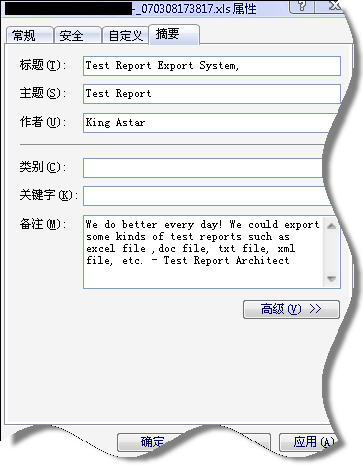
在网络上搜寻一番发现一些有用的网址 1.如何编辑文件的摘要 http://groups.google.com/group/microsoft.public.dotnet.framework/msg/99a5dd5c80c084b5?hl=zh-CN&lr=&ie=UTF-8&oe=UTF-8&rnum=4 2.微软知识库关于ole32.dll 中函数的说明 http://msdn2.microsoft.com/en-us/library/aa380328.aspx 3.新手对COM的认识及疑惑 http://www.cn-doc.com/_soft_visual_c_tech_doc/2005_08_18_23/20050818230216780.htm[原处]http://dev.csdn.net/user/putongren
下面是对本问题的总结:
刚开始,我以为是shell32里面的方法可以完成,因此引用了Microsoft Shell Controls And Automation, (shell32.dll),但经过分析后没有找到相关的方法. shell32是COM可以托管引用. 引用shell32可以查出文件的摘要信息,但无法编辑保存,下面是关于这个问题的答案. 如何用C#获得文件信息以及扩展信息
多次网上查询后,我发现这篇在微软讨论组的文章(居然用google搜出来,没有用msdn搜出),实际已经解决我的问题 setting file comment attribute programmatically
主要思路定义相关结构体(以接口方式定义)及输入参数的枚举值 引入ole32.dll 定义静态方法对应函数 通过静态方法返回接口, 此接口实际上就是一个指针(可以调用它的函数) 调用接口函数
开始我以为ole32.dll是一个COM,一直想引用,结果发现它只是一个函数库, 必须对它进行dllimport.具体代码可以看后面. 另外,我还发现以前微软的virsual studio 6 里面的Depends工具,依然在virsual studio 2005中提供了,目录在?:/Program Files/Microsoft Visual Studio 8/Common7/Tools 用这个工具可以查看一个函数库有哪些公开方法.
补充点知识,先
对于使用COM或者函数库的总结,来之(http://dev.csdn.net/user/putongren), 引用一部分
1. 想办法知道 com 组件的 clsid (一个编号,16字节长,全球唯一);如果不知道 clsid,则要知道名字(progid),如 excel.application。
2. 开始与 ole32.dll 打交道吧 ! 如果进程尚未装载它,那就 loadlibrary,然后再 getprocaddress ...
3. 不管三七二十一,先运行调用 coinitializeex,ole32.dll 内的一个函数,以便 ole32.dll 内部为线程记录相应的数据,并允许你调用 ole32.dll 内的其他函数。
4. 如果已知道 clsid,则此步跳过。否则调用 clsidfromprogid 根据名字计算出 clsid。
这个 ole32.dll 内的函数实际上是在注册表中进行查找,位置在: /hkey_classes_root/名字(progid),其下有一个 /clsid,里面就是clsid,其实自己去注册表查找也可以。 excel.application 对应的 clsid = {00024500-0000-0000-c000-000000000046}。
5. 调用 ole32.dll 内的 cogetclassobject 建立一个 clsid 的 object。也可以调用 cocreateinstance / cocreateinstanceex。
这个 object 可以想象成操作系统在内存中加载了一个动态链接库,或独立启动了一个进程,它不返回 object 的句柄,所以不要想通过一个句柄进行进一步访问——像 getwindow(hwnd, ...),也趁早放弃通过 getprocaddress 取得函数入口位置进行进一步访问的想法。到底怎么访问呢,往下看...
6. 调用 cogetclassobject 建立一个 clsid 的 object 的同时,根据一个接口编号参数 iid_i... (全世界统一固定编号)返回一个接口指针,一个接口可以想象成一个函数的集合。
根据 clsid 产生的 object 可能有若干个不同的函数集合,每一个函数集合都有一个接口编号与其对应,iunknown 这个编号对应的接口是每个 object 都有的。每个函数集的前三个函数都一样:queryinterface、addref、release。把其他接口编号作为参数调用 queryinterface 就可以找到其对应的函数集。
7. 关于 clsid 和 接口 iid
clsid 是一个 16 字节长的全球唯一编号,ole32.dll 根据它在注册表中寻找对应的dll文件(也可以是exe文件)。参考程序与进程的概念,clsid 的实例化是加载一个 dll,或运行一个 exe 进程。dll 或 exe 被 ole32.dll 加载后,在 ole32.dll 的地址空间为其建立若干函数入口地址表(当然根据 dll 或 exe 的自身定义),并为每一个函数入口表建立一个保存其开始地址的指针(这个指针是地址中的一个长字)。
iid -- 接口,也是一个 16 字节长的全球唯一编号,ole32.dll 根据它在 clsid 的实例的所有 函数入口地址表的 指针 中找到一个对应的,返回来。所以接口的实例就是那个返回来的指针。
c 程序员可以把接口认为是一个结构,其成员是若干函数;c++ 程序员可以把接口认为是一个类 class。
至于通过 iid 找到的 函数入口表 中的各函数如何调用,去看那个 dll 或 exe 的开发接口文档吧。在调用一个具体的函数时,当然可以把参数压入堆栈,然后 call 那个函数,不过这好像是汇编中的低级做法,比较麻烦,在 vc 中定义一个类指针来保存接口返回来的指针,然后访问类成员,用起来比较方便——参数压入堆栈的问题编译器替你解决了。
8. com
所以 com,概括起来说,就是用两级编号,通过 ole32.dll 调用某个 dll 或 exe 提供的函数的方式。
当然在这基础上还有 automation 等,定义了更多标准的接口编号及访问方式,完成更复杂的功能。
调用方法SetProperty
 /*pls visit this article

  * * http://msdn2.microsoft.com/en-us/library/aa380328.aspx

  * To open an existing file, use the StgOpenStorageEx function instead.

  notice:

 Applications written for Windows 2000, Windows Server 2003 and Windows XP must use StgCreateStorageEx rather than StgCreateDocfile to take advantage of the enhanced Windows 2000 and Windows XP Structured Storage features.

  *

  */

 using System;

 using System.Collections.Generic;

 using System.Text;

 using StructuredStorageWrapper;

 namespace WindowsApplication8

 {

     class FileSummary

     {

         public static void SetProperty(string filename,string msg , SummaryPropId summaryType)

         {

             // first you need to either create or open a file and its

             // property set stream

             //申明接口(指针)

             IPropertySetStorage propSetStorage = null;

             //com 组件的 clsid 参见IPropertySetStorage定义

             Guid IID_PropertySetStorage = new

 Guid("0000013A-0000-0000-C000-000000000046");

             //Applications written for Windows 2000, Windows Server 2003 and Windows XP must use StgCreateStorageEx rather than StgCreateDocfile to take advantage of the enhanced Windows 2000 and Windows XP Structured Storage features

             uint hresult = ole32.StgOpenStorageEx(

                 filename,

                 (int)(STGM.SHARE_EXCLUSIVE | STGM.READWRITE),

                 (int)STGFMT.FILE,

                 ,

                 (IntPtr),

                 (IntPtr),

                 ref IID_PropertySetStorage,

                 ref propSetStorage); //返回指针

             // next you need to create or open the Summary Information property set

             Guid fmtid_SummaryProperties = new

 Guid("F29F85E0-4FF9-1068-AB91-08002B27B3D9");

             IPropertyStorage propStorage = null;

             hresult = propSetStorage.Create(

                 ref fmtid_SummaryProperties,

                 (IntPtr),

                 (int)PROPSETFLAG.DEFAULT,

                 (int)(STGM.CREATE | STGM.READWRITE |

 STGM.SHARE_EXCLUSIVE),

                 ref propStorage);

             // next, you assemble a property descriptor for the property you

             // want to write to, in our case the Comment property

             PropSpec propertySpecification = new PropSpec();

             propertySpecification.ulKind = ;

             propertySpecification.Name_Or_ID = new

 IntPtr((int)summaryType);

             //now, set the value you want in a property variant

             PropVariant propertyValue = new PropVariant();

             propertyValue.FromObject(msg);

             // Simply pass the property spec and its new value to the WriteMultiple

             // method and you're almost done

             propStorage.WriteMultiple(, ref propertySpecification, ref

 propertyValue, );

             // the only thing left to do is commit your changes.  Now you're done!

             hresult = propStorage.Commit((int)STGC.DEFAULT);

             //下面的很关键,如何关闭一个非托管的指针,如果不关闭,则本程序不关闭,文件被锁定!

             System.Runtime.InteropServices.Marshal.ReleaseComObject(propSetStorage);

             propSetStorage = null;

             GC.Collect();

         }

     }

 }

把ole32一些方法进行COM封装

 using System;

 using System.Text;

 using System.Runtime.InteropServices;

 namespace StructuredStorageWrapper

 {

     public enum SummaryPropId : int

     {

         Title = 0x00000002,

         Subject = 0x00000003,

         Author = 0x00000004,

         Keywords = 0x00000005,

         Comments = 0x00000006,

         Template = 0x00000007,

         LastSavedBy = 0x00000008,

         RevisionNumber = 0x00000009,

         TotalEditingTime = 0x0000000A,

         LastPrinted = 0x0000000B,

         CreateDateTime = 0x0000000C,

         LastSaveDateTime = 0x0000000D,

         NumPages = 0x0000000E,

         NumWords = 0x0000000F,

         NumChars = 0x00000010,

         Thumbnail = 0x00000011,

         AppName = 0x00000012,

         Security = 0x00000013

     }

     public enum STGC : int

     {

         DEFAULT = ,

         OVERWRITE = ,

         ONLYIFCURRENT = ,

         DANGEROUSLYCOMMITMERELYTODISKCACHE = ,

         CONSOLIDATE =

     }

     public enum PROPSETFLAG : int

     {

         DEFAULT = ,

         NONSIMPLE = ,

         ANSI = ,

         UNBUFFERED = ,

         CASE_SENSITIVE =

     }

     public enum STGM : int

     {

         READ = 0x00000000,

         WRITE = 0x00000001,

         READWRITE = 0x00000002,

         SHARE_DENY_NONE = 0x00000040,

         SHARE_DENY_READ = 0x00000030,

         SHARE_DENY_WRITE = 0x00000020,

         SHARE_EXCLUSIVE = 0x00000010,

         PRIORITY = 0x00040000,

         CREATE = 0x00001000,

         CONVERT = 0x00020000,

         FAILIFTHERE = 0x00000000,

         DIRECT = 0x00000000,

         TRANSACTED = 0x00010000,

         NOSCRATCH = 0x00100000,

         NOSNAPSHOT = 0x00200000,

         SIMPLE = 0x08000000,

         DIRECT_SWMR = 0x00400000,

         DELETEONRELEASE = 0x04000000

     }

     public enum STGFMT : int

     {

         STORAGE = ,

         FILE = ,

         ANY = ,

         DOCFILE =

     }

     [StructLayout(LayoutKind.Explicit, Size = , CharSet = CharSet.Unicode)]

     public struct PropSpec

     {

         [FieldOffset()]

         public int ulKind;

         [FieldOffset()]

         public IntPtr Name_Or_ID;

     }

     [StructLayout(LayoutKind.Explicit, Size = )]

     public struct PropVariant

     {

         [FieldOffset()]

         public short variantType;

         [FieldOffset()]

         public IntPtr pointerValue;

         [FieldOffset()]

         public byte byteValue;

         [FieldOffset()]

         public long longValue;

         public void FromObject(object obj)

         {

             if (obj.GetType() == typeof(string))

             {

                 this.variantType = (short)VarEnum.VT_LPWSTR;

                 this.pointerValue = Marshal.StringToHGlobalUni((string)obj);

             }

         }

     }

     [ComVisible(true), ComImport(),

     Guid("0000013A-0000-0000-C000-000000000046"),

     InterfaceType(ComInterfaceType.InterfaceIsIUnknown)]

     public interface IPropertySetStorage

     {

         uint Create(

             [In, MarshalAs(UnmanagedType.Struct)] ref System.Guid rfmtid,

       [In] IntPtr pclsid,

       [In] int grfFlags,

             [In] int grfMode,

       ref IPropertyStorage propertyStorage);

         int Open(

             [In, MarshalAs(UnmanagedType.Struct)] ref System.Guid rfmtid,

             [In] int grfMode,

                   [Out] IPropertyStorage propertyStorage);

     }

     [ComVisible(true), ComImport(),

     Guid("00000138-0000-0000-C000-000000000046"),

     InterfaceType(ComInterfaceType.InterfaceIsIUnknown)]

     public interface IPropertyStorage

     {

         int ReadMultiple(

             uint numProperties,

             PropSpec[] propertySpecifications,

             PropVariant[] propertyValues);

         int WriteMultiple(

             uint numProperties,

             [MarshalAs(UnmanagedType.Struct)] ref PropSpec

 propertySpecification,

             ref PropVariant propertyValues,

             int propIDNameFirst);

         uint Commit(

             int commitFlags);

     }

     public enum HResults : uint

     {

         S_OK = ,

         STG_E_FILEALREADYEXISTS = 0x80030050

     }

     public class ole32

     {

         [StructLayout(LayoutKind.Explicit, Size = ,

 CharSet = CharSet.Unicode)]

         public struct STGOptions

         {

             [FieldOffset()]

             ushort usVersion;

             [FieldOffset()]

             ushort reserved;

             [FieldOffset()]

             uint uiSectorSize;

             [FieldOffset(), MarshalAs(UnmanagedType.LPWStr)]

             string

 pwcsTemplateFile;

         }

         [DllImport("ole32.dll", CharSet = CharSet.Unicode)]

         public static extern uint StgCreateStorageEx(

             [MarshalAs(UnmanagedType.LPWStr)] string name,

             int accessMode, int storageFileFormat, int fileBuffering,

             IntPtr options, IntPtr reserved, ref System.Guid riid,

             [MarshalAs(UnmanagedType.Interface)] ref IPropertySetStorage

 propertySetStorage);

         [DllImport("ole32.dll", CharSet = CharSet.Unicode)]

         public static extern uint StgOpenStorageEx(

             [MarshalAs(UnmanagedType.LPWStr)] string name,

             int accessMode, int storageFileFormat, int fileBuffering,

             IntPtr options, IntPtr reserved, ref System.Guid riid,

             [MarshalAs(UnmanagedType.Interface)] ref IPropertySetStorage

 propertySetStorage);

     }

 }
C# 如何编辑文件的摘要信息的更多相关文章
- vim编辑文件警告Swap file already exists ,如何删除vim编辑产生的.swp文件?查看隐藏文件命令
vim编辑文件警告Swap file already exists,如何删除vim编辑产生的.swp文件?查看隐藏文件命令 Linux(centos7)下多个用户同时编辑一个文件,或编辑时非正常关闭, ...
- [python爬虫] Selenium定向爬取PubMed生物医学摘要信息
本文主要是自己的在线代码笔记.在生物医学本体Ontology构建过程中,我使用Selenium定向爬取生物医学PubMed数据库的内容. PubMed是一个免费的搜寻引擎,提供生物医学方 ...
- vi编辑文件保存后,提示“Can't open file for writing Press ENTER or type command to continue”
在linux上使用vi命令修改或者编辑一个文件内容的时候,最后发现使用<Esc+:+wq!>无法保存退出,却出现,如下提示: E212: Can't open file for writi ...
- 如何通过 terminal 查看一个文件的 meta信息
如何通过 terminal 查看一个文件的 meta 信息 Linux shell stat 查看文件 meta 信息 stat stat指令:文件/文件系统的详细信息显示: 使用格式:stat 文件 ...
- 如何直接在ftp里编辑文件
首先要连接ftp,如何链接ftp,这个我已经分享过,如果还有不懂的,可以查看下经验分享,打开ftp,并连接你要修改的站点! 下载安装代码编辑器,比如EditPlus.sublime text等,随 ...
- python 编辑文件时路径问题解决方法:文件或者目录不存在、文件编辑后无法保存等(以编辑xml文件为例)
1.获取工程所在根路径:根路径=os.path.dirname(os.path.abspath('__file__')) 2.将获取的根路径和相对路径组合:组合路径=os.path.join(根路径, ...
- vs切换当前编辑文件时自动定位目录树
在编辑区,切换当前编辑文件时(单击.cpp或.h文件选项卡),"解决方案资源管理器"目录树会自动定位当前编辑的文件,并以灰色标识,当一个解决方案中的工程数目数目很多,每个工程下面又 ...
- 哇 真的是一个好插件!!!Sublime Text编辑文件后快速刷新浏览器
http://9iphp.com/web/html/sublime-text-refresh-browser.html这篇博文咯 来源:[Tips]Sublime Text编辑文件后快速刷新浏览器 - ...
- VS设置程序集属性(文件的详细信息)
适用范围 本文方法适用于:C#创建的控制台程序,WinForm,WPF等VS创建的.Net工程信息设置. 方法步骤 1.在 项目 上点击鼠标右键选择 属性 ,进入这个页面,点击 程序集信息(重点关注 ...
随机推荐
- Android 中像素px和dp的转化
在Android的布局文件中,往往使用dp作为控件的宽度和高度尺寸,但是在Java代码中,调用getWidth()方法获得的尺寸单位却是像素px,这两个单位有明显的区别:dp和屏幕的密度有关,而px与 ...
- windows系统下Python环境的搭建及Selenium的安装
1.首先访问http://www.python.org/download/去下载最新的python版本: 2.下载安装包,一路安装完毕: 3.为计算机添加安装目录搭到环境变量,如图把python的安装 ...
- 坑爹的gltools编译错误解决
搭边手游,看opengl superbible, 书中代码需要一个gltools库.作者自己提供的code google地址里gltools项目是空的,此一坑. 他的网站(www.starstones ...
- 50种方法优化SQL Server数据库查询
查询速度慢的原因很多,常见如下几种: 1.没有索引或者没有用到索引(这是查询慢最常见的问题,是程序设计的缺陷) 2.I/O吞吐量小,形成了瓶颈效应. 3.没有创建计算列导致查询不优化. 4.内存不足 ...
- Qt之操作数据库(SQLite)
SQLite 简介 SQLite,是一款轻型的数据库,是遵守ACID的关联式数据库管理系统,它的设计目标是嵌入式的,而且目前已经在很多嵌入式产品中使用了它,它占用资源非常的低,在嵌入式设备中,可能只需 ...
- Ubuntu 下一个可用的音乐播放器
参考:http://www.pairsdoll.com/install-audacious-music-palyer-in-ubuntu.html/ 方法:打开terminal,sudo apt-ge ...
- How to Keep Alive SSH Sessions
How to Keep Alive SSH Sessions Many NAT firewalls time out idle sessions after a certain period of t ...
- 第二百零一天 how can I坚持
sql要学的东西还很多,很简单的一个sql都不会写,还得请教别人,哎. 八千代.铜钱草,小叶元宝,绿萝.还有我的鱼,还有罗娜. 今天试用了一下三星,系统优化就是不行啊,掉电太快,想搞个小米5,还想买个 ...
- 第二百一十九天 how can I 坚持
今天好冷,白天在家待了一天,晚上,老贾生日,生日快乐,去海底捞吃了个火锅,没感觉呢. 今天还发现了个好游戏,纪念碑谷,挺新颖,就是难度有点大了. 好累.睡觉,明天想去爬山啊,可是该死的天气.
- PC端 $_SERVER 说明
$_SERVER['PHP_SELF'] #当前正在执行脚本的文件名,与 document root相关. $_SERVER['argv'] #传递给该脚本的参数. $_SERVER['argc'] ...