
Android 读取和保存文件(手机内置存储器)
1:activity_main.xml
<RelativeLayout xmlns:android="http://schemas.android.com/apk/res/android"

    xmlns:tools="http://schemas.android.com/tools"

    android:layout_width="match_parent"

    android:layout_height="match_parent">

    <TextView

        android:id="@+id/tv_filename"

        android:layout_width="wrap_content"

        android:layout_height="wrap_content"

        android:text="文件名称"/>

    <EditText

        android:id="@+id/et_filename"

        android:layout_below="@id/tv_filename"

        android:layout_width="match_parent"

        android:layout_height="wrap_content"/>

    <TextView

        android:id="@+id/tv_content"

        android:layout_below="@id/et_filename"

        android:layout_width="wrap_content"

        android:layout_height="wrap_content"

        android:text="文件内容"/>

    <EditText

        android:id="@+id/et_content"

        android:layout_below="@id/tv_content"

        android:layout_width="match_parent"

        android:layout_height="wrap_content"/>

    <Button

        android:id="@+id/btn_save"

        android:layout_below="@id/et_content"

        android:layout_width="match_parent"

        android:layout_height="wrap_content"

        android:text="保存"/>

    <Button

        android:id="@+id/btn_read"

        android:layout_below="@id/btn_save"

        android:layout_width="match_parent"

        android:layout_height="wrap_content"

        android:text="读取"/>

</RelativeLayout>
2:文件操作类:FileService.java
public class FileService {

	private Context context=null;

	public FileService(Context context){

		this.context=context;

	}

	//save file

	public void saveFile(String filename,String content) throws Exception{

		FileOutputStream out=context.openFileOutput(filename, Context.MODE_PRIVATE);

		out.write(content.getBytes());

		out.close();

	}

	//read file

	public String readFile(String filename)throws Exception{

		FileInputStream is=context.openFileInput(filename);

		byte b[]=new byte[1024];

		int len=0;

		ByteArrayOutputStream baos=new ByteArrayOutputStream();

		//先把数据写入内存

		while((len=is.read(b))!=-1){

			baos.write(b,0,len);

		}

		//从内存中读取数据

		byte data[]=baos.toByteArray();

		baos.close();

		is.close();

		return new String(data);

	}

}
3:MainActivity.java
public class MainActivity extends Activity {

	private FileService fileService=null;

	private Button btnSave=null,btnRead=null;

	private EditText etFilename=null;

	private EditText etContent=null;

	@Override

	protected void onCreate(Bundle savedInstanceState) {

		super.onCreate(savedInstanceState);

		setContentView(R.layout.activity_main);

		btnSave=(Button)findViewById(R.id.btn_save);

		btnRead=(Button)findViewById(R.id.btn_read);

		etFilename=(EditText)findViewById(R.id.et_filename);

		etContent=(EditText)findViewById(R.id.et_content);

		fileService=new FileService(MainActivity.this);

		btnSave.setOnClickListener(new OnClickListener(){

			public void onClick(View view){

				String filename=etFilename.getText().toString();

				String content=etContent.getText().toString();

				try {

					fileService.saveFile(filename, content);

					Toast.makeText(MainActivity.this, "Save file success!", Toast.LENGTH_SHORT).show();

				} catch (Exception e) {

					Toast.makeText(MainActivity.this, "Save file error!", Toast.LENGTH_SHORT).show();

				}

			}

		});

		btnRead.setOnClickListener(new OnClickListener(){

			public void onClick(View view){

				String filename=etFilename.getText().toString();

				try {

					String text=fileService.readFile(filename);

					etContent.setText(text);

				} catch (Exception e) {

					Toast.makeText(MainActivity.this, "Read file error!", Toast.LENGTH_SHORT).show();

				}

			}

		});

	}

}
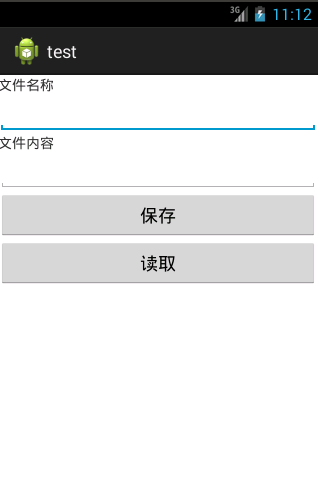
4:运行结果
Android 读取和保存文件(手机内置存储器)的更多相关文章
- JavaScript进阶(六)用JavaScript读取和保存文件
用JavaScript读取和保存文件 因为Google还不提供同步插件数据的功能,所以导入和导出插件配置就必须和文件打交道了.而出于安全原因,只有IE才提供访问文件的API:但随着HTML 5的到来, ...
- Android学习笔记——保存文件(Saving Files)
本人邮箱:JohnTsai.Work@gmail.com,欢迎交流讨论. 欢迎转载,转载请注明网址:http://www.cnblogs.com/J ...
- android 读取SD卡文件
SD卡作为手机的扩展存储设备,在手机中充当硬盘角色,可以让我们手机存放更多的数据以及多媒体等大体积文件.因此查看SD卡的内存就跟我们查看硬盘的剩余空间一样,是我们经常操作的一件事,那么在Android ...
- android 读取用户号码,手机串号,SIM卡序列号
简介: IMSI:international mobiles subscriber identity国际移动用户号码标识,这个一般大家是不知道,GSM必须写在卡内相关文件中:MSISDN:mobile ...
- [Android] Android读取Asset下文件的最简单的方法总结(用于MediaPlayer中)
方法一:getAssets().openFd //读取asset内容 private void openAssetMusic(String index) throws IOException { ...
- android 读取本地json文件 解决显示乱码显示
1.读取本地JSON ,但是显示汉字乱码 public static String readLocalJson(Context context, String fileName){ ...
- C# FileStream分块读取和保存文件
一 FileStream分块读取文件 public byte[] GetFileData(string fileName, long startPosition, long length) { byt ...
- Android学习笔记-保存数据的实现方法1
Android开发中,有时候我们需要对信息进行保存,那么今天就来介绍一下,保存文件到内存,以及SD卡的一些操作,及方法,供参考. 第一种,保存数据到内存中: //java开发中的保存数据的方式 pub ...
- 无废话Android之android下junit测试框架配置、保存文件到手机内存、android下文件访问的权限、保存文件到SD卡、获取SD卡大小、使用SharedPreferences进行数据存储、使用Pull解析器操作XML文件、android下操作sqlite数据库和事务(2)
1.android下junit测试框架配置 单元测试需要在手机中进行安装测试 (1).在清单文件中manifest节点下配置如下节点 <instrumentation android:name= ...
随机推荐
- Aggregating tests in suites
我们可以将来自不同类的test组成一个test suite.在JUnit 3.8.x我们使用 static Test suite()方法,但是在JUnit4我们使用在类前面加上注释 @RunWith( ...
- <a>标签的href属性
<a> 标签的 href 属性用于指定超链接目标的 URL. 语法 <a href="value"> 属性值 值 描述 URL 超链接的 URL.可能的值: ...
- jQuery表单验证以及将表单序列化为json对象小练习
jquery表单验证(非实时验证),同时,将表单序列化为json对象提交表单. <!DOCTYPE html> <html lang="en"> <h ...
- open Session In View模式
首先看图说话: ****Open Session In View模式的主要思想是:在用户的每一次请求过程始终保持一个Session对象打开着*** 接下来就是代码: +++++++++++++++++ ...
- 提交表单时的等待(loading)效果
$(document).ready(function () { $("body").prepend('<div id="overlay" class=&q ...
- android插件化-获取apkplug框架已安装插件-03
上一篇文章成功的将apkplug框架嵌入了应用中而且启动 链接http://www.apkplug.com/blog/?post=10 这一篇文章实现怎样获取全部已安装插件 一 获取框架的System ...
- packets
packets 时间限制(普通/Java):1000MS/10000MS 运行内存限制:65536KByte 总提交: 27 测试通过: 14 描述 A factor ...
- Android BroadcastReceiver实例Demo(有序广播的发送)
上一篇简介了广播的发送,这篇主要介绍下,有序广播的发送. 设置完相关属性的时候,广播就会依照有序的方式进行发送: 发送顺序: 先发送第二条广播: 再发送第一条广播: 最后发送第三条广播. 代码例如以下 ...
- Install the OpenStack command-line
Install the OpenStack command-line Install the prerequisite software python 2.7 or later note: Curre ...
- div 固定宽高 水平垂直居中方法
div固定宽高,水平垂直居中,根据所用单位不同,分成两种情况,分别是"px"和"%"情况. 例:将三层div做出三个边框,要求水平垂直居中.效果如图 情况一(单 ...