
Android 读取和保存文件(手机内置存储器)
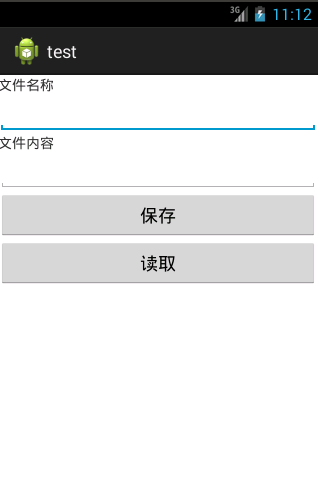
1:activity_main.xml
<RelativeLayout xmlns:android="http://schemas.android.com/apk/res/android"

    xmlns:tools="http://schemas.android.com/tools"

    android:layout_width="match_parent"

    android:layout_height="match_parent">

    <TextView

        android:id="@+id/tv_filename"

        android:layout_width="wrap_content"

        android:layout_height="wrap_content"

        android:text="文件名称"/>

    <EditText

        android:id="@+id/et_filename"

        android:layout_below="@id/tv_filename"

        android:layout_width="match_parent"

        android:layout_height="wrap_content"/>

    <TextView

        android:id="@+id/tv_content"

        android:layout_below="@id/et_filename"

        android:layout_width="wrap_content"

        android:layout_height="wrap_content"

        android:text="文件内容"/>

    <EditText

        android:id="@+id/et_content"

        android:layout_below="@id/tv_content"

        android:layout_width="match_parent"

        android:layout_height="wrap_content"/>

    <Button

        android:id="@+id/btn_save"

        android:layout_below="@id/et_content"

        android:layout_width="match_parent"

        android:layout_height="wrap_content"

        android:text="保存"/>

    <Button

        android:id="@+id/btn_read"

        android:layout_below="@id/btn_save"

        android:layout_width="match_parent"

        android:layout_height="wrap_content"

        android:text="读取"/>

</RelativeLayout>
2:文件操作类:FileService.java
public class FileService {

	private Context context=null;

	public FileService(Context context){

		this.context=context;

	}

	//save file

	public void saveFile(String filename,String content) throws Exception{

		FileOutputStream out=context.openFileOutput(filename, Context.MODE_PRIVATE);

		out.write(content.getBytes());

		out.close();

	}

	//read file

	public String readFile(String filename)throws Exception{

		FileInputStream is=context.openFileInput(filename);

		byte b[]=new byte[1024];

		int len=0;

		ByteArrayOutputStream baos=new ByteArrayOutputStream();

		//先把数据写入内存

		while((len=is.read(b))!=-1){

			baos.write(b,0,len);

		}

		//从内存中读取数据

		byte data[]=baos.toByteArray();

		baos.close();

		is.close();

		return new String(data);

	}

}
3:MainActivity.java
public class MainActivity extends Activity {

	private FileService fileService=null;

	private Button btnSave=null,btnRead=null;

	private EditText etFilename=null;

	private EditText etContent=null;

	@Override

	protected void onCreate(Bundle savedInstanceState) {

		super.onCreate(savedInstanceState);

		setContentView(R.layout.activity_main);

		btnSave=(Button)findViewById(R.id.btn_save);

		btnRead=(Button)findViewById(R.id.btn_read);

		etFilename=(EditText)findViewById(R.id.et_filename);

		etContent=(EditText)findViewById(R.id.et_content);

		fileService=new FileService(MainActivity.this);

		btnSave.setOnClickListener(new OnClickListener(){

			public void onClick(View view){

				String filename=etFilename.getText().toString();

				String content=etContent.getText().toString();

				try {

					fileService.saveFile(filename, content);

					Toast.makeText(MainActivity.this, "Save file success!", Toast.LENGTH_SHORT).show();

				} catch (Exception e) {

					Toast.makeText(MainActivity.this, "Save file error!", Toast.LENGTH_SHORT).show();

				}

			}

		});

		btnRead.setOnClickListener(new OnClickListener(){

			public void onClick(View view){

				String filename=etFilename.getText().toString();

				try {

					String text=fileService.readFile(filename);

					etContent.setText(text);

				} catch (Exception e) {

					Toast.makeText(MainActivity.this, "Read file error!", Toast.LENGTH_SHORT).show();

				}

			}

		});

	}

}
4:运行结果
Android 读取和保存文件(手机内置存储器)的更多相关文章
- JavaScript进阶(六)用JavaScript读取和保存文件
用JavaScript读取和保存文件 因为Google还不提供同步插件数据的功能,所以导入和导出插件配置就必须和文件打交道了.而出于安全原因,只有IE才提供访问文件的API:但随着HTML 5的到来, ...
- Android学习笔记——保存文件(Saving Files)
本人邮箱:JohnTsai.Work@gmail.com,欢迎交流讨论. 欢迎转载,转载请注明网址:http://www.cnblogs.com/J ...
- android 读取SD卡文件
SD卡作为手机的扩展存储设备,在手机中充当硬盘角色,可以让我们手机存放更多的数据以及多媒体等大体积文件.因此查看SD卡的内存就跟我们查看硬盘的剩余空间一样,是我们经常操作的一件事,那么在Android ...
- android 读取用户号码,手机串号,SIM卡序列号
简介: IMSI:international mobiles subscriber identity国际移动用户号码标识,这个一般大家是不知道,GSM必须写在卡内相关文件中:MSISDN:mobile ...
- [Android] Android读取Asset下文件的最简单的方法总结(用于MediaPlayer中)
方法一:getAssets().openFd //读取asset内容 private void openAssetMusic(String index) throws IOException { ...
- android 读取本地json文件 解决显示乱码显示
1.读取本地JSON ,但是显示汉字乱码 public static String readLocalJson(Context context, String fileName){ ...
- C# FileStream分块读取和保存文件
一 FileStream分块读取文件 public byte[] GetFileData(string fileName, long startPosition, long length) { byt ...
- Android学习笔记-保存数据的实现方法1
Android开发中,有时候我们需要对信息进行保存,那么今天就来介绍一下,保存文件到内存,以及SD卡的一些操作,及方法,供参考. 第一种,保存数据到内存中: //java开发中的保存数据的方式 pub ...
- 无废话Android之android下junit测试框架配置、保存文件到手机内存、android下文件访问的权限、保存文件到SD卡、获取SD卡大小、使用SharedPreferences进行数据存储、使用Pull解析器操作XML文件、android下操作sqlite数据库和事务(2)
1.android下junit测试框架配置 单元测试需要在手机中进行安装测试 (1).在清单文件中manifest节点下配置如下节点 <instrumentation android:name= ...
随机推荐
- N - Optimal Milking - POJ 2112(二分图多重匹配+Floyd+二分搜索)
题意:有K太挤奶机,C头奶牛,每个挤奶机每天只能为M头奶牛服务,下面给的K+C的矩阵,是形容相互之间的距离,求出来走最远的那头奶牛要走多远 分析:应该先使用floyd求出来点之间的最短路??(不晓得给 ...
- otl获得sql出错位置(oracle)
项目的一个需要,要获得sql出错的位置,从而给出类似sqlplus的错误提示(如下) sql出错原因易获得,记录在otl_exception::msg,但出错位置就不是那么容易了. 默认情况下otl异 ...
- SCGHR 分析思路
-- 分析某个模块业务 a:添加表,登记表,历史表,信息表 --- (把表名搞清楚,再看具体的字段) 先搞清楚大概的数据流向,在着手具体的数据,大处布局,小处着手 b:表中的字段,以及各表直接传递什么 ...
- SKTexture类
继承自 NSObject 符合 NSCodingNSCopyingNSObject(NSObject) 框架 /System/Library/Frameworks/SpriteKit.framewo ...
- 使用jcrop进行头像剪切
http://www.cnblogs.com/chenssy/archive/2013/05/18/3084985.html http://code.ciaoca.com/jquery/jcrop/ ...
- 4G时代来临,运营商为谁搭台献唱?
4G时代已然来临.对用户而言,4G意味着更快的传输速度,以及更优质的移动网络体验. 只是对运营商而言.怎样部署4G却成了一大难题.众所周知,在全球范围内,4G LTE成为眼下最率先的移动宽带解 ...
- .NET注册页面代码
using System;using System.Collections.Generic;using System.Linq;using System.Web;using System.Web.UI ...
- 计算方法(一)用C#实现数值迭代
平时,经常会遇到解方程,计算方法中常用的有二分法(精度太低,迭代次数多,一般没人用),牛顿迭代法,弦截法,网上大多都是C++或者Java的实现代码,很少有C#的,我在本科毕业论文中用到了这些,那时也需 ...
- (转)js arguments对象
在javascript中,不需要明确指出参数名,就能访问它们.如: function hi(){if(arguments[0]=="andy"){ return;}aler ...
- GitHub的css/js文件给墙了的解决方法
今天早上一打开github发现css等都加载失败. 后来发现是给墙了. 本人用的是windows. 解决方法:改hosts 一般情况是在这里:C:\Windows\System32\drivers\e ...