
OutputCache属性详解(三)— VaryByHeader,VaryByCustom
目录
VaryByHeader :分号分隔的 HTTP 标头列表,用于使输出缓存发生变化。将该特性设为多标头时,对于每个指定标头组合,输出缓存都包含一个不同版本的请求文档。
注意:设置 VaryByHeader 特性将启用在所有 HTTP 1.1 版缓存中缓存项,而不仅仅在 ASP.NET 缓存中进行缓存。用户控件中的 @ OutputCache 指令不支持此特性。
准备测试代码配置文件和页面如下:
  <system.web>

    <caching>

      <outputCacheSettings>

        <outputCacheProfiles>

          <!--name 缓存配置名称

           duration 缓存的时间(以秒计)

           enabled  指定缓存有效

           -->

          <add name="outputCache60" duration="60" enabled="true" varyByParam="none" location="Any"  varyByHeader="User-Agent"/>

        </outputCacheProfiles>

      </outputCacheSettings>

    </caching>

    <compilation debug="true"/>

  </system.web>
<%@ Page Language="C#" AutoEventWireup="true" CodeFile="Default.aspx.cs" Inherits="_Default" %>

<!DOCTYPE html PUBLIC "-//W3C//DTD XHTML 1.0 Transitional//EN" "http://www.w3.org/TR/xhtml1/DTD/xhtml1-transitional.dtd">

<%@ OutputCache CacheProfile="outputCache60"  %>

<html xmlns="http://www.w3.org/1999/xhtml">

<head runat="server">

    <title></title>

    <script src="Scripts/jquery-1.4.1.js" type="text/javascript"></script>

</head>

<body>

    <form id="form1" runat="server">

    <div>

    <%=DateTime.Now %>  <br />

    <asp:Label ID="lblTime" runat="server"></asp:Label>

    </div>

    <a href="Default2.aspx" >Default2.aspx</a>

    </form>

</body>

</html>
打开火狐和IE访问这个页面,我们可以看到火狐和IE下的HTTP请求头中的User-Agent不一致,如下: 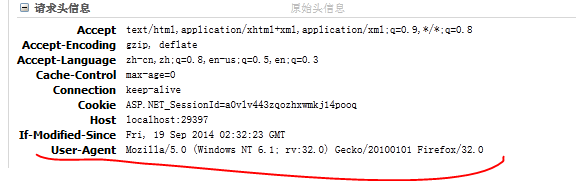
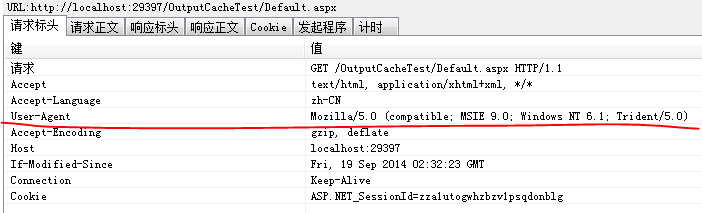
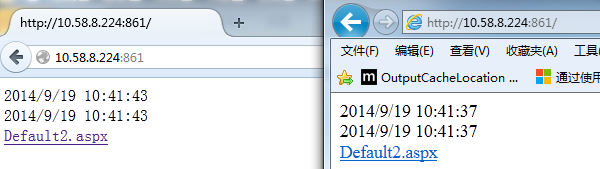
则两个浏览器访问的结果也不一致,如下
我们修改参数,采用HttpHeader中的Host参数,如下:
<add name="outputCache60" duration="60" enabled="true" varyByParam="none" location="Any" varyByHeader="Host"/>
这两个浏览器的请求的HttpHeader中Host数据时一致的,浏览器数据结果也能保持一致: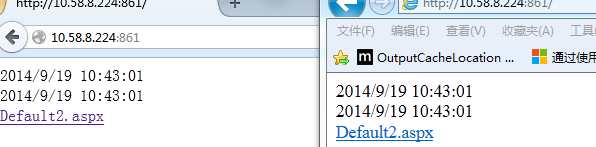
VaryByContentEncodings:以分号分隔的字符串列表,用于更改输出缓存。将 VaryByContentEncodings 属性用于 Accept-Encoding 标头,可确定不同内容编码获得缓存响应的方式。
测试使用谷歌,IE,火狐三种浏览器,这三种浏览器的Accept-Encoding如下:
谷歌:Accept-Encoding:gzip,deflate,sdch
IE:Accept-Encoding gzip, deflate
火狐:Accept-Encoding gzip, deflate
修改配置文件如下:
<add name="outputCache60" duration="60" enabled="true" varyByParam="none" location="Any" varyByContentEncoding="sdch"/>
在三个浏览器中输入测试地址,刷新我们会发现 火狐和IE数据保持一致,读取缓存数据,而谷歌的数据则一直在变。
如果我们设置配置文件为:
<add name="outputCache60" duration="60" enabled="true" varyByParam="none" location="Any" varyByContentEncoding="sdch;gzip"/>
则三个浏览器的缓存都将会失效。
VaryByCustom表示自定义输出缓存要求的任意文本。
如果赋予该属性的值为 browser,缓存将随浏览器名称和主要版本信息的不同而异。如果输入自定义字符串,则必须在应用程序的 Global.asax 文件中重写 GetVaryByCustomString 方法。
<add name="outputCache60" duration="60" enabled="true" varyByParam="none" location="Any" varyByCustom="browser"/>
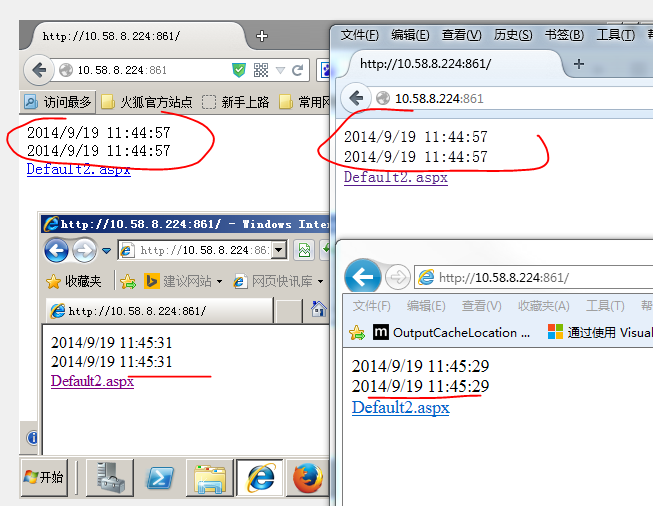
测试在两台机器上进行,一台机器火狐版本为32.0.1 IE8,另一台火狐版本为32.0.1 IE9,如下图所示,火狐的缓存数据保持一致,但IE的数据则不会一致(版本不一样)。
如果输入自定义字符串,则必须在应用程序的 Global.asax 文件中重写 GetVaryByCustomString 方法。如代码所示:
<add name="outputCache60" duration="60" enabled="true" varyByParam="none" location="Any" varyByCustom="UserHostName"/>
Global.asax文件新增如下:
    public override string GetVaryByCustomString(HttpContext context, string custom)

    {

        if (string.Equals(custom, "UserHostName", StringComparison.OrdinalIgnoreCase))

        {

            return Context.Request.UserHostName;

        }

        return base.GetVaryByCustomString(context, custom);

    }
如果我们将 varyByCustom="UserHostName" 代码去掉,那在多个客户端同时访问这个页面时,多个客户端所输出的内容都一致,但是采用varyByCustom="UserHostName" 这种自定义缓存模式,则每个客户端的缓存是按它们的请求的UserHostName 进行区分的,效果如下: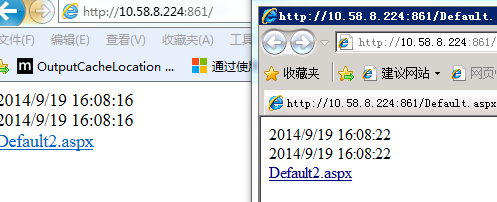
关于varyByCustom 推荐个论坛大家可以看下:http://bbs.csdn.net/topics/390667018
VaryByControl 获取或设置一组分号分隔的控件标识符,这些标识符包含在当前页或用户控件内,用于改变当前缓存项。指当前页缓存依赖与制定控件的值,如下代码所示:
<%@ Page Language="C#" AutoEventWireup="true" CodeFile="Default.aspx.cs" Inherits="_Default" %>

<!DOCTYPE html PUBLIC "-//W3C//DTD XHTML 1.0 Transitional//EN" "http://www.w3.org/TR/xhtml1/DTD/xhtml1-transitional.dtd">

<%@ OutputCache Duration="60" VaryByControl="slt_VaryByControl" %>

<html xmlns="http://www.w3.org/1999/xhtml">

<head runat="server">

    <title></title>

    <script src="Scripts/jquery-1.4.1.js" type="text/javascript"></script>

</head>

<body>

    <form id="form1" runat="server">

    <div>

        <%=DateTime.Now %>

        <br />

        <asp:DropDownList ID="slt_VaryByControl" AutoPostBack="true" runat="server">

            <asp:ListItem Text="测试数据1" Value="1"></asp:ListItem>

            <asp:ListItem Text="测试数据2" Value="2"></asp:ListItem>

            <asp:ListItem Text="测试数据3" Value="3"></asp:ListItem>

        </asp:DropDownList>

    </div>

    <a href="Default2.aspx">Default2.aspx</a>

    </form>

</body>

</html>
当我们切换slt_VaryByControl值时,缓存机制会根据所选的值来输出新的页面还是缓存页面。

VaryByHeader 、VaryByContentEncodings、VaryByCustom、VaryByControl 写到这,如有问题欢迎指正。
作者:释迦苦僧 出处:http://www.cnblogs.com/woxpp/p/3980851.html 本文版权归作者和博客园共有,欢迎转载,但未经作者同意必须保留此段声明,且在文章页面明显位置给出原文连接。
OutputCache属性详解(三)— VaryByHeader,VaryByCustom的更多相关文章
- OutputCache属性详解(一)一Duration、VaryByParam
目录 OutputCache概念学习 OutputCache属性详解(一) OutputCache属性详解(二) OutputCache属性详解(三) OutputCache属性详解(四)— SqlD ...
- OutputCache属性详解(二)一 Location
目录 OutputCache概念学习 OutputCache属性详解(一) OutputCache属性详解(二) OutputCache属性详解(三) OutputCache属性详解(四)— SqlD ...
- OutputCache属性详解(四)— SqlDependency
目录 OutputCache概念学习 OutputCache属性详解(一) OutputCache属性详解(二) OutputCache属性详解(三) OutputCache属性详解(四)— SqlD ...
- Intent属性详解三 data、type和extra
1 Data 执行时要操作的数据 在目标<data/>标签中包含了以下几种子元素,他们定义了url的匹配规则: android:scheme 匹配url中的前缀,除了“http”.“ht ...
- tomcat 三种部署方式以及server.xml文件的几个属性详解
一.直接将web项目文件件拷贝到webapps目录中 这是最常用的方式,Tomcat的Webapps目录是Tomcat默认的应用目录,当服务器启动时,会加载所有这个目录下的应用.如果你想要修改这个默认 ...
- [置顶]
MVC输出缓存(OutputCache参数详解)
1.学习之前你应该知道这些 几乎每个项目都会用到缓存,这是必然的.以前在学校时做的网站基本上的一个标准就是1.搞定增删改查2.页面做的不要太差3.能运行(ps真的有这种情况,答辩验收的时候几个人在讲台 ...
- MVC输出缓存(OutputCache参数详解)
版权声明:本文为博主原创文章,未经博主允许转载随意. https://blog.csdn.net/kebi007/article/details/59199115 1.学习之前你应该知道这些 几乎每个 ...
- HTML video 视频标签全属性详解
HTML 5 video 视频标签全属性详解 现在如果要在页面中使用video标签,需要考虑三种情况,支持Ogg Theora或者VP8(如果这玩意儿没出事的话)的(Opera.Mozilla.C ...
- Android组件---四大布局的属性详解
[声明] 欢迎转载,但请保留文章原始出处→_→ 文章来源:http://www.cnblogs.com/smyhvae/p/4372222.html Android常见布局有下面几种: LinearL ...
随机推荐
- Genymotion创建下载模拟器的时候出现Unable to create Genymotion virtual devices:Connection timeout错误
如图,如果Genymotion创建下载模拟器的时候出现Unable to create Genymotion virtual devices:Connection timeout错误,具体解决方法如下 ...
- 启动tomcat时遇到的问题
1.当启动Tomcat时,出现了如下信息: The APR based Apache Tomcat Native library which allows optimal performance in ...
- jsp_内置对象_request
request内置对象是使用最多的一个对象,其主要作用是接收客户端发送来的请求信息.如请求的参数.发送的头信息等都属于客户端发送来的信息.request是javax.servlet.http.Http ...
- mac OS X 配置Python+Web.py+MySQLdb环境
MAC默认支持Python 2.7所以不用安装. 1.安装pip sudo easy_install pip 2.安装Web.py sudo pip install Web.py 3.安装MySQLd ...
- SpringMVC常用注解實例詳解3:@ResponseBody
我的開發環境框架: springmvc+spring+freemarker開發工具: springsource-tool-suite-2.9.0JDK版本: 1.6.0_29tomcat ...
- CSS 自定义字体
移动端如何兼容UI给的字体 [toc] 移动端的默认字体 IOS 默认中文字体是Heiti SC 默认英文字体是Helvetica 默认数字字体是HelveticaNeue Android 默认中文字 ...
- UE4动作流程总结
右键新窗口打开看大图
- 小游戏runpig总结
前几天写了一个JavaScript小游戏,大概是这样的 demo:strongfanfan.top/RunPig 源代码:www.github.com/strongfanfan/RunPig 画风简 ...
- ssh端口转发
http://blog.sina.com.cn/s/blog_47094def0101fvge.html
- xxxx年度员工岗位技能调查表
昨天应公司要求设计了一张 <员工岗位技能调查表>,写微博有2个目的:第一是供大家参考,第二是记录下从事质量管理工作走过的点点滴滴.这是我第一次写工作方面的博客,之后会坚持写下去的. --- ...