
基于WebDriver&TestNG 实现自己的Annotation @TakeScreenshotOnFailure
相信用过Selenium WebDriver 的朋友都应该知道如何使用WebDriver API实现Take Screenshot的功能。
在这篇文章里,我主要来介绍对failed tests实现 take screenshot的功能, 并且我们也高大上一回,做成注解的形式。
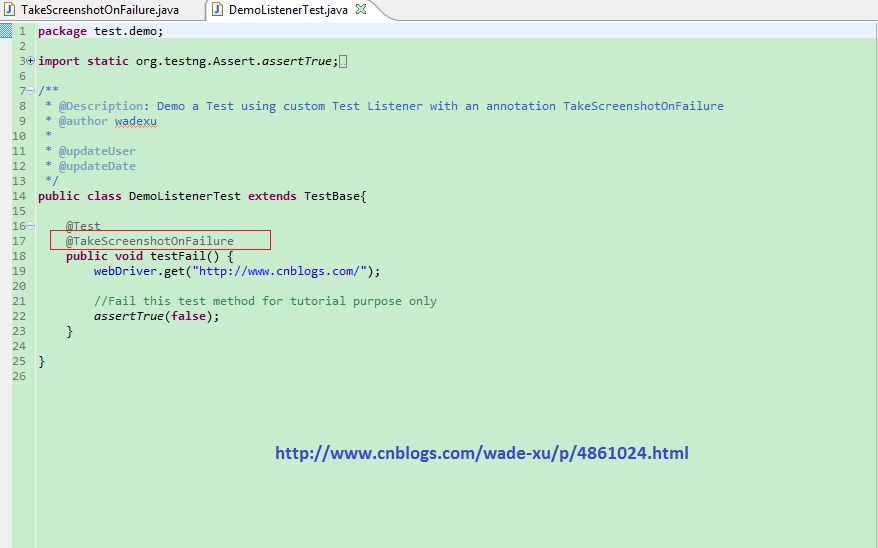
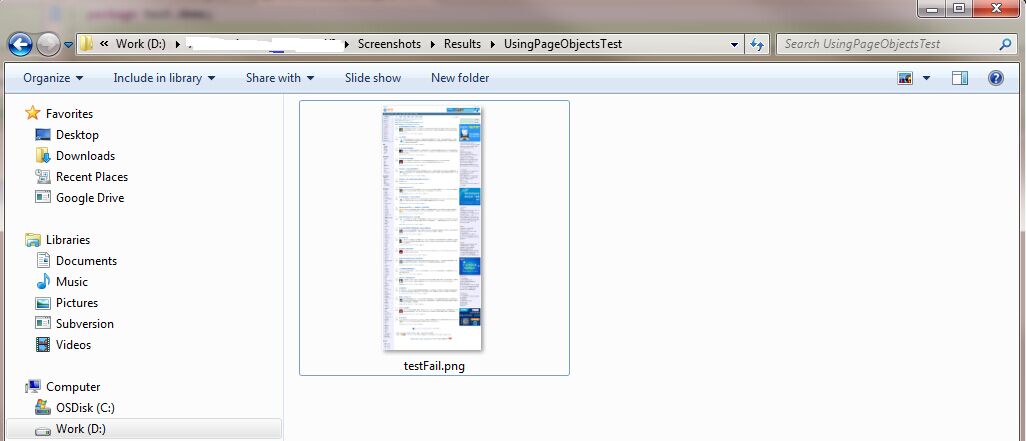
效果如下:
目录

    前提

    Maven 配置

    Example
    简单类图
     TakeScreenshotOnFailure

        CustomTestListener

        WebDriverHost

        TestBase

        DemoListenerTest

        TestNG.xml

        Run as TestNG
前提
- JDK 1.7
- Maven 3
Maven 配置
        <dependency>

            <groupId>org.testng</groupId>

            <artifactId>testng</artifactId>

            <version>6.9.5</version>

        </dependency>

        <dependency>

            <groupId>org.seleniumhq.selenium</groupId>

            <artifactId>selenium-java</artifactId>

            <version>2.46.0</version>

        </dependency>
Example
简单类图
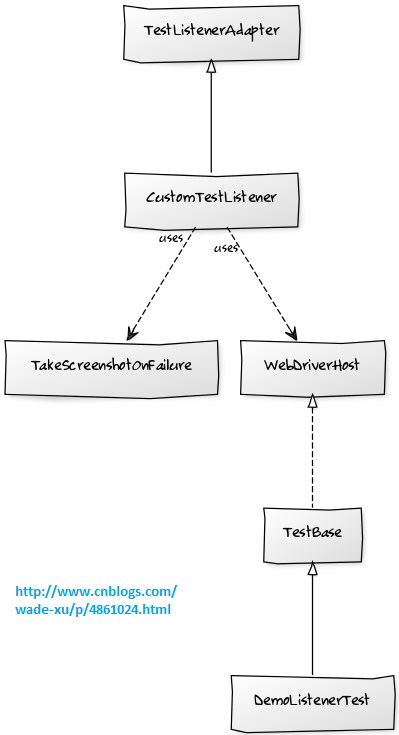
首先创建一个类 如下 TakeScreenshotOnFailure.java
package test.demo;

import java.lang.annotation.ElementType;

import java.lang.annotation.Retention;

import java.lang.annotation.RetentionPolicy;

import java.lang.annotation.Target;

/**

 * Annotation informs CustomTestListener to take screenshot if test method fails. File name is method name + png suffix.

 * Test class must implement WebDriverHost in order for the screenshot to work.

 *

 * @author wadexu

 */

@Retention(RetentionPolicy.RUNTIME)

@Target(value =

  {ElementType.METHOD})

public @interface TakeScreenshotOnFailure {

}
##转载注明出处: http://www.cnblogs.com/wade-xu/p/4861024.html
然后创建一个自己的CustomTestListener 继承TestNG 的 TestListenerAdapter 重写onTestFailure()方法, 加入take screenshot的功能
代码如下
package test.demo;

import java.io.File;

import java.lang.reflect.Method;

import org.apache.commons.io.FileUtils;

import org.apache.log4j.Logger;

import org.openqa.selenium.OutputType;

import org.openqa.selenium.TakesScreenshot;

import org.openqa.selenium.WebDriver;

import org.testng.ITestResult;

import org.testng.TestListenerAdapter;

/**

*

* @Description: A custom test listener extends TestListenerAdapter for take screen shot on failed test case.

* @author wadexu

*

* @updateUser

* @updateDate

*/

public class CustomTestListener extends TestListenerAdapter {

    private static String fileSeperator = System.getProperty("file.separator");

    protected static final Logger logger = Logger.getLogger(CustomTestListener.class);

    @Override

    public void onTestFailure(ITestResult result) {

        super.onTestFailure(result);

        Object o = result.getInstance();

        WebDriver driver = ((WebDriverHost) o).getWebDriver();

        Method method = result.getMethod().getConstructorOrMethod().getMethod();

        TakeScreenshotOnFailure tsc = method.getAnnotation(TakeScreenshotOnFailure.class);

        if (tsc != null) {

            String testClassName = getTestClassName(result.getInstance().toString()).trim();

            String testMethodName = result.getName().toString().trim();

            String screenShotName = testMethodName + ".png";

            if (driver != null) {

                String imagePath =

                        ".." + fileSeperator + "Screenshots" + fileSeperator + "Results"

                                + fileSeperator + testClassName + fileSeperator

                                + takeScreenShot(driver, screenShotName, testClassName);

                logger.info("Screenshot can be found : " + imagePath);

            }

        }

    }

    /**

    * Get screen shot as a file and copy to a new target file

    *

    * @Title: takeScreenShot

    * @param driver

    * @param screenShotName

    * @param testClassName

    * @return screenShotName

    */

    public static String takeScreenShot(WebDriver driver,

            String screenShotName, String testClassName) {

        try {

            File file = new File("Screenshots" + fileSeperator + "Results");

            if (!file.exists()) {

                logger.info("File created " + file);

                file.mkdir();

            }

            File screenshotFile = ((TakesScreenshot) driver).getScreenshotAs(OutputType.FILE);

            File targetFile = new File("Screenshots" + fileSeperator + "Results" + fileSeperator + testClassName, screenShotName);

            FileUtils.copyFile(screenshotFile, targetFile);

            return screenShotName;

        } catch (Exception e) {

            logger.error("An exception occured while taking screenshot " + e.getCause());

            return null;

        }

    }

    /**

    * Get a test class name

    *

    * @Title: getTestClassName

    * @param testName

    * @return testClassName

    */

    public String getTestClassName(String testName) {

        String[] reqTestClassname = testName.split("\\.");

        int i = reqTestClassname.length - 1;

        String testClassName = reqTestClassname[i].substring(0, reqTestClassname[i].indexOf("@"));

        logger.info("Required Test Name : " + testClassName);

        return testClassName;

    }

}
接口类 WebDriverHost
package test.demo;

import org.openqa.selenium.WebDriver;

/**

 * Class implementing that interface is expected to return instance of web driver used in last test method.

 *

 * @author wadexu

 */

public interface WebDriverHost {

  /**

   * Returns instance of web driver used in last test method.

   *

   * @return WebDriver

   */

  public WebDriver getWebDriver();

}
##转载注明出处: http://www.cnblogs.com/wade-xu/p/4861024.html
测试基类TestBase
package test.demo;

import java.io.File;

import java.io.IOException;

import org.openqa.selenium.WebDriver;

import org.openqa.selenium.firefox.FirefoxDriver;

import org.openqa.selenium.firefox.FirefoxProfile;

import org.testng.annotations.AfterClass;

import org.testng.annotations.BeforeClass;

/**

 * @Description: Abstract test base class, Test class must extends this class.

 *               Initialize a firefox webDriver for tutorial purpose only.

 * @author wadexu

 *

 * @updateUser

 * @updateDate

 */

public abstract class TestBase implements WebDriverHost{

    protected WebDriver webDriver = null;

    @Override

    public WebDriver getWebDriver() {

      return webDriver;

    }

    @BeforeClass

    public void setUp() throws IOException {

        FirefoxProfile firefoxProfile = new FirefoxProfile();

        // use proxy

        firefoxProfile.setPreference("network.proxy.type", 1);

        firefoxProfile.setPreference("network.proxy.http", "10.51.1.000");

        firefoxProfile.setPreference("network.proxy.http_port", "8080");

        //get rid of google analytics, otherwise it's too slow to access to cnblogs website

        firefoxProfile.addExtension(new File(getClass().getClassLoader().getResource("no_google_analytics-0.6-an+fx.xpi").getFile()));

        webDriver = new FirefoxDriver(firefoxProfile);

    }

    @AfterClass

    public void tearDown() {

        webDriver.close();

    }

}
DemoListenerTest 测试类
package test.demo;

import static org.testng.Assert.assertTrue;

import org.testng.annotations.Test;

/**

 * @Description: Demo a Test using custom Test Listener with an annotation TakeScreenshotOnFailure

 * @author wadexu

 *

 * @updateUser

 * @updateDate

 */

public class DemoListenerTest extends TestBase{

    @Test

    @TakeScreenshotOnFailure

    public void testFail() {

        webDriver.get("http://www.cnblogs.com/");

        //Fail this test method for tutorial purpose only

        assertTrue(false);

    }

}
TestNG 的 xml 文件 配置如下,加入listener监听
<?xml version="1.0" encoding="UTF-8" ?>

<!DOCTYPE suite SYSTEM "http://testng.org/testng-1.0.dtd" >

<!--<suite name="DMP_Test_Suite" -->

<suite name="Demo_Test_Suite" parallel="false">

    <listeners>

        <listener class-name="test.demo.CustomTestListener" />

    </listeners>

    <test name="Demo_Test">

        <classes>

            <class name="test.demo.DemoListenerTest" />

        </classes>

    </test>

</suite>
##转载注明出处: http://www.cnblogs.com/wade-xu/p/4861024.html
Run as TestNG
断言故意错误 让test fail
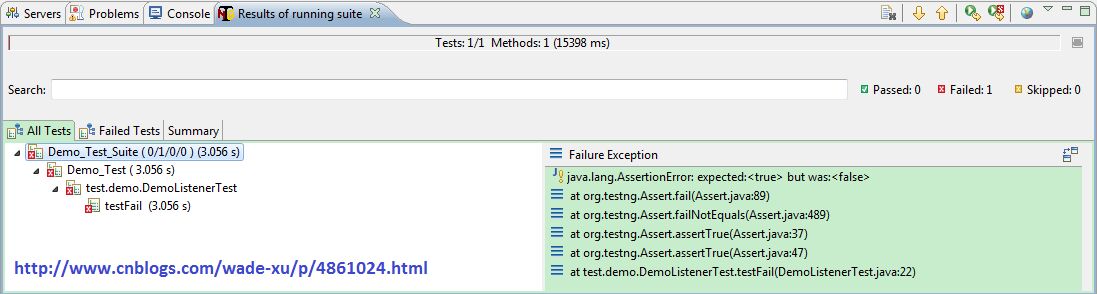
控制台输出
2015-10-08 15:04:29,896 INFO [test.demo.CustomTestListener] - Required Test Name : DemoListenerTest

2015-10-08 15:04:31,985 INFO [test.demo.CustomTestListener] - Screenshot can be found : ..\Screenshots\Results\DemoListenerTest\testFail.png
图片以测试方法命名, 存在含类名的路径下
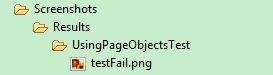
测试方法Pass 或者 fail但没加Annotation 都不会截屏。
感谢阅读,如果您觉得本文的内容对您的学习有所帮助,您可以点击右下方的推荐按钮,您的鼓励是我创作的动力。
##转载注明出处: http://www.cnblogs.com/wade-xu/p/4861024.html
基于WebDriver&TestNG 实现自己的Annotation @TakeScreenshotOnFailure的更多相关文章
- 基于webdriver的jmeter性能测试-通过jmeter实现jar录制脚本的性能测试
续接--基于webdriver的jmeter性能测试-Eclipse+Selenium+JUnit生成jar包 在进行测试前先将用于支持selenium录制脚本运行所需的类包jar文件放到jmeter ...
- linux搭建phantomjs+webdriver+testng+ant自动化工程
因为项目的原因,需要将脚本在linux环境无浏览器化去跑,那么原有的在windows系统下有浏览器化的自动化脚本场景就不适用了,这里给出linux系统下搭建phantomjs+webdriver+te ...
- selenium webdriver testng自动化测试数据驱动
selenium webdriver testng自动化测试数据驱动 selenium webdriver testng自动化测试数据驱动 一.数据驱动测试概念 数据驱动测试是相同的测试脚本使用不同的 ...
- 基于 webdriver 的测试代码日常调试方python 篇
看到论坛有人写了JAVA的测试代码日常设计,就给大家分享一下偶自己平时是如何测试测试代码的.主要基于python语言.基于 webdriver 的日常调试在 python交互模式下非常方便,打开pyt ...
- nightwatch 基于Webdriver的端到端自动化测试框架
nightwatch 是使用nodejs编写的,基于Webdriver api 的端到端自动化测试框架 包含以下特性 清晰的语法,基于js 以及css 还有xpath 的选择器 内置测试runner, ...
- Guiceberry+Webdriver+TestNG
1. Guiceberry Leverage Guice to achieve Dependency Injection on your JUnit tests https://code.google ...
- Selenium WebDriver TestNg Maven Eclipse java 简单实例
环境准备 前提条件Eclipse 已经安装过 TestNg ,Maven 插件 新建一个普通的java项目 点击右键 configure->convert to Maven Project 之后 ...
- Webdriver+testNG+ReportNG+Maven+SVN+Jenkins自动化测试框架的pom.xml配置
<project xmlns="http://maven.apache.org/POM/4.0.0" xmlns:xsi="http://www.w3.org/20 ...
- Webdriver+Testng实现测试用例失败自动截图功能
testng执行测试用例的时候,如果用例执行失败会自动截图,方便后续排查问题 1.首先定义一个截图类: package com.rrx.utils; import java.io.File;impor ...
随机推荐
- HTTPURLConnection 发送Post数据
在使用HTTPURLConnection发送POST数据时,通常使用如下方式: byte[] body = new byte[512]; // 需要发送的body数据 URL url = new UR ...
- coreData部分报错:This NSPersistentStoreCoordinator has no persistent stores.
最近在修改一个程序BUG的时候遇到一个问题coreData部分报错:This NSPersistentStoreCoordinator has no persistent stores. 但实际跑程序 ...
- 排球比赛计分规则(P205页)
排球比赛计分规则: 1.SPEC的目标是什么?SPEC的目标不包括什么? 为了让大家更加了解排球比赛. 2.SPEC用户和典型场景是什么? 用户:运动员,观众,教练 场景:排球赛场 3.SPEC用到哪 ...
- winfrom 限制文本框小数点后两位
private void numWeight_KeyPress(object sender, KeyPressEventArgs e) { if (char.IsNumber(e.KeyChar) | ...
- Javascript.//DOM
文档对象模型(Document Object Model,简称DOM),是W3C组织推荐的处理可扩展标志语言的标准编程接口.Document Object Model的历史可以追溯至1990年代后期微 ...
- Unix系统小知识(转)
Unix操作系统的小知识 2.VI添加行号/翻页/清屏 .在对话模式时(即输完Esc再输入: ),输入“:set number”可以将编辑的文本加上行号.跟玩俄罗斯方块一样方便的上下左右移动箭头的快捷 ...
- Android——播放器和图片轮播
layout文件: <?xml version="1.0" encoding="utf-8"?> <LinearLayout xmlns:an ...
- c :set标签的陷阱(未解决)
三层嵌套的list,第二层解套的时候用Cset标签给设置别名,第一个对象正常使用,第二个对象开始传入内存的地址的值,但是无法获取对象属性
- 如何在Jenkins CI 里调试
背景 厂内的CI系统把 Jenkins 和Github 连接了起来,这样Dev 只要通过github pr 就能够了解到测试job 运行的情况.有的时候,Dev会找到QA问,如何在Jenkins CI ...
- Android EidtText 光标的使用和设置
使光标移动到制定的位置: editText.setSelection(editText.length()); 输入的参数是个整数 在请求出现光标是,也就是在获取焦点时: editText.requ ...