
ptyhon - 接口自动化测试实战case1
work_20181203_httprequest.py:
import  requests
class http_request:

    def http_get(url,params):
        res = requests.get(url,params)
        return res

    def http_post(url,params,cookies = None):
        res = requests.post(url,params,cookies = cookies)
        return res
work_20181203_testcase.py:
#-*- coding:utf-8 -*-
# author:jiaxy
# datetime:2018/12/3 14:03
# file: work_20181203_testcase.py

'''
登录

login='http://47.107.168.87:8080/futureloan/mvc/api/member/login'
login_data={'mobilephone':18688773467,'pwd':'123456'}

充值

recharge='http://47.107.168.87:8080/futureloan/mvc/api/member/recharge'
recharge_data={'mobilephone':18688773467,'amount':'1000'}
'''

import unittest
from jiaxy.work_20181203_httprequest import http_request

class Test(unittest.TestCase):

    login = 'http://47.107.168.87:8080/futureloan/mvc/api/member/login'
    login_data={'mobilephone':18688773467,'pwd':'123456'}
    recharge = 'http://47.107.168.87:8080/futureloan/mvc/api/member/recharge'
    recharge_data={'mobilephone':18688773467,'amount':'1000'}

    def setUp(self):
        print('开始测试...')

    def tearDown(self):
        print('测试完成...')

    def test_001_login_nomobie(self):
        login_url = self.login
        login_data = {'mobilephone':'','pwd':'123456'}
        login_msg = http_request.http_get(login_url,login_data)
        try:
            self.assertEquals('手机号不能为空',login_msg.json()['msg'])
            print('test_001_login_nomobie 测试通过')
        except Exception as e:
            print('test_001_login_nomobie 测试不通过')
            raise e

    def test_002_login_nopwd(self):
        login_url =  self.login
        login_data = {'mobilephone':18688773467,'pwd':''}
        login_msg = http_request.http_get(login_url,login_data)
        try:
            self.assertEquals('密码不能为空',login_msg.json()['msg'])
            print('test_002_login_nopwd 测试通过')
        except Exception as e:
            print('test_002_login_nopwd 测试不通过')
            raise e

    def test_003_login_errorpwd(self):
        login_url =  self.login
        login_data = {'mobilephone':18688773467,'pwd':'12345'}
        login_msg = http_request.http_get(login_url,login_data)
        try:
            self.assertEquals('用户名或密码错误',login_msg.json()['msg'])
            print('test_003_login_errorpwd 测试通过')
        except Exception as e:
            print('test_003_login_errorpwd 测试不通过')
            raise e

    def test_004_login_success(self):
        login_url =  self.login
        login_data = self.login_data
        login_msg = http_request.http_get(login_url,login_data)
        try:
            self.assertEquals('登录成功',login_msg.json()['msg'])
            print('test_004_login_success 测试通过')
            cookies = login_msg.cookies
        except Exception as e:
            print('test_004_login_success 测试不通过')
            raise e
            cookies = None
        return cookies

    def test_005_recharge_success(self):
        recharge_url = self.recharge
        recharge_data = self.recharge_data
        cookies = self.test_004_login_success()
        recharge_msg = http_request.http_post(recharge_url,recharge_data,cookies = cookies)
        try:
            self.assertEquals('充值成功',recharge_msg.json()['msg'])
            print('test_005_recharge_success 测试通过')
        except Exception as e:
            print('test_005_recharge_success 测试不通过')
            raise e

    def test_006_recharge_nomobile(self):
        recharge_url = self.recharge
        recharge_data = {'mobilephone':'','amount':'1000'}
        cookies = self.test_004_login_success()
        recharge_msg = http_request.http_post(recharge_url,recharge_data,cookies = cookies)
        try:
            self.assertEquals('手机号不能为空',recharge_msg.json()['msg'])
            print('test_006_recharge_nomobile 测试通过')
        except Exception as e:
            print('test_006_recharge_nomobile 测试不通过')
            raise e

    def test_007_recharge_errmobile(self):
        recharge_url = self.recharge
        recharge_data = {'mobilephone':1868877346,'amount':'1000'}
        cookies = self.test_004_login_success()
        recharge_msg = http_request.http_post(recharge_url,recharge_data,cookies = cookies)
        try:
            self.assertEquals('手机号码格式不正确',recharge_msg.json()['msg'])
            print('test_007_recharge_errmobile 测试通过')
        except Exception as e:
            print('test_007_recharge_errmobile 测试不通过')
            raise e

    def test_008_recharge_nocharge(self):
        recharge_url = self.recharge
        recharge_data = {'mobilephone':18688773467,'amount':''}
        cookies = self.test_004_login_success()
        recharge_msg = http_request.http_post(recharge_url,recharge_data,cookies = cookies)
        try:
            self.assertEquals('请输入金额',recharge_msg.json()['msg'])
            print('test_008_recharge_nocharge 测试通过')
        except Exception as e:
            print('test_008_recharge_nocharge 测试不通过')
            raise e

    def test_009_recharge_toolargecharge(self):
        recharge_url = self.recharge
        recharge_data = {'mobilephone':18688773467,'amount':'10000000000000000000000'}
        cookies = self.test_004_login_success()
        recharge_msg = http_request.http_post(recharge_url,recharge_data,cookies = cookies)
        try:
            self.assertEquals('请输入范围在0到50万之间的正数金额',recharge_msg.json()['msg'])
            print('test_009_recharge_toolargecharge 测试通过')
        except Exception as e:
            print('test_009_recharge_toolargecharge 测试不通过')
            raise e
work_20181203_testrun.py:
#-*- coding:utf-8 -*-
# author:jiaxy
# datetime:2018/12/3 14:04
# file: work_20181203_testrun.py

from jiaxy import work_20181203_testcase
import HTMLTestRunner
import unittest

def runTest():
    suite = unittest.TestSuite()
    loader = unittest.TestLoader()
    suite.addTest(loader.loadTestsFromModule(work_20181203_testcase))
    with open('test_result.html','wb+') as file:
        runner = HTMLTestRunner.HTMLTestRunner(
            stream = file,
            verbosity = 2
        )
        runner.run(suite)

if __name__ == '__main__':
    runTest()

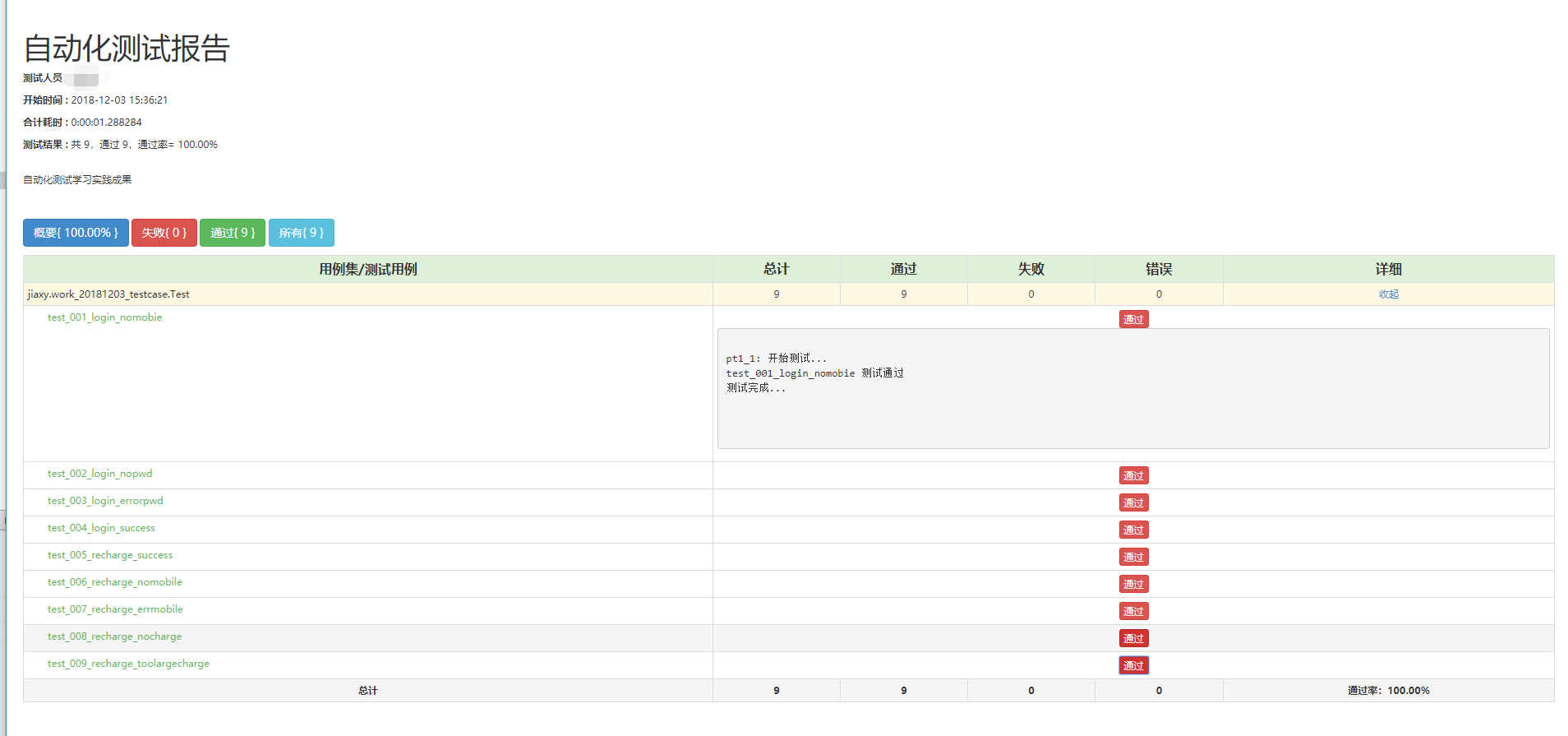
测试报告:
ptyhon - 接口自动化测试实战case1的更多相关文章
- python - 接口自动化测试实战 - case1 - 再次优化版
本次优化: 1. 各级分Package 2. 封装[ReadExcel]类 3. 封装[ReadConfig]类 4. 封装[GetLog]类 5. 引入ddt数据驱动测试,优化测试用例代码 ...
- python - 接口自动化测试实战 - case1 - 优化版
题目: 基于以下两个接口和数据完成接口自动化测试,并生成测试报告: '''登录 login='http://47.107.168.87:8080/futureloan/mvc/api/member/l ...
- 面面俱到的Java接口自动化测试实战
第1章 接口自动化测试整体认知了解什么是接口和为什么要做接口测试.并且知道接口自动化测试应该学习哪些技术以及接口自动化测试的落地过程. 1-1 导学章节 1-2 什么是接口 1-3 为什么要做接口测试 ...
- Python接口自动化测试实战-----附源码
目录 1. 接口定义 2. 基本流程 3. 需求分析 4. 用例设计 5. 脚本开发 6. 结果分析 接口定义: 接口普遍有两种意思,一种是API(Application Program Interf ...
- Java接口自动化测试实战笔记
综述 代码管理工具Git 测试框架 TestNG 测试报告 Mock 接口框架 HTTP 协议接口 测试框架 HttpClient SprintBoot 自动化测试开发 数据持久层框架 MyBatis ...
- 【三】Jmeter接口自动化测试系列之Http接口自动化实战
作者:大虫 本文介绍 Jmeter 工具的 http 接口 自动化测试 实战! 为了通用性,就拿知乎 网站作为实战例子吧! 必备技能:http接口基础知识.抓包,本文不做详细介绍,不会的可以先百度恶补 ...
- 关于《Python自动化测试实战》
作者有话说 笔者写这本书的初心是想通过自身经验分享一些在自动化测试领域中的实用技术,能够帮助那些正在从事自动化测试相关工作或者准备转型自动化测试的测试人员.任何一门技术涵盖的知识点都是非常广泛的,可能 ...
- Python接口自动化测试框架实战 从设计到开发
第1章 课程介绍(不要错过)本章主要讲解课程的详细安排.课程学习要求.课程面向用户等,让大家很直观的对课程有整体认知! 第2章 接口测试工具Fiddler的运用本章重点讲解如何抓app\web的htt ...
- 性能测试学习之路 (四)jmeter 脚本开发实战(JDBC &JMS &接口脚本 & 轻量级接口自动化测试框架)
1.业务级脚本开发 登录脚本->思路:在线程组下新建两个HTTP请求,一个是完成访问登录页,一个是完成登录的数据提交. 步骤如下: 1) 访问登录页 2) 提交登录数据的HTTP PS:对于 ...
随机推荐
- UVA 11468 Substring (AC自动机)
用把失配边也加到正常边以后AC自动机,状态是长度递减的DAG,每次选一个不会匹配字符的转移. dp[u][L]表示当前在tire树上u结点长度还剩L时候不匹配的概率,根据全概率公式跑记忆化搜索. #i ...
- CF Gym 100187A Potion of Immortality (思路,最坏情况的最小损失)
根据兔子试药情况可以缩小范围,如果死了,不在试过的药里面,如果活着,在试过的药里. 最糟的情况: 两个原则 1.能确定魔药所在的范围的尽量大,2.死得兔子尽量多. 如果当前不知道情况的药n为k的二倍以 ...
- 激光推送报错:APNs is not available,please check your provisioning profile and certification 和 设置别名问题 app not registed, give up set tag:
前几天,项目中用到了推送功能,就集成了激光,遇到了2个问题,就给大家分享一下, 第一个问题: 在集成的过程是按照激光的文档做的,但是最后配置完了,一运行,就打印出这么一句话, APNs is not ...
- checkbox绑定v-for的数据
简述自己遇到的问题,觉得合适就拿去用 我在使用v-for遍历checked复选框数据的时候,数据分为两部分,一个主活动,主活动下面有多个子活动 我实体类的设计是里面加个list放子活动, 页面循环需要 ...
- 基于arcgis api for js高速公路智能化智慧公路养护WebGIS开源系统
伴随着高速公路建设进程加快,其涉及信息量增大.类型多样.地点分布广,传统的信息管理方式已不适应公路建设迅速发展的需要,而目前能对高速公路在设计.施工.养护等阶段的各类信息综合进行管理的信息系统尚较少见 ...
- echarts事件中获取当前实例
直接使用this即可
- NOIP模拟赛 不等数列
[题目描述] 将1到n任意排列,然后在排列的每两个数之间根据他们的大小关系插入“>”和“<”.问在所有排列中,有多少个排列恰好有k个“<”.答案对2012取模. [输入格式] 第一行 ...
- 201621123080《Java程序设计》第十一周学习总结
201621123080<Java程序设计>第十一周学习总结 1. 本周学习总结 1.1 以你喜欢的方式(思维导图或其他)归纳总结多线程相关内容. 2. 书面作业 本次PTA作业题集多线程 ...
- tmp_获取下一个回文数
直接拿之前一次竞赛中写的code,稍微完善了点,后面有机会在优化 uint64_t GetNextPalindrome(uint64_t data) { //100以内的数字已经特殊考虑过,不存在差值 ...
- leetcode-23-DynamicProgramming-1
357. Count Numbers with Unique Digits 解题思路: 用arr[i]存放长度为i时,各位互不相同的数字的个数,所以arr[1]=10,arr[2]=9*9.(第一位要 ...