
ptyhon - 接口自动化测试实战case1
work_20181203_httprequest.py:
import  requests
class http_request:

    def http_get(url,params):
        res = requests.get(url,params)
        return res

    def http_post(url,params,cookies = None):
        res = requests.post(url,params,cookies = cookies)
        return res
work_20181203_testcase.py:
#-*- coding:utf-8 -*-
# author:jiaxy
# datetime:2018/12/3 14:03
# file: work_20181203_testcase.py

'''
登录

login='http://47.107.168.87:8080/futureloan/mvc/api/member/login'
login_data={'mobilephone':18688773467,'pwd':'123456'}

充值

recharge='http://47.107.168.87:8080/futureloan/mvc/api/member/recharge'
recharge_data={'mobilephone':18688773467,'amount':'1000'}
'''

import unittest
from jiaxy.work_20181203_httprequest import http_request

class Test(unittest.TestCase):

    login = 'http://47.107.168.87:8080/futureloan/mvc/api/member/login'
    login_data={'mobilephone':18688773467,'pwd':'123456'}
    recharge = 'http://47.107.168.87:8080/futureloan/mvc/api/member/recharge'
    recharge_data={'mobilephone':18688773467,'amount':'1000'}

    def setUp(self):
        print('开始测试...')

    def tearDown(self):
        print('测试完成...')

    def test_001_login_nomobie(self):
        login_url = self.login
        login_data = {'mobilephone':'','pwd':'123456'}
        login_msg = http_request.http_get(login_url,login_data)
        try:
            self.assertEquals('手机号不能为空',login_msg.json()['msg'])
            print('test_001_login_nomobie 测试通过')
        except Exception as e:
            print('test_001_login_nomobie 测试不通过')
            raise e

    def test_002_login_nopwd(self):
        login_url =  self.login
        login_data = {'mobilephone':18688773467,'pwd':''}
        login_msg = http_request.http_get(login_url,login_data)
        try:
            self.assertEquals('密码不能为空',login_msg.json()['msg'])
            print('test_002_login_nopwd 测试通过')
        except Exception as e:
            print('test_002_login_nopwd 测试不通过')
            raise e

    def test_003_login_errorpwd(self):
        login_url =  self.login
        login_data = {'mobilephone':18688773467,'pwd':'12345'}
        login_msg = http_request.http_get(login_url,login_data)
        try:
            self.assertEquals('用户名或密码错误',login_msg.json()['msg'])
            print('test_003_login_errorpwd 测试通过')
        except Exception as e:
            print('test_003_login_errorpwd 测试不通过')
            raise e

    def test_004_login_success(self):
        login_url =  self.login
        login_data = self.login_data
        login_msg = http_request.http_get(login_url,login_data)
        try:
            self.assertEquals('登录成功',login_msg.json()['msg'])
            print('test_004_login_success 测试通过')
            cookies = login_msg.cookies
        except Exception as e:
            print('test_004_login_success 测试不通过')
            raise e
            cookies = None
        return cookies

    def test_005_recharge_success(self):
        recharge_url = self.recharge
        recharge_data = self.recharge_data
        cookies = self.test_004_login_success()
        recharge_msg = http_request.http_post(recharge_url,recharge_data,cookies = cookies)
        try:
            self.assertEquals('充值成功',recharge_msg.json()['msg'])
            print('test_005_recharge_success 测试通过')
        except Exception as e:
            print('test_005_recharge_success 测试不通过')
            raise e

    def test_006_recharge_nomobile(self):
        recharge_url = self.recharge
        recharge_data = {'mobilephone':'','amount':'1000'}
        cookies = self.test_004_login_success()
        recharge_msg = http_request.http_post(recharge_url,recharge_data,cookies = cookies)
        try:
            self.assertEquals('手机号不能为空',recharge_msg.json()['msg'])
            print('test_006_recharge_nomobile 测试通过')
        except Exception as e:
            print('test_006_recharge_nomobile 测试不通过')
            raise e

    def test_007_recharge_errmobile(self):
        recharge_url = self.recharge
        recharge_data = {'mobilephone':1868877346,'amount':'1000'}
        cookies = self.test_004_login_success()
        recharge_msg = http_request.http_post(recharge_url,recharge_data,cookies = cookies)
        try:
            self.assertEquals('手机号码格式不正确',recharge_msg.json()['msg'])
            print('test_007_recharge_errmobile 测试通过')
        except Exception as e:
            print('test_007_recharge_errmobile 测试不通过')
            raise e

    def test_008_recharge_nocharge(self):
        recharge_url = self.recharge
        recharge_data = {'mobilephone':18688773467,'amount':''}
        cookies = self.test_004_login_success()
        recharge_msg = http_request.http_post(recharge_url,recharge_data,cookies = cookies)
        try:
            self.assertEquals('请输入金额',recharge_msg.json()['msg'])
            print('test_008_recharge_nocharge 测试通过')
        except Exception as e:
            print('test_008_recharge_nocharge 测试不通过')
            raise e

    def test_009_recharge_toolargecharge(self):
        recharge_url = self.recharge
        recharge_data = {'mobilephone':18688773467,'amount':'10000000000000000000000'}
        cookies = self.test_004_login_success()
        recharge_msg = http_request.http_post(recharge_url,recharge_data,cookies = cookies)
        try:
            self.assertEquals('请输入范围在0到50万之间的正数金额',recharge_msg.json()['msg'])
            print('test_009_recharge_toolargecharge 测试通过')
        except Exception as e:
            print('test_009_recharge_toolargecharge 测试不通过')
            raise e
work_20181203_testrun.py:
#-*- coding:utf-8 -*-
# author:jiaxy
# datetime:2018/12/3 14:04
# file: work_20181203_testrun.py

from jiaxy import work_20181203_testcase
import HTMLTestRunner
import unittest

def runTest():
    suite = unittest.TestSuite()
    loader = unittest.TestLoader()
    suite.addTest(loader.loadTestsFromModule(work_20181203_testcase))
    with open('test_result.html','wb+') as file:
        runner = HTMLTestRunner.HTMLTestRunner(
            stream = file,
            verbosity = 2
        )
        runner.run(suite)

if __name__ == '__main__':
    runTest()

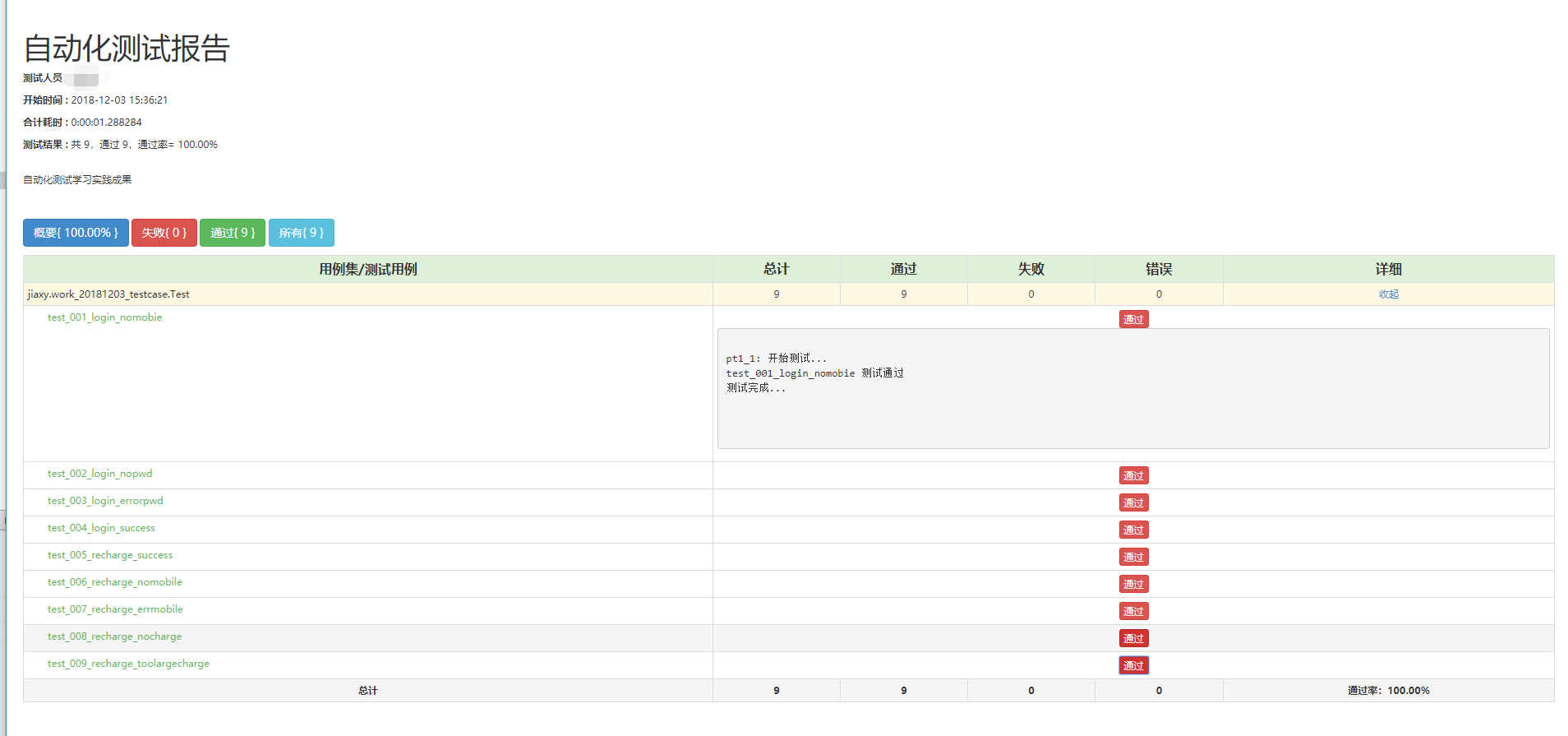
测试报告:
ptyhon - 接口自动化测试实战case1的更多相关文章
- python - 接口自动化测试实战 - case1 - 再次优化版
本次优化: 1. 各级分Package 2. 封装[ReadExcel]类 3. 封装[ReadConfig]类 4. 封装[GetLog]类 5. 引入ddt数据驱动测试,优化测试用例代码 ...
- python - 接口自动化测试实战 - case1 - 优化版
题目: 基于以下两个接口和数据完成接口自动化测试,并生成测试报告: '''登录 login='http://47.107.168.87:8080/futureloan/mvc/api/member/l ...
- 面面俱到的Java接口自动化测试实战
第1章 接口自动化测试整体认知了解什么是接口和为什么要做接口测试.并且知道接口自动化测试应该学习哪些技术以及接口自动化测试的落地过程. 1-1 导学章节 1-2 什么是接口 1-3 为什么要做接口测试 ...
- Python接口自动化测试实战-----附源码
目录 1. 接口定义 2. 基本流程 3. 需求分析 4. 用例设计 5. 脚本开发 6. 结果分析 接口定义: 接口普遍有两种意思,一种是API(Application Program Interf ...
- Java接口自动化测试实战笔记
综述 代码管理工具Git 测试框架 TestNG 测试报告 Mock 接口框架 HTTP 协议接口 测试框架 HttpClient SprintBoot 自动化测试开发 数据持久层框架 MyBatis ...
- 【三】Jmeter接口自动化测试系列之Http接口自动化实战
作者:大虫 本文介绍 Jmeter 工具的 http 接口 自动化测试 实战! 为了通用性,就拿知乎 网站作为实战例子吧! 必备技能:http接口基础知识.抓包,本文不做详细介绍,不会的可以先百度恶补 ...
- 关于《Python自动化测试实战》
作者有话说 笔者写这本书的初心是想通过自身经验分享一些在自动化测试领域中的实用技术,能够帮助那些正在从事自动化测试相关工作或者准备转型自动化测试的测试人员.任何一门技术涵盖的知识点都是非常广泛的,可能 ...
- Python接口自动化测试框架实战 从设计到开发
第1章 课程介绍(不要错过)本章主要讲解课程的详细安排.课程学习要求.课程面向用户等,让大家很直观的对课程有整体认知! 第2章 接口测试工具Fiddler的运用本章重点讲解如何抓app\web的htt ...
- 性能测试学习之路 (四)jmeter 脚本开发实战(JDBC &JMS &接口脚本 & 轻量级接口自动化测试框架)
1.业务级脚本开发 登录脚本->思路:在线程组下新建两个HTTP请求,一个是完成访问登录页,一个是完成登录的数据提交. 步骤如下: 1) 访问登录页 2) 提交登录数据的HTTP PS:对于 ...
随机推荐
- 从typeof()说起
本文也同步发表在我的公众号“我的天空” 首先我们先思考一下,执行下列语句分别会显示什么? alert(typeof(Array)); alert(typeof(Array())); 我们进入正题! 在 ...
- JavaScript是什么
JavaScript是一种解释型语言而不是编译型语言,它往往被认为是一种脚本语言,而不被看作是一种真正的编程语言.也就是说,脚本语言比较简单,它们是非程序员所使用的编程语言. 如果一个程序员对Java ...
- Unity3d通过脚本生成apk
参考链接:http://www.jianshu.com/p/a9261113b4ac 照着链接的方法并没有正确生成APK,IPA没有测试过,不过大致的方法是正确的,修改如下: Environment. ...
- dos 删除文件夹 rd
windows普通方法删除不了文件.文件夹?那么试试dos命令吧. rd的另外一个写法是rmdir,源自ReMakeDirectory.使用的方法也很简单:rd 文件夹名 即可,例如:rd test. ...
- WisdomTool REST Client 下载 测试请求,生成api文档
https://github.com/Wisdom-Projects/rest-client
- linux下杀毒工具clamav
ClamAV 杀毒是Linux平台最受欢迎的杀毒软件,ClamAV属于免费开源产品,支持多种平台,如:Linux/Unix.MAC OS X.Windows.OpenVMS.ClamAV是基于病毒扫描 ...
- uva 10328 - Coin Toss 投硬币(dp递推,大数)
题意:抛出n次硬币(有顺序),求至少k个以上的连续正面的情况的种数. 思路:转换成求抛n个硬币,至多k-1个连续的情况种数,用所有可能出现的情况种数减去至多k-1个的情况,就得到答案了.此题涉及大数加 ...
- (转)在SQL Server 2016,Visual Studio 2017环境下,连接数据库屡屡失败,在connectionString上出的问题
适用情景: 1,ServerVersion出了问题,“SqlCnt.ServerVersion”引发了类型“System.InvalidOperationException”的异常 2,在String ...
- 使用EventLog组件读写事件日志
实现效果: 知识运用: Eventlog类的SourceExists方法 //确定指定的事件源是否已在本地计算机注册 public static bool SourceExists(string s ...
- Ubuntu下命令行访问网站
第一步,需要安装一个名为w3m的软件工具,打开终端,输入如下命令 sudo apt-get install w3m 第二步,安装好w3m之后,在终端里面启动w3m,打开一个网址,比如w3m www ...