
What the 80/20 Rule Tells Us about Reducing HTTP Requests
Performance Research, Part 1: What the 80/20 Rule Tells Us about Reducing HTTP Requests https://yuiblog.com/blog/2006/11/28/performance-research-part-1/
Performance Research, Part 1: What the 80/20 Rule Tells Us about Reducing HTTP Requests

This is the first in a series of articles describing experiments conducted to learn more about optimizing web page performance. You may be wondering why you're reading a performance article on the YUI Blog. It turns out that most of web page performance is affected by front-end engineering, that is, the user interface design and development.
It's no secret that users prefer faster web sites. I work in a dedicated team focused on quantifying and improving the performance of Yahoo! products worldwide. As part of our work, we conduct experiments related to web page performance. We are sharing our findings so that other front-end engineers join us in accelerating the user experience on the web.
The 80/20 Performance Rule
Vilfredo Pareto, an economist in the early 1900s, made a famous observation where 80% of the nation's wealth belonged to 20% of the population. This was later generalized into what's commonly referred to as the Pareto principle (also known as the 80-20 rule), which states for any phenomenon, 80% of the consequences come from 20% of the causes. We see this phenomenon in software engineering where 80% of the time is spent in only 20% of the code. When we optimize our applications, we know to focus on that 20% of the code. This same technique should also be applied when optimizing web pages. Most performance optimization today are made on the parts that generate the HTML document (apache, C++, databases, etc.), but those parts only contribute to about 20% of the user's response time. It's better to focus on optimizing the parts that contribute to the other 80%.
Using a packet sniffer, we discover what takes place in that other 80%. Figure 1 is a graphical view of where the time is spent loading http://www.yahoo.com with an empty cache. Each bar represents a specific component and is shown in the order started by the browser. The first bar is the time spent for the browser to retrieve just the HTML document. Notice only 10% of the time is spent here for the browser to request the HTML page, and for apache to stitch together the HTML and return the response back to the browser. The other 90% of the time is spent fetching other components in the page including images, scripts and stylesheets.
Figure 1. Loading http://www.yahoo.com
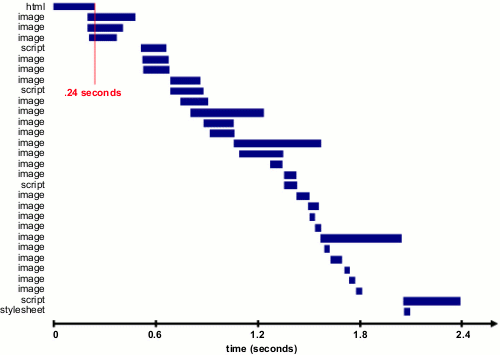
Table 1 shows popular web sites spending between 5% and 38% of the time downloading the HTML document. The other 62% to 95% of the time is spent making HTTP requests to fetch all the components in that HTML document (i.e. images, scripts, and stylesheets). The impact of having many components in the page is exacerbated by the fact that browsers download only two or four components in parallel per hostname, depending on the HTTP version of the response and the user's browser. Our experience shows that reducing the number of HTTP requests has the biggest impact on reducing response time and is often the easiest performance improvement to make.
Table 1. Time spent loading popular web site
Time Retrieving HTML Time Elsewhere
Yahoo! 10% 90%
Google 25% 75%
MySpace 9% 91%
MSN 5% 95%
ebay 5% 95%
Amazon 38% 62%
YouTube 9% 91%
CNN 15% 85%
Note: Times are for page loads with an empty cache over Comcast cable modem (~2.5 mbps).
Shouldn't everything be saved in the browser's cache anyway?
The conclusion is the same: Reducing the number of HTTP requests has the biggest impact on reducing response time and is often the easiest performance improvement to make. In the next article we'll look at the impact of caching, and some surprising real-world findings.
Disclaimer: Design imperatives dictating visual richness need to be weighed against this request-reduction goal. When you need visual richness, additional steps can be taken -- aggregating JS files, using CSS sprites, etc. -- but visual richness does tend to run counter to a slender HTTP request pipeline.
What the 80/20 Rule Tells Us about Reducing HTTP Requests的更多相关文章
- 二八法则(The 80/20 Principle)
二八法则的定义:在任何一组事物中,最重要的只占其中一小部分,约20%,其余80%尽管占多数,却是次要的. 二八法则的例子:社会上20%的人占有80%的社会财富 20%的工厂有80%的产出 80%的利润 ...
- Code Complete阅读笔记(二)
2015-03-06 328 Unusual Data Types ——You can carry this technique to extremes,putting all the ...
- How do I learn mathematics for machine learning?
https://www.quora.com/How-do-I-learn-mathematics-for-machine-learning How do I learn mathematics f ...
- software quality assurance 常见问题收录
1. What is Quality? Quality means, “meeting requirements.” ..Whether or not the product or service d ...
- [SinGuLaRiTy] COCI 2016~2017 #5
[SinGuLaRiTy-1012] Copyright (c) SinGuLaRiTy 2017. All Rights Reserved. 最近神犇喜欢考COCI...... 测试题目 对于所有的 ...
- EOS多节点组网:商业场景分析以及节点启动时序
区块链公链都是基于p2p网络,本篇文章将建立一个多节点不同职责参与的EOS的测试网络,根据路上发现的可做文章的技术点大做文章. 关键字:EOS组网,全节点,交易确认,boot sequence,sta ...
- 【Agile123】Automated Test in Agile
https://www.infoq.com/articles/thoughts-on-test-automation-in-agile Start Small Balance the cost vs. ...
- 从理论到实践,全方位认识DNS
从理论到实践,全方位认识DNS 2015-11-23 程序员之家 作者:selfboot 原文:http://segmentfault.com/a/1190000003956853 对于 DNS(Do ...
- 从理论到实践,全方位认识DNS(理论篇)
对于 DNS(Domain Name System) 大家肯定不陌生,不就是用来将一个网站的域名转换为对应的IP吗.当我们发现可以上QQ但不能浏览网页时,我们会想到可能是域名服务器挂掉了:当我们用别人 ...
随机推荐
- 31深入理解C指针之---指针和字符串
一.字符串与指针 1.定义:使用字符指针表示字符串 2.特征: 1).可以直接使用字符串字面量初始化字符指针 2).声明后,赋值就只能使用字符串操作函数strcpy函数赋值 3).可以使用类似于数组的 ...
- HDU 4912 Paths on the tree(LCA+贪心)
题目链接 Paths on the tree 来源 2014 多校联合训练第5场 Problem B 题意就是给出m条树上的路径,让你求出可以同时选择的互不相交的路径最大数目. 我们先求出每一条路径 ...
- Android Q 兼容那些事
文章微信公众号「AndroidTraveler」首发 5 月 20 号参加了 Android Q Labs,因此本篇说一说会议的部分内容以及自己的一些想法. 会议主要是加深开发者对 Android Q ...
- luogu P1879 [USACO06NOV]玉米田Corn Fields
题目描述 Farmer John has purchased a lush new rectangular pasture composed of M by N (1 ≤ M ≤ 12; 1 ≤ N ...
- linux几种常见的文件内容查找和替换命令
作为一个以前没怎么接触过linux的小白,开始使用linux,各种不习惯,这周遇到一个文件内容测查找和替换的需求.学习了以下几种实现方式: 1.vi命令下的查找和替换 1.1 vi下的查找 /patt ...
- Java基础教程:tutorialspoint-junit
教程: 来自turorialspoint的JUnit教程(英文),官网:https://www.tutorialspoint.com/junit/index.htm 中文版本:http://wiki. ...
- fastdfs-zyc监控系统的使用
原文:http://blog.csdn.net/foreversunshine/article/details/51907659 写在前面 前面有介绍过怎么安装与使用FastDFS来进行分布式的文件存 ...
- Mybatis原理分析一 从JDBC到Mybaits
1.引言 本文主要讲解JDBC怎么演变到Mybatis的渐变过程,重点讲解了为什么要将JDBC封装成Mybaits这样一个持久层框架.再而论述Mybatis作为一个数据持久层框架本身有待改进之处. 2 ...
- asp.net Excel导入&导出
1.Excel数据导入到数据库中: //该方法实现从Excel中导出数据到DataSet中,其中filepath为Excel文件的绝对路径,sheetname为表示那个Excel表: p ...
- [Algorithms] Refactor a Loop in JavaScript to Use Recursion
Recursion is when a function calls itself. This self calling function handles at least two cases, th ...