
在Windows中安装Memcached
Memcached是一个高并发的内存键值对缓存系统,它的主要作用是将数据库查询结果,内容,以及其它一些耗时的计算结果缓存到系统内存中,从而加速Web应用程序的响应速度。
Memcached最开始是作为Linux应用程序被安装在Linux服务器上来使用的,不过自从开源之后,它又被重新编译以适用于Windows环境。Jellycan和Northscale两个站点都提供了Windows的二进制可执行文件下载,下面是下载的地址:
http://code.jellycan.com/files/memcached-1.2.5-win32-bin.zip
http://code.jellycan.com/files/memcached-1.2.6-win32-bin.zip
http://downloads.northscale.com/memcached-win32-1.4.4-14.zip
http://downloads.northscale.com/memcached-win64-1.4.4-14.zip
http://downloads.northscale.com/memcached-1.4.5-x86.zip
http://downloads.northscale.com/memcached-1.4.5-amd64.zip
在1.4.5版本之前,memcached可以被安装成一个服务,但之后的版本中该功能被移除了。因此memcached的安装可以分为两类,第一类是1.4.5之前的版本,另一类是1.4.5之后的版本。
安装memcached < 1.4.5:
1. 将下载的文件解压到任意目录。
2. 1.4.5之前版本的memcached会被安装成一个服务,以administrator打开控制台,运行下面的命令:
c:\memcached\memcached.exe -d install
* 注意将路径c:\memcached\memcached.exe替换成你本地的安装路径。
3. 然后使用下面的命令启动或停止memcached服务:
c:\memcached\memcached.exe -d start

c:\memcached\memcached.exe -d stop
4. 通过注册表键值来修改memcached的配置项。在运行中输入regedit.exe,然后导航到"HKEY_LOCAL_MACHINE\SYSTEM\CurrentControlSet\Services\memcached"。修改其中的键值。例如你想增加memcached所使用的最大内存限制,可以修改ImagePath的值:
"c:\memcached\memcached.exe" -d runservice -m
* 除了参数'-m 512'之外,你还可以使用其它的参数。通过“c:\memcached\memcached.exe -h”可以查看所有能使用的参数。
5. 如果要卸载memcached服务,可以使用下面的命令:
c:\memcached\memcached.exe -d uninstall
安装memcached >= 1.4.5
1. 将下载的文件解压到任意目录。
2. 1.4.5之后版本的memcached不能作为Windows服务来运行,必须使用Windows计划任务来运行它。要将memcached配置成当Windows启动时自动运行,在命令行运行下面的命令:
schtasks /create /sc onstart /tn memcached /tr "'c:\memcached\memcached.exe' -m 512"
* 注意将路径c:\memcached\memcached.exe替换成你本地的安装路径。
** 除了参数'-m 512'之外,你还可以使用其它的参数。通过“c:\memcached\memcached.exe -h”可以查看所有能使用的参数。
3. 通过下面的命令将memcached从Windows计划任务中移除:
schtasks /delete /tn memcached
在PHP中使用memcached
要在PHP中使用memcached,首先需要安装memcache扩展包:
1. 查看你本地的PHP扩展包目录里是否有php_memcache.dll这个文件,如果没有,从https://pecl.php.net/package/memcache下载(选择windows dll文件),然后复制到PHP扩展包目录里。
2. 在php.ini中添加下面的代码以启用memcache扩展包:
extension=php_memcache.dll
3. 创建下面的php示例代码进行测试:
<?php

$memcache = new Memcache;

$memcache->connect('localhost', 11211) or die ("Could not connect");

$version = $memcache->getVersion();

echo "Server's version: ".$version."<br/>\n";

$tmp_object = new stdClass;

$tmp_object->str_attr = 'test';

$tmp_object->int_attr = 123;

$memcache->set('key', $tmp_object, false, 10) or die ("Failed to save data at the server");

echo "Store data in the cache (data will expire in 10 seconds)<br/>\n";

$get_result = $memcache->get('key');

echo "Data from the cache:<br/>\n";

var_dump($get_result);

?>
在Python中使用memcached
要在Python中使用memcached,首先需要安装memcached客户端:
1. 执行下面的命令进行memcached客户端的安装。第一个适用于Python 2.x,第二个适用于Python 3.x。
pip install python-memcached

pip install python3-memcached
2. 创建下面的python示例代码进行测试:
import memcache

mc = memcache.Client(['127.0.0.1:11211'], debug=0)

mc.set("some_key", "Some value")

value = mc.get("some_key")

mc.set("another_key", 3)

mc.delete("another_key")

mc.set("key", "")   # note that the key used for incr/decr must be a string.

mc.incr("key")

mc.decr("key")
在Node.js中使用memcached
在Node.js中可以通过memcached包来使用memcache,Github的地址https://github.com/3rd-Eden/memcached。下面是一段示例代码:
var Memcached = require( 'memcached' );

// connect to our memcached server on host 10.211.55.5, port 11211

var memcached = new Memcached( "10.211.55.5:11211" );

memcached.set( "hello", 1, 10000, function( err, result ){

    if( err ) console.error( err );

    console.dir( result );

    memcached.end(); // as we are 100% certain we are not going to use the connection again, we are going to end it

});

memcached.get( "hello", function( err, result ){

    if( err ) console.error( err );

    console.dir( result );

    memcached.end(); // as we are 100% certain we are not going to use the connection again, we are going to end it

});
更详细的使用方法可以参考Github上的说明。
Memcached的数据统计
要查看memcached的数据统计,可以通过telnet连接到memcached:
telnet 127.0.0.1
* ip地址后面的数字为memcached运行的端口号
** 在Windows 10中telnet组件默认并没有添加,可通过Control Panel > Programs and Features > Turn Windows features on or off来添加。
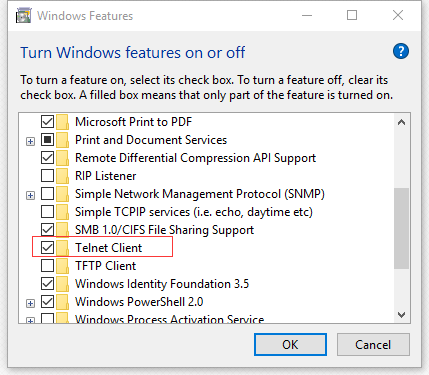
然后使用stats来查看统计信息。下表列出了stats统计结果中各数据项的含义:
| Name | Type | Meaning |
|---|---|---|
| pid | 32u | Process id of this server process |
| uptime | 32u | Number of secs since the server started |
| time | 32u | current UNIX time according to the server |
| version | string | Version string of this server |
| pointer_size | 32 | Default size of pointers on the host OS (generally 32 or 64) |
| rusage_user | 32u.32u | Accumulated user time for this process (seconds:microseconds) |
| rusage_system | 32u.32u | Accumulated system time for this process (seconds:microseconds) |
| curr_items | 32u | Current number of items stored |
| total_items | 32u | Total number of items stored since the server started |
| bytes | 64u | Current number of bytes used to store items |
| curr_connections | 32u | Number of open connections |
| total_connections | 32u | Total number of connections opened since the server started running |
| connection_structures | 32u | Number of connection structures allocated by the server |
| reserved_fds | 32u | Number of misc fds used internally |
| cmd_get | 64u | Cumulative number of retrieval reqs |
| cmd_set | 64u | Cumulative number of storage reqs |
| cmd_flush | 64u | Cumulative number of flush reqs |
| cmd_touch | 64u | Cumulative number of touch reqs |
| get_hits | 64u | Number of keys that have been requested and found present |
| get_misses | 64u | Number of items that have been requested and not found |
| delete_misses | 64u | Number of deletions reqs for missing keys |
| delete_hits | 64u | Number of deletion reqs resulting in an item being removed. |
| incr_misses | 64u | Number of incr reqs against missing keys. |
| incr_hits | 64u | Number of successful incr reqs. |
| decr_misses | 64u | Number of decr reqs against missing keys. |
| decr_hits | 64u | Number of successful decr reqs. |
| cas_misses | 64u | Number of CAS reqs against missing keys. |
| cas_hits | 64u | Number of successful CAS reqs. |
| cas_badval | 64u | Number of CAS reqs for which a key was found, but the CAS value did not match. |
| touch_hits | 64u | Numer of keys that have been touched with a new expiration time |
| touch_misses | 64u | Numer of items that have been touched and not found |
| auth_cmds | 64u | Number of authentication commands handled, success or failure. |
| auth_errors | 64u | Number of failed authentications. |
| evictions | 64u | Number of valid items removed from cache to free memory for new items |
| reclaimed | 64u | Number of times an entry was stored using memory from an expired entry |
| bytes_read | 64u | Total number of bytes read by this server from network |
| bytes_written | 64u | Total number of bytes sent by this server to network |
| limit_maxbytes | 32u | Number of bytes this server is allowed to use for storage. |
| threads | 32u | Number of worker threads requested. (see doc/threads.txt) |
| conn_yields | 64u | Number of times any connection yielded to another due to hitting the -R limit. |
| hash_power_level | 32u | Current size multiplier for hash table |
| hash_bytes | 64u | Bytes currently used by hash tables |
| hash_is_expanding | bool | Indicates if the hash table is being grown to a new size |
| expired_unfetched | 64u | Items pulled from LRU that were never touched by get/incr/append/etc before expiring |
| evicted_unfetched | 64u | Items evicted from LRU that were never touched by get/incr/append/etc. |
| slab_reassign_running | bool | If a slab page is being moved |
| slabs_moved | 64u | Total slab pages moved |
| crawler_reclaimed | 64u | Total items freed by LRU Crawler |
| lrutail_reflocked | 64u | Times LRU tail was found with active ref. Items moved to head to avoid OOM errors. |
更详细的内容可以查看这里:https://github.com/memcached/memcached/blob/master/doc/protocol.txt
另外,有关Memcached的常用命令及使用说明也可以参考这篇文章:http://www.cnblogs.com/jeffwongishandsome/archive/2011/11/06/2238265.html
在Windows中安装Memcached的更多相关文章
- [转]在Windows中安装Memcached
Memcached是一个高并发的内存键值对缓存系统,它的主要作用是将数据库查询结果,内容,以及其它一些耗时的计算结果缓存到系统内存中,从而加速Web应用程序的响应速度. Memcached最开始是作为 ...
- Windows 下安装 Memcached
Windows 下安装 Memcached 官网上并未提供 Memcached 的 Windows 平台安装包,我们可以使用以下链接来下载,你需要根据自己的系统平台及需要的版本号点击对应的链接下载即可 ...
- 怎样把windows中安装的程序列出来?
症状/问题我怎样把windows中安装的程序信息输出到一个文本文件中?解决方法使用 windows 操作系统中的命令:wmic就可以做到.下面的命令就可以把系统中安装的程序都输出到文件ProgramL ...
- windows中安装python
windows中安装python 在windows中安装python的步骤如下. 1.下载python的安装包 python的安装包地址为: https://www.python.org/ftp/py ...
- 在Windows中安装PostgreSQL
在Windows中安装PostgreSQL 虽然PostgreSQL是为类UNIX平台开发的,但它却是可以移植的.从7.1版本开始,PostgreSQL可以编译安装和作为一个PostgreSQL服务器 ...
- Windows中安装Scrapy
在linux中安装Scrapy只需要导入一些非python的支持包,在windows中安装Scrapy则是一波三折. 总之来说,主要分为以下几个步骤,可能由于系统问题(国内个人机子,甚至是小企业的机子 ...
- 在Windows中安装MinGW-w64(有图,一步一步)
在Windows中安装MinGW-w64 发表回复 如需配合Sublime Text 3编译C程序, 请参考本站文章: 使用Sublime Text 3与MinGW-w64编译C语言程序 MinGW, ...
- 下载文件时-修改文件名字 Redis在Windows中安装方法 SVN安装和使用(简单版) WinForm-SQL查询避免UI卡死 Asp.Net MVC Https设置
下载文件时-修改文件名字 1后台代码 /// <summary> /// 文件下载2 /// </summary> /// <param name="Fil ...
- Python原来这么好学-1.1节: 在windows中安装Python
这是一本教同学们彻底学通Python的高质量学习教程,认真地学习每一章节的内容,每天只需学好一节,帮助你成为一名卓越的Python程序员: 本教程面向的是零编程基础的同学,非科班人士,以及有一定编程水 ...
随机推荐
- z-stack组网过程
z-stack组网分:协调器建立网络.路由器和终端加入网络 暂时只记录第一次上电建立网络的过程,至于开启NV_RESTORE后,恢复原有的网络则暂时不分析. 一.协调器建立网络: 1.ZDO层的ZDA ...
- 一场IT民工 与 人贩子 之间的战争 - 感受来自PostgreSQL的爱
标签 PostgreSQL , 图数据库 , 社会关系分析 , 流式分析 , 人贩子 , 图像识别 , 人脸识别 , 公安刑侦 , pipelinedb , stream , neo4j , plpr ...
- 转:WaitForSingleObject()函数、WaitForMultipleObject()函数
http://blog.csdn.net/xiaobai1593/article/details/6672193 在多线程下面,有时候我们会希望等待某一线程完成了再继续做其他事情,要实现这个目的,可以 ...
- CI框架使用PHPmail插件发送QQ邮件:
有助请顶,不好请评.0:33 2016/3/12CI框架使用PHPmail插件发送QQ邮件:发送成功,不过修改了主机参数,还包含了一个phpmail中的一个另外的文件,详见下方:参见:http://c ...
- 【JAVA】Socket 编程
对于Java Socket编程而言,有两个概念,一个是ServerSocket,一个是Socket.服务端和客户端之间通过Socket建立连接,之后它们就可以进行通信了.首先ServerSocket将 ...
- ASIHTTPRequest取消异步请求
今天碰到一个问题 异步请求等待中 cancel后会发生什么,网上找了下资料说取消的请求默认都会按请求失败处理,并调用请求失败delegate 查找到的资料具体解释了下ASIHTTPRequest取消异 ...
- web前端面试题汇总
1.doctype作用 <!DOCTYPE>声明位于位于HTML文档中的第一行,处于 <html> 标签之前.告知浏览器的解析器用什么文档标准解析这个文档.DOCTYPE不存在 ...
- 安装WampServer时出现的问题(丢失VCRUNTIME140.dll或MSVCR110.dll)以及解决办法
今天,在安装WampServer时,刚开始提示了"丢失VCRUNTIME140.dll"的问题. 我就网上查了一下,结果大家说是没有安装VC++,然后我就按照网友们提供的网址去下载 ...
- python中非关键字可变长参数和关键字变量参数的区别
#非关键字可变长参数 def add(*arg): return type(arg) print add() #打印结果 <type 'tuple'> #关键字变量参数 def ab ...
- About kaychen
关于我 现武汉科技大学,大二学生.互联网前端技术爱好者,未来想从事前端开发工作.进入前端开发领域之前,作为创始人之一,创建了武汉江城时空电子商务有限责任公司.目前在海投网前端开发小组实习.热爱互联网行 ...