
Vue父子组件间的通信
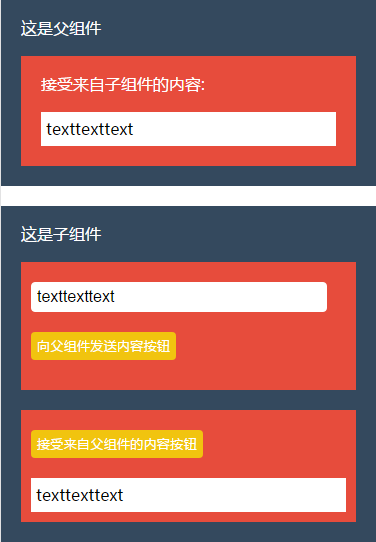
父组件通过 props 向下传递数据给子组件,子组件通过 events 向上给父组件发送消息。
父组件:

<div>

    <div style="background:#34495E;color: #fff; padding:20px">

      <p style="margin-bottom: 20px">这是父组件</p>

      <div style="background:#E74C3C;color: #fff; padding:20px; margin-top:20px">

        <p>接受来自子组件的内容: </p>

        <p style="margin-top:20px;background:#fff; color:#000; padding:5px; line-height:1.5;">{{hello}}</p>

      </div>

    </div>

    <div style="background:#34495E;color: #fff; padding:20px; margin-top:20px">

      <p style="margin-bottom: 20px">这是子组件</p>

      <musicsearch @trans="transContent" :pupu="hello" :info="info"></musicsearch>

    </div>

  </div>

export default {

  components: {

    musicsearch

  },

  data() {

    return {

      hello: '',

      info: ''

    }

  },

  methods: {

    transContent(msgs) {

      this.hello = msgs;

      this.info = msgs;

    }

  }

}
子组件:

<div>

    <div style="margin-top:20px; background:#E74C3C; padding:10px;">

      <input type="text" ref="ipt" style="border:none; margin-top:10px; margin-bottom: 20px; border-radius:4px; width:90%; height:18px; padding:5px; line-height:18px; border:1px solid #fff">

      <button @click="sendVal()" style="margin-bottom: 20px; border:none; outline:none; border-radius:4px; height:28px; line-height:28px; background:#F1C40F; color:#fff;">向父组件发送内容按钮</button>

    </div>

    <div style="margin-top:20px; background:#E74C3C; padding:10px;">

      <button @click="click()" style=" margin-top:10px; border:none; outline:none; border-radius:4px; height:28px; line-height:28px; background:#F1C40F; color:#fff;">接受来自父组件的内容按钮</button>

      <div style="margin-top:20px;background:#fff; color:#000; padding:5px; line-height:1.5;">{{msg}}</div>

    </div>

  </div>

export default {

  name: 'girl-group',

  props: {

    info: ''

  },

  data() {

    return {

      msg: ''

    }

  },

  methods: {

    sendVal() {

      this.$emit('trans', this.$refs.ipt.value);

    //这里在父组件使用v-on来监听子组件上的自定义事件($emit的变化),一旦发生变化click方法里的值就会跟着改变,调用click事件可看到信息

    },

    click() {

      this.msg = this.info;

    }

  }

}
Vue父子组件间的通信的更多相关文章
- Vue 父子组件间的通信
前言 在 Vue 项目中父子组件的通信是非常常见的,最近做项目的时候发现对这方面的知识还不怎么熟练,在这边做一下笔记,系统学习一下吧. 1 父组件传值给子组件 1.1 传值写法 父组件传值给子组件,这 ...
- 第四节:Vue表单标签和组件的基本用法,父子组件间的通信
vue表单标签和组件的基本用法,父子组件间的通信,直接看例子吧. <!DOCTYPE html> <html> <head> <meta charset=&q ...
- vue组件定义方式,vue父子组件间的传值
vue组件定义方式,vue父子组件间的传值 <!DOCTYPE html> <html lang="zh-cn"> <head> <met ...
- 【转】vue父子组件之间的通信
vue父子组件之间的通信 在vue组件通信中其中最常见通信方式就是父子组件之中的通性,而父子组件的设定方式在不同情况下又各有不同.最常见的就是父组件为控制组件子组件为视图组件.父组件传递数据给子组件使 ...
- React中父子组件间的通信问题
1.https://blog.csdn.net/sinat_17775997/article/details/59103173 (React中父子组件间的通信问题)
- vue:父子组件间通信,父组件调用子组件方法进行校验子组件的表单
参考: ElementUI多个子组件表单的校验管理:https://www.jianshu.com/p/541d8b18cf95 Vue 子组件调用父组件方法总结:https://juejin.im/ ...
- vue父子组件之间的通信
利用props在子组件接受父组件传过来的值1.父组件parentComp.vue <template> <childComp :fromParentToChild="fro ...
- vue -- 父子组件间的事件触发
1.父组件触发子组件事件 Parent.vue <child ref="child"></child> <div @click="fn&qu ...
- vue——父子组件间传值
(1)父组件给子组件传值(商品详情页): 根据订单类型,判断显示立即购买/立即拼单: 通过props来传递参数 父组件(商品详情页) 父组件调用子组件,在子组件的标签中,通过:数据名称=”数据”的形式 ...
随机推荐
- pycharm的todo和fixme标记,标志为今后再做和bug点
使用方法,及查看方法: https://blog.csdn.net/xiemanR/article/details/73368440
- 数组全排列 knuth 分解质因数
template<typename T> void swap(T* a, T* b) { T temp = *a; *a = *b; *b = temp; } //数组的全排列 void ...
- vue 给组件绑定原生事件
有时候,你可能想在某个组件的根元素上监听一个原生事件.可以使用 v-on 的修饰符 .native.例如: <my-component v-on:click.native="doThe ...
- C++11中的原子操作(atomic operation)(转)
所谓的原子操作,取的就是“原子是最小的.不可分割的最小个体”的意义,它表示在多个线程访问同一个全局资源的时候,能够确保所有其他的线程都不在同一时间内访问相同的资源.也就是他确保了在同一时刻只有唯一的线 ...
- 解读Unity中的CG编写Shader系列1——初识CG
CG=C for Graphics 用于计算机图形编程的C语言超集 前提知识点: 1.CG代码必须用 CGPROGRAM ... ENDCG括起来 2.顶点着色器与片段着色器的主函数名称可任意,但须 ...
- Ubuntu下安装libsvm
在安装LibSVM前需要先装 python 和 gnuplot linux 一般都自带了python2.7,所以python的安装不再赘述 在 ubuntu 下安装 gnuplot 不能直接 sudo ...
- VC++的project文件
VC++的project文件说明: *.dsp:是VC++的项目文件,文本格式. *.dsw:是工作区文件,它能够指向一个或多个.dsp文件. *.clw:是 ClassWizard信息文件,实际上是 ...
- 【Spark Core】TaskScheduler源代码与任务提交原理浅析2
引言 上一节<TaskScheduler源代码与任务提交原理浅析1>介绍了TaskScheduler的创建过程,在这一节中,我将承接<Stage生成和Stage源代码浅析>中的 ...
- 小printf的故事:什么是真正的程序员?
http://kb.cnblogs.com/page/570194/ 作者: 削微寒 来源: 博客园 发布时间: 2017-06-06 10:03 阅读: 33004 次 推荐: 98 原 ...
- 数据仓库建模与ETL的实践技巧(转载)
一.Data仓库的架构 Data仓库(Data Warehouse DW)是为了便于多维分析和多角度展现而将Data按特定的模式进行存储所建立起来的关系型Datcbase,它的Data基于OLTP源S ...