
Grafana安装配置介绍
一、Grafana介绍
Grafana是一个可视化面板(Dashboard),有着非常漂亮的图表和布局展示,功能齐全的度量仪表盘和图形编辑器,支持Graphite、zabbix、InfluxDB、Prometheus和OpenTSDB作为数据源。Grafana主要特性:灵活丰富的图形化选项;可以混合多种风格;支持白天和夜间模式;多个数据源。
二、安装Grafana
CentOS系列使用YUM安装
|
1
2
|
$ wget https://s3-us-west-2.amazonaws.com/grafana-releases/release/grafana-4.2.0-1.x86_64.rpm
$ sudo yum localinstall grafana-4.2.0-1.x86_64.rpm
|
或者
|
1
2
|
$ yum install initscripts fontconfig
$ rpm -Uvh grafana-3.1.1-1470047149.x86_64.rpm
|
安装文件
|
1
2
3
4
5
6
7
8
9
10
11
12
13
14
15
16
17
18
19
20
|
# 二进制程序文件
/usr/sbin/grafana-server
# init.d脚本
/etc/init.d/grafana-server
# 安装默认环境变量文件
/etc/sysconfig/grafana-server
# 配置文件
/etc/grafana/grafana.ini
# systemd服务名称
grafana-server.service
# 日志文件
/var/log/grafana/grafana.log
# 默认sqlite3数据库
/var/lib/grafana/grafana.db
|
Sysv方式启动Grafana
|
1
2
|
$ service grafana-server start
$ chkconfig --add grafana-server
|
Systemd方式启动Grafana
|
1
2
3
|
$ systemctl daemon-reload
$ systemctl start grafana-server
$ systemctl status grafana-server
|
启动Granfa之后,进程名称为grafana-server。将会默认使用grafana用户和组运行Granfa进程。默认会开启HTTP的3000端口。启动服务之后直接直接在浏览器访问http://IP:3000就会出现如下界面,默认账号和用户名为admin/admin,在/etc/grafana/grafana.ini配置文件中可修改。
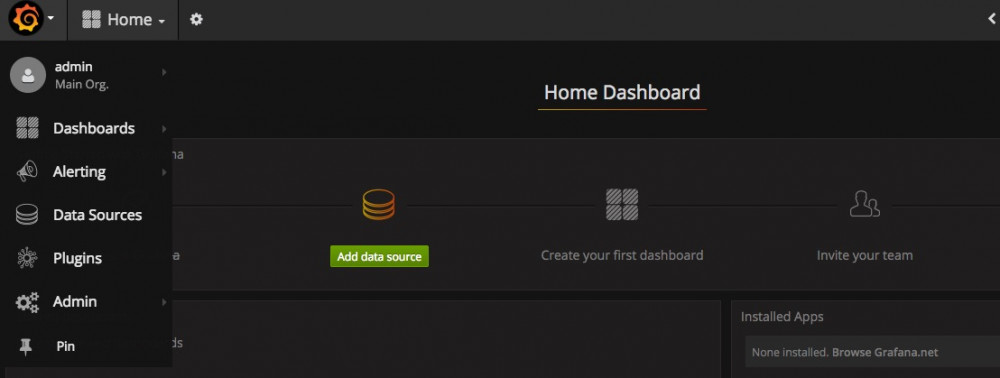
在/usr/share/grafana/public/app/plugins/datasource/目录下存放着Grafana默认支持的数据源,有如下数据源。
|
1
2
3
4
5
6
7
8
9
10
|
[root@localhost ~]# ll /usr/share/grafana/public/app/plugins/datasource/
drwxr-xr-x. 5 root root 4096 Aug 26 15:16 cloudwatch
drwxr-xr-x. 5 root root 4096 Aug 26 15:16 elasticsearch
drwxr-xr-x. 3 root root 4096 Aug 26 15:16 grafana
drwxr-xr-x. 3 root root 4096 Aug 26 15:16 grafana-live
drwxr-xr-x. 6 root root 4096 Aug 26 15:16 graphite
drwxr-xr-x. 5 root root 4096 Aug 26 15:16 influxdb
drwxr-xr-x. 2 root root 4096 Aug 26 15:16 mixed
drwxr-xr-x. 5 root root 4096 Aug 26 15:16 opentsdb
drwxr-xr-x. 6 root root 4096 Aug 26 15:16 prometheus
|
当Grafana安装完成后,就可以着手为Grafana添加数据源了,比如以Graphite和zabbix为数据源,或者以Elasticsearch为数据源都可以。具体如何添加数据源Grafana官网有详细说明
http://docs.grafana.org/datasources/overview/
后面我也会给出几个数据源具体添加过程作为参考。
三、Grafana插件安装
Grafana官网提供了很多类型的插件,能够帮助我们完成一些其他的任务,使用grafana-cli工具安装即可。如下:
安装Panel类型,以Clock为例
|
1
|
$grafana-cli plugins install grafana-clock-panel
|
安装apps类型,以Worldping为例
|
1
|
$ grafana-cli plugins install raintank-worldping-app
|
安装Data source类型,以SimpleJson为例
|
1
|
$ grafana-cli plugins install grafana-simple-json-datasource
|
安装完成,提示重启grafana服务
|
1
|
$ /etc/init.d/grafana-server restart
|
插件使用及仪表板模板导入,Worldping使用展示。
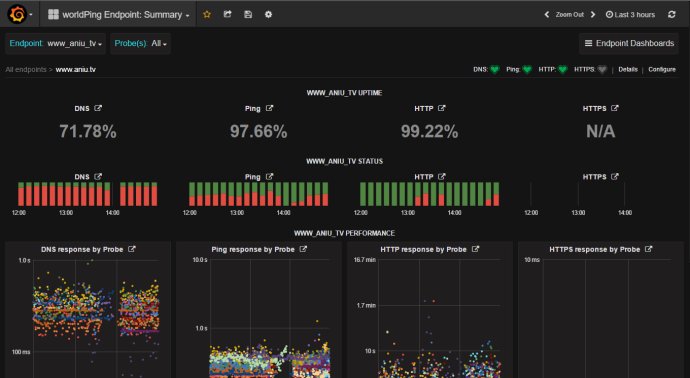
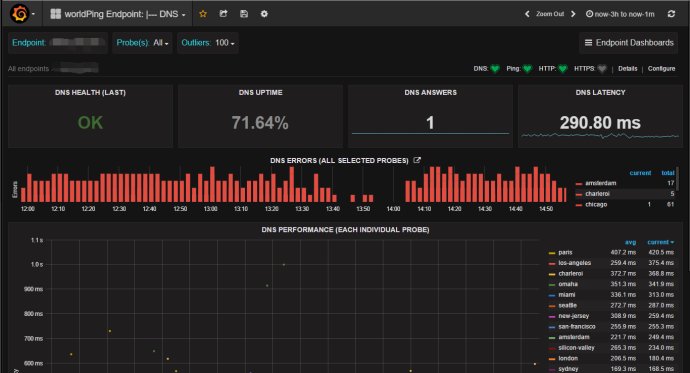
更多插件的使用自己摸索。
列出插件
|
1
|
$ grafana-cli plugins ls
|
更新插件
|
1
|
$ grafana-cli plugins update <plugin-id>
|
移除插件
|
1
|
$ grafana-cli plugins remove <plugin-id>
|
完结。。。
摘自 http://www.ywnds.com/?p=5903
关于grafana 的文章还有 https://yq.aliyun.com/articles/227006 《5分钟搭建网站实时分析:Grafana+日志服务实战》
Grafana安装配置介绍的更多相关文章
- grafana 安装配置
Grafana安装配置 1.下载安装包 wget https://s3-us-west-2.amazonaws.com/grafana-releases/release/grafana-5.1.3.l ...
- Prometheus(一):Prometheus+Grafana 安装配置
一.基础环境 系统 IP 监控主机 CentOS 7 192.168.56.200 被监控主机 CentOS 7 192.168.56.201 二.Prometheus服务端安装 以下操作皆在监控主机 ...
- Jmeter+ InfluxDB+Grafana安装配置
前置条件: 系统:windows jmeter:5.1 InfluxDB安装 下载InfluxDB-v1.7.9和Chronograf-v1.7.14(InfluxDB的可视化web端). 下载完成之 ...
- Grafana是一个可视化面板-安装配置介绍
Grafana是一个可视化面板(Dashboard),有着非常漂亮的图表和布局展示,功能齐全的度量仪表盘和图形编辑器,支持Graphite.zabbix.InfluxDB.Prometheus和Ope ...
- Node.js 安装配置介绍
Node.js 安装配置 本章节我们将向大家介绍在window和Linux上安装Node.js的方法. 本安装教程以Node.js v6.10.1 LTS(长期支持版本)版本为例. Node.js安装 ...
- influxDB+grafana安装配置及邮件告警发送配置
1. InfluxDB安装 下载包并解压: $:wgethttps://dl.influxdata.com/influxdb/releases/influxdb-1.3.6_linux_amd64.t ...
- NodeJS学习(1)--- 安装配置介绍
Node.js 安装配置 本章节我们将向大家介绍在window和Linux上安装Node.js的方法. 本安装教程以Node.js v6.10.1 LTS(长期支持版本)版本为例. Node.js安装 ...
- Nginx安装配置介绍(二)
一:Nginx安装(Windows) 官网地址:https://nginx.org/en/download.html 解压完成后,文件目录如下: 启动Nginx: 直接双击目录下的nginx.exe, ...
- 转:Redis 的安装配置介绍
redis 是一个高性能的key-value数据库. redis的出现,很大程度补偿了memcached这类keyvalue存储的不足,在部 分场合可以对关系数据库起到很好的补充作用.它提供了Pyth ...
随机推荐
- WijmoJS 全面支持 Angular 7
概述 首先恭喜Angular团队发布Angular 7.0.0版本! 对于大多数开发人员,只需要执行一个命令就可以更新到Angular 7: ng update \@angular/cli \@ang ...
- BaseEditor
using UnityEngine;using System.Collections.Generic;using UnityEditor;using System.Text;using System. ...
- Xshell5中常用linux服务器命令集合
简易版:http://www.zhimengzhe.com/linux/84546.html 详细版:http://www.cnblogs.com/peida/tag/%E6%AF%8F%E6%97% ...
- webpack优化记录
什么是Webpack . ( 模块打包机,分析项目结构,找到js不能识别的代码语言,转换和打包后,供browser使用 ) WebPack可以看做是模块打包机:它做的事情是,分析你的项目结构,找到 ...
- 力扣(LeetCode)415. 字符串相加
给定两个字符串形式的非负整数 num1 和num2 ,计算它们的和. 注意: num1 和num2 的长度都小于 5100. num1 和num2 都只包含数字 0-9. num1 和num2 都不包 ...
- MySQL学习(二)
1 增删改查是针对表来说的. 2 创建一个表 mysql> create table stu( -> id int primary key auto_increment, -> sn ...
- 日志log4cxx 封装、实例讲解、配置文件log4cxx.properties
日志log4cxx 封装.实例讲解.配置文件log4cxx.properties 1. 日志作用 程序运行过程中,需要记录程序中的运行状况,方便排查问题,记录数据.可以根据日志的记录快速定位错误发生的 ...
- Codeforces 1016 E - Rest In The Shades
E - Rest In The Shades 思路: 相似 红色的长度等于(y - s) / y 倍的 A' 和 B' 之间的 fence的长度 A' 是 p 和 A 连线和 x 轴交点, B'同理 ...
- Python pip 常用命令
使用了这么就pip命令,但是一直是简单使用,很多命令都是用了查,查了用,今天把常用的命令汇总一下,方便使用. 命令: pip 由上图可以看到 pip 支持一下命令 Commands: install ...
- Python数据分析-Day1-Numpy模块
1.numpy.genfromtxt读取txt文件 import numpyworld_alcohol = numpy.genfromtxt("world_alcohol.txt" ...