
GUI相应鼠标事件
 function varargout = GUI18(varargin)

 % GUI18 MATLAB code for GUI18.fig

 %      GUI18, by itself, creates a new GUI18 or raises the existing

 %      singleton*.

 %

 %      H = GUI18 returns the handle to a new GUI18 or the handle to

 %      the existing singleton*.

 %

 %      GUI18('CALLBACK',hObject,eventData,handles,...) calls the local

 %      function named CALLBACK in GUI18.M with the given input arguments.

 %

 %      GUI18('Property','Value',...) creates a new GUI18 or raises the

 %      existing singleton*.  Starting from the left, property value pairs are

 %      applied to the GUI before GUI18_OpeningFcn gets called.  An

 %      unrecognized property name or invalid value makes property application

 %      stop.  All inputs are passed to GUI18_OpeningFcn via varargin.

 %

 %      *See GUI Options on GUIDE's Tools menu.  Choose "GUI allows only one

 %      instance to run (singleton)".

 %

 % See also: GUIDE, GUIDATA, GUIHANDLES

 % Edit the above text to modify the response to help GUI18

 % Last Modified by GUIDE v2. -Jan- ::

 % Begin initialization code - DO NOT EDIT

 gui_Singleton = ;

 gui_State = struct('gui_Name',       mfilename, ...

                    'gui_Singleton',  gui_Singleton, ...

                    'gui_OpeningFcn', @GUI18_OpeningFcn, ...

                    'gui_OutputFcn',  @GUI18_OutputFcn, ...

                    'gui_LayoutFcn',  [] , ...

                    'gui_Callback',   []);

 if nargin && ischar(varargin{})

     gui_State.gui_Callback = str2func(varargin{});

 end

 if nargout

     [varargout{:nargout}] = gui_mainfcn(gui_State, varargin{:});

 else

     gui_mainfcn(gui_State, varargin{:});

 end

 % End initialization code - DO NOT EDIT

 % --- Executes just before GUI18 is made visible.

 function GUI18_OpeningFcn(hObject, eventdata, handles, varargin)

 % This function has no output args, see OutputFcn.

 % hObject    handle to figure

 % eventdata  reserved - to be defined in a future version of MATLAB

 % handles    structure with handles and user data (see GUIDATA)

 % varargin   command line arguments to GUI18 (see VARARGIN)

 % Choose default command line output for GUI18

 handles.output = hObject;

 global ButtonDown pos1;

 ButtonDown = [];

 pos1 = [];

 % Update handles structure

 guidata(hObject, handles);

 % UIWAIT makes GUI18 wait for user response (see UIRESUME)

 % uiwait(handles.figure1);

 % --- Outputs from this function are returned to the command line.

 function varargout = GUI18_OutputFcn(hObject, eventdata, handles)

 % varargout  cell array for returning output args (see VARARGOUT);

 % hObject    handle to figure

 % eventdata  reserved - to be defined in a future version of MATLAB

 % handles    structure with handles and user data (see GUIDATA)

 global ButtonDown pos1;

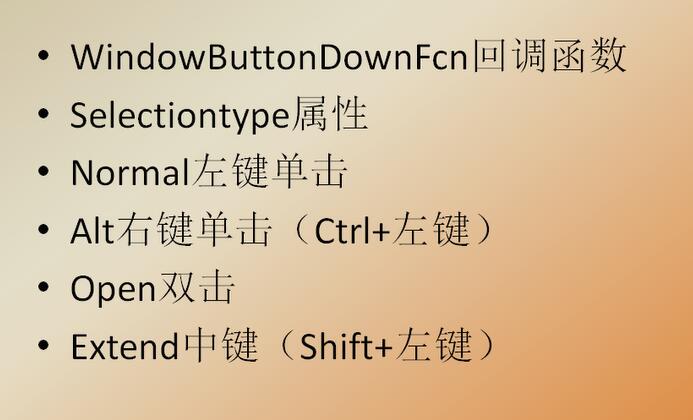
 if strcmp(get(gcf,'SelectionType'),'normal')

     ButtonDown = ;

     pos1 = get (handles.axes1,'CurrentPoint');

 end

 % Get default command line output from handles structure

 varargout{} = handles.output;

 % --- Executes on mouse motion over figure - except title and menu.

 function figure1_WindowButtonMotionFcn(hObject, eventdata, handles)

 % hObject    handle to figure1 (see GCBO)

 % eventdata  reserved - to be defined in a future version of MATLAB

 % handles    structure with handles and user data (see GUIDATA)

 global ButtonDown pos1

 if ButtonDown ==

     pos = get (handles.axes1,'CurrentPoint');

     line([pos1(,) pos(,)],[pos1(,) pos(,)],'LineWidth',);

     pos1=pos;

 end

 % --- Executes on key release with focus on figure1 or any of its controls.

 function figure1_WindowKeyReleaseFcn(hObject, eventdata, handles)

 % hObject    handle to figure1 (see GCBO)

 % eventdata  structure with the following fields (see MATLAB.UI.FIGURE)

 %    Key: name of the key that was released, in lower case

 %    Character: character interpretation of the key(s) that was released

 %    Modifier: name(s) of the modifier key(s) (i.e., control, shift) released

 % handles    structure with handles and user data (see GUIDATA)

 % --- Executes on mouse press over figure background, over a disabled or

 % --- inactive control, or over an axes background.

 function figure1_WindowButtonUpFcn(hObject, eventdata, handles)

 % hObject    handle to figure1 (see GCBO)

 % eventdata  reserved - to be defined in a future version of MATLAB

 % handles    structure with handles and user data (see GUIDATA)

 global ButtonDown

 ButtonDown =  ;
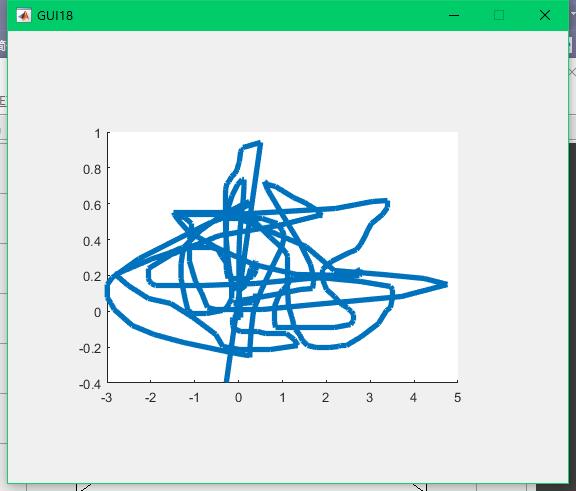
画线:
GUI相应鼠标事件的更多相关文章
- 7.JAVA之GUI编程鼠标事件
鼠标事件: 功能: 1.基本窗体功能实现 2.鼠标移动监听,当鼠标移动到按钮上时,触发打印事件. 3.按钮活动监听,当按钮活动时,触发打印事件. 4.按钮被单击时触发打印事件. 源码如下: impor ...
- [javaSE] GUI(鼠标事件)
调用Button对象的addMouseListener方法,参数:MouseListener对象,这个类是个接口,需要实现以下方法 mouseClicked mousePressed mouseRel ...
- 6.JAVA之GUI编程Action事件
功能:单击一个按钮实现关闭窗口: import java.awt.*; import java.awt.event.*; public class StudyAction { // 定义该图形所需的组 ...
- JAVA之旅(三十一)——JAVA的图形化界面,GUI布局,Frame,GUI事件监听机制,Action事件,鼠标事件
JAVA之旅(三十一)--JAVA的图形化界面,GUI布局,Frame,GUI事件监听机制,Action事件,鼠标事件 有段时间没有更新JAVA了,我们今天来说一下JAVA中的图形化界面,也就是GUI ...
- 十. 图形界面(GUI)设计13.鼠标事件
鼠标事件的事件源往往与容器相关,当鼠标进入容器.离开容器,或者在容器中单击鼠标.拖动鼠标时都会发生鼠标事件.java语言为处理鼠标事件提供两个接口:MouseListener,MouseMotionL ...
- Java GUI 鼠标事件
import java.awt.Button; import java.awt.FlowLayout; import java.awt.Frame; import java.awt.event.Mou ...
- Unity3D笔记十六 输入输出-键盘事件、鼠标事件
输入与控制操作Unity为开发者提供了Input类库,其中包括键盘事件.鼠标事件和触摸事件等一切跨平台所需要的控制事件. 一.键盘事件 1.按下事件 Input.GetKeyDown():如果按键被按 ...
- MATLAB鼠标事件
来源:https://blog.csdn.net/weixin_39090239/article/details/80586930 前记: 人机交互的方式--键盘开关.鼠标.触摸屏.体感传感器(Kin ...
- 5.JAVA之GUI编程窗体事件
我们回顾下第三篇时的内容: 在3.JAVA之GUI编程Frame窗口中窗体是无法直接关闭的,想要关闭须进程管理器结束进程方式关掉. 现在我们就来解决下这个问题. ******************* ...
随机推荐
- 查看Centos内存使用情况linux命令
我们在使用centos版linux服务器的过程中,有时会出现卡顿的情况,这时我们可以通过查看一下内存的使用来判断发生了什么情况,那么如何查看centos内容使用情况呢?有几个方法可以尝试,跟着ytka ...
- 时间序列分析工具箱——sweep
版权声明:本文为博主原创文章,未经博主同意不得转载. https://blog.csdn.net/kMD8d5R/article/details/81977856 作者:徐瑞龙.量化分析师,R语言中文 ...
- 经典的js返回(退个页面)
<a href="javascript:history.back()">返回</a> <a href="javascript:window. ...
- Go包管理工具Vendor使用
一.Go包管理工具Vendor 一.使用步骤 1.首先,从go get -u github.com/kardianos/govendor下载govendor工具到本地. 2.govendor使用时,必 ...
- (转)Springboot日志配置(超详细,推荐)
Spring Boot-日志配置(超详细) 更新日志: 20170810 更新通过 application.yml传递参数到 logback 中. Spring Boot-日志配置超详细 默认日志 L ...
- 【Java】-NO.16.EBook.4.Java.1.001-【疯狂Java讲义第3版 李刚】- UML
1.0.0 Summary Tittle:[Java]-NO.16.EBook.4.Java.1.001-[疯狂Java讲义第3版 李刚]- Style:EBook Series:Java Since ...
- git 冲突解决办法
1. Pull is not possible because you have unmerged files. 症状:pull的时候 $ git pull Pull is not possible ...
- 机器人meta标签和X-Robots-Tag HTTP标头规格
抽象 本文档详细介绍了页级索引设置如何让您控制Google如何通过搜索结果提供内容.您可以通过在(X)HTML页面或HTTP标头中包含元标记来指定这些标记. 笔记 请注意,只有当抓取工具被允许访问包含 ...
- 家庭记账本之Github账号注册与安装(二)
好多程序猿都在使用github用来存放自己的代码:但是如果仅仅用github的web版本的话:有一些功能还是需要使用git客户端工具才能操作的: 那么今天将指导大家如何安装GitHub for win ...
- IdentityServer4:IdentityServer4+API+Client+User实践OAuth2.0密码模式(2)
一.密码模式实操 仍然使用第一节的代码:做如下改动: 1.授权服务端 前面我们使用项目:Practice.IdentityServer作为授权服务器 修改项目的Config.cs类: 添加测试用户,并 ...