
Html to Pdf 的另类解决方案
Background
项目里要求将一个HTML页面(支付结果)生成pdf文档。页面有图片,有表格,貌似开源的iTextSharp应付不了.
在一番搜索之后,找到了wkhtmltopdf,一个命令行的开源转换工具,支持指定url或本地html file的路径,试用后效果不错,还特意用wkhtmltopdf写了一个工具将博客园的帖子备份pdf到本地,后续有空把这个工具分享出来
But,发给客户测试两天运行效果不太理想,出现一些未知错误,而且奇怪的是在测试环境没问题,正式环境却频繁出错。最后客户放弃这个方案
附上 WkhtmlToXSharp C# wrapper wrapper (using P/Invoke) for the excelent Html to PDF conversion library wkhtmltopdf library.
OK,来到正题,另类的解决方案:Hook
调用IE打印功能,使用XPS打印机,先将HTML文件生成xps文档,再生成pdf
新建WinForm 项目,拖入WebBrowser控件,代码指定Url到本地html文件路径,等待文档加载完成后 WebBrowser.Print(); OK,运行,会弹出选择打印机的对话框,如图一。点击打印后,弹出另存为的对话框,输入xps路径后保存(图二),即可得到一份xps文档。
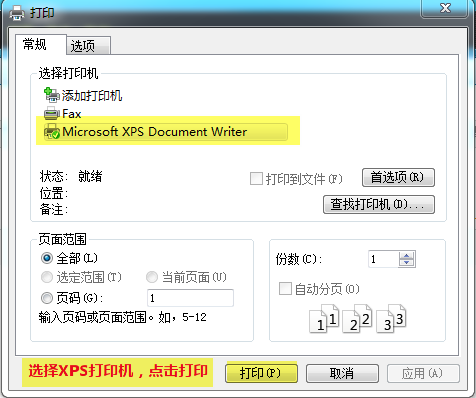
图一:选择打印机
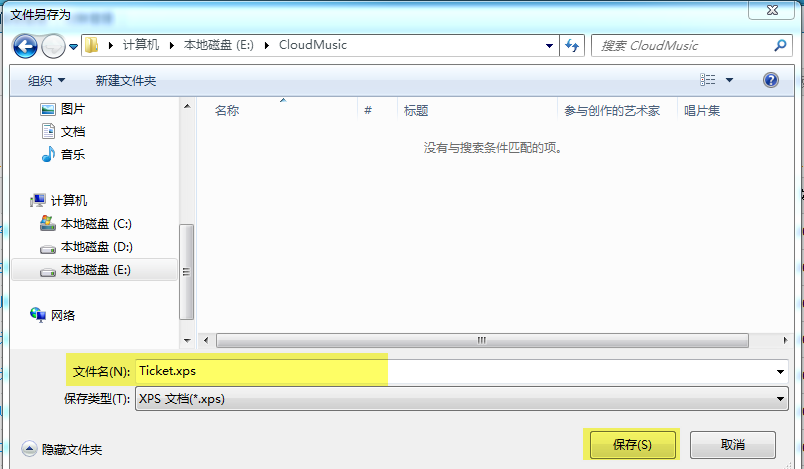
图二:输入xps路径
从上面可以看到,这里的打印需要与UI交互,人工点击打印,输入xps路径保存才行。
接下来在网络搜索:怎么不显示对话框,直接打印生成xps文件,在stackoverflow,codeproject看了很多,没找到办法。后来偶然翻到园子前人的文章,采用hook方式,UI Automation来完成打印和保存的动作,觉得这个方案可行
接下来上代码吧
	//调用WebBrowser.Print的代码就忽略了,直接看钩子

	IntPtr hwndDialog;

    string pathFile;

    EnumBrowserFileSaveType saveType;

    // Imports of the User32 DLL.

    [DllImport("user32.dll", CharSet = CharSet.Auto)]

    public static extern IntPtr SendMessage(IntPtr hWnd, int msg, int wParam, int lParam);

    [DllImport("user32.dll", CharSet = CharSet.Auto)]

    public static extern IntPtr GetDlgItem(IntPtr hWnd, int nIDDlgItem);

    [DllImport("user32.dll", CharSet = CharSet.Auto)]

    static extern private bool SetWindowText(IntPtr hWnd, string lpString);

    [DllImport("user32.dll")]

    [return: MarshalAs(UnmanagedType.Bool)]

    static extern bool IsWindowVisible(IntPtr hWnd);

    //Win32 Api定义

    [DllImport("user32.dll")]

    static extern IntPtr FindWindow(string lpClassName, string lpWindowName);

    [DllImport("user32.dll")]

    static extern IntPtr FindWindowEx(IntPtr hwndParent, IntPtr hwndChildAfeter, string lpszClass, string lpszWindow);

    [DllImport("user32.dll")]

    static extern IntPtr SendMessage(IntPtr hWnd, uint Msg, IntPtr wParam, String lParam);

    [DllImport("user32.dll")]

    static extern bool PostMessage(IntPtr hWnd, uint Msg, IntPtr wParam, IntPtr lParam);

    //Win32消息定义

    const uint WM_SETTEXT = 0x000c;

    const uint WM_IME_KEYDOWN = 0x0290;

    const uint WM_LBUTTONDOWN = 0x0201;

    const uint WM_LBUTTONUP = 0x0202;

    // The thread procedure performs the message loop and place the data

    public void ThreadProc()

    {

        int maxRetry = 10;

        int retry = 0;

        IntPtr hWndPrint = FindWindow("#32770", "打印");

        IntPtr hWnd = FindWindow("#32770", "文件另存为");

        if (hWnd != IntPtr.Zero)

        {

            log.InfoFormat("got saveas dialog handle. Printer Dialog skipped.");

        }

        else

        {

            Thread.Sleep(200);

            hWndPrint = FindWindow("#32770", "打印");

            //这里有时候获取不到window,所以加了Sleep,多试几次

            while (hWndPrint == IntPtr.Zero && retry < maxRetry)

            {

                Thread.Sleep(200);

                log.InfoFormat("retry get Print dialog handle.retry:{0}", retry);

                hWndPrint = FindWindow("#32770", "打印");

                retry++;

            }

            if (hWndPrint == IntPtr.Zero)

            {

                //wait 1 second,retry again

                Thread.Sleep(1000);

                hWndPrint = FindWindow("#32770", "打印");

            }

            if (hWndPrint == IntPtr.Zero)

            {

                log.InfoFormat("Did not get Print dialog handle.retry:{0}", retry);

                return;

            }

            log.InfoFormat("got Print dialog handle.retry:{0}", retry);

            //select printer dialog

            IntPtr hChildP;

            hChildP = IntPtr.Zero;

            hChildP = FindWindowEx(hWndPrint, IntPtr.Zero, "Button", "打印(&P)");

            // 向保存按钮发送2个消息,以模拟click消息,借此来按下保存按钮

            PostMessage(hChildP, WM_LBUTTONDOWN, IntPtr.Zero, IntPtr.Zero);

            PostMessage(hChildP, WM_LBUTTONUP, IntPtr.Zero, IntPtr.Zero);

            Application.DoEvents();

        }

        //hWnd = FindWindow("#32770", null);

        hWnd = FindWindow("#32770", "文件另存为");

        //To avoid race condition, we are forcing this thread to wait until Saveas dialog is displayed.

        retry = 0;

        while ((!IsWindowVisible(hWnd) || hWnd == IntPtr.Zero) && retry < maxRetry)

        {

            Thread.Sleep(200);

            log.InfoFormat("retry get saveas dialog handle.retry:{0}", retry);

            hWnd = FindWindow("#32770", null);

            retry++;

            Application.DoEvents();

        }

        log.InfoFormat("got saveas dialog handle.retry:{0}", retry);

        if (hWnd == IntPtr.Zero)

        {

            //wait 1 second,retry again

            Thread.Sleep(1000);

            hWnd = FindWindow("#32770", "文件另存为");

        }

        if (hWnd == IntPtr.Zero)

        {

            return;

        }

        Application.DoEvents();

        IntPtr hChild;

        // 由于输入框被多个控件嵌套,因此需要一级一级的往控件内找到输入框

        hChild = FindWindowEx(hWnd, IntPtr.Zero, "DUIViewWndClassName", String.Empty);

        hChild = FindWindowEx(hChild, IntPtr.Zero, "DirectUIHWND", String.Empty);

        hChild = FindWindowEx(hChild, IntPtr.Zero, "FloatNotifySink", String.Empty);

        hChild = FindWindowEx(hChild, IntPtr.Zero, "ComboBox", String.Empty);

        hChild = FindWindowEx(hChild, IntPtr.Zero, "Edit", String.Empty); // File name edit control

        // 向输入框发送消息,填充目标xps文件名

        SendMessage(hChild, WM_SETTEXT, IntPtr.Zero, pathFile);

        // 等待1秒钟

        System.Threading.Thread.Sleep(1000);

        // 找到对话框内的保存按钮

        hChild = IntPtr.Zero;

        hChild = FindWindowEx(hWnd, IntPtr.Zero, "Button", "保存(&S)");

        // 向保存按钮发送2个消息,以模拟click消息,借此来按下保存按钮

        PostMessage(hChild, WM_LBUTTONDOWN, IntPtr.Zero, IntPtr.Zero);

        PostMessage(hChild, WM_LBUTTONUP, IntPtr.Zero, IntPtr.Zero);

        // Clean up GUI - we have clicked save button.

        //GC is going to do that cleanup job, so we are OK

        Application.DoEvents();

        //Terminate the thread.

        return;

    }
接下来有关xps转pdf,使用了Spire.Pdf,官方有demo,这里不再说明
有图有真相

有关自动选择XPS Document Writer的hook代码我还没完成,各位赐教!
Html to Pdf 的另类解决方案的更多相关文章
- asp.net2.0导出pdf文件完美解决方案【转载】
asp.net2.0导出pdf文件完美解决方案 作者:清清月儿 PDF简介:PDF(Portable Document Format)文件格式是Adobe公司开发的电子文件格式.这种文件格式与操作系统 ...
- Windows7 IIS7.5 HTTP Error 503 The service is unavailable 另类解决方案
这篇文章是在你看了别的解决方案仍然解决不了之后才有用. 所以再未用别的解决方案之前,用了该解决方案依然无效的话,请自己看着办. 原创: .net2.0和.net3.5的应用程序池请在开始菜单打开VS2 ...
- MacOS 的预览 Preview 打开pdf 容易卡死 解决方案
MacOs 10.13.6 打开pdf之后容易卡死. 移动一下窗口之后就卡死了. 有时候等一会还能缓过来,有时候就缓不过来了. 只要执行下这个命令就可以了. sudo rm -rf ~/Library ...
- mssql sql server上如何建一个只读视图–视图锁定的另类解决方案
转自:http://www.maomao365.com/?p=4508 <span style="color:red;font-weight:bold;">我们熟知一个 ...
- js 回调地狱的另类解决方案尝试
例如 通过学生获取学生所在学校信息,需要先查询学生所在班级,再通过班级查询所在学校信息.js代码类似写法如下: function getStudentSchool(id) { ajax.get(&qu ...
- Delphi存取图像完整解决方案
http://blog.sina.com.cn/s/blog_693cf1cf0100plkq.html 对于涉及图像数据的数据库应用程序,图像数据的存取技术是一个关键.由于缺少技术文档及DEMO例程 ...
- R: 导入 csv 文件,导出到csv文件,;绘图后导出为图片、pdf等
################################################### 问题:导入 csv 文件 如何从csv文件中导入数据,?参数怎么设置?常用参数模板是啥? 解决方 ...
- JavaScript - 如果...没有方法
这篇文章源于我上一周所读的一篇12年的文章.原作者提出了一个问题,如果js没有原生方法Math.round(),我们如何去实现呢? 对此我和我的基友进行了小小探讨,并给出了一些有意思的答案. 本文内容 ...
- [知识库分享系列] 二、.NET(ASP.NET)
最近时间又有了新的想法,当我用新的眼光在整理一些很老的知识库时,发现很多东西都已经过时,或者是很基础很零碎的知识点.如果分享出去大家不看倒好,更担心的是会误人子弟,但为了保证此系列的完整,还是选择分享 ...
随机推荐
- POJ 2391 Ombrophobic Bovines
Ombrophobic Bovines Time Limit: 1000MS Memory Limit: 65536K Total Submissions: 18623 Accepted: 4 ...
- BZOJ1500[NOI2005]维修数列
Description Input 输入的第1 行包含两个数N 和M(M ≤20 000),N 表示初始时数列中数的个数,M表示要进行的操作数目.第2行包含N个数字,描述初始时的数列.以下M行,每行一 ...
- TypeScript 素描 - 类
本文虽然是学自官方教程而来,但是也融入了自己的理解,而且对官方的例子做了一些修改 /* 类 面向对象编程的一大核心 使用C#.Java进行编程的朋友肯定已经是不能够再熟悉了 TypeScript的类与 ...
- [LeetCode] Second Highest Salary 第二高薪水
Write a SQL query to get the second highest salary from the Employee table. +----+--------+ | Id | S ...
- postgresql 导入sql,out等sql文件
假设postgresql安装位置 然后,使用dos窗口进入这个位置 导入(本地和默认端口可以不用属性) psql -d 数据库名 -h ip地址 -p 数据库端口 -U 用户名 -f 文件地址 完成
- C语言猜数字游戏
猜数字游戏,各式各样的实现方式,我这边提供一个实现方式,希望可以帮到新手. 老程序猿就不要看了,黑呵呵 源代码1 include stdio.h include stdlib.h include ti ...
- PHP 做文件校验,MD5,CRC32,SHA等
函数 hash_file(): 使用给定文件的内容生成哈希值 说明 string hash_file ( string $algo , string $filename [, bool $raw_ou ...
- js浏览器对象模型(BOM)
浏览器对象模型(Browser Object Model,BOM):浏览器为js提供的对象集合. 1 windows对象 windows对象:表示浏览器的框架以及与其相关的内容,比如滚动条和导航栏图标 ...
- HDU 4569 Special equations(取模)
Special equations Time Limit:1000MS Memory Limit:32768KB 64bit IO Format:%I64d & %I64u S ...
- ionic 图标以及启动页图片不能正确加载
前段时间莫名其妙的发现发布的app不能正常的现实图标和启动页了,加载出来的图标以及图片显示的都是cordova的默认图片以及启动页图片 在网上找了很多教程各种查找都不能解决方法 表现原因为: 项目根目 ...