
antd的Tree控件实现点击展开功能
antd 的 Tree 控件没有提供点击展开的功能,只能通过左边的三角形实现展开和收起,没办法只好自己实现这个功能。
先看效果
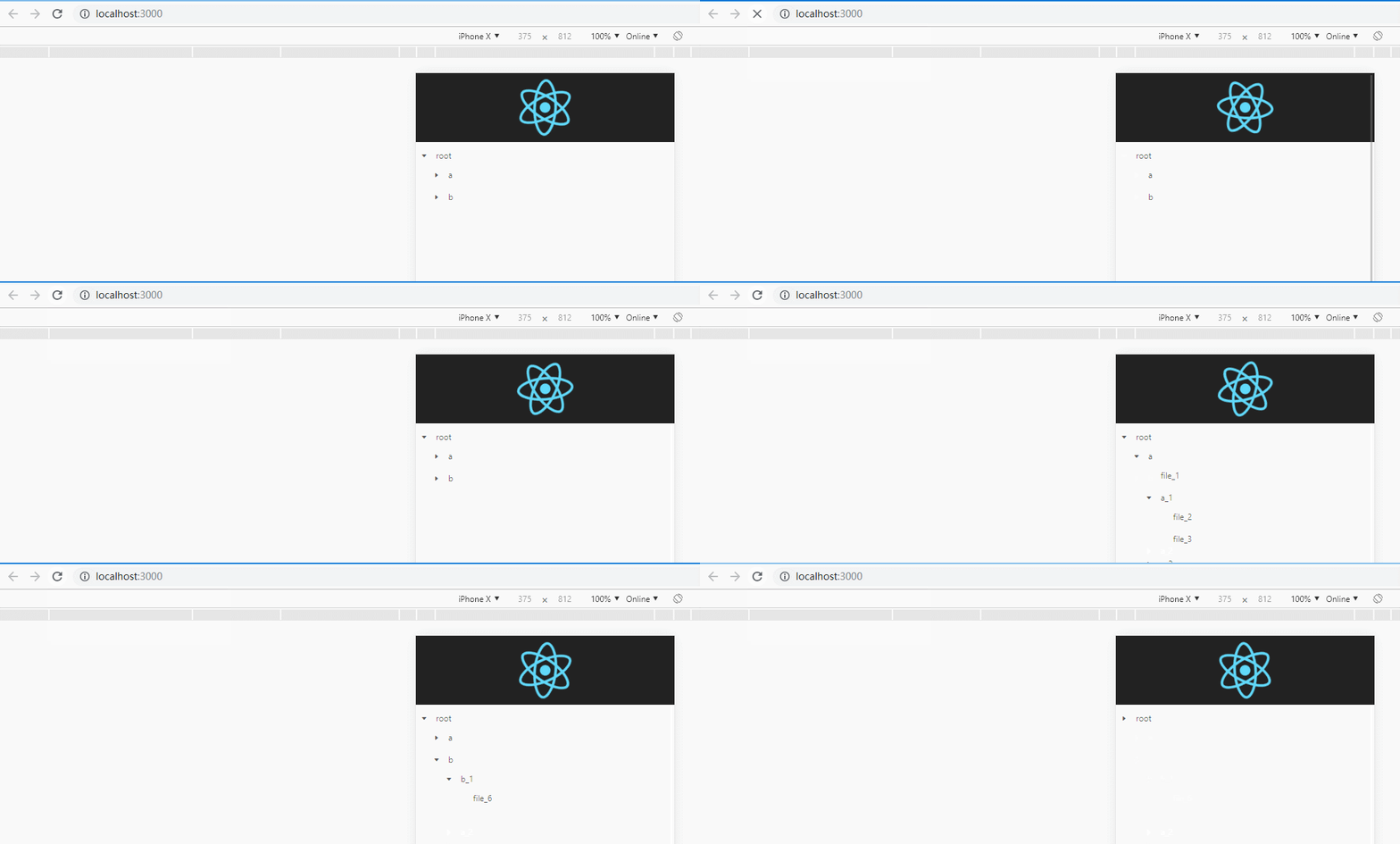
如图实现的是类似 Mac 文件目录形式的结构,有箭头代表是个文件夹,点击展开文件夹,点击外层文件夹可以收起整个文件夹。
首先根据服务器返回的 Json 数据生成树形结构
const data = {

    name: "root",

    children: [{

        name: "a",

        value: "/a",

        children: [{

            name: "file_1",

            value: "/a/file_1"

        }, {

            name: "a_1",

            value: "/a/a_1",

            children: [{

                name: "file_2",

                value: "/a/a_1/file_2"

            }, {

                name: "file_3",

                value: "/a/a_1/file_3"

            }]

        }, {

            name: "a_2",

            value: "/a/a_2",

            children: [{

                name: "file_4",

                value: "/a/a_2/file_4"

            }, {

                name: "file_5",

                value: "/a/a_2/file_5"

            }]

        }]

    }, {

        name: "b",

        value: "/b",

        children: [{

            name: "b_1",

            value: "/b/b_1",

            children: [{

                name: "file_6",

                value: "/b/b_1/file_6"

            }]

        }]

    }]

}
数据结构中有 children 字段代表是个文件夹,因此需要递归遍历出 TreeNode 视图
import React from "react";

import Tree from 'antd/lib/tree';

import 'antd/lib/tree/style/css';

const TreeNode = Tree.TreeNode;

class TreeView extends React.Component {

    //遍历json绘制出tree结构

    mapData = (children) => {

        if (children && Array.isArray(children)) {

            return children.map((ele) => {

                if (ele.children && Array.isArray(ele.children)) {

                    return <TreeNode title={ele.name} key={ele.value}>

                        {this.mapData(ele.children)}

                    </TreeNode>

                } else {

                    return <TreeNode title={ele.name} key={ele.value}/>

                }

            })

        }

        return []

    }

    render() {

        let content = []

        let {name, children} = data

        if (name) {

            content.push(<TreeNode title={name} key="/">{this.mapData(children)}</TreeNode>)

        }

        return (

            <Tree>

                {content}

            </Tree>

        );

    }

}

export default TreeView
已经完成第一步,生成树形结构视图。接下来就是要实现点击展开树形结构
state = {

        expandedKeys: ["/"],

        autoExpandParent: true,

        selectedKeys: []

    }

    //选中的回调

    onSelect = (selectedKeys, obj) => {

        let {expandedKeys} = this.state

        let selectedKey = this.state.selectedKeys

        //选中的状态

        if (obj.selected) {

            //判断是否已经展开,未展开就添加到 expandedKeys 中

            //已经展开就不用管

            let index = expandedKeys.indexOf(selectedKeys[0])

            if (index === -1) {

                expandedKeys.push(selectedKeys[0])

                this.setState({

                    expandedKeys: expandedKeys,

                    selectedKeys: selectedKeys

                })

            } else {

                this.setState({

                    selectedKeys: selectedKeys

                })

            }

            // 没有 children 代表当前已没有下一级目录

            if (obj.event && obj.selectedNodes.length === 1 && !obj.selectedNodes[0].props.children) {

                //do something

            }

        } else {

            //selectedKey 是上次选中的元素 在 expandedKeys 肯定是存在的

            //找到下标后需要过滤掉子类目录 例如上次选中的元素为 /a ,

            //子类 /a/a_1 已经展开就需要从 expandedKeys 中移除这个元素

            let index = expandedKeys.indexOf(selectedKey[0])

            if (index !== -1) {

                //过渡掉子类元素

                expandedKeys = expandedKeys.filter((ele) => {

                    return !ele.includes(selectedKey[0])

                })

                this.setState({

                    expandedKeys: expandedKeys,

                    selectedKeys: []

                })

            } else {

                this.setState({

                    selectedKeys: []

                })

            }

        }

    }

    //展开的回调

    onExpend = (expandedKey, obj) => {

        let {expandedKeys} = this.state

        //展开的状态

        if (obj.expanded) {

            this.setState({

                expandedKeys: expandedKey,

                selectedKeys: []

            })

        } else {

            //expandedKey 返回的是当前已经展开的元素 expandedKeys 是上次展开的元素

            //比较两个数组中缺少的元素得出当前被收起的是哪个元素

            let removeArray = this.diffArray(expandedKey, expandedKeys)

            //收起的时候需要把里面展开的元素一并移除,不然会造成收起动作无效

            expandedKeys = expandedKeys.filter((ele) => {

                return !ele.includes(removeArray[0])

            })

            this.setState({

                expandedKeys: expandedKeys,

                selectedKeys: []

            })

        }

    }

    //比较出2个数组中不一样的元素

    diffArray = (arr1, arr2) => {

        let arr3 = [];

        for (let i = 0; i < arr1.length; i++) {

            if (arr2.indexOf(arr1[i]) === -1)

                arr3.push(arr1[i]);

        }

        for (let j = 0; j < arr2.length; j++) {

            if (arr1.indexOf(arr2[j]) === -1)

                arr3.push(arr2[j]);

        }

        return arr3;

    }

    ......

    render() {

        return (

            <Tree

                onExpand={this.onExpend}

                expandedKeys={this.state.expandedKeys}

                autoExpandParent={this.state.autoExpandParent}

                onSelect={this.onSelect}

                selectedKeys={this.state.selectedKeys}>

                {content}

            </Tree>

        )

    }
根index.js文件
import React from 'react';

import ReactDOM from 'react-dom';

import './index.css';

import App from './App';

import registerServiceWorker from './registerServiceWorker';

ReactDOM.render(<App />, document.getElementById('root'));

registerServiceWorker();
根APP组件
import React, {Component} from 'react';

import logo from './logo.svg';

import './App.css';

import TreeView from "./TreeView";

class App extends Component {

    render() {

        return (

            <div className="App">

                <div className="App-header">

                    <img src={logo} className="App-logo" alt="logo"/>

                </div>

                <div style={{marginTop: "100px"}}>

                    <TreeView/>

                </div>

            </div>

        );

    }

}

export default App;
本文学习自:https://www.jianshu.com/p/d104f491b8c9
antd的Tree控件实现点击展开功能的更多相关文章
- vue+element项目中使用el-dialog弹出Tree控件报错问题
1. 按正常的点击按钮,显示dialog弹出的Tree控件,然后把该条数据下的已经选中的checkbox , 用setCheckedNodes或者setCheckedKeys方法选择上 , 报下面这个 ...
- ElementUI Tree控件在懒加载模式下的重新加载和模糊查询
之所以使用懒加载是为了提高性能,而且只有在懒加载模式下默认会给所有显示节点设置展开按钮.leaf也可以做到,但是要操作数据比较麻烦. 要实现懒加载模式下的模糊查询以及重新加载必须要使用data与laz ...
- Android 使用代码主动去调用控件的点击事件(模拟人手去触摸控件)
使用代码主动去调用控件的点击事件(模拟人手去触摸控件) //View 可以是LinearLayout,Button,TextView View.performClick();
- easyui中tree控件添加自定义图标icon
来源于:http://blog.163.com/lintianhuanhai@126/blog/static/165587366201421704420256/ <!DOCTYPE html&g ...
- DWZ (JUI) 教程 tree 控件的选中事件
DWZ (JUI) 教程 tree 控件的选中事件 先简单说一下流程 第一步 当然是先定义好回调事件了 function checkCallback(json){ ........... ...... ...
- webdynpro tree控件使用
1. 首先创建一个TREE控件 2. 在Tree下面创建一个TREE NODE TYPE ,node type 是可以继续展开的,而Item type是无法展开的. 3. 创建node.,下面 ...
- Kinect用体感来实现UI控件的点击
用体感来实现UI控件的点击,如点击按钮. 做法:用一个图片表示左手手掌,图片位置追踪左手手掌移动,当手掌位于UI控件的矩形内时,握拳表示点击该控件. using UnityEngine; using ...
- UiAutomator2.0 - 控件实现点击操作原理
目录 一.UiObject 二.UiObject2 穿梭各大技术博客网站,每天都能看到一些的新的技术.突然感觉UiAutomator 2.0相对于现在来说已经是个很久远的东西了ε=(´ο`*))).写 ...
- android中RecyclerView控件实现点击事件
RecyclerView控件实现点击事件跟ListView控件不同,并没有提供类似setOnItemClickListener()这样的注册监听器方法,而是需要自己给子项具体的注册点击事件. 本文的例 ...
随机推荐
- 领域驱动设计(DDD:Domain-Driven Design)
领域驱动设计(DDD:Domain-Driven Design) Eric Evans的"Domain-Driven Design领域驱动设计"简称DDD,Evans DDD是一套 ...
- 解决service iptables save出错please try to use systemctl
# service iptables save The service command supports only basic LSB actions (start, stop, restart, t ...
- Linux如何查找某个时间点后生成的空文件
今天遇到一个特殊需求,需要找到某天(例如2017-04-13)以及这之后生成的空文件.那么这个要怎么处理呢?这个当然是用find命令来解决.如下所示, -mtime -5 表示查找距现在 5*24H ...
- nginx主配置文件详解
#定义Nginx运行的用户和用户组user www www; #nginx进程数,建议设置为等于CPU总核心数.worker_processes 8; #全局错误日志定义类型,[ debug | in ...
- LeetCode算法题-Construct String from Binary Tree(Java实现)
这是悦乐书的第273次更新,第288篇原创 01 看题和准备 今天介绍的是LeetCode算法题中Easy级别的第141题(顺位题号是606).构造一个字符串,该字符串由二叉树中的括号和整数组成,并具 ...
- 使用Python的Mock库进行PySpark单元测试
测试是软件开发中的基础工作,它经常被数据开发者忽视,但是它很重要.在本文中会展示如何使用Python的uniittest.mock库对一段PySpark代码进行测试.笔者会从数据科学家的视角来进行描述 ...
- Django REST framework基础:解析器和渲染器
解析器 解析器的作用 解析器的作用就是服务端接收客户端传过来的数据,把数据解析成自己可以处理的数据.本质就是对请求体中的数据进行解析. 在了解解析器之前,我们要先知道Accept以及ContentTy ...
- 【English】20190415
approximately大约 [əˈprɑ:ksɪmətli] This install will take + minutes and requires the download of appro ...
- CSS伪元素:before/CSS伪元素:before/:after content 显示Font Awesome字体图标:after content 显示Font Awesome字体图标
HTML <a href="javascript:volid(0);"><i class="icon-table"></i> ...
- 轻量级卷积神经网络——MobileNet
谷歌论文题目: MobileNets: Efficient Convolutional Neural Networks for Mobile Vision Applications 其他参考: CNN ...