
nginx的configure流程
configure配置
nginx的编译过程,第一步是configure。我们使用 --help可以看到configure的很多配置。
configure的过程做的事情其实就是检测环境,然后根据环境生成Makefile,包含各种参数的c头文件等(ngx_auto_config.h/ ngx_auto_headers.h)。这个c头文件包含了所有根据当前环境配置的参数。
configure命令 之后多了些什么?
多了一个Makefile文件
这里的Makefile文件指的是根目录下的Makefile, 这个是后面make命令的入口
多了一个objs文件夹
objs文件夹里面有这几个文件:
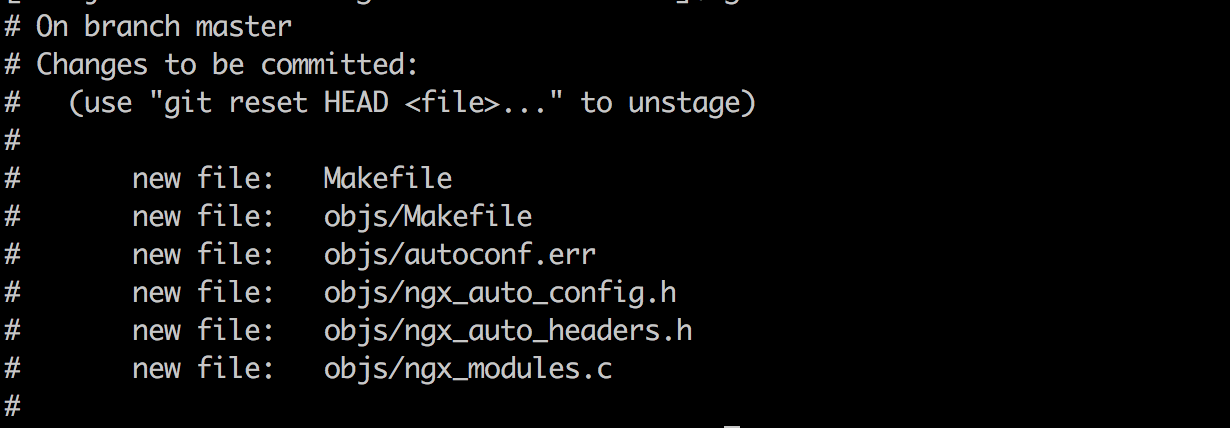
autoconf.err
configure过程中不仅仅是使用简单的shell命令来检测环境,还会生成一些简单的c程序,并且用编译器编译执行,获取输出来获取环境参数。只是这些c程序和编译后的文件在获取参数完成之后会删除,所以我们实际看不到这个文件的存在。
这些shell命令,c程序的一些输出和错误信息都记录在这个autoconf.err中了,实际上这个文件没有什么用。
Makefile
这个obj/Makefile才是本质的构建程序和模块的过程。所有需要加载的模块和一些设置都在这边了。
我们可以看一下,它使用的编译器是cc, cc编译器在linux上就是gcc。 gcc是一个各种不同语言的编译器。gcc代表 the GNU Compiler Collection。 比如你的代码后缀是.c, 它会调用c的编译器还有linker去链接c的库。
nginx_auto_config.h
这个就是configure出来的一个重要成果,本机环境的一些配置,比如int多少位之类的。
nginx_auto_headers.h
这个是configure出来的,判断一些header是否存在。
nginx_modules.c
这个文件就告诉我们了我们这次编译nginx到底有多少个模块。
其中的一些模块是很重要的,但是我们也可以自主选择。
configure的语法
have + auto/define 语法
have=NGX_SBIN_PATH value="\"$NGX_SBIN_PATH\"" . auto/define
auto/define的定义:
# Copyright (C) Igor Sysoev

# Copyright (C) Nginx, Inc.

cat << END >> $NGX_AUTO_CONFIG_H

#ifndef $have

#define $have  $value

#endif

END
结合起来的意思就是,如果我在参数里面设置了NGX_SBIN_PATH(有参数可以设置),那么我就在ngx_auto_config.h中增加这个宏定义:
#ifndef NGX_SBIN_PATH

#define NGX_SBIN_PATH  "sbin/nginx"

#endif
have + auto/have 语法
cat << END >> $NGX_AUTO_CONFIG_H

#ifndef $have

#define $have  1

#endif

END
意思其实就是auto/define的翻版,只是如果这里的value是1
比如
have=NGX_HAVE_EPOLL . auto/have
等同
#ifndef NGX_HAVE_EPOLL

#define NGX_HAVE_EPOLL  1

#endif
auto/feature
ngx_feature="GeoIP IPv6 support"

ngx_feature_name="NGX_HAVE_GEOIP_V6"

ngx_feature_run=no

ngx_feature_incs="#include <stdio.h>

                  #include <GeoIP.h>"

#ngx_feature_path=

#ngx_feature_libs=

ngx_feature_test="printf(\"%d\", GEOIP_CITY_EDITION_REV0_V6);"

. auto/feature
上面这个是个feature的模版,它的目的是为了检查当前的环境是否包含这个feature, 比如上面的例子就是判断这个机器环境是否支持GEO IPV6。
还可以看看下面这个例子:
ngx_feature="GeoIP library in /opt/local/"

ngx_feature_path="/opt/local/include"

if [ $NGX_RPATH = YES ]; then

    ngx_feature_libs="-R/opt/local/lib -L/opt/local/lib -lGeoIP"

else

    ngx_feature_libs="-L/opt/local/lib -lGeoIP"

fi

. auto/feature
feature的代码就不贴出来了, 具体做了下面几个事情:
- 控制台先输出checking for
- 在auto_config.err中输出checking for
- 检查变量$ngx_feature_name是否有设置
- 如果设置了ngx_feature_path,就设置ngx_feature_inc_path
- 根据$ngx_feature_test生成测试c文件
- 编译生成的测试c文件
- 执行测试c文件并捕获输出到auto_config.err
- 如果设置了ngx_feature_run, 就把输出设置为对应的$ngx_feature_name的值
- 没有找到的情况,在auto_config.err中体现,并且在控制台显示 not found
- 删除测试c文件及编译出来的东西
auto/include
ngx_include="inttypes.h"; . auto/include
生成一个简单的c文件:
cat << END > $NGX_AUTOTEST.c

$NGX_INCLUDE_SYS_PARAM_H

#include <$ngx_include>

int main(void) {

    return 0;

}

END
判断检测环境是否有这个头文件。
auto/module
ngx_module_type=HTTP

if :; then

    ngx_module_name="ngx_http_module \

                     ngx_http_core_module \

                     ngx_http_log_module \

                     ngx_http_upstream_module"

    ngx_module_incs="src/http src/http/modules"

    ngx_module_deps="src/http/ngx_http.h \

                     src/http/ngx_http_request.h \

                     src/http/ngx_http_config.h \

                     src/http/ngx_http_core_module.h \

                     src/http/ngx_http_cache.h \

                     src/http/ngx_http_variables.h \

                     src/http/ngx_http_script.h \

                     src/http/ngx_http_upstream.h \

                     src/http/ngx_http_upstream_round_robin.h"

    ngx_module_srcs="src/http/ngx_http.c \

                     src/http/ngx_http_core_module.c \

                     src/http/ngx_http_special_response.c \

                     src/http/ngx_http_request.c \

                     src/http/ngx_http_parse.c \

                     src/http/modules/ngx_http_log_module.c \

                     src/http/ngx_http_request_body.c \

                     src/http/ngx_http_variables.c \

                     src/http/ngx_http_script.c \

                     src/http/ngx_http_upstream.c \

                     src/http/ngx_http_upstream_round_robin.c"

    ngx_module_libs=

    ngx_module_link=YES

    . auto/module
这个auto/module会对每一个模块设置一些模块需要的变量,比如模块的源码地址,模块依赖的lib库等。
控制台输出:
checking for OS

 + Linux 3.10.0-514.16.1.el7.x86_64 x86_64

checking for C compiler ... found

 + using GNU C compiler

 + gcc version: 4.4.7 20120313 (Red Hat 4.4.7-18) (GCC)

checking for gcc -pipe switch ... found

checking for -Wl,-E switch ... found

checking for gcc builtin atomic operations ... found

checking for C99 variadic macros ... found

checking for gcc variadic macros ... found

checking for gcc builtin 64 bit byteswap ... found

checking for unistd.h ... found

checking for inttypes.h ... found

checking for limits.h ... found

checking for sys/filio.h ... not found

checking for sys/param.h ... found

checking for sys/mount.h ... found

checking for sys/statvfs.h ... found

checking for crypt.h ... found

checking for Linux specific features

checking for epoll ... found

checking for EPOLLRDHUP ... found

checking for EPOLLEXCLUSIVE ... not found

checking for O_PATH ... not found

checking for sendfile() ... found

checking for sendfile64() ... found

checking for sys/prctl.h ... found

checking for prctl(PR_SET_DUMPABLE) ... found

checking for prctl(PR_SET_KEEPCAPS) ... found

checking for capabilities ... found

checking for crypt_r() ... found

checking for sys/vfs.h ... found

checking for nobody group ... found

checking for poll() ... found

checking for /dev/poll ... not found

checking for kqueue ... not found

checking for crypt() ... not found

checking for crypt() in libcrypt ... found

checking for F_READAHEAD ... not found

checking for posix_fadvise() ... found

checking for O_DIRECT ... found

checking for F_NOCACHE ... not found

checking for directio() ... not found

checking for statfs() ... found

checking for statvfs() ... found

checking for dlopen() ... not found

checking for dlopen() in libdl ... found

checking for sched_yield() ... found

checking for sched_setaffinity() ... found

checking for SO_SETFIB ... not found

checking for SO_REUSEPORT ... found

checking for SO_ACCEPTFILTER ... not found

checking for SO_BINDANY ... not found

checking for IP_TRANSPARENT ... found

checking for IP_BINDANY ... not found

checking for IP_BIND_ADDRESS_NO_PORT ... not found

checking for IP_RECVDSTADDR ... not found

checking for IP_SENDSRCADDR ... not found

checking for IP_PKTINFO ... found

checking for IPV6_RECVPKTINFO ... found

checking for TCP_DEFER_ACCEPT ... found

checking for TCP_KEEPIDLE ... found

checking for TCP_FASTOPEN ... not found

checking for TCP_INFO ... found

checking for accept4() ... found

checking for eventfd() ... found

checking for int size ... 4 bytes

checking for long size ... 8 bytes

checking for long long size ... 8 bytes

checking for void * size ... 8 bytes

checking for uint32_t ... found

checking for uint64_t ... found

checking for sig_atomic_t ... found

checking for sig_atomic_t size ... 4 bytes

checking for socklen_t ... found

checking for in_addr_t ... found

checking for in_port_t ... found

checking for rlim_t ... found

checking for uintptr_t ... uintptr_t found

checking for system byte ordering ... little endian

checking for size_t size ... 8 bytes

checking for off_t size ... 8 bytes

checking for time_t size ... 8 bytes

checking for AF_INET6 ... found

checking for setproctitle() ... not found

checking for pread() ... found

checking for pwrite() ... found

checking for pwritev() ... found

checking for sys_nerr ... found

checking for localtime_r() ... found

checking for clock_gettime(CLOCK_MONOTONIC) ... not found

checking for clock_gettime(CLOCK_MONOTONIC) in librt ... found

checking for posix_memalign() ... found

checking for memalign() ... found

checking for mmap(MAP_ANON|MAP_SHARED) ... found

checking for mmap("/dev/zero", MAP_SHARED) ... found

checking for System V shared memory ... found

checking for POSIX semaphores ... not found

checking for POSIX semaphores in libpthread ... found

checking for struct msghdr.msg_control ... found

checking for ioctl(FIONBIO) ... found

checking for struct tm.tm_gmtoff ... found

checking for struct dirent.d_namlen ... not found

checking for struct dirent.d_type ... found

checking for sysconf(_SC_NPROCESSORS_ONLN) ... found

checking for sysconf(_SC_LEVEL1_DCACHE_LINESIZE) ... found

checking for openat(), fstatat() ... found

checking for getaddrinfo() ... found

checking for zlib library ... found

creating objs/Makefile

Configuration summary

  + PCRE library is not used

  + OpenSSL library is not used

  + using system zlib library

  nginx path prefix: "/usr/local/nginx"

  nginx binary file: "/usr/local/nginx/sbin/nginx"

  nginx modules path: "/usr/local/nginx/modules"

  nginx configuration prefix: "/usr/local/nginx/conf"

  nginx configuration file: "/usr/local/nginx/conf/nginx.conf"

  nginx pid file: "/usr/local/nginx/logs/nginx.pid"

  nginx error log file: "/usr/local/nginx/logs/error.log"

  nginx http access log file: "/usr/local/nginx/logs/access.log"

  nginx http client request body temporary files: "client_body_temp"

  nginx http proxy temporary files: "proxy_temp"

  nginx http fastcgi temporary files: "fastcgi_temp"

  nginx http uwsgi temporary files: "uwsgi_temp"

  nginx http scgi temporary files: "scgi_temp
我们其实可以对着 xmind 的流程和 configure 这个程序来看就很清晰了
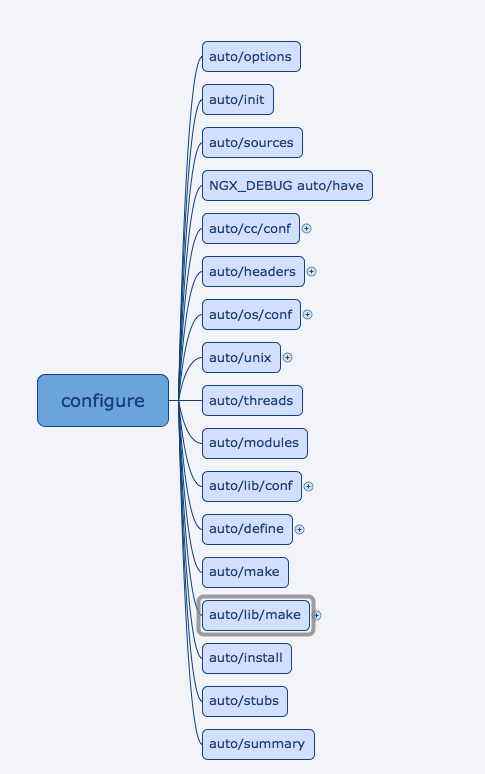
https://github.com/its-tech/nginx-1.14.0-research/blob/master/configure
再加上前面几个configure语法就能看懂了。
参考文章
https://blog.csdn.net/fzy0201/article/details/17683883
nginx的configure流程的更多相关文章
- nginx系列5:nginx的请求处理流程
nginx的请求处理流程 如下图: nginx可以处理来自web(http),Email,TCP/UDP的三类请求. nginx底层使用非阻塞的事件驱动引擎,结合状态机来完成异步通知,其中处理Http ...
- Nginx 的请求处理流程,你了解吗?
之前我们已经讲解了 Nginx 的基础内容,接下来我们开始介绍 Nginx 的架构基础. 为什么我们要讨论 Nginx 的架构基础? 因为 Nginx 运行在企业内网的最外层也就是边缘节点,那么他处理 ...
- 探究 Nginx 中 reload 流程的真相
今天这篇文章主要来介绍下 Nginx 的 reload 流程.实际上在之前文章中,在更改了 nginx 配置文件时,我们都会执行 nginx -s reload 命令,我们执行这条命令的原因是希望 n ...
- Nginx 在configure时的参数
Nginx 使用 Unix 下常用的 './configure && make && make install' 过程来编译安装. configure 脚本确定系统所具 ...
- Nginx的configure各项中文说明
–prefix=<path> – Nginx安装路径.如果没有指定,默认为 /usr/local/nginx. –sbin-path=<path> – Nginx可执行文件安装 ...
- Nginx(./configure --help)
# ./configure --help --help print this message --prefix=PATH set installation prefix --sbin-path=PAT ...
- centos7安装nginx 报./configure: error: C compiler cc is not found
CentOS 7 下 安装 nginx 执行配置命令 ./configure 时提示以下错误: 解决: 执行以下命令: yum -y install gcc gcc-c++ autoconf auto ...
- nginx的工作流程
nginx请求处理流程 nginx进程结构 master进程:是作为worker进程管理的 worker进程:处理真正的请求的而master进程则是管控这些进程的工作方式的:缓存是在多个worker进 ...
- Nginx热升级流程,看这篇就够了
在之前做过 Nginx 热升级的演示,他能保证nginx在不停止服务的情况下更换他的 binary 文件,这个功能非常有用,但我们在执行 Nginx 的 binary 文件升级过程中,还是会遇到很多问 ...
随机推荐
- navicat连接centos7上mysql:2003-Can't connect to MySQL server (10060)
问题解决步骤: 1.参考http://jingyan.baidu.com/article/95c9d20dac9040ec4f75617a.html,发现是防火墙未关闭: 2.关闭并禁止firewal ...
- Linux系统下配置网络、JAVA环境,配置tomcat,mysql
一.配置网络 1.进入自己的系统,并跳转到network-scripts 2.编辑 3.查看系统的信息 4.将其添加到刚刚的if-cfg-eth0中 5.重启网络 6.这个时候ping百度还是ping ...
- SpringBoot报错
同时生成了两个mapper,删除一个就行了
- sklearn.datasates 加载测试数据
数据一:波士顿房价(适合做回归),以后直接用boston标记 这行代码就读进来了boston = sklearn.datasets.load_boston()查询具体数据说明,用这个代码:print ...
- 指针*p,p,&p等辨别
#include<iostream> #include<iomanip> #include<cmath> using namespace std; int main ...
- redis的雪崩与穿透原理的浅理解
首先列一下主要说什么, 1.什么是Redis缓存的雪崩? 2.什么是Redis缓存的穿透? 3.Redis缓存崩溃会怎么样? 4.怎么预防Redis缓存崩溃? 1.什么是Redis缓存的雪崩? 举个栗 ...
- iOS开发只简单动画实现
1.动画旋转: [UIViewbeginAnimations:@"View Flip"context:nil]; //声明,@"XX"为标题, [UIViews ...
- go语言基础之字符串遍历
Go的字符串遍历,有两种方式: utf-8遍历 unicode遍历 package main import "fmt" func main() { str := "Hel ...
- scala Actor Akka
推荐博客:过往记忆 https://www.iteblog.com/archives/1154.html akka.io
- Notepad++常用快捷键
Ctrl-H 打开Find / Replace 对话框 Ctrl-D 复制当前行 Ctrl-L 删除当前行 Ctrl-T 上下行交换 F3 找下一个 Shift-F3 ...