
React Native之通知栏消息提示(ios)
React Native之通知栏消息提示(ios)
一,需求分析与概述
详情请查看:React Native之通知栏消息提示(android)
二,极光推送注册与集成
2.1,注册
详情请查看:React Native之通知栏消息提示(android)
2.2,集成(ios)
第一步:安装
打开终端,进入项目根目录文件夹下,执行以下命令:
1  npm install jpush-react-native --save

2  jpush-react-native 1.4.2 版本以后需要同时安装 jcore-react-native

3  npm install jcore-react-native --save
第二步:配置
自动关联配置
1 # 针对性的link,避免之前手动配置的其它插件重复配置造成报错

2  react-native link jpush-react-native

3  react-native link jcore-react-native
执行完 link 项目后可能会出现报错,这没关系,打开Xcode手动配置一下
手动配置
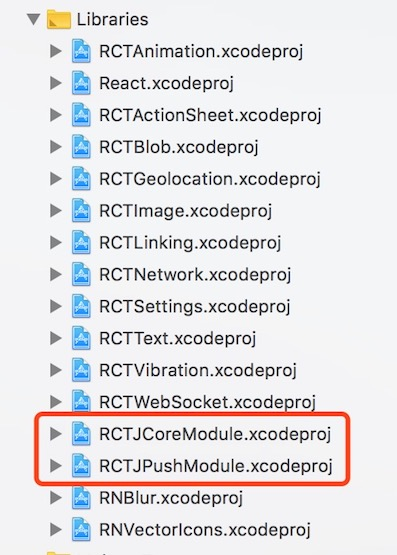
(1),检查Libraries文件夹下有没有RCTJpushModule.xcodproj和RCTJcoreModule.xcodproj文件,没有的话就添加文件,目录在项目文件夹下的:
 /node_modules/jpush-react-native/ios/RCTJPushModule.xcodeproj

 /node_modules/jcore-react-native/ios/RCTJCoreModule.xcodeproj
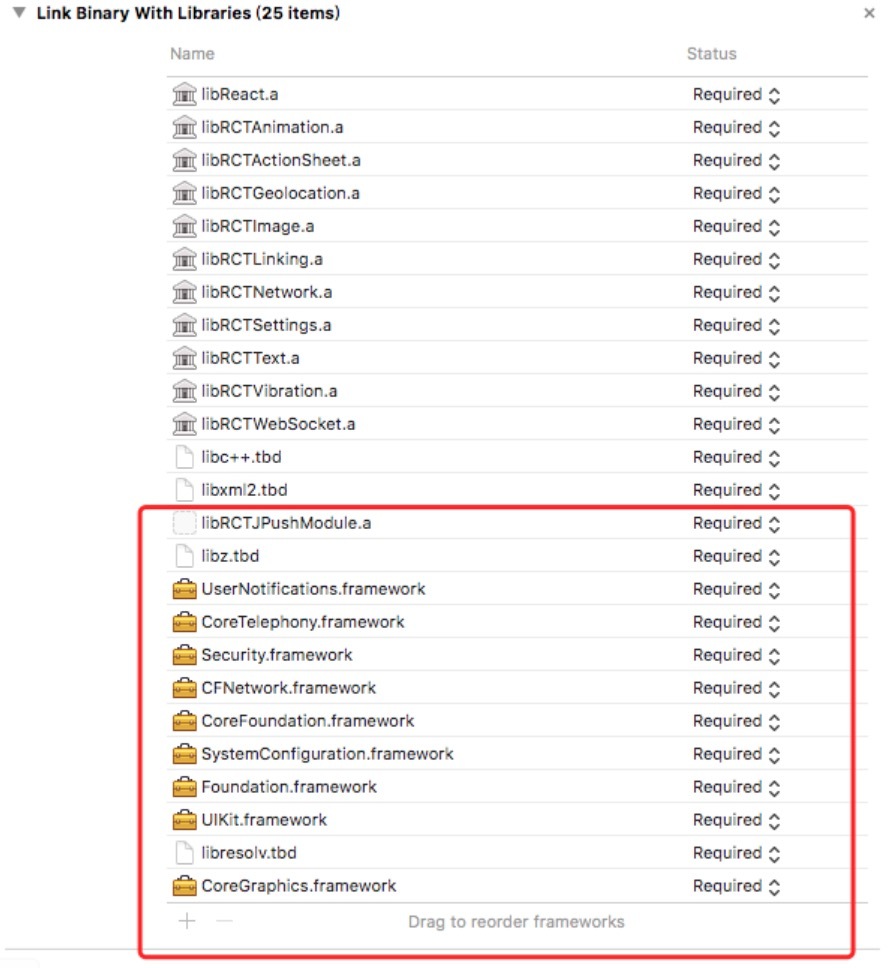
(2),在 iOS 工程 targets 的 General->Link Binary with Libraries 中加入如下库:
 libRCTJpushModule.a

 libRCTJcoreModule.a

 libz.tbd

 CoreTelephony.framework

 Security.framework

 CFNetwork.framework

 CoreFoundation.framework

 SystemConfiguration.framework

 Foundation.framework

 UIKit.framework

 UserNotifications.framework

 libresolv.tbd
(3),在AppDelegate.h文件里边添加如下代码:
 static NSString *appKey = @"";     //填写appkey

 static NSString *channel = @"nil";    //填写channel   一般为nil

 static BOOL isProduction = false;  //填写isProdurion  平时测试时为false ,生产时填写true
(4),在AppDelegate.m文件里边添加如下代码:
 /**

  * Copyright (c) 2015-present, Facebook, Inc.

  *声明部分

  */

 #import <RCTJPushModule.h>

 #ifdef NSFoundationVersionNumber_iOS_9_x_Max

 #import <UserNotifications/UserNotifications.h>

 #endif

 @implementation AppDelegate

 /**

  * Copyright (c) 2015-present, Facebook, Inc.

  *功能模块部分

  */

 - (void)application:(UIApplication *)application didRegisterForRemoteNotificationsWithDeviceToken:(NSData *)deviceToken

 {

   [JPUSHService registerDeviceToken:deviceToken];

 }
为了在收到推送点击进入应用程序能够获取该条件推送内容需要在AppDelegate.m的didReceiveRemoteNotification方法里面添加[[NSNotificationCenter defaultCenter] postNotificationName:kJPFDidReceiveRemoteNotification object:userInfo]方法
注意:这里需要在两个方法里面加一个是iOS7以前的一个是iOS7及以后的,如果AppDelegate.m没有这个两个方法则直接复制这两个方法,在iOS10的设备则可以使用JPush提供的两个方法
 - (void)application:(UIApplication *)application didReceiveRemoteNotification:(NSDictionary *)userInfo

 {

   [[NSNotificationCenter defaultCenter] postNotificationName:kJPFDidReceiveRemoteNotification object:userInfo];

 }

 //iOS 7 Remote Notification

 - (void)application:(UIApplication *)application didReceiveLocalNotification:(UILocalNotification *)notification

 {

   [[NSNotificationCenter defaultCenter] postNotificationName:kJPFDidReceiveRemoteNotification object: notification.userInfo];

 }

 // iOS 10 Support

 - (void)application:(UIApplication *)application didReceiveRemoteNotification:(NSDictionary *)userInfo fetchCompletionHandler:(void (^)   (UIBackgroundFetchResult))completionHandler

 {

   [[NSNotificationCenter defaultCenter] postNotificationName:kJPFDidReceiveRemoteNotification object:userInfo];

 }

 - (void)jpushNotificationCenter:(UNUserNotificationCenter *)center willPresentNotification:(UNNotification *)notification withCompletionHandler:(void (^)(NSInteger))completionHandler

 {

   NSDictionary * userInfo = notification.request.content.userInfo;

   if ([notification.request.trigger isKindOfClass:[UNPushNotificationTrigger class]]) {

     [JPUSHService handleRemoteNotification:userInfo];

     [[NSNotificationCenter defaultCenter] postNotificationName:kJPFDidReceiveRemoteNotification object:userInfo];

   }

   completionHandler(UNNotificationPresentationOptionAlert);

 }
在 didFinishLaunchingWithOptions方法里面添加如下代码:
 JPUSHRegisterEntity * entity = [[JPUSHRegisterEntity alloc] init];

   entity.types = UNAuthorizationOptionAlert|UNAuthorizationOptionBadge|UNAuthorizationOptionSound;

   [JPUSHService registerForRemoteNotificationConfig:entity delegate:self];

   [JPUSHService setupWithOption:launchOptions appKey:appKey channel:channel apsForProduction:isProduction];
(5),#import <RCTJPushModule.h>可能会报找不到的错误,需要在Build Settings->Search Paths->Header Search Paths添加代码:
$(SRCROOT)/../node_modules/jpush-react-native/ios/RCTJPushModule
(6),在Capabilities中点开推送Push Notifications以及Background Modes中的Remote notifications
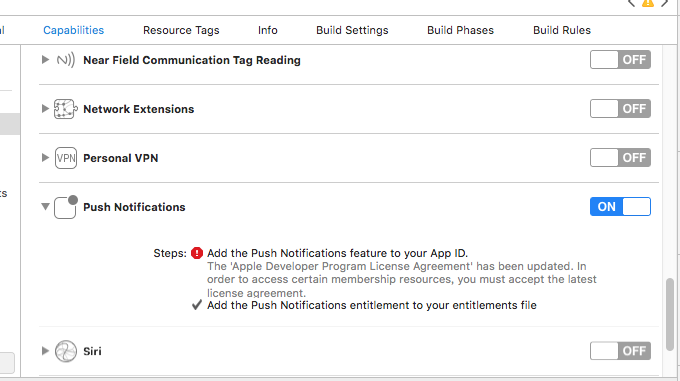
ios的推送证书申请可参考:react native极光推送android和ios证书申请
这样就基本完成了所有的配置。接下来就可以在 JS 中调用插件提供的 API 了。
三,使用与实现
3.1,使用
(1),在js中 1 import React, { PureComponent } from 'react';
 2 import {

 3   Linking,

 4   Alert

 5 } from 'react-native';

 6 import JPushModule from 'jpush-react-native'

 7

 8 ...

 9

10

11 componentDidMount() {

12 /****************************通知 start **************************************************/

13     if (Platform.OS === 'android') {

14       JPushModule.initPush()

15    // 新版本必需写回调函数

16       JPushModule.notifyJSDidLoad(resultCode => {

17         if (resultCode === 0) {

18         }

19       })

20     } else {

21       JPushModule.setupPush()

22     }

23     // 接收自定义消息

24     this.receiveCustomMsgListener = map => {

25       this.setState({

26         pushMsg: map.content

27       })

28       console.log('extras: ' + map.extras)

29     }

30

31         // 接收自定义消息JPushModule.addReceiveCustomMsgListener(this.receiveCustomMsgListener)

32     this.receiveNotificationListener = map => {

33       console.log('alertContent: ' + map.alertContent)

34       console.log('extras: ' + map.extras)

35     }

36     // 接收推送通知

37 JPushModule.addReceiveNotificationListener(this.receiveNotificationListener)

38  // 打开通知

39     this.openNotificationListener = map => {

40       // console.log('Opening notification!')

41     //  console.log('map.extra: ' + map.extras)

42      let webUrl= JSON.parse(map.extras).webUrl

43       let url = webUrl.replace(new RegExp("\/", 'g'), "/")

44       Linking.canOpenURL(url).then(supported => {

45         if (!supported) {

46           Alert.alert('您的系统不支持打开浏览器!')

47         } else {

48           return Linking.openURL(url);

49         }

50       }).catch(err => { });

51

52     }

53     JPushModule.addReceiveOpenNotificationListener(this.openNotificationListener)

54

55     // this.getRegistrationIdListener = registrationId => {

56     //   console.log('Device register succeed, registrationId ' + registrationId)

57     // }

58     // JPushModule.addGetRegistrationIdListener(this.getRegistrationIdListener)

59     /****************************通知 end **************************************************/

60

61

62   }

63   componentWillUnmount() {

64     JPushModule.removeReceiveCustomMsgListener(this.receiveCustomMsgListener)

65     JPushModule.removeReceiveNotificationListener(this.receiveNotificationListener)

66     JPushModule.removeReceiveOpenNotificationListener(this.openNotificationListener)

67     // JPushModule.removeGetRegistrationIdListener(this.getRegistrationIdListener)

68     // console.log('Will clear all notifications')

69     // JPushModule.clearAllNotifications()

70   }

71

72 }

73

74 ...
ios不支持的函数:
setBaseStyle () {

    if (Platform.OS === 'android') {

      JPushModule.setStyleBasic()

    } else {

      Alert.alert('iOS not support this function', '')

    }

  }

  setCustomStyle () {

    if (Platform.OS === 'android') {

      JPushModule.setStyleCustom()

    } else {

      Alert.alert('iOS not support this function', '')

    }
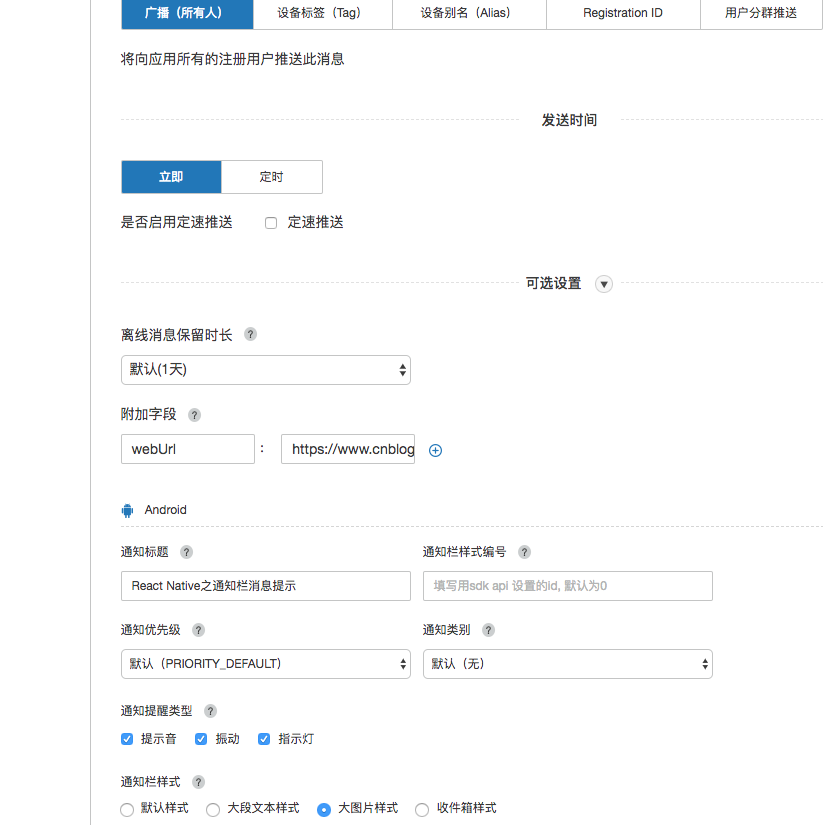
(2),在极光官网上设置与推送
React Native之通知栏消息提示(ios)的更多相关文章
- React Native之通知栏消息提示(android)
React Native之通知栏消息提示(android) 一,需求分析与概述 1.1,推送作为手机应用的基本功能,是手机应用的重要部分,如果自己实现一套推送系统费时费力,所以大部分的应用都会选择使用 ...
- React Native之配置URL Scheme(iOS Android)
React Native之配置URL Scheme(iOS Android) 一,需求分析 1.1,需要在网站中打开/唤起app,或其他app中打开app,则需要设置URL Scheme.比如微信的是 ...
- React Native发布APP之打包iOS应用
用React Native开发好APP之后,如何将APP发布以供用户使用呢?一款APP的发布流程无外乎:签名打包—>发布到各store这两大步骤.本文将向大家分享如何签名打包一款React Na ...
- react native 之 在现有的iOS工程中集成react native
在现有的iOS工程中集成react native, 或者说将react native引入到iOS 项目,是RN和iOS混合开发的必经之路 参考官网教程:https://reactnative.cn/d ...
- React Native 手工搭建环境 之iOS篇
常识 React native 开发服务器 在开发时,我们的框架是这样的:  当正式发布进入到生产环境时,开发服务器上所有的js文件将会被编译成包的形式,直接嵌入到客户端内.这时,已经不再需要开发服 ...
- [React Native] Writing Platform-Specific Components for iOS and Android in React Native
Learn to write components that render differently on iOS and Android, but present the same API. Firs ...
- React Native 简介:用 JavaScript 搭建 iOS 应用(2)
[编者按]本篇文章的作者是 Joyce Echessa--渥合数位服务创办人,毕业于台湾大学,近年来专注于协助客户进行 App 软体以及网站开发.本篇文章中,作者介绍通过 React Native 框 ...
- WebStorm开发工具设置React Native智能提示
最近在做React Native开发的时候,相信大家一般会使用WebStorm,Sublime,Atom等等开发工具.二之前搞前端的对WebStorm会很熟悉,WebStorm最新版是WebStorm ...
- 《React Native 精解与实战》书籍连载「iOS 平台与 React Native 混合开发」
此文是我的出版书籍<React Native 精解与实战>连载分享,此书由机械工业出版社出版,书中详解了 React Native 框架底层原理.React Native 组件布局.组件与 ...
随机推荐
- C# string数组转int数组(转载)
C# string数组转int数组 用法 1 2 3 4 5 6 7 8 9 10 11 12 13 14 //字符串数组(源数组) string[] sNums = new[] {"1 ...
- 【java】随机生成6位的数字
int radomInt = new Random().nextInt(999999); int radomInt2 =(int)((Math.random()*9+1)*100000); Syste ...
- Java开发笔记(五十四)内部类和嵌套类
通常情况下,一个Java代码文件只定义一个类,即使两个类是父类与子类的关系,也要把它们拆成两个代码文件分别定义.可是有些事物相互之间密切联系,又不同于父子类的继承关系,比如一棵树会开很多花朵,这些花儿 ...
- TensorFlow与Flask结合识别手写体数字
阅读本文约“2.2分钟” TensorFlow框架 ——TensorFlow是谷歌基于DistBelief进行研发的第二代人工智能学习系统 ——可被用于语音识别或图像识别等多项机器学习和深度学习领域 ...
- 用node.js express设置路径后 子路径下的页面访问静态资源路径出问题
在routes/news_mian.js 设置了访问news_main.html 的路径 '/',通知设置一个访问news-page.html的子路径'/newspage'子路径.但是在访问loacl ...
- import提升导致Fundebug报错:“请配置apikey”
摘要: 解释一下"请配置apikey"报错的原因. 部分Fundebug用户使用import来导入js文件时,出现了"请配置apikey"的报错,这是由于imp ...
- paas saas iaas 区别
最近在公司里面经常听到一些paas saas iaas云服务的名词,把我自己都听蒙圈啦,所以就各种找资料终于对这三个名词有了一定的了解 首先上一张图如下: IAAS(nfrastructure as ...
- 编写高性能.NET程序-《Concurrency in .NET》(1)- 为什么要读这本书?
最近广州.NET微软技术俱乐部对如何编写高性能.NET程序发起了讨论. 首先是在ORM和SQL方面进行了讨论,主题当然是经久不衰的月经贴: EF性能很差. Edi.Wang专门写了一篇文章< ...
- AndroidTV端的requestFocus()问题
每次开机盒子或者电视的时候,发现给某些控件设置请求焦点 requestFocus 会失效 最终的解决办法就是延时请求 view.postDelayed(new Runnable() { @Overri ...
- (简单)华为荣耀9i LLD-AL20的Usb调试模式在哪里开启的方法
每当我们使用pc通过数据线连接上安卓手机的时候,如果手机没有开启Usb开发者调试模式,pc则没法成功检测到我们的手机,有时,我们使用的一些功能较好的应用如以前我们使用的一个应用引号精灵,老版本就需要开 ...