
Assembly Experiment3
AIMS & PREPARATIONS of THIS EXPERIMENT:
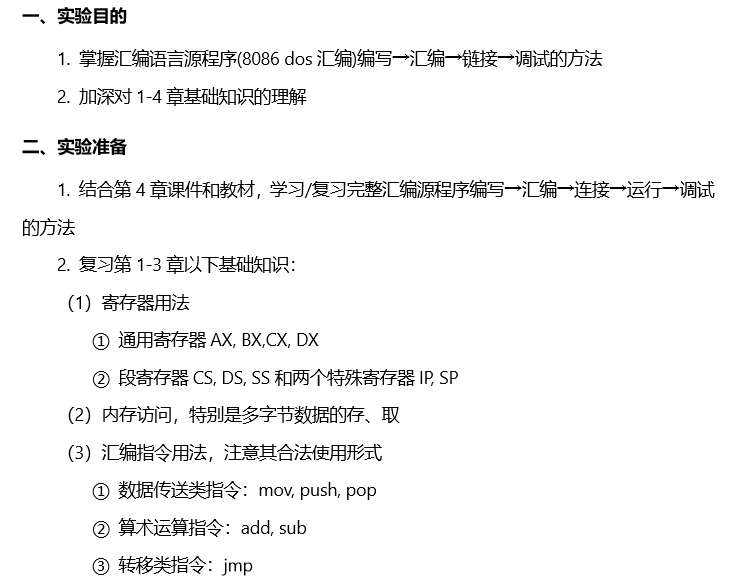
1st point of this experiment:
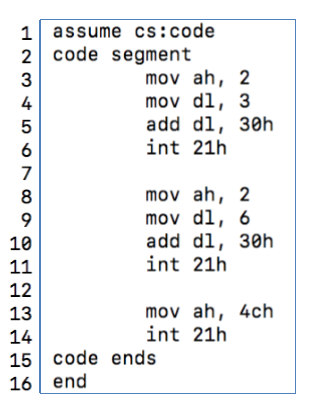
realize the programme t1.asm in DOSBox (code as follow)
STEPS&SCREENSHOTS of THIS EXPERIMENT:
( 1 ). COMPILE, LINK, RUN and DEBUG the PROGRAM t1.exe
(I used the computer which installed Win7 in lab for the experment, the disks are not virtual)
1.Creating a txt file (23.txt) in d:\epr

2.Copy the code given above (t1.asm) into the file 23.txt
3.Compile the programto get the object file
compile under the Microsoft assembly compiler masm5.0
by using the original way showed in the book
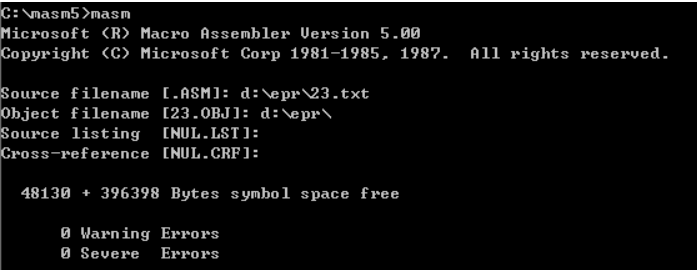
I saved the compiled file (.OBJ file) at the folder epr in disk D (d:\epr\)
after the compilation finished, a new file 23.OBJ (Object File) appered in the folder epr

4.Link the object file (to get the run file)
link the object file by running the link.exe in masm folder
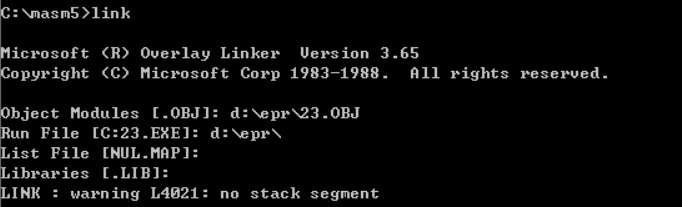
I also saved the run file (23.exe) in d:\epr\
after the linkage, the file 23.EXE appered in the folder epr in disk D

5.Run the exe file

we get the result: 36
6.Debug the run file 23.exe
① Using the command r to observe the numerical value saved in register cx and ds

we can easily view that a assosiation exists between the value in cx and dx : (cs)=(ds)+10H
② Checking the first two bytes of PSP,
because the PSP occupies 256bytes (100H) before the address of the program in the internal memory, and we can find the address of the first statement (MOV AH,02) is 15d9:0000, which is also the address of the program, so we set the address to 15c9:0000 (15d90H-100H=15c90H)
by using the command d, we can get the first two bytes of PSP, which is CD and 20 indeed
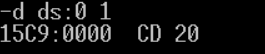
③ Disassembling the 23.exe by using the command u, observe the source code of 23.exe

④ Debug the program step by step, using the command t and r
r for command int to view the result
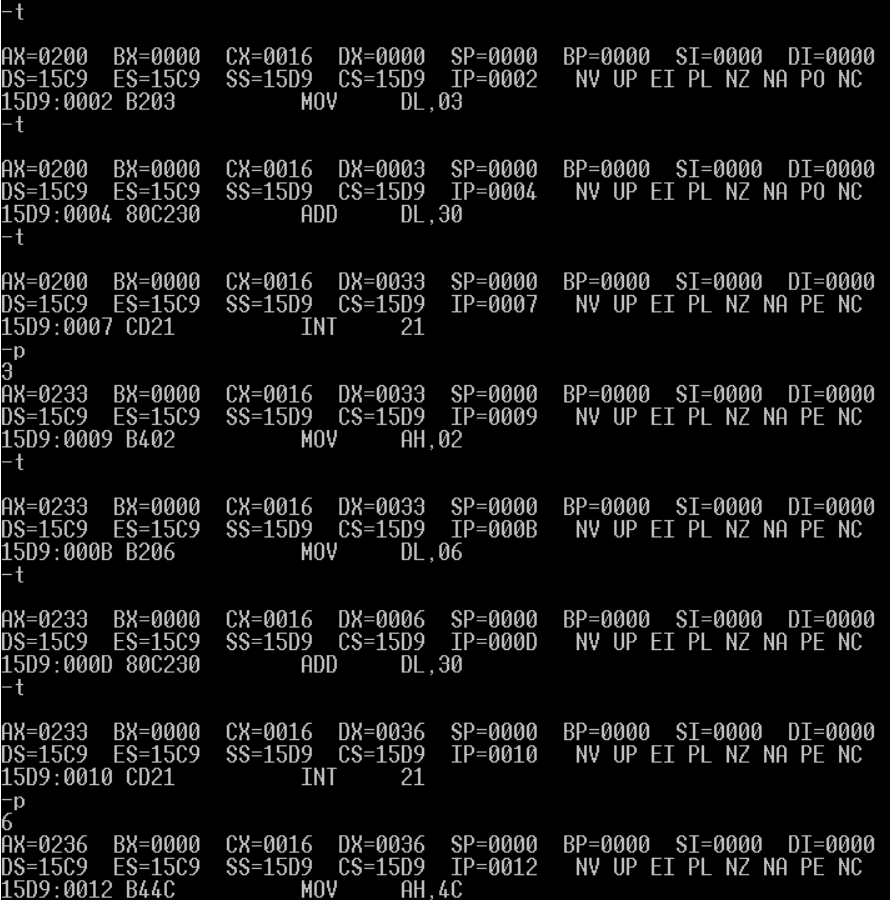

the program ends after (15D9:0014 INT 21)
at the 1st (15D9:0007 INT 21) the program gets a result---3
at the 2nd (15D9:0010 INT 21) the program gets a result---6
( 2 ). COMPILE, LINK and RUN the NEW PROGRAM
In this case, I use the DOXBox0.74-2 for Win10 to realize the compilation
1.Creating a txt file (23.txt) in d:\epr

2.Using masm.exe and link.exe to compile and link the 233.txt

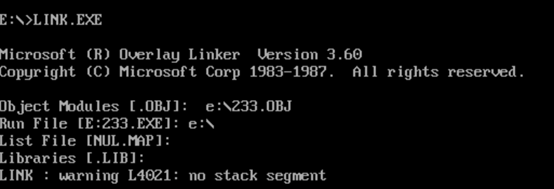
after the compilation and linkage, 233.OBJ and 233.EXE appears in the folder E

then run the 233.exe in the dosbox

we find that nothing appears on the screen
then we use the command cls to clear the screen, and run the 233.exe again
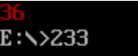
now we can get the result of 233.exe ------- number 36, which color is red
3.Change the number in the file 233.txt, after compilation and linkage, check the chage of its result.

compared with the original 233.txt showed before,
we changed the hex number in line 6 and line 8
mov [bx], 0433h ==> mov [bx], 0432h
mov [bx], 0436h ==> mov [bx], 0439h
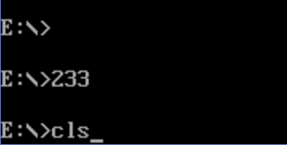
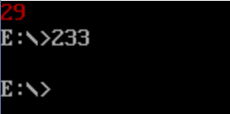
the new exe file also can't directly been showed on the screen
by using the command cls, and run the program again, number 29, which color is also red, appers on the top of the screen
4.Change the number in the file 233.txt again, after compilation and linkage, check the chage of its result.
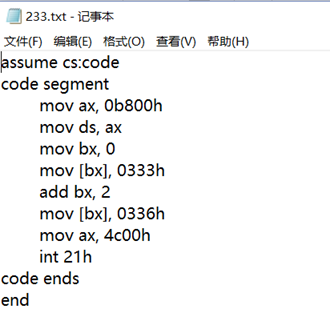
in this case we change the following statement:
(compared with the original file, changes also impled at line 6 and line 8)
mov [bx], 0433h ==> mov [bx], 0333h
mov [bx], 0436h ==> mov [bx], 0336h
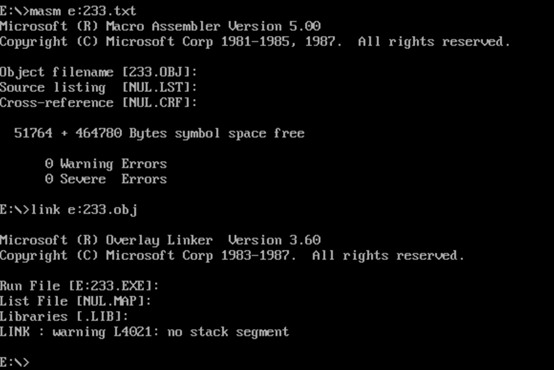
same way of compilation&linkage
as well as same invisible result
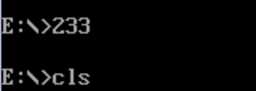
and same way to uncover it

now we can see number 36 appears on the screen, but, its color is cyan
SUMMARY & REVIEW of THIS EXPERIMENT :
In thisexperiment, I grasped the method of compiling, linking and running of the assembly program. Especially creating a txt file with statement in it, and turn the unexecutable file to executable file by using the tool masm.exe and link.exe: masm.exe to change the txt file to object file (.OBJ file) while link.exe to change the object file to executable file (.EXE file).
Hoever, there still confusions remained in this experiment:
First, why using statement ( mov bx, 0 mov [bx], 0433h) instead of (mov [0], 0433h) ?
one explanation to question1 is using the statement ( mov bx, 0 mov [bx], 0433h) can
have a positive influence on the circulation later
Second, why the result of some exe file cannot been showed on the screen immediately after execute. Instead, we need to clear the screen and run the file again to get the answer.
one realiable explanation to question 2 is that bugs exists while running the program in
doxbox in some platforms which I think includes Windows 10
Third, why the answer we get after clearing the screen and running the executable file again showed on the top of the screen? Does it belong to the execution command we typed before clearing the screen or after clearing the screen?
I assume that the answer belongs to the command after clearing screen, but why the result
appers on the top of the window still bothers me
Assembly Experiment3的更多相关文章
- 为C# as 类型转换及Assembly.LoadFrom埋坑!
背景: 不久前,我发布了一个调试工具:发布:.NET开发人员必备的可视化调试工具(你值的拥有) 效果是这样的: 之后,有小部分用户反映,工具用不了(没反应或有异常)~~~ 然后,建议小部分用户换个电脑 ...
- ASP.NET Core: You must add a reference to assembly mscorlib, version=4.0.0.0
ASP.NET Core 引用外部程序包的时候,有时会出现下面的错误: The type 'Object' is defined in an assembly that is not referenc ...
- An error occurred during the installation of assembly 'Microsoft.VC90.CRT……的问题
有一段时间没有用到AnkhSvn了,今天工作需要安装了一下.结果安装到一半就无法继续了,提示An error occurred during the installation of assembly ...
- Beennan的内嵌汇编指导(译)Brennan's Guide to Inline Assembly
注:写在前面,这是一篇翻译文章,本人的英文水平很有限,但内嵌汇编是学习操作系统不可少的知识,本人也常去查看这方面的内容,本文是在做mit的jos实验中的一篇关于内嵌汇编的介绍.关于常用的内嵌汇编(AT ...
- MAC上安装 HLA(High Level Assembly)
1.安装HLA 最新版的hla汇编器可在这里下载,支持MacOs,Linux,Windows平台 2.安装步骤 将下载好的hla程序包放在Mac根目录下 最重要的一步是设置好环境变量,打开Mac根目录 ...
- .NET 程序集Assembly使用
概述 一直以来,我们都在用C#编写程序,编写程序的时候,我们用到继承.多态.接口以及泛型,我们也都明白子类可以继承抽象类,并能够重写父类的抽象方法,可是大家是否想过,如下几个问题: 1.凡树必有根和叶 ...
- configuration error-could not load file or assembly crystaldecisions.reportappserver.clientdoc
IIS启动网站后报错: configuration error Could not load file or assembly 'crystaldecisions.reportappserver.cl ...
- Could not load file or assembly 'Microsoft.ReportViewer.WebForms, Version=10.0.0.0, Culture=neutral, PublicKeyToken=b03f5f7f11d50a3a' or one of its de
页面加载时出现这个错误: Could not load file or assembly 'Microsoft.ReportViewer.WebForms, Version=10.0.0.0, Cul ...
- How to make your assembly more secure from referencing by unauthorized bits
Now the security has a trend to become more and more important in our daily work, hence I did some r ...
随机推荐
- 浅析android系统设计中的回调思想
一.为何写作本文 在慢慢深入接触android开发的过程中,我越来越发现android中(至少应用曾的开发)用到了很多回调的思想.比如activity的生命周期,fragment的生命周期,皆是回调 ...
- Ubuntu 中文拼音输入法键入异常
如果确定系统装的OK,可以修复ubuntu Ctrl+Alt+t切出终端,输入命令: " ibus-daemon -drx",然后再输入拼音试一试就会OK .
- HYPERSPACE
Windows中,不管是应用程序还是内核程序,都不能直接访问物理内存,所有非IO指令都只能访问虚拟内存地址,如Mov eax, DWORD PTR[虚拟地址]形式,但是,有时候,我们明明已经知道了某个 ...
- 理解UDP协议的首部校验和校验和
reference: https://blog.csdn.net/qiuchangyong/article/details/79945630 https://seanwangjs.github.io/ ...
- 20175224 2018-2019-2 《Java程序设计》第六周学习总结
教材学习内容总结 第七章:内部类与异常类 内部类:java支持在类中定义另一个类,这个类为内部类,包含内部类的类称为外嵌类. 理解内部类与外嵌类. Java编译器生成的内部类的字节码文件为“外嵌类名$ ...
- .Net Core+Angular6 学习 第一部分(创建web api)
. 创建.net core web api 1.1 选择一个empty 模式,里面只有简单的2个class 1.2 配置web api 的路由. 1.2.1 打开Startup.cs,首先引用conf ...
- js 音乐播放器
在写之前先说下我遇到得两个问题,第一个问题是,在音乐标签,我希望得是切换数据做到得,但是出了问题,暂时为解决,第二个问题,页面切换时音乐继续播放由卡顿情况,未处理好. 好了,那我们开始做这个音乐播放器 ...
- 精进之路之lru
原理 LRU(Least recently used,最近最少使用)算法根据数据的历史访问记录来进行淘汰数据,其核心思想是“如果数据最近被访问过,那么将来被访问的几率也更高”. 实现1 最常见的实现是 ...
- java第11周
1.JPQL查询 JPQL全称Java Persistence Query Language 基于首次在EJB2.0中引入的EJB查询语言(EJB QL),Java持久化查询语言(JPQL)是一种可移 ...
- Qt + VS2013
参考文章: https://blog.csdn.net/u013447988/article/details/76170070