
angular4 富文本编辑器
使用quill富文本编辑器实现,angular项目中用到了ngx-quill插件。
quill的GitHub地址:https://github.com/quilljs/quill
ngx-quill的GitHub地址:https://github.com/KillerCodeMonkey/ngx-quill
ngx-quill适用于版本号在2以及以上的angular。
具体操作如下:
1、ngx-quill的安装
angular >= 5时ngx-quill的安装
npm install ngx-quill
angular < 5时
npm install ngx-quill@1.6.0
2、quill的配置
引入(ngx-quill的)QuillModule :
import { QuillModule } from 'ngx-quill'
在你的NgModule中添加 QuillModule :
@NgModule({
imports: [
...,
QuillModule
],
...
})
在index.html中添加quill的样式 :
<link href="https://cdn.quilljs.com/1.0.0/quill.snow.css" rel="stylesheet">
3、使用
在页面使用标签<quill-editor></quill-editor>进行使用,效果如下:
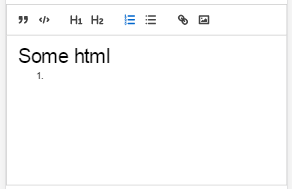
上图中的工具类是配置后的工具类,代码如下:
<quill-editor [modules]="config" [style]="{height: '200px'}" [(ngModel)]="data.content"></quill-editor>


config的内容如下:

{

  toolbar: [

    //['bold', 'italic', 'underline', 'strike'],        // toggled buttons

    ['blockquote', 'code-block'],

    [{ 'header': 1 }, { 'header': 2 }],               // custom button values

    [{ 'list': 'ordered'}, { 'list': 'bullet' }],

    //[{ 'script': 'sub'}, { 'script': 'super' }],      // superscript/subscript

    //[{ 'indent': '-1'}, { 'indent': '+1' }],          // outdent/indent

    //[{ 'direction': 'rtl' }],                         // text direction

    //[{ 'size': ['small', false, 'large', 'huge'] }],  // custom dropdown

    //[{ 'header': [1, 2, 3, 4, 5, 6, false] }],

    //[{ 'color': [] }, { 'background': [] }],          // dropdown with defaults from theme

    //[{ 'font': [] }],

    //[{ 'align': [] }],

    //['clean'],                                         // remove formatting button

    ['link', 'image', 'video']                         // link and image, video

  ]

};
-------------------------------------------------
2018-05-13 16:13:20
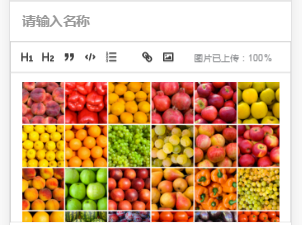
自定义工具栏
<quill-editor [style]="{height: '200px'}" [(ngModel)]="data.content" placeholder="在这里详细描述一个推荐原因,\n">

            <div quill-editor-toolbar>

              <span class="ql-formats">

                <button type="button" class="ql-header" value=""></button>

                <button type="button" class="ql-header" value=""></button>

                <button type="button" class="ql-blockquote"></button>

                <button type="button" class="ql-code-block ql-active"></button>

                <button type="button" class="ql-list" value="ordered"></button>

              </span>

              <span class="ql-formats">

                  <button type="button" class="ql-link"></button>

                  <button type="button" style="outline:none">

                    <div class="upload_img">

                        <svg class="camera" viewBox="0 0 18 18"> <rect class="ql-stroke" height="" width="" x="" y=""></rect> <circle class="ql-fill" cx="" cy="" r=""></circle> <polyline class="ql-even ql-fill" points="5 12 5 11 7 9 8 10 11 7 13 9 13 12 5 12"></polyline> </svg>

                        <input type="file" class="file_input" ng2FileSelect [uploader]="uploader2" />

                    </div>

                </button>

              </span>

              <span class="ql-formats">

                  <p style="font-size: 9px;" *ngIf="uploader2?.queue.length > 0">图片已上传:{{ uploader2?.queue.length >  ? uploader2?.queue[uploader2?.queue.length-]?.progress :  }}%</p>

              </span>

            </div>

          </quill-editor>
上传图片代码(使用了ng2-file-upload插件)
public uploader2: FileUploader;

this.uploader2 = new FileUploader({

      url: this.URL

      , method: "POST"

      , itemAlias: "upfile"

      , autoUpload: true

    });

    this.uploader2.onSuccessItem = function (item, response, status, headers) {

      if(status == ){

        let rsp = JSON.parse(response);

        let img = '<img class="camera" src="'+"http://您的域名"+  rsp.url+'" alt="">';

        that.data.content += img;

      }

    };
angular4 富文本编辑器的更多相关文章
- 富文本编辑器Simditor的简易使用
最近打算自己做一个博客系统,并不打算使用帝国cms或者wordpress之类的做后台管理!自己处于学习阶段也就想把从前台到后台一起谢了.好了,废话不多说了,先来看看富文本编辑器SimDitor,这里是 ...
- 个人网站对xss跨站脚本攻击(重点是富文本编辑器情况)和sql注入攻击的防范
昨天本博客受到了xss跨站脚本注入攻击,3分钟攻陷--其实攻击者进攻的手法很简单,没啥技术含量.只能感叹自己之前竟然完全没防范. 这是数据库里留下的一些记录.最后那人弄了一个无限循环弹出框的脚本,估计 ...
- UEditor百度富文本编辑器--让编辑器自适应宽度的解决方案
UEditor百度富文本编辑器的initialFrameWidth属性,默认值是1000. 不能够自适应屏幕宽度.如图1: 刚开始的时候,我是直接设置initialFrameWidth=null的.效 ...
- PHP Ueditor 富文本编辑器
2016年12月11日 08:46:59 星期日 百度的简版富文本编辑器umeditor很久没更新了 全功能版本的配置项跟umeditor还是有区别的, 这里说下ueditor怎么对接到项目中去, 主 ...
- JavaScript 富文本编辑器
WEB项目中使用UEditor(富文本编辑器) UEditor - 完整示例 http://ueditor.baidu.com/website/onlinedemo.html UEditor注意事项: ...
- MVC 使用 Ueditor富文本编辑器
一.Ueditor 1.下载Ueditor富文本编辑器 官方下载地址: http://ueditor.baidu.com/website/download.html 建议下载开发版,此处我下载的是 . ...
- 富文本编辑器kindeditor配置
<!--富文本编辑器kindeditor配置↓ --> <link type="text/css" rel="stylesheet" href ...
- web开发实战--弹出式富文本编辑器的实现思路和踩过的坑
前言: 和弟弟合作, 一起整了个智慧屋的小web站点, 里面包含了很多经典的智力和推理题. 其实该站点从技术层面来分析的话, 也算一个信息发布站点. 因此在该网站的后台运营中, 富文本的编辑器显得尤为 ...
- 富文本编辑器防止xss注入javascript版
富文本编辑器:ueditor 其实富文本编辑器已经有防止xss注入功能,但是你服务端程序在接收的时候在做一次转义,否则有可能然后前端验证直接提交数据导致被xss攻击. 为了节省后端程序开销则在前端 显 ...
随机推荐
- 【python 3】 字典方法操作汇总
基础数据类型:tuple 1.1 新增 dic["key"] = value 字典中没有key就添加,有key就覆盖 dic ...
- IISExpress配置使其能通过IP访问方法
环境说明: 本机IP:192.168.2.100:Web端口:11843 步骤一 打开[我的文档]\IISExpress\config\applicationhost.config,找到下面的代码块 ...
- es6开发环境搭建,babel 将es6转化成es5
工欲善其事,必先利其器.所以我们第1节就是搭建一个基本的ES6开发环境.现在的Chrome浏览器已经支持ES6了,但是有些低版本的浏览器还是不支持ES6的语法,这就需要我们把ES6的语法自动的转变成E ...
- introduce explaining variable 引入解释变量
一段复杂的计算的表达式(一般 逻辑判断 if(a!=1 && b!=Null && a>b ) && .... 直接在代码中参与到 代码的逻辑 ...
- Python 进度条原理
#进度条原理 import sys,time for i in range(50): sys.stdout.write("#")#标准输出 #若不能够按照时间一个一个依次显示,则代 ...
- java,优先队列的用法
像C++语言一样,java中,也有包装好的优先队列类PriorityQueue. 用法如下(模板代码): 工作安排问题: 问题描述:设有n件工作分配给n个人,将工作i分配给第j个人所需的费用为cij. ...
- mysql5.7.25安装
附:mysql安装包 链接:https://pan.baidu.com/s/1vROdBSw0GiMWCRpuwmqFCg 提取码:ug4o a.运行mysql-installer-community ...
- 『超分辨率重建』从SRCNN到WDSR
超分辨率重建技术(Super-Resolution)是指从观测到的低分辨率图像重建出相应的高分辨率图像.SR可分为两类: 1. 从多张低分辨率图像重建出高分辨率图像 2. 从单张低分辨率图 ...
- FPM五:拆解前面的四——OVP做查询和结果
说明:前面的例子是将list和search放到一个Feeder Class里的,这里来做拆解分步说明. 1.创建SEARCH的结构 2.创建RESULT的结构 表类型(不用表类型的话,需要自己在cla ...
- 探索 | “中医+AI”会诊电力设备故障
在 AlphaGo 成功挑战围棋世界冠军后,人工智能(AI)“深度学习”家喻户晓.电力企业有机会着眼自身战略,利用落地的 AI 技术和应用聚焦业务流程优化.效率提升以及对全新机遇的发掘.本文针对设备故 ...