
[翻译] M13ProgressSuite
M13ProgressSuite

https://github.com/Marxon13/M13ProgressSuite

A set of classes used to display progress information to users on iOS.
这是一系列进度信息显示效果的类.
Includes:
- A interchangeable set of progress view of diffrent styles. All the progress views are based on the same superclass, allowing any of them to be switched with any other easily. 这是一个具有不同风格的进度条显示效果的view,所有子类都是继承至一个父类,允许他们彼此之间随意替换
- A progress bar for UINavigationBar that works like Apple's Messages app. It also has the added feature of having an indeterminate style. 一个用于UINavigationBar的进度条,像Apple Messages的app的效果.
- A HUD overlay that works over any UIView. Uses the M13ProgressView class to allow easy customizablility of the progress view. 这个HUD可以加载在任何view上面,使用M13ProgressView进行定制是很easy的一件事情.
- A progress view that is styled like terminal. 类似于终端的进度条效果.
- Complete documentation of each class. 每一个类都有详细的文档说明.
UINavigationController (M13ProgressViewBar)
Adds a progress bar to the UINavigationController's UINavigationBar. The progress bar is controlled through the UINavigationController.
将一个进度条信息添加到UINavigationController上面的UINavigationBar,这个进度条完全由UINavigationController所控制.


M13ProgressHUD
A customizable HUD that displays progress, and status information to the user. It uses the M13ProgressView class to allow easy changing of the progress view style.
一个定制的HUD用以显示进度效果,以及状态更改信息.使用M13ProgressView可以很方便的修改进度条的状态.

M13ProgressConsole
A progress view styled like Terminal on OS X.
类似于OS X的终端进度条效果.


M13ProgressViews
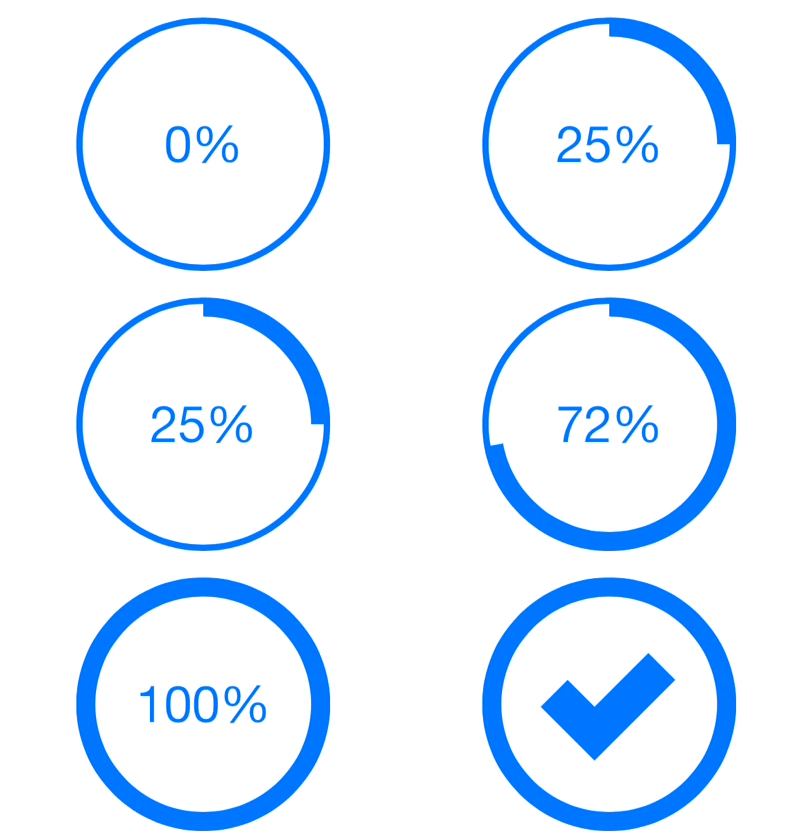
A set of progess view based off of the same superclass. Allowing easy switching between progress view. Each progress view has success and failure actions, an indeterminate mode, and appearance customization features.
一系列的进度条效果,都是继承于同一个父类.不同的进度条之间切换效果很容易.每一种进度条效果都有一个成功与失败的动作,以及一个中间状态,你还可以整体的定制它们的样式.







Known Bugs:
- When the HUD is set to apply the iOS 7 style blur to the HUD background, it doesn't work. The screenshot of the superview is not taken in the proper CGRect. It seems to work when the mask type is set to iOS 7 Blur, I beleive it is because the CGRectOrigin is {0, 0}.
[翻译] M13ProgressSuite的更多相关文章
- 《Django By Example》第五章 中文 翻译 (个人学习,渣翻)
书籍出处:https://www.packtpub.com/web-development/django-example 原作者:Antonio Melé (译者@ucag注:大家好,我是新来的翻译, ...
- 《Django By Example》第四章 中文 翻译 (个人学习,渣翻)
书籍出处:https://www.packtpub.com/web-development/django-example 原作者:Antonio Melé (译者注:祝大家新年快乐,这次带来<D ...
- [翻译]开发文档:android Bitmap的高效使用
内容概述 本文内容来自开发文档"Traning > Displaying Bitmaps Efficiently",包括大尺寸Bitmap的高效加载,图片的异步加载和数据缓存 ...
- 【探索】机器指令翻译成 JavaScript
前言 前些时候研究脚本混淆时,打算先学一些「程序流程」相关的概念.为了不因太枯燥而放弃,决定想一个有趣的案例,可以边探索边学. 于是想了一个话题:尝试将机器指令 1:1 翻译 成 JavaScript ...
- 《Django By Example》第三章 中文 翻译 (个人学习,渣翻)
书籍出处:https://www.packtpub.com/web-development/django-example 原作者:Antonio Melé (译者注:第三章滚烫出炉,大家请不要吐槽文中 ...
- 《Django By Example》第二章 中文 翻译 (个人学习,渣翻)
书籍出处:https://www.packtpub.com/web-development/django-example 原作者:Antonio Melé (译者注:翻译完第一章后,发现翻译第二章的速 ...
- 《Django By Example》第一章 中文 翻译 (个人学习,渣翻)
书籍出处:https://www.packtpub.com/web-development/django-example 原作者:Antonio Melé (译者注:本人目前在杭州某家互联网公司工作, ...
- 【翻译】Awesome R资源大全中文版来了,全球最火的R工具包一网打尽,超过300+工具,还在等什么?
0.前言 虽然很早就知道R被微软收购,也很早知道R在统计分析处理方面很强大,开始一直没有行动过...直到 直到12月初在微软技术大会,看到我软的工程师演示R的使用,我就震惊了,然后最近在网上到处了解和 ...
- ASP.NET MVC with Entity Framework and CSS一书翻译系列文章之第一章:创建基本的MVC Web站点
在这一章中,我们将学习如何使用基架快速搭建和运行一个简单的Microsoft ASP.NET MVC Web站点.在我们马上投入学习和编码之前,我们首先了解一些有关ASP.NET MVC和Entity ...
随机推荐
- R语言-RStudio快捷键总结
一.控制台 功能 Windows & Linux Mac 移动鼠标到控制台 Ctrl+2 Ctrl+2 移动到鼠标命令编辑 Ctrl+1 Ctrl+1 控制台清屏 Ctrl+L Comm ...
- C/C++中的常量到底存在了什么地方
一般来说,基本类型(整型.字符型等)常量会在编译阶段被编译成立即数,占的是代码段的内存.(代码段是只读的,而且不允程序员获取代码段的地址,所以在c++中,尽量不为const分配数据段的内存,但是一旦取 ...
- UOJ #356. 【JOI2017春季合宿】Port Facility
Description 小M有两个本质不同的栈. 无聊的小M找来了n个玩具.之后小M把这n个玩具随机顺序加入某一个栈或把他们弹出. 现在小M告诉你每个玩具的入栈和出栈时间,现在她想考考小S,有多少种方 ...
- Express开发性能优化
1.使用浏览器缓存 在app.js里添加 var CACHETIME = 60 * 1000 * 60 * 24 * 30; app.use(express.static(path.join(__di ...
- centos 6.5安装docker
安装linux,需要系统内核为3.x以上,如果centos版本为7以下,先升级系统内核 1.关闭selinux setenforce 0 sed -i '/^SELINUX=/c\SELINUX=di ...
- [转][C#] 对List<T>取交集、连集及差集
本文转自:http://www.cnblogs.com/shuibin/archive/2012/04/19/2457867.html 最近在專案中,剛好遇到這個需求, 需要比對兩個List,進行一些 ...
- APPCAN的mas服务报错
报错信息 主要是: [meap_im_java]load java warning { [Error: Cannot find module 'java'] code: 'MODULE_NOT_FOU ...
- 通向全栈之路——(3)node环境搭建
1:更新系统 sudo apt-get update2:安装相关软件 sudo apt-get install vim openssl build-essential libssl-dev wget ...
- linux命令新建文件
在命令行输入vi filename就创建了一个叫filename的文件了,如果存在就打开了. 进入vi以后,输入内容,最后按一下esc,再按冒号,输入wq就保存退出了. 新建一个文本文件 vi New ...
- Jquery Easy UI初步学习(三)数据增删改
第二篇只是学了加载用datagrid加载数据,数据的增删改还没有做,今天主要是解决这个问题了. 在做增删改前需要弹出对应窗口,这就需要了解一下EasyUi的弹窗控件. 摘自:http://philoo ...