
程序设计 之 C#实现《拼图游戏》 (上)代码篇
原理详解请参考博客中
拼图游戏(下)原理篇 http://www.cnblogs.com/labixiaohei/p/6713761.html
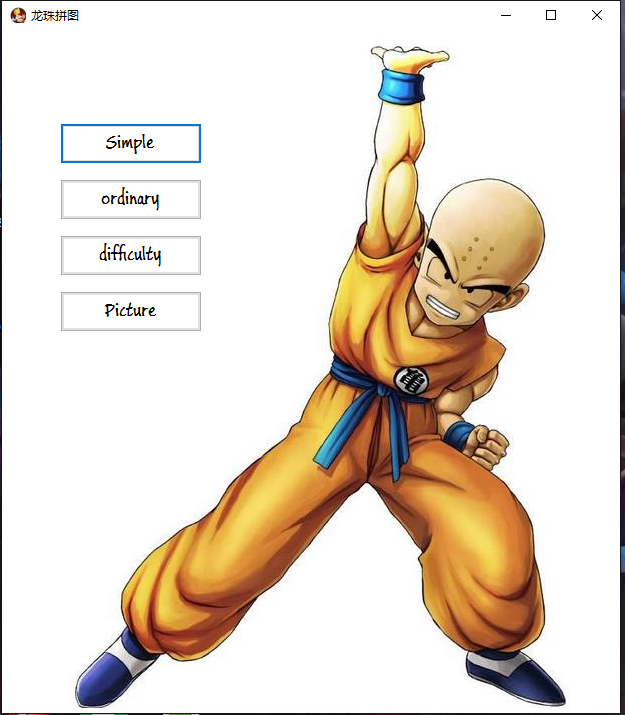
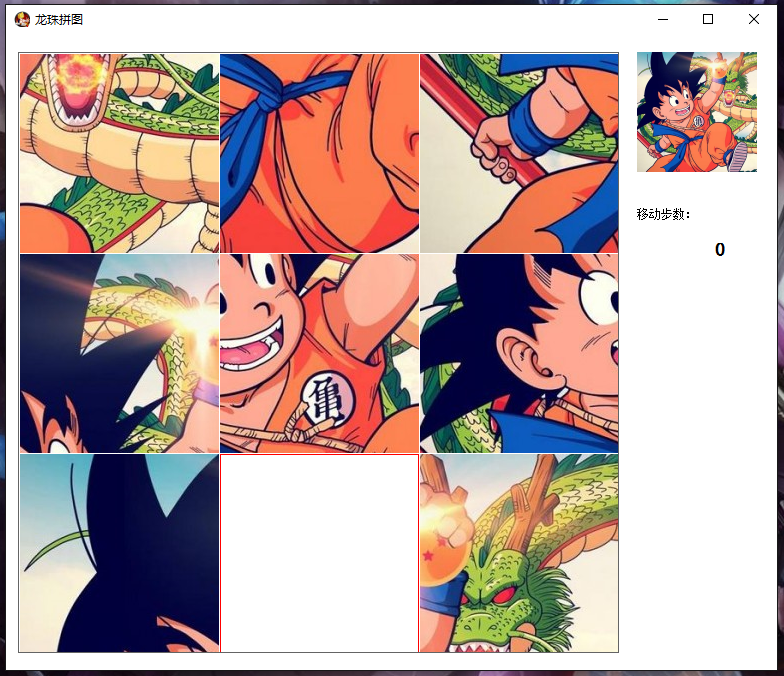
功能描述:
1.用户自定义上传图片
2.游戏难度选择:简单(3*3)、一般(5*5)、困难(9*9)三个级别
3.纪录完成步数
模块:
1.拼图类
2.配置类
3.游戏菜单窗口
4.游戏运行窗口
代码文件VS2013版本:
游戏: 百度网盘链接:http://pan.baidu.com/s/1boQFZqf
--------------------------------------------------我叫分割线---------------------------------------------------------------
1.拼图类
方法:
1.构造函数:传图片并分割成一个一个小图片
2.交换方法
3.大图中截取小单元方法
4.移动单元的方法
5.打乱单元顺序方法
using System;

using System.Collections.Generic;

using System.Drawing;

using System.Linq;

using System.Text;

using System.Threading.Tasks;

using System.Windows.Forms;

namespace 拼图

{

    public class Puzzle

    {

        public enum Diff         //游戏难度

        {

            simple,//简单

            ordinary,//普通

            difficulty//困难

        }

        private struct Node      //拼图单元格结构体

        {

            public Image Img;

            public int Num;

        }

        private Image _img;      //拼图图片

        public int Width;       //拼图边长

        private Diff _gameDif;   //游戏难度

        private Node[,] node;    //单元格数组

        public int N;           //单元格数组行列数

        /// <summary>

        /// 构造函数

        /// </summary>

        /// <param name="Img">拼图大图</param>

        /// <param name="GameDif">游戏难度,该类下结构体Diff</param>

        public Puzzle(Image Img,int Width, Diff GameDif)

        {

            this._gameDif = GameDif;

            this._img = Img;

            this.Width = Width;

            switch(this._gameDif)

            {

                case Diff.simple:    //简单则单元格数组保存为3*3的二维数组

                    this.N = ;

                    node=new Node[,];

                    break;

                case Diff.ordinary:    //一般则为5*5

                    this.N = ;

                    node = new Node[, ];

                    break;

                case Diff.difficulty:  //困难则为9*9

                    this.N = ;

                    node = new Node[, ];

                    break;

            }

            //分割图片形成各单元保存在数组中

            int Count = ;

            for (int x = ; x < this.N; x++)

            {

                for (int y = ; y < this.N; y++)

                {

                    node[x, y].Img = CaptureImage(this._img, this.Width / this.N, this.Width / this.N, x * (this.Width / this.N), y * (this.Width / this.N));

                    node[x, y].Num = Count;

                    Count++;

                }

            }

            for (int x = ; x < this.N; x++)

            {

                for (int y = ; y < this.N; y++)

                {

                    Graphics newGra = Graphics.FromImage(node[x, y].Img);

                    newGra.DrawLine(new Pen(Color.White), new Point(, ), new Point(, this.Width / this.N));

                    newGra.DrawLine(new Pen(Color.White), new Point(, ), new Point(this.Width / this.N, ));

                    newGra.DrawLine(new Pen(Color.White), new Point(this.Width / this.N, this.Width / this.N), new Point(this.Width / this.N, ));

                    newGra.DrawLine(new Pen(Color.White), new Point(this.Width / this.N, this.Width / this.N), new Point(,this.Width / this.N));

                }

            }

            //(最后一项为空单独处理)

            node[N - , N - ].Img = Image.FromFile("Image\\end.PNG");

            Graphics newGra2 = Graphics.FromImage(node[N - , N - ].Img);

            newGra2.DrawLine(new Pen(Color.Red), new Point(, ), new Point(, this.Width / this.N - ));

            newGra2.DrawLine(new Pen(Color.Red), new Point(, ), new Point(this.Width / this.N - , ));

            newGra2.DrawLine(new Pen(Color.Red), new Point(this.Width / this.N - , this.Width / this.N - ), new Point(this.Width / this.N - , ));

            newGra2.DrawLine(new Pen(Color.Red), new Point(this.Width / this.N - , this.Width / this.N - ), new Point( ,this.Width / this.N - ));

            //打乱拼图

            this.Upset();

        }

        /// <summary>

        /// 由图片fromImage中截图并返回

        /// </summary>

        /// <param name="fromImage">原图片</param>

        /// <param name="width">宽</param>

        /// <param name="height">高</param>

        /// <param name="spaceX">起始X坐标</param>

        /// <param name="spaceY">起始Y坐标</param>

        /// <returns></returns>

        public  Image CaptureImage(Image fromImage, int width, int height, int spaceX, int spaceY)

        {

            int x = ;

            int y = ;

            int sX = fromImage.Width - width;

            int sY = fromImage.Height - height;

            if (sX > )

            {

                x = sX > spaceX ? spaceX : sX;

            }

            else

            {

                width = fromImage.Width;

            }

            if (sY > )

            {

                y = sY > spaceY ? spaceY : sY;

            }

            else

            {

                height = fromImage.Height;

            }

            //创建新图位图

            Bitmap bitmap = new Bitmap(width, height);

            //创建作图区域

            Graphics graphic = Graphics.FromImage(bitmap);

            //截取原图相应区域写入作图区

            graphic.DrawImage(fromImage, , , new Rectangle(x, y, width, height), GraphicsUnit.Pixel);

            //从作图区生成新图

            Image saveImage = Image.FromHbitmap(bitmap.GetHbitmap());

            return saveImage;

        }

        /// <summary>

        /// 移动坐标(x,y)拼图单元

        /// </summary>

        /// <param name="x">拼图单元x坐标</param>

        /// <param name="y">拼图单元y坐标</param>

        public bool Move(int x,int y)

        {

            //MessageBox.Show(" " + node[2, 2].Num);

            if (x +  != N && node[x + , y].Num ==  N * N - )

            {

                Swap(new Point(x + , y), new Point(x, y));

                return true;

            }

            if (y +  != N && node[x, y + ].Num ==  N * N - )

            {

                Swap(new Point(x, y + ), new Point(x, y));

                return true;

            }

            if (x -  != - && node[x - , y].Num == N * N - )

            {

                Swap(new Point(x - , y), new Point(x, y));

                return true;

            }

            if (y -  != - && node[x, y - ].Num == N * N - )

            {

                Swap(new Point(x, y - ), new Point(x, y));

                return true;

            }

            return false;

        }

        //交换两个单元格

        private  void Swap(Point a, Point b)

        {

            Node temp = new Node();

            temp = this.node[a.X, a.Y];

            this.node[a.X, a.Y] = this.node[b.X, b.Y];

            this.node[b.X, b.Y] = temp;

        }

        public bool Judge()

        {

            int count=;

            for (int x = ; x < this.N; x++)

            {

                for (int y = ; y < this.N; y++)

                {

                    if (this.node[x, y].Num != count)

                        return false;

                    count++;

                }

            }

            return true;

        }

        public Image Display()

        {

            Bitmap bitmap = new Bitmap(this.Width, this.Width);

            //创建作图区域

            Graphics newGra = Graphics.FromImage(bitmap);

            for (int x = ; x < this.N; x++)

                for (int y = ; y < this.N; y++)

                    newGra.DrawImage(node[x, y].Img, new Point(x * this.Width / this.N, y * this.Width / this.N));

            return bitmap;

        }

        /// <summary>

        /// 打乱拼图

        /// </summary>

        public void Upset()

        {

            int sum = ;

            if (this._gameDif == Diff.simple) sum = ;

            //if (this._gameDif == Diff.ordinary) sum = 100000;

            Random ran = new Random();

            for (int i = , x = N - , y = N - ; i < sum; i++)

            {

                long tick = DateTime.Now.Ticks;

                ran = new Random((int)(tick & 0xffffffffL) | (int)(tick >> )|ran.Next());

                switch (ran.Next(, ))

                {

                    case :

                        if (x +  != N)

                        {

                            Move(x + , y);

                            x = x + ;

                        }

                        break;

                    case :

                        if (y +  != N)

                        {

                            Move(x, y + );

                            y = y + ;

                        }

                        break;

                    case :

                        if (x -  != -)

                        {

                            Move(x - , y);

                            x = x - ;

                        }

                        break;

                    case :

                        if (y -  != -)

                        {

                            Move(x, y - );

                            y = y - ;

                        }

                        break;

                }

            }

        }

    }

}
配置类:
using System;

using System.Collections.Generic;

using System.Drawing;

using System.Linq;

using System.Text;

using System.Threading.Tasks;

namespace 拼图

{

    public static class GamePage

    {

        public static Puzzle.Diff Dif;  //游戏难度

        public static Image img;        //拼图图案

    }

}
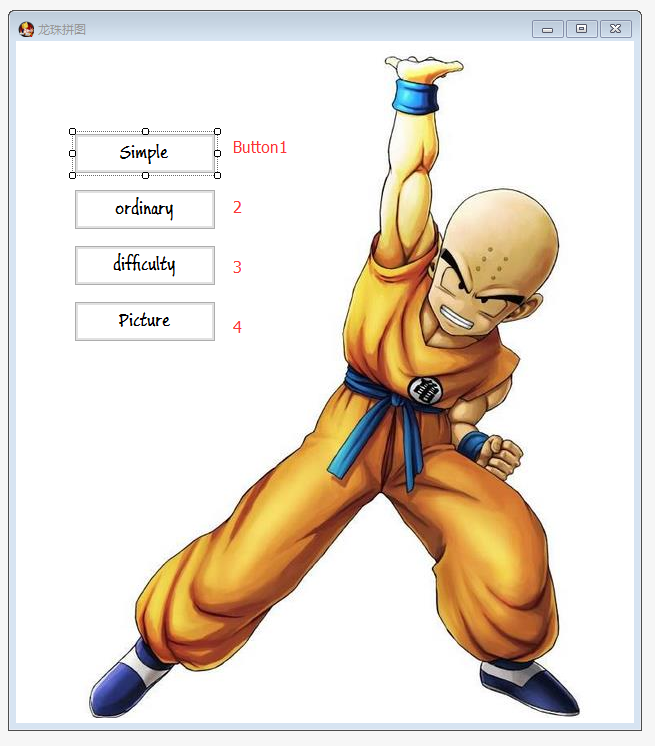
游戏菜单:
通过菜单,上传图片至配置类img,并选择难度上传至配置类Dif,然后拼图对象构造时读取配置类
using System;

using System.Collections.Generic;

using System.ComponentModel;

using System.Data;

using System.Drawing;

using System.Linq;

using System.Text;

using System.Threading.Tasks;

using System.Windows.Forms;

namespace 拼图

{

    public partial class Menu : Form

    {

        public Menu()

        {

            InitializeComponent();

            GamePage.img =Image.FromFile(@"Image\\拼图.jpg");

            Control.CheckForIllegalCrossThreadCalls = false;

        }

        private void button1_Click(object sender, EventArgs e)

        {

            GamePage.Dif = Puzzle.Diff.simple;

            this.Hide();

            Form1 ff = new Form1();

            ff.closefather+=new 拼图.Form1.childclose(this.closethis);

            ff.Show();

        }

        private void button2_Click(object sender, EventArgs e)

        {

            GamePage.Dif = Puzzle.Diff.ordinary;

            this.Hide();

            Form1 ff = new Form1();

            ff.closefather += new 拼图.Form1.childclose(this.closethis);

            ff.Show();

        }

        private void button3_Click(object sender, EventArgs e)

        {

            GamePage.Dif = Puzzle.Diff.difficulty;

            this.Hide();

            Form1 ff = new Form1();

            ff.closefather += new 拼图.Form1.childclose(this.closethis);

            ff.Show();

        }

        public void closethis()

        {

            this.Show();

        }

        private void button4_Click(object sender, EventArgs e)

        {

            OpenFileDialog ofd = new OpenFileDialog();

            ofd.ShowDialog();

            GamePage.img = Image.FromFile(ofd.FileName).GetThumbnailImage(,,new Image.GetThumbnailImageAbort(delegate { return false; }), IntPtr.Zero);

        }

        private void Menu_Load(object sender, EventArgs e)

        {

        }

    }

}
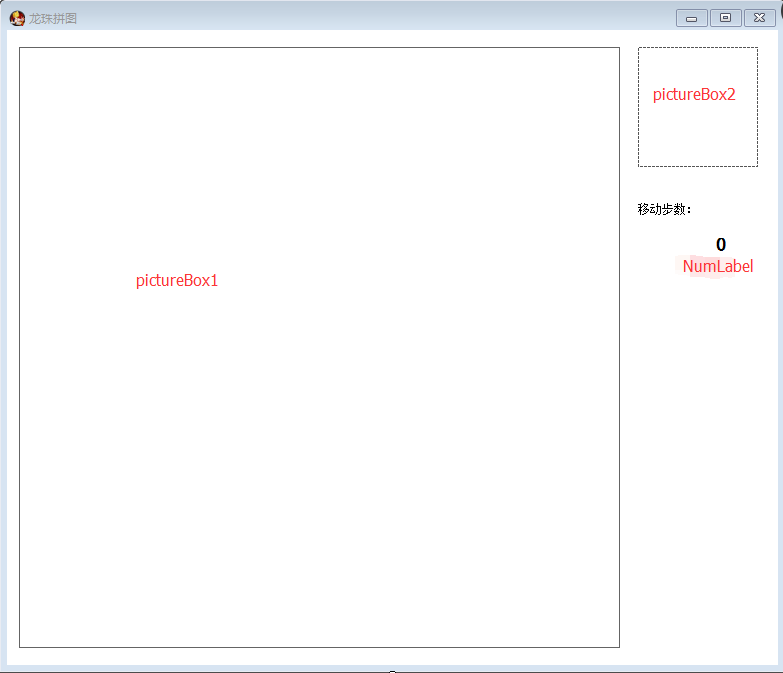
游戏运行窗口:
1.注册鼠标点击事件来获得输入消息
2.显示功能
3.pictureBox1用来展示游戏拼图情况
4.pictureBox2展示完整拼图的缩略图(当鼠标移至pictureBox2时,发送消息,使pictureBox1显示完整拼图)
5.Numlabel来显示移动步数(通过变量Num的累加来计算)
using System;

using System.Collections.Generic;

using System.ComponentModel;

using System.Data;

using System.Drawing;

using System.Linq;

using System.Text;

using System.Threading;

using System.Threading.Tasks;

using System.Windows.Forms;

namespace 拼图

{

    public partial class Form1 : Form

    {

        public Form1()

        {

            InitializeComponent();

        }

        private Puzzle puzzle;

        private int Num=;

        private Image img;

        private void Form1_Load(object sender, EventArgs e)

        {

            img = GamePage.img;

            pictureBox2.Image = img.GetThumbnailImage(,, new Image.GetThumbnailImageAbort(delegate { return false; }), IntPtr.Zero);

            puzzle = new Puzzle(img, , GamePage.Dif);

            pictureBox1.Image =puzzle.Display();

        }

        private void pictureBox1_MouseClick(object sender, MouseEventArgs e)

        {

            if (puzzle.Move(e.X / (puzzle.Width / puzzle.N), e.Y / (puzzle.Width / puzzle.N)))

            {

                Num++;

                pictureBox1.Image = puzzle.Display();

                if (puzzle.Judge())

                {

                    if (MessageBox.Show("恭喜过关", "是否重新玩一把", MessageBoxButtons.OKCancel) == DialogResult.OK)

                    {

                        Num = ;

                        puzzle.Upset();

                        pictureBox1.Image = puzzle.Display();

                    }

                    else

                    {

                        Num = ;

                        closefather();

                        this.Close();

                    }

                }

            }

            NumLabel.Text = Num.ToString();

        }

        private void pictureBox2_MouseEnter(object sender, EventArgs e)

        {

            pictureBox1.Image = img;

        }

        private void pictureBox2_MouseLeave(object sender, EventArgs e)

        {

            pictureBox1.Image = puzzle.Display();

        }

        private void Form1_FormClosed(object sender, FormClosedEventArgs e)

        {

            closefather();

        }

        public delegate void childclose();

        public event childclose closefather;

    }

}
程序设计 之 C#实现《拼图游戏》 (上)代码篇的更多相关文章
- 练手小游戏(代码篇之敌人AI
诶呀~又没有更新微博,去拔牙了,疼死了,休息了几天过来接着写代码~ 首先是Base.写了一个框架,照别人扒的. Base分三部分,AILocomotion(AI移动),Steering(行为基类),V ...
- JavaScript写一个拼图游戏
拼图游戏的代码400行, 有点多了, 在线DEMO的地址是:打开: 因为使用canvas,所以某些浏览器是不支持的: you know: 为什么要用canvas(⊙o⊙)? 因为图片是一整张jpg或 ...
- 微信小程序开发的游戏《拼图游戏》
微信小程序开发的游戏<拼图游戏> 代码直接考进去就能用 pintu.js // pintu.js Page({ /** * 页面的初始数据 */ data: { }, initGame: ...
- 程序设计 之 C#实现《拼图游戏》 (下) 原理篇
前言:在 http://www.cnblogs.com/labixiaohei/p/6698887.html 程序设计 之 C#实现<拼图游戏>(上),上传了各模块代码,而在本文中将详细剖 ...
- 程序设计 之 C#实现《拼图游戏》
功能描述: 1.用户自定义上传图片 2.游戏难度选择:简单(3*3).一般(5*5).困难(9*9)三个级别 3.纪录完成步数 模块: 1.拼图类 2.配置类 3.游戏菜单窗口 4.游戏运行窗口 -- ...
- C#实现拼图游戏
C#实现<拼图游戏> (下) 原理篇 前言:在 http://www.cnblogs.com/labixiaohei/p/6698887.html 程序设计 之 C#实现<拼图游 ...
- 利用Vue.js实现拼图游戏
之前写过一篇<基于Vue.js的表格分页组件>的文章,主要介绍了Vue组件的编写方法,有兴趣的可以访问这里进行阅读:http://www.cnblogs.com/luozhihao/p/5 ...
- JavaScript拼图游戏
今天是2016年最后一天上班了.最近几天都比较休闲,有时间空闲下来写写文档之类的. 2016过得真是快.感觉没做什么就过去了.想到之前想坚持每个月写一写博客都没坚持到.希望2017年可以吧. 无聊之余 ...
- atitit.html5 拼图游戏的解决之道.
atitit.html5 拼图游戏的解决之道. 1. 拼图游戏的操作(点击法and 拖动法) 1 1. 支持键盘上.下.左.右键移动: 1 2. 支持点击空白模块中的上下左右箭头移动: 1 3. 支持 ...
随机推荐
- Java并发编程--1.Thread和Runnable
创建线程 Java有两种方式创建线程, 继承Thread类和实现Runnable接口 继承Thread 步骤: 1.自定义一个类继承Thread类, 重写run方法 2.创建自定义类的对象,调用sta ...
- vue打包以后,除了首页意外,其余页面是空白
针对vue项目打包以后,除了首页意外,其余页面是空白的,需要在服务端进行配置. 原因是router中,mode是history引起的 如果是nginx,改成如下: location / { root ...
- SSM框架之批量增加示例(同步请求jsp视图解析)
准备环境:SSM框架+JDK8/JDK7+MySQL5.7+MAVEN3以上+Tomcat8/7应用服务器 示例说明: 分发给用户优惠券,通过checkbox选中批量分发,对应也就是批量增加. 对于公 ...
- 关于SpringApplication包无法导入报错问题
问题描述:一直再报红线,包始终无法导入,参考过好几个博友分享的解决方案,依然没有效果,对了补充一点SprinBoot版本为2.0.3. 问题解决:目前通过更换版本得到解决1.5.6或者1.5.8都可以 ...
- 关于WebSocket长链接的详细介绍iOS
http://www.cocoachina.com/ios/20181030/25327.html
- gulp插件(8) - gulp-sourcemaps(生成sourcemap)
功能描述生成sourcemap文件(什么是sourcemap?请参考,简单讲就是文件压缩后不利于查看与调试,但是有了sourcemap,出错的时候,除错工具将直接显示原始代码,而不是转换后的代码) 插 ...
- CCF认证201712-2游戏
问题描述 有n个小朋友围成一圈玩游戏,小朋友从1至n编号,2号小朋友坐在1号小朋友的顺时针方向,3号小朋友坐在2号小朋友的顺时针方向,……,1号小朋友坐在n号小朋友的顺时针方向. 游戏开始,从1号小朋 ...
- Java类是如何默认继承Object的?
原:https://juejin.im/post/5ca1e8ade51d454e6a300048 前言 学过Java的人都知道,Object是所有类的父类.但是你有没有这样的疑问,我并没有写exte ...
- ORM增删改查(django)
单表操作: 一.添加 (1)方式一 from mysite.models import * def add(request): book= Book(name="python" ...
- 如何防止网页被植入广告,内容被监控-HTTPS
前几天一朋友说访问网站页面底部怎么出现小广告了呢,内容有点不雅,朋友截图发给我,调侃我说怎么放这种广告,我一听纳闷,网站运行伊始,从来没有投放过任何广告,更别说不雅广告了. 最近还遇到一个问题就是,网 ...