
C# 压缩图片到指定宽度,假如图片小于指定宽度 判断图片大小是否大于指定大小(KB) 如果大于则压缩图片质量 宽高不变
class Program

{

    static void Main(string[] args)

    {//G:\zhyue\backup\projects\Test\ConsoleApplication1\img

     //var url = "http://seo.jrechina.com/houselist/";

     //var res = WebRequestExt.GetData(url);

        string img_url = @"D:\Documents\Pictures\壁纸\179 KB.jpg";

        string img_savePath = @"G:\zhyue\backup\projects\Test\ConsoleApplication1\img\179 KB.jpg";

        string[] files=Directory.GetFiles(@"D:\Documents\Pictures\准备压缩图片");

        foreach (var file in files)

        {

            img_url = file;

            img_savePath = @"G:\zhyue\backup\projects\Test\ConsoleApplication1\img\" + Path.GetFileName(img_url);

            bool res = ImgHelper.CompressImageWidthTo760(img_url, img_savePath, , , true);

        }

        Console.WriteLine("ok");

        Console.ReadKey();

    }

}

lic class ImgHelper

{

    /// <summary>

    /// 无损压缩图片 压缩宽度到指定宽度760 小于指定宽度的判断size是否大于200KB进行质量压缩 宽高不变

    /// </summary>

    /// <param name="sFile">原图片地址</param>

    /// <param name="dFile">压缩后保存图片地址</param>

    /// <param name="flag">压缩质量(数字越小压缩率越高)1-100</param>

    /// <param name="size">压缩后图片的最大大小 KB</param>

    /// <param name="sfsc">是否是第一次调用</param>

    /// <returns></returns>

    public static bool CompressImageWidthTo760(string sFile, string dFile, int flag = , int size = , bool sfsc = true)

    {

        using (Image iSource = Image.FromFile(sFile))

        {

            ImageFormat tFormat = iSource.RawFormat;

            //如果是第一次调用,原始图像的大小小于要压缩的大小,则直接复制文件,并且返回true

            FileInfo firstFileInfo = new FileInfo(sFile);

            if (sfsc == true && firstFileInfo.Length < size *  && iSource.Width <= )

            {

                firstFileInfo.CopyTo(dFile, true);

                return true;

            }

            if (firstFileInfo.Length > size *  && iSource.Width <= )

            {//超过200KB只压缩质量不压缩宽高

                return NewMethodByQuality(sFile, dFile, ref flag, size, tFormat, iSource as Bitmap);

            }

            //每次压缩一半的宽高比例

            double percent = 760.0 / iSource.Width;

            int dHeight = (int)Math.Ceiling(percent * iSource.Height);

            int dWidth = ;

            int sW = , sH = ;

            //按比例缩放

            Size tem_size = new Size(iSource.Width, iSource.Height);

            if (tem_size.Width > dHeight || tem_size.Width > dWidth)

            {

                if ((tem_size.Width * dHeight) > (tem_size.Width * dWidth))

                {

                    sW = dWidth;

                    sH = (dWidth * tem_size.Height) / tem_size.Width;

                }

                else

                {

                    sH = dHeight;

                    sW = (tem_size.Width * dHeight) / tem_size.Height;

                }

            }

            else

            {

                sW = tem_size.Width;

                sH = tem_size.Height;

            }

            using (Bitmap ob = new Bitmap(dWidth, dHeight))

            {

                using (Graphics g = Graphics.FromImage(ob))

                {

                    g.Clear(Color.WhiteSmoke);

                    g.CompositingQuality = System.Drawing.Drawing2D.CompositingQuality.HighQuality;

                    g.SmoothingMode = System.Drawing.Drawing2D.SmoothingMode.HighQuality;

                    g.InterpolationMode = System.Drawing.Drawing2D.InterpolationMode.HighQualityBicubic;

                    //g.DrawImage(iSource, new Rectangle((dWidth - sW) / 2, (dHeight - sH) / 2, sW, sH), 0, 0, iSource.Width, iSource.Height, GraphicsUnit.Pixel);

                    //g.DrawImage(iSource, new Rectangle((int)Math.Ceiling((dWidth - sW) / percent), (int)Math.Ceiling((dHeight - sH) / percent), sW, sH), 0, 0, iSource.Width, iSource.Height, GraphicsUnit.Pixel);

                    g.DrawImage(iSource, new Rectangle((int)Math.Ceiling((dWidth - sW) / percent), (int)Math.Ceiling((dHeight - sH) / percent), sW, sH), , , iSource.Width, iSource.Height, GraphicsUnit.Pixel);

                    g.Dispose();

                }

                return NewMethodByQuality(sFile, dFile, ref flag, size, tFormat, ob);

            }

        }

    }

    /// <summary>

    /// 根据图片质量压缩

    /// </summary>

    /// <param name="sFile"></param>

    /// <param name="dFile"></param>

    /// <param name="flag"></param>

    /// <param name="size"></param>

    /// <param name="tFormat"></param>

    /// <param name="ob"></param>

    /// <returns></returns>

    private static bool NewMethodByQuality(string sFile, string dFile, ref int flag, int size, ImageFormat tFormat, Bitmap ob)

    {

        //以下代码为保存图片时,设置压缩质量

        EncoderParameters ep = new EncoderParameters();

        long[] qy = new long[];

        qy[] = flag;//设置压缩的比例1-100

        EncoderParameter eParam = new EncoderParameter(System.Drawing.Imaging.Encoder.Quality, qy);

        ep.Param[] = eParam;

        try

        {

            ImageCodecInfo[] arrayICI = ImageCodecInfo.GetImageEncoders();

            ImageCodecInfo jpegICIinfo = null;

            for (int x = ; x < arrayICI.Length; x++)

            {

                if (arrayICI[x].FormatDescription.Equals("JPEG"))

                {

                    jpegICIinfo = arrayICI[x];

                    break;

                }

            }

            if (jpegICIinfo != null)

            {

                ob.Save(dFile, jpegICIinfo, ep);//dFile是压缩后的新路径

                FileInfo fi = new FileInfo(dFile);

                if (fi.Length >  * size)

                {

                    flag = flag - ;

                    CompressImageWidthTo760(sFile, dFile, flag, size, false);

                }

            }

            else

            {

                ob.Save(dFile, tFormat);

            }

            return true;

        }

        catch

        {

            return false;

        }

    }

}
图片等比例压缩
说明:等比例压缩图片到指定宽度,假如图片小于指定宽度 判断图片大小是否大于指定大小(KB) 如果大于则压缩图片质量 宽高不变
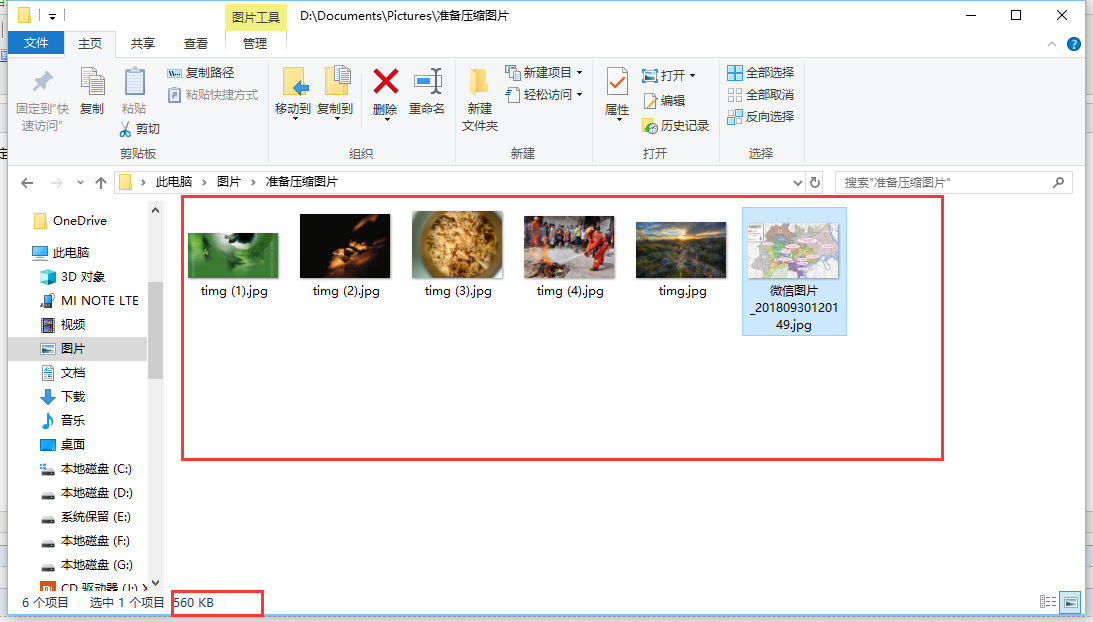
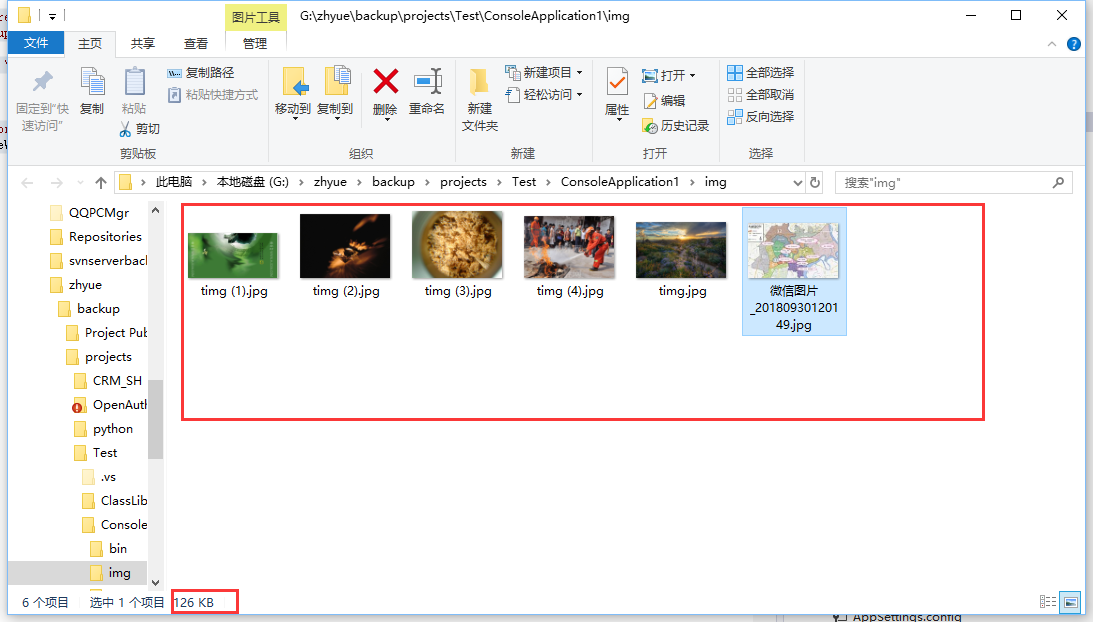
压缩后:
C# 压缩图片到指定宽度,假如图片小于指定宽度 判断图片大小是否大于指定大小(KB) 如果大于则压缩图片质量 宽高不变的更多相关文章
- shell 批量压缩指定文件夹及子文件夹内图片
shell 批量压缩指定文件夹及子文件夹内图片 用户上传的图片,一般都没有经过压缩,造成空间浪费.因此须要编写一个程序,查找文件夹及子文件夹的图片文件(jpg,gif,png),将大于某值的图片进行压 ...
- java中判断图片格式并且等比例压缩图片
最近项目中需要判断上传的图片必须是png,jpg,gif三种格式的图片,并且当图片的宽度大于600px时,压缩图片至600px,并且等比例的压缩图片的高度. 具体的实现形式: 大致的思路是: 判断根据 ...
- java压缩图片设置宽高
package html2pdf_2; import java.awt.Image; import java.awt.image.BufferedImage; import java.io.File; ...
- iOS学习-压缩图片(改变图片的宽高)
压缩图片,图片的大小与我们期望的宽高不一致时,我们可以将其处理为我们想要的宽高. 传入想要修改的图片,以及新的尺寸 -(UIImage*)imageWithImage:(UIImage*)image ...
- Android大图片之缩略图,以及对原图依照指定宽高裁剪成缩略图
<Android大图片之变换缩略图,以及对原始大图片依照指定宽.高裁剪成缩略图> 在Android的ImageView载入图像资源过程中,出于性能和内存开销的须要.有时候须要把一个原 ...
- php 图片上传的公共方法(按图片宽高缩放或原图)
写的用于图片上传的公共方法类调用方法: $upload_name='pic';$type = 'logo_val';$file_name = 'logo_' . $user_id .create_st ...
- 七牛--关于图片上传方向不统一的问题--主要关于图片EXIF信息中旋转参数Orientation的理解
[图片引用方向纠正]直接在图片后面添加 ?imageMogr/auto-orient eg:http://data.upfitapp.com/data/2016/10/18/1629114767606 ...
- javascript判断图片是否加载完成方法整理
有时候我们在前端开发工作中为了获取图片的信息,需要在图片加载完成后才可以正确的获取到图片的大小尺寸,并且执行相应的回调函数使图片产生某种显示效果.本文主要整理了几种常见的javascipt判断图片加载 ...
- Js获取图片原始宽高
如果我们页面看到的图片都是缩略图,那就需要做个图片点击放大效果,那么怎样获取图片的原始宽高呢?方法如下: //获取图片原始宽度 function getNaturalWidthAndHeight(im ...
随机推荐
- Swift 里字符串(七)stringIndex
在 String 里,用来索引 Character 的,不是整数,而是StringIndex 内部结构 extension String { /// A position of a character ...
- 【12】JMicro微服务-Zookeeper
如非授权,禁止用于商业用途,转载请注明出处作者:mynewworldyyl 往下看前,建议完成前面1到11小节 1. CuratorFramework支持 JMicro目前基于Zookeeper实现统 ...
- 剑指offer五十六之删除链表中重复的结点
一.题目 在一个排序的链表中,存在重复的结点,请删除该链表中重复的结点,重复的结点不保留,返回链表头指针. 例如,链表1->2->3->3->4->4->5 处理后 ...
- VM下--Linux根分区磁盘扩容
转载请注明源出处:http://www.cnblogs.com/lighten/p/6825938.html 1.缘由 由于需要对虚拟机中的软件进行升级,执行yum update的时候,整个更新包在8 ...
- java数据结构之(堆)栈
(堆)栈概述栈是一种特殊的线性表,是操作受限的线性表栈的定义和特点•定义:限定仅在表尾进行插入或删除操作的线性表,表尾—栈顶,表头—栈底,不含元素的空表称空栈•特点:先进后出(FILO)或后进先出(L ...
- Office Visio 201*安装详细步骤并激活
不多说直接上干货! 初步了解: Visio的百度百科:http://baike.baidu.com/link?url=tNv_gqhhVKcurpP8kvh4ylkknc5JQLIm6bGmQVxi ...
- 《垃圾回收的算法与实现》——GC标记-压缩算法
基本算法 Mark-Compact与Mark-Sweep的第一阶段均为标记活跃对象,第二阶段则不同,压缩算法则是将活跃对象逻辑上移到一起. Lisp2算法 对象头中增加forwarding指针,其用法 ...
- WPF中定义TabItem的可选区域(特别是当使用Label来呈现Header时)
1. 如上图,所示,此时当鼠标移入蓝色框内除文字部分,整个TabItem是没反应的 经过查看代码可以看到: 将图标中的VerticalAlignment="Center"和Hori ...
- [转载]Angular4 组件通讯方法大全
组件通讯,意在不同的指令和组件之间共享信息.如何在两个多个组件之间共享信息呢. 最近在项目上,组件跟组件之间可能是父子关系,兄弟关系,爷孙关系都有.....我也找找了很多关于组件之间通讯的方法,不同的 ...
- 扫描网站服务器真实IP的小脚本
#!/usr/bin/env python # -*- coding: gbk -*- # -*- coding: utf_8 -*- # Date: 2015年9月11日 # Author:蔚蓝行 ...