
matplotlib热图
1.基础知识点回顾
- 1.plot(x, y, marker='D')表示绘制折线图,marker设置样式菱形。
- 2.scatter(x, y, marker='s', color='r')绘制散点图,红色正方形。
- 3.bar(x, y, 0.5, color='c')绘制柱状图,间距为0.5,原色。
- 4.hist(data,40,normed=1,histtype='bar',facecolor='yellowgreen',alpha=0.75)直方图。
- 5.设置x轴和y轴的坐标值:
- xlim(-2.5, 2.5) #设置x轴范围
- ylim(-1, 1) #设置y轴范围
- 6.显示中文和负号代码如下:
- plt.rcParams['font.sas-serig']=['SimHei'] #用来正常显示中文标签
- plt.rcParams['axes.unicode_minus']=False #用来正常显示负号
2.Heatmap热图基础知识
详情请参阅:http://matplotlib.org/users/image_tutorial.html
In [1]: import matplot.pyplot as plt

In [2]: help(plt.imshow)

Help on function imshow in module matplotlib.pyplot:

imshow(X, cmap=None, norm=None, aspect=None, interpolation=None, alpha=None, vmin=None, vmax=None, origin=None, extent=None, shape=None, filternorm=1, filterrad=4.0, imlim=None, resample=None, url=None, hold=None, data=None, **kwargs)

    Display an image on the axes.

    Parameters

    ----------

    X : array_like, shape (n, m) or (n, m, 3) or (n, m, 4)

        Display the image in `X` to current axes.  `X` may be an

        array or a PIL image. If `X` is an array, it

        can have the following shapes and types:

        - MxN -- values to be mapped (float or int)

        - MxNx3 -- RGB (float or uint8)

        - MxNx4 -- RGBA (float or uint8)

        The value for each component of MxNx3 and MxNx4 float arrays

        should be in the range 0.0 to 1.0. MxN arrays are mapped

        to colors based on the `norm` (mapping scalar to scalar)

        and the `cmap` (mapping the normed scalar to a color).

    cmap : `~matplotlib.colors.Colormap`, optional, default: None

        If None, default to rc `image.cmap` value. `cmap` is ignored

        if `X` is 3-D, directly specifying RGB(A) values.
参数X可以是图片也可以数组,若是数组,必须以下三种形式
- MxN:values to be mapped (float or int)
- MxNx3 -- RGB (float or uint8)
- MxNx4 -- RGBA (float or uint8))
- 3维数组或4维数组范围必须是(0,1)
- 参考:http://blog.csdn.net/Eastmount/article/details/73392106?fps=1&locationNum=5
3.Heatmap热图绘制
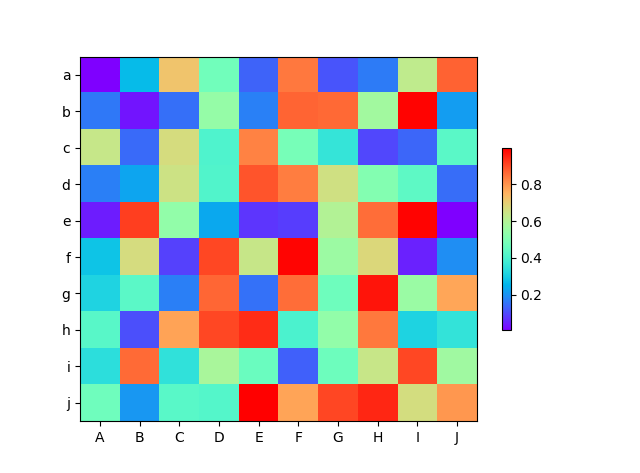
import numpy as np

from matplotlib import pyplot as plt

from matplotlib import cm

from matplotlib import axes

def draw_heatmap(data,xlabels,ylabels):

    #cmap=cm.Blues

    cmap=cm.get_cmap('rainbow',1000)

    figure=plt.figure(facecolor='w')

    ax=figure.add_subplot(1,1,1,position=[0.1,0.15,0.8,0.8])

    ax.set_yticks(range(len(ylabels)))

    ax.set_yticklabels(ylabels)

    ax.set_xticks(range(len(xlabels)))

    ax.set_xticklabels(xlabels)

    map=ax.imshow(data,interpolation='nearest',cmap=cmap,aspect='auto',vmin=a.min(),vmax=a.max())

    cb=plt.colorbar(mappable=map,cax=None,ax=None,shrink=0.5)

    plt.show()

a=np.random.rand(10,10)

print(a)

xlabels=['A','B','C','D','E','F','G','H','I','J']

ylabels=['a','b','c','d','e','f','g','h','i','j']

draw_heatmap(a,xlabels,ylabels)
这里想把某块显示成一种颜色,则需要调用interpolation='nearest'参数即可
matplotlib热图的更多相关文章
- 基于matplotlib的数据可视化 - 热图imshow
热图: Display an image on the axes. 可以用来比较两个矩阵的相似程度 mp.imshow(z, cmap=颜色映射,origin=垂直轴向) imshow( X, cma ...
- Matplotlib学习---用matplotlib画热图(heatmap)
这里利用Nathan Yau所著的<鲜活的数据:数据可视化指南>一书中的数据,学习画图. 数据地址:http://datasets.flowingdata.com/ppg2008.csv ...
- python matplotlib imshow热图坐标替换/映射
今天遇到了这样一个问题,使用matplotlib绘制热图数组中横纵坐标自然是图片的像素排列顺序, 但是这样带来的问题就是画出来的x,y轴中坐标点的数据任然是x,y在数组中的下标, 实际中我们可能期望坐 ...
- Python图表数据可视化Seaborn:3. 线性关系数据| 时间线图表| 热图
1. 线性关系数据可视化 lmplot( ) import numpy as np import pandas as pd import matplotlib.pyplot as plt import ...
- 基于HTML5实现3D热图Heatmap应用
Heatmap热图通过众多数据点信息,汇聚成直观可视化颜色效果,热图已广泛被应用于气象预报.医疗成像.机房温度监控等行业,甚至应用于竞技体育领域的数据分析. http://www.hightopo.c ...
- 用Excel制作热图(heatmap)的方法
http://jingyan.baidu.com/article/64d05a0240ec75de55f73bd8.html 利用Excel 2010及以上版本的"条件格式"--& ...
- Heatmap.js v2.0 – 最强大的 Web 动态热图
Heatmap 是用来呈现一定区域内的统计度量,最常见的网站访问热力图就是以特殊高亮的形式显示访客热衷的页面区域和访客所在的地理区域的图示.Heatmap.js 这个 JavaScript 库可以实现 ...
- 基于HTML5实现的Heatmap热图3D应用
Heatmap热图通过众多数据点信息,汇聚成直观可视化颜色效果,热图已广泛被应用于气象预报.医疗成像.机房温度监控等行业,甚至应用于竞技体育领域的数据分析. 已有众多文章分享了生成Heatmap热图原 ...
- matplotlib 出图示例
如果你想要在Linxu中获得一个高效.自动化.高质量的科学画图的解决方案,应该考虑尝试下matplotlib库.Matplotlib是基于python的开源科学测绘包,基于python软件基金会许可证 ...
随机推荐
- 用js做一个简单的留言板效果
html部分: 1: <!DOCTYPE> 2: <html lang="zh-en"> 3: <head> 4: <title>j ...
- 15 款JavaScript 热门图形图表库
图表是数据图形化的表示,也就是“通过形象的图表来展示数据,比如条形图,折线图,饼图”.几乎每个开发或者项目管理团队都需要图表或者图形来简化 理解,可视化复杂的数据和 web 应用工作流.可视化图表可以 ...
- WordPress 后台上传自定义网站Logo
需求: 众所周知一般网站的logo都是固定的所以我在做网站时也是使用的静态logo文件,但最近用wp给一个客户做的网站时,因为网站现在的logo可能会需要重新设计,所以客户提出了需要在后台可以自己修改 ...
- IE与Cognos的那些事
问题描述1:打开报表设计页面的时候,即打开reportstudio的时候报IE阻止了一个来自XX.XX.XX.XX的弹出窗口程序 IE设置:关闭弹出窗口阻止程序即可 问题描述2:无法下载文件,例如Ex ...
- (字符串)最长公共字串(Longest-Common-SubString,LCS)
题目: 给定两个字符串X,Y,求二者最长的公共子串,例如X=[aaaba],Y=[abaa].二者的最长公共子串为[aba],长度为3. 子序列是不要求连续的,字串必须是连续的. 思路与代码: 1.简 ...
- 关于LayoutInflater的错误用法
转自:http://www.doubleencore.com/2013/05/layout-inflation-as-intended/ Layout inflation is the term us ...
- sqlite可视化工具推荐
软件名称:SQLite Expert 下载地址:http://www.sqliteexpert.com/download.html 下载免费的Personal版本就可以了 我试用了SQLite Exp ...
- JavaScript 之 对象和数组
一:对象 说起对象,我们不自然就想起了面向对象中自封装的一个类,同样JS中也是遵循这个守则,在web编程中几乎天天用到的就是JSON.是的,这就是一个对象,不过这个对象下面的字段都是字符串和值类型 ...
- JDK核心JAVA源代码解析(1) - Object
想写这个系列非常久了,对自己也是个总结与提高.原来在学JAVA时.那些JAVA入门书籍会告诉你一些规律还有法则,可是用的时候我们一般非常难想起来,由于我们用的少而且不知道为什么.知其所以然方能印象深刻 ...
- TOD&FIXME&XXX
TODO: + 说明: 如果代码中有该标识,说明在标识处有功能代码待编写,待实现的功能在说明中会简略说明.FIXME: + 说明:如果代码中有该标识,说明标识处代码需要修正,甚至代码是错误的,不能工作 ...