
android 中的 window,view,activity具体关系
通过讨论这个问题,我们能够见识到google是对面向对象模式的理解,能够理解android底层的一些调用。这也是一道很常见的面试题。
我们这篇文章就来解决这四个问题:
- Android 中view的显示视图么?
- Activity,window,View的关系是什么?
- LayOutInflater 填充是什么?
- LayOutInflater 具体怎么做?
首先,我们从activity开始说起,说起activity我们都要知道setcontentview和attach方法。setcontentview中的,主要用来填充相应的布局文件。而至于attach方法了,这个方法用的很少,但是很重要。
我们跟踪java的源代码了,我们清晰的看到这个activity实际上是调用phonewindow的setcontentview中的方法来进行界面的呈现。他的类图如下:
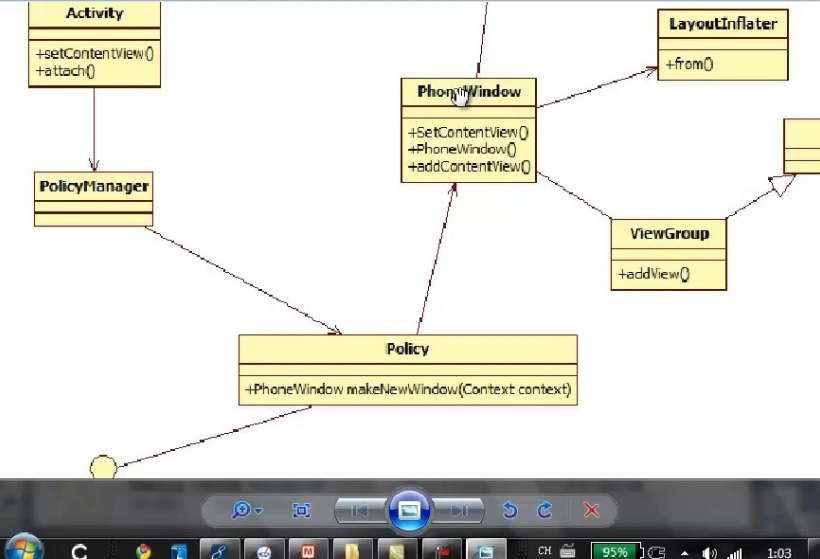
而phonewindow有初始化了一个ViewGroup对象,这个ViewGroup的子类,可以显示每个控件的视图,还有一个LayoutInflator使xml文件能够填充为相应的视图。他们的类图又是如下:
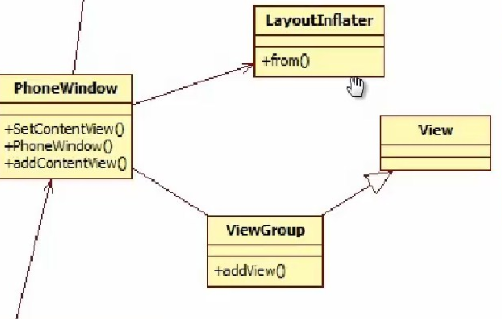
我们看看具体的源代码如下:
首先,我们找到activity中的attach方法,这是这个程序启动的时候最重要的方法。了,这是他的源代码:
final void attach(Context context, ActivityThread aThread,

            Instrumentation instr, IBinder token, int ident,

            Application application, Intent intent, ActivityInfo info,

            CharSequence title, Activity parent, String id,

            Object lastNonConfigurationInstance,

            HashMap<String,Object> lastNonConfigurationChildInstances,

            Configuration config) {

        attachBaseContext(context);

        mWindow = PolicyManager.makeNewWindow(this);

        mWindow.setCallback(this);

        if (info.softInputMode != WindowManager.LayoutParams.SOFT_INPUT_STATE_UNSPECIFIED) {

            mWindow.setSoftInputMode(info.softInputMode);

        }

        mUiThread = Thread.currentThread();

        mMainThread = aThread;

        mInstrumentation = instr;

        mToken = token;

        mIdent = ident;

        mApplication = application;

        mIntent = intent;

        mComponent = intent.getComponent();

        mActivityInfo = info;

        mTitle = title;

        mParent = parent;

        mEmbeddedID = id;

        mLastNonConfigurationInstance = lastNonConfigurationInstance;

        mLastNonConfigurationChildInstances = lastNonConfigurationChildInstances;

        mWindow.setWindowManager(null, mToken, mComponent.flattenToString());

        if (mParent != null) {

            mWindow.setContainer(mParent.getWindow());

        }

        mWindowManager = mWindow.getWindowManager();

        mCurrentConfig = config;

    }
我们看到policymanager对象中有一个window对象,这个window就是现实的窗口了。他是一个抽象类,又是如何new出这个对象,我们继续关注。这就来到了policymanager的类中了。看makenewwindow这个方法:
public static Window makeNewWindow(Context context) {

        return sPolicy.makeNewWindow(context);

    }
他又是传递context调用ipolicy接口中的makeNewWindow方法,来返回一个window对象。继续深挖,我们来看makenewwindow这个方法真实的本来面目。
这个本身的makewindow是ipolicy的一个抽象方法,他是发包给policy实现的,这个policy是new出一个phonewindow对象。 这个phonewindow的类又是怎么样子了。关注源代码我们得知,他是继承与window这个基类的,饶了一大圈以后,发现这个makenewwindow确实是new出一个window的对象。 他构造函数是这个样子:
    public PhoneWindow(Context context) {

        super(context);

        mLayoutInflater = LayoutInflater.from(context);

    }
发现他是用一个layoutflater从布局文件中填充一个相应的界面,通过这一大篇源代码证明,我们看到window,activity,和view的关系是这个样子的:
activity中new出一个window,而window通过这个phonewindow子类来获取一个子类。这是一种典型composite模式。一个经典的应用,希望对大家带来帮助。
怎么添加窗口上了,是通过setcontentview方法,我们看到这个还是通过phonewindow的setcontentview方法,他的源代码如下:
    public void setContentView(View view, ViewGroup.LayoutParams params) {

        if (mContentParent == null) {

            installDecor();

        } else {

            mContentParent.removeAllViews();

        }

        mContentParent.addView(view, params);

        final Callback cb = getCallback();

        if (cb != null) {

            cb.onContentChanged();

        }

    }
他是通过mcontentparent来添加视图,这更进一步揭示了window与view的关系。
这就是我的理解。
好好学习,天天向上。
android 中的 window,view,activity具体关系的更多相关文章
- Android中退出多个Activity的两个经典方法
这里介绍两种方法:一种把每个activity记住,然后逐一干掉:另一种思路是使用广播. 方法一.用list保存activity实例,然后逐一干掉 上代码: import java.util.Linke ...
- Android中的this、Activity、Context等
Android中的this.Activity.Context.Application等虽然有相似之处,但是不能乱用,每一个都有自己的特点.用的时候不能太随意了. 避免context相关的内存泄露,注意 ...
- android中正确保存view的状态
英文原文: http://trickyandroid.com/saving-android-view-state-correctly/ 转载此译文须注明出处. 今天我们聊一聊安卓中保存和恢复view状 ...
- Android中fragment之间和Activity的传值、切换
功能介绍:通过一个activity下方的三个按钮,分别是发送消息(sendButton).聊天记录(chatButton).常用语(commonButton).当单击按钮是,来切换上方的fragmen ...
- Android中多个调用Activity的问题
<application android:allowBackup="true" android:icon="@drawable/ic_launcher" ...
- android中使用Intent在activity之间传递数据
android中intent传递数据的简单使用: 1.使用intent传递数据: 首先将需要传递的数据放入到intent中 Intent intent = new Intent(MainActivit ...
- android中activity,window,view之间的关系
activity:控制单元 window:承载模型 view:显示视图 几个小tip: 1.一个 Activity 构造的时候一定会构造一个 Window(PhoneWindow),并且只有一个 2. ...
- Android中使用自定义View实现下载进度的显示
一般有下载功能的应用都会有这样一个场景,需要一个图标来标识不同的状态.之前在公司的项目中写过一个,今天抽空来整理一下. 一般下载都会有这么几种状态:未开始.等待.正在下载.下载结束,当然有时候会有下载 ...
- Android中onTouch与onClick事件的关系
这几天遇到点关于Android的触摸事件相关的,还跟onClick有关.暂且记下: LinearLayout分别设置了onTouchListener,onClickListener,onLongCli ...
随机推荐
- PHP 笔记——文件引用
1. 文件路径 "文件路径"指的是被包含文件所在的绝对路径或相对路径. 在相对路径中,"./"表示当前目录,"../"表示当前目录的上级目录 ...
- BZOJ3611 HEOI2014大工程
先建虚树,然后统计答案. 对于这个两点间最大值和最小值的操作我参考了hzwer的代码. 建虚树时注意判自环 By:大奕哥 #include<bits/stdc++.h> using nam ...
- BZOJ5217: [Lydsy2017省队十连测]航海舰队 FFT
被FFT的空间卡了半天 后来发现根本不用开那么大... 首先可以把包含舰艇的那个小矩形找出来 将它一行一行连接成一个串T 其中舰艇位置为1其他位置为0 将大矩形也连成串S 其中礁石为1其他为0 两个串 ...
- BZOJ 1003 物流运输trans dijstra+dp
1003: [ZJOI2006]物流运输trans Time Limit: 10 Sec Memory Limit: 162 MBSubmit: 3896 Solved: 1608[Submit] ...
- ASP.NET 构建高性能网站 第5篇
利用分析工具分析加载页面信息 站点的优化说到底还是站点每一个页面的优化,即使得站点的页面更快的呈现在用户的眼前.所以在此之前,我们首先来看看一个web页面的组成部分: 1. Html文件:在ASP.N ...
- Jmeter+JDK的安装学习笔记
第一步:首先从jmeter的官网下载jmeter,目前最新版本为3.3,支持的JDK最高为1.8 下载地址: jmeter:http://jmeter.apache.org/download_jmet ...
- RTSP交互过程
步骤一: 发送:OPTIONS rtsp://127.0.0.1/172.30.31.225:8000:HIK-DS8000HC:0:1:admin:hs123456:av_stream RTSP/1 ...
- [分享]2013:Linux的黄金之年-十大杰出成就
2013年已经过去.这一年见证了许多里程碑事件,使得2013年可以称得上是一个Linux的黄金之年.其中一些成果在FOSS和Linux世界更可以称得上是举世瞩目的成就. 1.Android的上升趋势 ...
- 2007 Audi A4 INSTRUMENT CLUSTER WIRING DIAGRAM
BOSCH RB8 8E0920 951G I found the answer by myself...... Here is what it's work for me. GREEN CONNEC ...
- Vue 组件 data为什么是函数?
在创建或注册模板的时候,传入一个data属性作为用来绑定的数据.但是在组件中,data必须是一个函数,而不能直接把一个对象赋值给它. Vue.component('my-component', { t ...