
.net中的TreeView的数据绑定与EasyUi_tree的数据绑定
昨天看到了.net中的TreeView,学习了一波TreeView的数据绑定,联想到EasyUi中的Tree的数据,觉得里面的逻辑差不多,就总结了一下两者的数据绑定。
前端页面和必要的JS如下
<%@ Page Language="C#" AutoEventWireup="true" CodeBehind="TreeView_Study.aspx.cs"

    Inherits="StudyProgram.Pages.TreeView_Study" %>

<!DOCTYPE html PUBLIC "-//W3C//DTD XHTML 1.0 Transitional//EN" "http://www.w3.org/TR/xhtml1/DTD/xhtml1-transitional.dtd">

<html xmlns="http://www.w3.org/1999/xhtml">

<head runat="server">

    <title></title>

    <link href="../Content/easyui/themes/material/easyui.css" rel="stylesheet" type="text/css" />

    <link href="../Content/easyui/themes/icon.css" rel="stylesheet" type="text/css" />

    <script src="../Scripts/JQuery-1-10-2.js" type="text/javascript"></script>

    <script src="../Content/easyui/jquery.easyui.min.js" type="text/javascript"></script>

    <script type="text/javascript">

        $(function () {

            //   $("#tt").tree({

            //   url: "treeJson.json",

            //   method: "get"

            //  });

            $.ajax({

                url: "?act=GetTreeJson1",

                type: 'post',

                dataType: 'json',

                success: function (data) {

                    console.log(data);

                    if (data != null)

                        $("#tt").tree({

                            data: data

                        });

                },

                error: function (data) {}

            });

        });

        //checkbox点击事件

        function OnCheckEvent() {

            var objNode = event.srcElement;

            if (objNode.tagName != "INPUT" || objNode.type != "checkbox")

                return;

            //获得当前树结点

            var ck_ID = objNode.getAttribute("ID");

            var node_ID = ck_ID.substring(, ck_ID.indexOf("CheckBox")) + "Nodes";

            var curTreeNode = document.getElementById(node_ID);

            //级联选择

            SetChildCheckBox(curTreeNode, objNode.checked);

            SetParentCheckBox(objNode);

        }

        //子结点字符串

        var childIds = "";

        //获取子结点ID数组

        function GetChildIdArray(parentNode) {

            if (parentNode == null)

                return;

            var childNodes = parentNode.children;

            var count = childNodes.length;

            for (var i = ; i < count; i++) {

                var tmpNode = childNodes[i];

                if (tmpNode.tagName == "INPUT" && tmpNode.type == "checkbox") {

                    childIds = tmpNode.id + ":" + childIds;

                }

                GetChildIdArray(tmpNode);

            }

        }

        //设置子结点的checkbox

        function SetChildCheckBox(parentNode, checked) {

            if (parentNode == null)

                return;

            var childNodes = parentNode.children;

            var count = childNodes.length;

            for (var i = ; i < count; i++) {

                var tmpNode = childNodes[i];

                if (tmpNode.tagName == "INPUT" && tmpNode.type == "checkbox") {

                    tmpNode.checked = checked;

                }

                SetChildCheckBox(tmpNode, checked);

            }

        }

        //设置父结点的checkbox

        function SetParentCheckBox(childNode) {

            if (childNode == null)

                return;

            var parent = childNode.parentNode;

            if (parent == null || parent == "undefined")

                return;

            do {

                parent = parent.parentNode;

            }

            while (parent && parent.tagName != "DIV");

            if (parent == "undefined" || parent == null)

                return;

            var parentId = parent.getAttribute("ID");

            var objParent;

            if (parentId != "") {

                objParent = document.getElementById(parentId);

                childIds = "";

                GetChildIdArray(objParent);

            }

            //判断子结点状态

            childIds = childIds.substring(, childIds.length - );

            var aryChild = childIds.split(":");

            var result = false;

            //当子结点的checkbox状态有一个为true,其父结点checkbox状态即为true,否则为false

            for (var i in aryChild) {

                var childCk = document.getElementById(aryChild[i]);

                if (childCk != null && childCk.checked)

                    result = true;

            }

            if (parentId != null) {

                parentId = parentId.replace("Nodes", "CheckBox");

                var parentCk = document.getElementById(parentId);

                if (parentCk == null)

                    return;

                if (result)

                    parentCk.checked = true;

                else

                    parentCk.checked = false;

                SetParentCheckBox(parentCk);

            }

        }

    </script>

</head>

<body>

    <form id="form1" runat="server">

    <div>

        <asp:TreeView ID="SysModuleTree" runat="server" ShowCheckBoxes="All" ImageSet="Arrows">

            <HoverNodeStyle Font-Underline="True" ForeColor="#5555DD" />

            <NodeStyle Font-Names="微软雅黑" Font-Size="12pt" ForeColor="Black" HorizontalPadding="5px"

                NodeSpacing="0px" VerticalPadding="0px" />

            <%--根--%>

            <ParentNodeStyle Font-Bold="False" ForeColor="Blue" />

            <%--父级--%>

            <SelectedNodeStyle Font-Underline="True" ForeColor="#5555DD" HorizontalPadding="0px"

                VerticalPadding="0px" />

            <%--叶子--%>

        </asp:TreeView>

        <br />

        <br />

        <asp:TreeView ID="Treeview1" runat="server" ShowCheckBoxes="All" ImageSet="Arrows"

            CssClass="TreeMenu">

            <HoverNodeStyle ForeColor="#5555DD" />

            <NodeStyle Font-Names="微软雅黑" Font-Size="10pt" ForeColor="Black" HorizontalPadding="5px"

                NodeSpacing="0px" VerticalPadding="0px" />

            <RootNodeStyle Font-Bold="True" />

            <ParentNodeStyle Font-Bold="True" ForeColor="#653CFC" />

            <SelectedNodeStyle ForeColor="#5555DD" HorizontalPadding="0px" VerticalPadding="0px" />

        </asp:TreeView>

        <br />

        <br />

        <ul id="tt">

        </ul>

        <%--      <ul id="Ul1" class="easyui-tree">

            <li><span>Folder</span>

                <ul>

                    <li><span>Sub Folder </span>

                        <ul>

                            <li><span><a href="#">File </a></span></li>

                            <li><span>File </span></li>

                            <li><span>File </span></li>

                        </ul>

                    </li>

                    <li><span>File </span></li>

                    <li><span>File </span></li>

                </ul>

            </li>

            <li><span>File21</span></li>

        </ul>--%>

    </div>

    </form>

</body>

</html>
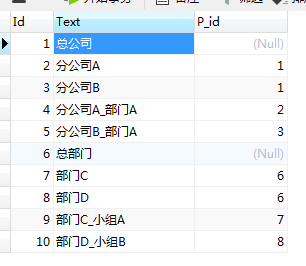
数据库数据格式:
后台代码:
using System;

using System.Collections.Generic;

using System.Linq;

using System.Web;

using System.Web.UI;

using System.Web.UI.WebControls;

using System.Data;

using StudyProgram.Common;

using Newtonsoft.Json;

namespace StudyProgram.Pages

{

    public partial class TreeView_Study : System.Web.UI.Page

    {

        protected void Page_Load(object sender, EventArgs e)

        {

            var act = Request["act"];

            if (act != null)

            {

                try

                {

                    var res = GetType().GetMethod(act, System.Reflection.BindingFlags.Public | System.Reflection.BindingFlags.Instance).Invoke(this, null);

                    if (res != null)

                        Response.Write(res);

                }

                catch (Exception ex)

                {

                    Response.Write(JsonConvert.SerializeObject(ex));

                }

                Response.End();

            }

            if (!IsPostBack)

            {

                var dt = GetDataTable();

                Treeview1.Attributes.Add("onClick", "OnCheckEvent()");

                TreeBind(SysModuleTree, dt, null, null, "Id", "P_id", "Text");

                TreeBind2(dt, Treeview1.Nodes, null, "Id", "P_id", "Text");

                var aa = GetTreeJson(dt);

            }

        }

        void TreeBind(TreeView treeView, DataTable dt, TreeNode p_Node, string pid_val, string id, string pid, string text)

        {

            DataView dv = dt.DefaultView;

            TreeNode tn;

            string filter = string.IsNullOrEmpty(pid_val) ? pid + " is null" : string.Format(" {0} ={1} ", pid, pid_val);

            dv.RowFilter = filter;//DV的筛选数据比DataTable好

            foreach (DataRowView row in dv)

            {

                tn = new TreeNode();

                tn.Value = row[id] + "";

                tn.Text = row[text] + "";

                if (p_Node == null) //添加根节点

                    treeView.Nodes.Add(tn);

                else

                    p_Node.ChildNodes.Add(tn);//添加子节点

                TreeBind(treeView, dt, tn, tn.Value, id, pid, text);//递归 绑定节点下面的子节点中的子节点

            }

        }

        void TreeBind2(DataTable dt, TreeNodeCollection tnc, string pid_val, string id, string pid, string text)

        {

            DataView dv = dt.DefaultView;

            TreeNode tn;

            string filter = string.IsNullOrEmpty(pid_val) ? pid + " is null" : string.Format(pid + "='{0}'", pid_val);

            dv.RowFilter = filter;//筛选数据

            foreach (DataRowView drv in dv)

            {

                tn = new TreeNode();//建立一个新节点

                tn.Value = drv[id].ToString();

                tn.Text = drv[text].ToString();

                tnc.Add(tn);//将该节点加入到TreeNodeCollection(节点集合)中

                TreeBind2(dt, tn.ChildNodes, tn.Value, id, pid, text);//递归

            }

        }

        DataTable GetDataTable()

        {

            string ConnectionString = System.Configuration.ConfigurationManager.AppSettings["ConnectionString"];

            return DBHelper.ExecuteDataset(ConnectionString, CommandType.Text, " SELECT * FROM [dbo].[T_Tree] ").Tables[];

        }

        public string GetTreeJson1()

        {

            DataTable dt = GetDataTable();

            return TreeHelper.GetTreeJsonTest(dt, "P_id", "Id", "Text", null);

        }

        string GetTreeJson(DataTable dt)

        {

            return TreeHelper.GetTreeJsonTest(dt, "P_id", "Id", "Text", null);

        }

    }

}
EasyUi tree的TreeHelper如下:
using System;

using System.Collections.Generic;

using System.Linq;

using System.Web;

using System.Data;

using System.Text;

using Newtonsoft.Json;

using System.Reflection;

namespace StudyProgram.Common

{

    /// <summary>

    /// Tree帮助类

    /// </summary>

    public class TreeHelper

    {

        /// <summary>

        /// 获取EasyUi——tree的JSON格式

        /// </summary>

        /// <param name="tabel">数据</param>

        /// <param name="pid">父Id的字段名</param>

        /// <param name="id">id的字段名</param>

        /// <param name="text">文本字段名</param>

        /// <param name="p_val">根节点的父Id的值(0或者null等等)</param>

        /// <returns></returns>

        public static string GetTreeJsonTest(DataTable tabel, string pid, string id, string text, string p_val)

        {

            List<Tree> list = new List<Tree>();

            string filer = string.IsNullOrEmpty(p_val) ? pid + " is null " : string.Format("{0}='{1}'", pid, p_val);

            DataRow[] rows = tabel.Select(filer);//筛选出根节点

            foreach (DataRow dr in rows)

            {

                Tree tree = new Tree();

                tree.id = dr[id] + "";

                tree.p_id = dr[pid] + "";

                tree.text = dr[text] + "";

                tree.children = GetChild(tree, tabel, pid, id, text);//获取子节点

                list.Add(tree);

            }

            return JsonConvert.SerializeObject(list);//转JSON

        }

        /// <summary>

        /// 获取子节点

        /// </summary>

        /// <param name="node">父节点</param>

        /// <param name="dt">数据源</param>

        /// <param name="pid">父Id的字段名</param>

        /// <param name="id">id的字段名</param>

        /// <param name="text">文本字段名</param>

        /// <returns></returns>

        private static List<Tree> GetChild(Tree node, DataTable dt, string pid, string id, string text)

        {

            List<Tree> lst = new List<Tree>();

            DataRow[] rows = dt.Select(pid + " = " + node.id);//筛选pid为父节点的Id的节点(即父节点node的所有子节点)

            foreach (var row in rows)

            {

                Tree n = new Tree();

                n.id = row[id] + "";

                n.text = row[text] + "";

                n.p_id = row[pid] + "";

                lst.Add(n);

                DataRow[] dr = dt.Select(pid + "=" + n.id);

                if (dr.Length > )

                    n.children = GetChild(n, dt, pid, id, text);

            }

            return lst;

        }

        /// <summary>

        /// List转EasyUi_tree格式

        /// </summary>

        /// <param name="lstData"></param>

        /// <param name="p_val"></param>

        /// <returns></returns>

        public static List<Tree> GetTreeJsonByList(List<Data> lstData, string p_val)

        {

            List<Tree> lstTree = new List<Tree>();

            if (lstData != null)

            {

                var lstRoot = lstData.Where(c => string.IsNullOrEmpty(p_val) ? c.P_id == null : c.P_id == Convert.ToInt32(p_val)).ToList();//找到根节点

                foreach (var ll in lstRoot)

                {

                    Tree tree = new Tree();

                    tree.id = ll.Id + "";

                    tree.p_id = ll.P_id + "";

                    tree.text = ll.Text;

                    tree.children = GetTreeJsonByList(lstData, ll.Id + "");

                    lstTree.Add(tree);

                }

            }

            return lstTree;

        }

        /// <summary>

        /// DataTable转List

        /// </summary>

        /// <typeparam name="T"></typeparam>

        /// <param name="dt"></param>

        /// <returns></returns>

        public static List<T> ConvertToList<T>(DataTable dt) where T : new()

        {

            List<T> list = new List<T>();

            PropertyInfo[] props = typeof(T).GetProperties();

            foreach (DataRow dr in dt.Rows)

            {

                T t = new T();

                foreach (PropertyInfo pro in props)

                {

                    if (dt.Columns.Contains(pro.Name))

                    {

                        if (!pro.CanWrite) continue;//属性不能写入,直接写入下个属性

                        object obj = dr[pro.Name];

                        if (obj != DBNull.Value)

                            pro.SetValue(t, obj, null);

                    }

                }

                list.Add(t);

            }

            return list;

        }

        /// <summary>

        /// List转DataTable

        /// </summary>

        /// <typeparam name="T"></typeparam>

        /// <param name="list"></param>

        /// <returns></returns>

        public static DataTable ConvertToDataTable<T>(List<T> list) where T : new() //在方法前面定义T,后面Where作为泛型约束

        {

            DataTable dt = new DataTable();

            PropertyInfo[] props = typeof(T).GetProperties();

            foreach (var p in props)

                dt.Columns.Add(p.Name, p.Name.GetType());

            foreach (var t in list)

            {

                DataRow n_row = dt.NewRow();

                foreach (var p in props)

                    n_row[p.Name] = p.GetValue(t, null);

                dt.Rows.Add(n_row);

            }

            return dt;

        }

    }

    public class Tree

    {

        public string id { get; set; }

        public string text { get; set; }

        public string p_id { get; set; }//父id可以不需要

        //public string iconCls

        //{

        //    get { return "icon-save"; }//设置Tree的图标,默认是文件夹

        //}

        public List<Tree> children { get; set; }

    }

    public class Data

    {

        public int Id { get; set; }

        public string Text { get; set; }

        public int? P_id { get; set; }

    }

}
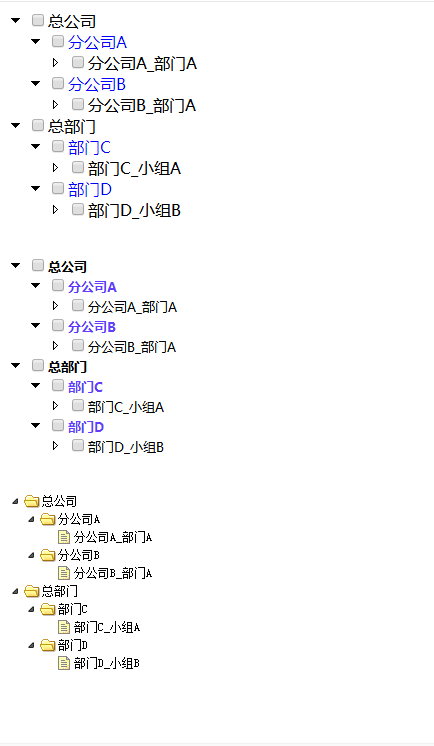
效果图如下:
.net中的TreeView的数据绑定与EasyUi_tree的数据绑定的更多相关文章
- MVC树控件,mvc中应用treeview,实现复选框树的多层级表单控件
类似于多层级的角色与权限控制功能,用MVC实现MVC树控件,mvc中应用treeview,实现复选框树的多层级表单控件.最近我们的项目中需要用到树型菜单,以前使用WebForm时,树型菜单有微软提供的 ...
- WinForm开发中针对TreeView控件改变当前选择节点的字体与颜色
本文转载:http://www.cnblogs.com/umplatform/archive/2012/08/29/2660240.html 在B/S开发中,对TreeView控件要改变当前选中节点的 ...
- 如何解决FormView中实现DropDownList连动选择时出现 "Eval()、XPath() 和 Bind() 这类数据绑定方法只能在数据绑定控件的上下文中使用" 的错误
原文:如何解决FormView中实现DropDownList连动选择时出现 "Eval().XPath() 和 Bind() 这类数据绑定方法只能在数据绑定控件的上下文中使用" 的 ...
- WPF中PasswordBox控件的Password属性的数据绑定
原文:WPF中PasswordBox控件的Password属性的数据绑定 英文原文:http://www.wpftutorial.net/PasswordBox.html 中文原文:http://bl ...
- WPF中获取TreeView以及ListView获取其本身滚动条的方法,可实现自行调节scoll滚动的位置(可相应获取任何控件中的内部滚动条)
原文:WPF中获取TreeView以及ListView获取其本身滚动条的方法,可实现自行调节scoll滚动的位置(可相应获取任何控件中的内部滚动条) 对于TreeView而言: TreeViewAut ...
- ASP.Net中的TreeView控件中对节点的上移和下移操作
Web中的TreeView中的没有PreNode和NextNode属性. 但它的集合属性中有一个IndexOf属性,从而能够找到它的前一个节点知后一个节点. TreeView中要么只有一个根节点:要么 ...
- VS中使用TreeView的Checked属性问题
VS中使用TreeView,当需要用到Checked属性,并需要同步子节点和父节点的Checked属性时,若使用AfterCheck事件会导致死循环,这里我使用的是NodeMouseClick事件.代 ...
- asp.net学习之 数据绑定控件--List数据绑定控件
原文:asp.net学习之 数据绑定控件--List数据绑定控件 List控件(如 CheckBoxList.DropDownList.ListBox 和 RadioButtonList 类)继承自L ...
- Eval()、XPath() 和 Bind() 这类数据绑定方法只能在数据绑定控件的上下文中使用
原文:Eval().XPath() 和 Bind() 这类数据绑定方法只能在数据绑定控件的上下文中使用 “/vs2005”应用程序中的服务器错误.--------------------------- ...
随机推荐
- mvc重定向
出处 : https://www.cnblogs.com/lgxlsm/p/5441149.html .重定向方法:Redirect / RedirectToAction / RedirectToRo ...
- js判断数组中是否包含某个值
/** * 判断数组中是否包含某个值 * @param arr 数组 * @param str 值 * @returns {boolean} */ function contains(arr, str ...
- PHP实现几秒前、几分钟前、几小时前、几天前
/** * @Description: 将时间转换为几秒前.几分钟前.几小时前.几天前 * @Author: Yang * @param $the_time 需要转换的时间 * @return str ...
- Xshell连接linux服务器不成功的乌龙问题
一般xshell连接linux服务器不成功有以下几个问题: linux防火墙拦截,导致Xshell不能访问linux 操作方法: firewalld(CentOS7):启动 :systemctl st ...
- Windows下Jupyter notebook 修改默认打开(工作、保存)文件夹(路径)
今天晚上兴致一起突然想看看我写了那么多的ipynb文件都去哪了 首先查了一下,应该是都默认保存到 C:\Users\芩溪儿 路径下了 然后我就想,我是不是得改改啊,总在那跟别的文件夹在一起总 ...
- UVA489 - Hangman Judge【紫书例题4.2】
题意:就是给出一个字符串,让你去一个一个猜测,相同字母算一次,如果是之前猜过的也算错,如果你在错7次前猜对就算你赢,文章中是LRJ的例题代码. #include<stdio.h> #inc ...
- codeforces 257c
#include<stdio.h> int main() { __int64 n,m,k,i,j,a,b; while(scanf("%I64d%I64d%I64d", ...
- 【ACM】nyoj_2_括号配对问题_201308091548
括号配对问题时间限制:3000 ms | 内存限制:65535 KB 难度:3描述 现在,有一行括号序列,请你检查这行括号是否配对. 输入 第一行输入一个数N(0<N<=100),表示 ...
- 修改oracle客户端的字符集
客户端字符集环境select * from nls_instance_parameters,其来源于v$parameter, 表示客户端的字符集的设置,可能是参数文件,环境变量或者是注册表 方法有 : ...
- JQuery的wrap用法
wrap是包裹元素的作用,比如我想在img外面包裹一个a标签时,可以这样写法: $(function(){ $('img').wrap(function(){ return '<a href=& ...