
45.Qt openGL实现三维绘图
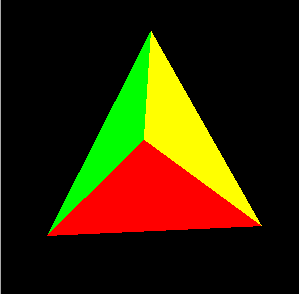
main.cpp
#include <QApplication>

#include <iostream>

#include "tetraheadron.h"

int main(int argc, char *argv[])

{

    QApplication app(argc, argv);

    if (!QGLFormat::hasOpenGL()) {

        std::cerr << "This system has no OpenGL support" << std::endl;

        return ;

    }

    Tetrahedron tetrahedron;

    tetrahedron.setWindowTitle(QObject::tr("Tetrahedron"));

    tetrahedron.resize(, );

    tetrahedron.show();

    return app.exec();

}
tetraheaderon.h
#ifndef TETRAHEDRON_H

#define TETRAHEDRON_H

#include <QGLWidget>

class Tetrahedron : public QGLWidget

{

    Q_OBJECT

public:

    Tetrahedron(QWidget *parent = );

protected:

    //在QGLWidget中实现

    void initializeGL();

    void resizeGL(int width, int height);

    void paintGL();

    //鼠标事件处理在QWidget中实现

    void mousePressEvent(QMouseEvent *event);

    void mouseMoveEvent(QMouseEvent *event);

    void mouseDoubleClickEvent(QMouseEvent *event);

private:

    void draw();

    int faceAtPosition(const QPoint &pos);

    GLfloat rotationX;

    GLfloat rotationY;

    GLfloat rotationZ;

    QColor faceColors[];

    QPoint lastPos;

};

#endif
tetraheadron.cpp
#include <QtGui>

#include <QtOpenGL>

#include <GL/glu.h>

#include "tetraheadron.h"

Tetrahedron::Tetrahedron(QWidget *parent)

    : QGLWidget(parent)

{

    //指定OpenGL的显示描述表

    setFormat(QGLFormat(QGL::DoubleBuffer | QGL::DepthBuffer));

    //初始化私有变量

    rotationX = -21.0;

    rotationY = -57.0;

    rotationZ = 0.0;

    faceColors[] = Qt::red;

    faceColors[] = Qt::green;

    faceColors[] = Qt::blue;

    faceColors[] = Qt::yellow;

}

//在调用paintGL()之前被调用一次.这里设置

//OpenGL的绘图描述表,定义显示列表,以及执行其他的初始化

void Tetrahedron::initializeGL()

{

    qglClearColor(Qt::black);

    glShadeModel(GL_FLAT);

    glEnable(GL_DEPTH_TEST);

    glEnable(GL_CULL_FACE);

}

//调用initializeGL之后调用resizeGL()函数,窗口部件改变大小时也调用resizeGL()

//函数,设置OpenGL视口,投影,以及其他与窗口部件尺寸相关的设置

void Tetrahedron::resizeGL(int width, int height)

{

    glViewport(, , width, height);

    glMatrixMode(GL_PROJECTION);

    glLoadIdentity();

    GLfloat x = GLfloat(width) / height;

    glFrustum(-x, +x, -1.0, +1.0, 4.0, 15.0);

    glMatrixMode(GL_MODELVIEW);

}

//需要重绘的时候调用

void Tetrahedron::paintGL()

{

    glClear(GL_COLOR_BUFFER_BIT | GL_DEPTH_BUFFER_BIT);

    //实际的绘制由私有函数draw()实现

    draw();

}

//鼠标按下的事件

void Tetrahedron::mousePressEvent(QMouseEvent *event)

{

    lastPos = event->pos();

}

//鼠标移动的事件

void Tetrahedron::mouseMoveEvent(QMouseEvent *event)

{

    GLfloat dx = GLfloat(event->x() - lastPos.x()) / width();

    GLfloat dy = GLfloat(event->y() - lastPos.y()) / height();

    //左键绕X,Y轴

    if (event->buttons() & Qt::LeftButton) {

        rotationX +=  * dy;

        rotationY +=  * dx;

        updateGL();

    }

    //右键绕X,Z轴

    else if (event->buttons() & Qt::RightButton) {

        rotationX +=  * dy;

        rotationZ +=  * dx;

        updateGL();

    }

    lastPos = event->pos();

}

//双击事件

void Tetrahedron::mouseDoubleClickEvent(QMouseEvent *event)

{

    int face = faceAtPosition(event->pos());

    if (face != -) {

        QColor color = QColorDialog::getColor(faceColors[face], this);

        if (color.isValid()) {

            faceColors[face] = color;

            updateGL();

        }

    }

}

//绘制

void Tetrahedron::draw()

{

    static const GLfloat P1[] = { 0.0, -1.0, +2.0 };

    static const GLfloat P2[] = { +1.73205081, -1.0, -1.0 };

    static const GLfloat P3[] = { -1.73205081, -1.0, -1.0 };

    static const GLfloat P4[] = { 0.0, +2.0, 0.0 };

    //四个面

    static const GLfloat * const coords[][] = {

        { P1, P2, P3 }, { P1, P3, P4 }, { P1, P4, P2 }, { P2, P4, P3 }

    };

    glMatrixMode(GL_MODELVIEW);

    glLoadIdentity();

    glTranslatef(0.0, 0.0, -10.0);

    //设置旋转

    glRotatef(rotationX, 1.0, 0.0, 0.0);

    glRotatef(rotationY, 0.0, 1.0, 0.0);

    glRotatef(rotationZ, 0.0, 0.0, 1.0);

    //设置颜色

    for (int i = ; i < ; ++i) {

        glLoadName(i);

        glBegin(GL_TRIANGLES);

        qglColor(faceColors[i]);

        for (int j = ; j < ; ++j) {

            glVertex3f(coords[i][j][], coords[i][j][],

                       coords[i][j][]);

        }

        glEnd();

    }

}

//返回窗口部件某位置所在的面的编号

int Tetrahedron::faceAtPosition(const QPoint &pos)

{

    const int MaxSize = ;

    GLuint buffer[MaxSize];

    GLint viewport[];

    makeCurrent();

    glGetIntegerv(GL_VIEWPORT, viewport);

    glSelectBuffer(MaxSize, buffer);

    glRenderMode(GL_SELECT);

    glInitNames();

    glPushName();

    glMatrixMode(GL_PROJECTION);

    glPushMatrix();

    glLoadIdentity();

    gluPickMatrix(GLdouble(pos.x()),GLdouble(viewport[] - pos.y()),5.0,5.0,viewport);

    GLfloat x = GLfloat(width()) / height();

    glFrustum(-x, x, -1.0, 1.0, 4.0, 15.0);

    draw();

    glMatrixMode(GL_PROJECTION);

    glPopMatrix();

    if (!glRenderMode(GL_RENDER))

        return -;

    return buffer[];

}
45.Qt openGL实现三维绘图的更多相关文章
- QT OpenGL绘制三维图形(立方体、圆柱体、圆锥、球体、圆环等等)
本文使用QGLWidget来绘制各种三维基本图形,包括立方体.圆柱体.圆锥.球体.圆环等等,涉及包括基本绘制以及上色.纹理.旋转等操作. 使用的软件版本:QT5.12 + QT Creater4.8. ...
- Qt OpenGL三维绘图
简介 OpenGL是为三维绘图提供的标准应用编程接口. OpenGL处理的仅仅是三维绘图方面,而很少或是根本不提供图形用户界面编程方面的支持.OpenGL*应用程序的用户界面必须由其它工具包创建,比 ...
- 使用C语言实现二维,三维绘图算法(3)-简单的二维分形
使用C语言实现二维,三维绘图算法(3)-简单的二维分形 ---- 引言---- 每次使用OpenGL或DirectX写三维程序的时候, 都有一种隔靴搔痒的感觉, 对于内部的三维算法的实现不甚了解. 其 ...
- 使用C语言实现二维,三维绘图算法(1)-透视投影
使用C语言实现二维,三维绘图算法(1)-透视投影 ---- 引言---- 每次使用OpenGL或DirectX写三维程序的时候, 都有一种隔靴搔痒的感觉, 对于内部的三维算法的实现不甚了解. 其实想想 ...
- 使用C语言实现二维,三维绘图算法(2)-解析曲面的显示
使用C语言实现二维,三维绘图算法(2)-解析曲面的显示 ---- 引言---- 每次使用OpenGL或DirectX写三维程序的时候, 都有一种隔靴搔痒的感觉, 对于内部的三维算法的实现不甚了解. 其 ...
- matlab的三维绘图和四维绘图
一.三维绘图1.曲线图plot3(X1,Y1,Z1,...):以默认线性属性绘制三维点集(X1,Y1,Z1)确定的曲线plot3(X1,Y1,Z1,LineSpec):以参数LineSpec确定的线性 ...
- QT OpenGL中文教程在QT4版本后的错误代码更改(一)
由于教程中说的已经够可以了,这里就不对代码进行分析了,有兴趣可以自己去看看.这个教程来源于原来的NeHeOpenGL中文教程 (http://www.yakergong.net/nehe/) ,但其有 ...
- 基于OpenGL的三维曲面动态显示实现
在使用Visual C++的MFC AppWizard建立应用程序框架后,生成了多个类,与OpenGL编程相关的类是视图类,主要的显示任务都在其中完成. 1.基于OpenGL绘图的基本设置 1.1 设 ...
- matlab学习笔记8 基本绘图命令-三维绘图
一起来学matlab-matlab学习笔记8 基本绘图命令_6 三维绘图 觉得有用的话,欢迎一起讨论相互学习~Follow Me 参考书籍 <matlab 程序设计与综合应用>张德丰等著 ...
随机推荐
- DOM高级编程
前言:W3C规定的三类DOM标准接口(换图)Core DOM(核心DOM),适用于各种结构化文档:XML DOM(Java OOP学过),专用于XML文档:HTML DOM,专用于HTML文档,下面了 ...
- JavaScript函数和window对象
一.什么是函数 函数的含义:类似于Java中的方法,是完成特定任务的代码语句块 使用更简单:不用定义属于某个类,直接使用 二.常用系统函数 parseInt ("字符串") ...
- 多开 MFC线程
序言:我才编程几年啊!就要处理多线程.对于只写函数的我,这难度简直了!不过MFC的多线程,貌似比较简单,还能处理的了. (1).开MFC多个线程 在视频采集的过程中,如果不使用媒体计数器,会造成主线程 ...
- JSP状态管理_1_Cookie
http协议的无状态性:当浏览器发送请求飞服务器时,服务器相应客户端请求:但当同一个浏览器再次发送请求给浏览器时,服务器并不知道它就是刚才那个客户端. 保存用户状态的两大机制:Session,Cook ...
- wx:for
.JSPage({ data: { input_data: [ { id: 1, unique: "unique1" }, { id: 2, unique: "uniqu ...
- MySQL--增删改查分页存储过程以及事务
添加和修改写在一起了 可以用id判断添加和修改 和事务在一起编码 可以让代码更严谨 在这里简单的说一下事务的四大特性 事务四大特性之原子性:原子性是指事务是一个不可再分割的工作单位,事务中的操作要么都 ...
- 不能访问windows installer 服务,可能你在安全模式下运行 windows ,或者windows installer
windows installer服务解决方案 很多朋友在安装MSI格式的文件包时,经常会遇到windows installer出错的情况,有如下几种现象: 1.所有使用windows install ...
- 复习MySQL③导入数据、检查及修改
导入数据: 用insert into语句为表插入数据: - insert into 表名(字段1,字段2,…) values …… 导入外部文本文件: - 导入外部txt文件(导入CSV文件分隔符为' ...
- 【剑指Offer】41、和为S的连续正数序列
题目描述: 小明很喜欢数学,有一天他在做数学作业时,要求计算出9~16的和,他马上就写出了正确答案是100.但是他并不满足于此,他在想究竟有多少种连续的正数序列的和为100(至少包括两个数). ...
- C# 常用语句
var list = dt.AsEnumerable().Select(t => t.Field<string>("Bed")).ToList();Select( ...