
亲测有效,解决Can 't connect to local MySQL server through socket '/tmp/mysql.sock '(2) ";
最近租了一个阿里云云翼服务器,趁着自己还是一个学生,享受一下优惠。我租的是阿里云Ubuntu16.04版本的服务器,在搭建mysql的时候,一开始是可以运行的,由于某次手抽,把mysql的套接字文件不小心删除了,然后无论怎么卸载重装,都出现了这个问题:
-
root@iZufkfljcZ:~# mysql -uroot -p
-
Enter password:
-
ERROR 2002 (HY000): Can't connect to local MySQL server through socket '/tmp/mysql.sock' (2)
-
网上找了好久,搜到的全部是重复的文章而且也没讲明为什么出现这个问题,找了一天才找到一篇讲解mysql.sock文件作用的文章,然后分析一下为什么出现这个问题,现在讲之总结一下,以备后人查阅。
我出现的问题是:找不到mysql.sock,如果你可以运行
find / -name mysql.sock
这条命令,并且能查到结果的话,只需将查到的结果做一个软连接到/tmp目录下即可解决(网上都是这么解决的)。
但是,我执行了这条语句之后,并没有任何反应,没有找到mysql.sock文件。
在这之前,需要明白mysql.sock这个文件有什么用?
连接localhost通常通过一个Unix域套接字文件进行,一般是/tmp/mysql.sock。如果套接字文件被删除了,本地客户就不能连接。这可能发生在你的系统运行一个cron任务删除了/tmp下的临时文件。
如果你因为丢失套接字文件而不能连接,你可以简单地通过重启服务器重新创建得到它。因为服务器在启动时重新创建它。
如果和我一样,重启服务器还是没有任何变化,你可以先执行下面的语句:
# mysql -uroot -h 127.0.0.1 -p
不出意外,这句话应该是可以执行的,你现在不能用套接字建立连接因为它不见了,所以可以建立一个TCP/IP连接
如果套接字文件被一个cron任务删除,问题将重复出现,除非你修改cron任务或使用一个或使用一个不同的套接字文件,我的解决办法是重新指定一个不同的套接字,或者说,我现在没有mysql.sock文件,所以我要想办法生成一个。
首先,更改my.cnf文件,我的服务器中的目录为/etc/my.cnf,如果没有的话可以用find去查找,
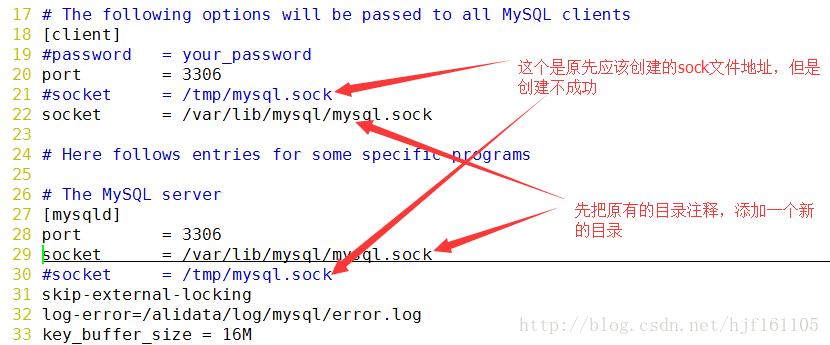
接下来就是保存退出,然后确保这个目录存在,并且将这个目录的权限修改一下
# chmod 777 /var/lib/mysql
准备步骤做好,然后就是mysql和mysqld服务重启
-
# service mysql restart
-
# service mysqld restart
我在重启mysqld服务的时候,重启失败了,显示如下:
-
root@iZufkfljcZ:~# service mysqld start
-
Job for mysqld.service failed because the control process exited with error code. See "systemctl status mysqld.service" and "journalc
-
tl -xe" for details.
这个时候,提示可以输入systemctl status mysqld.service去查看具体的失败原因,于是:
****************************************************************************************
root@iZufkfljcZ:~# systemctl status mysqld.service
● mysqld.service - LSB: start and stop MySQL
Loaded: loaded (/etc/init.d/mysqld; bad; vendor preset: enabled)
Active: failed(Result: exit-code) since 三 2017-12-20 10:38:30 CST; 45s ago
Docs: man:systemd-sysv-generator(8)
Process: 2154 ExecStart=/etc/init.d/mysqld start
(code=exited, status=1/FAILURE)
12月 20 10:38:29 iZufkfljcZ systemd[1]: Starting LSB: start and stop MySQL...
12月 20 10:38:29 iZufkfljcZ mysqld[2154]: Starting MySQL
12月 20 10:38:29 iZufkfljcZ mysqld_safe[2689]:Logging to '/var/log/mysql/error.log'.
12月 20 10:38:29 iZufkfljcZ mysqld_safe[2693]:Directory '/var/run/mysqld' for UNIX socket file don't exists.
12月 20 10:38:30 iZufkfljcZ mysqld[2154]: . * The server quit without updating PID file (/var/run/mysqld/mysqld.pid).
12月 20 10:38:30 iZufkfljcZ systemd[1]:
mysqld.service: Control process exited, code=exited status=1
12月 20 10:38:30 iZufkfljcZ systemd[1]:
Failed to start LSB: start and stop MySQL.
12月 20 10:38:30 iZufkfljcZ systemd[1]:
mysqld.service: Unit entered failed state.
12月 20 10:38:30 iZufkfljcZ systemd[1]:
mysqld.service: Failed with result 'exit-code'.
****************************************************************************************
根据提示可知,/var/run/mysqld目录不存在,也就是说mysqld服务重启需要这个目录,那就建一个吧:
-
root@iZufkfljcZ:~# mkdir /var/run/mysqld
-
root@iZufkfljcZ:~# chmod 777 /var/run/mysqld/
-
root@iZufkfljcZ:~# service mysqld start
-
root@iZufkfljcZ:~#
建完目录后,重新运行mysqld服务,发现重启成功了,那么我们再来看看为什么刚才要建这个目录呢?打开这个目录看看:
-
root@iZufkfljcZ# ls /var/run/mysqld
-
mysqld.pid mysqld.sock mysqld.sock.lock
发现了一个熟悉的东西,mysqld.sock,但是这个是不是我们需要的东西呢?不管他,先用这个sock文件登下mysql看看行不行:
-
root@iZufkfljcZ:/var/run/mysqld# mysql -uroot -p -S /var/run/mysqld/mysqld.sock
-
Enter password:
-
Welcome to the MySQL monitor. Commands end with ; or \g.
-
Your MySQL connection id is 4
-
Server version: 5.7.20-0ubuntu0.16.04.1 (Ubuntu)
-
-
Copyright (c) 2000, 2017, Oracle and/or its affiliates. All rights reserved.
-
-
Oracle is a registered trademark of Oracle Corporation and/or its
-
affiliates. Other names may be trademarks of their respective
-
owners.
-
-
Type 'help;' or '\h' for help. Type '\c' to clear the current input statement.
-
-
mysql>
这么一运行,发现好像可以了,那接下来好办了,我们把之前改的配置改回来就行了,之前的目录应该是/tmp/mysql.sock,我们可以建立一个软连接连上去就可以了,
-
root@iZufkfljcZ:~# ln -s /var/run/mysqld/mysqld.sock /tmp/mysql.sock
-
root@iZufkfljcZ:~# ls /tmp/
-
mysql.sock
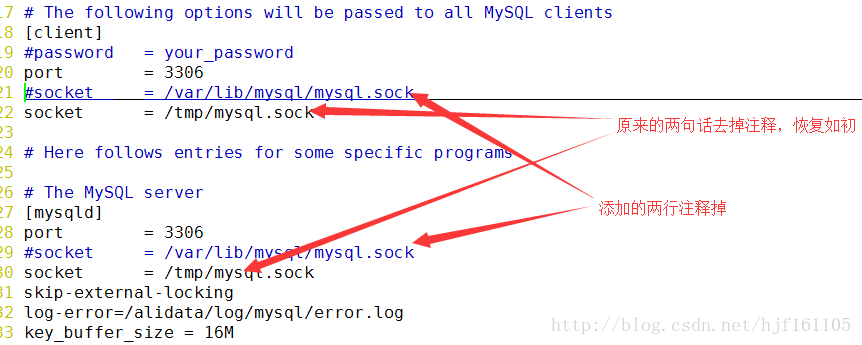
这样,tmp目录下就有了my.cnf配置文件中需要的mysql.sock文件了,然后把my.cnf改回就行了,
到此为止,我们的mysql应该已经完全修复了,那么我们再测试一下吧:
-
root@iZufkfljcZ:/var/run/mysqld# mysql -uroot -p
-
Enter password:
-
Welcome to the MySQL monitor. Commands end with ; or \g.
-
Your MySQL connection id is 5
-
Server version: 5.7.20-0ubuntu0.16.04.1 (Ubuntu)
-
-
Copyright (c) 2000, 2017, Oracle and/or its affiliates. All rights reserved.
-
-
Oracle is a registered trademark of Oracle Corporation and/or its
-
affiliates. Other names may be trademarks of their respective
-
owners.
-
-
Type 'help;' or '\h' for help. Type '\c' to clear the current input statement.
-
-
mysql>
OK,搞定收工,用了快一天时间在解决这个问题上,感觉收获还是挺多的,Linux的学习任重而道远啊!
亲测有效,解决Can 't connect to local MySQL server through socket '/tmp/mysql.sock '(2) ";的更多相关文章
- mac 安装mysql 报错“ERROR 2002 (HY000): Can not connect to local MySQL server through socket '/tmp/mysql.sock' (2)” 解决办法
首先安装 homebrew 再 brew install mysql 之后连接 mysql 无论是登录还是修改初始密码都会报如下的错误 ERROR 2002 (HY000): Can not conn ...
- Mac mySql ERROR 2002 (HY000): Can't connect to local MySQL server through socket '/tmp/mysql.sock' (2)的解决办法
我的环境:Mac 10.11.6 ,mysql 5.7.14 . mac mySql 报错ERROR 2002 (HY000): Can't connect to local MySQL serv ...
- Mac端解决(含修改8.0.13版的密码):Can't connect to local MySQL server through socket '/tmp/mysql.sock' (2)
1. 安装mysql但是从来没启动过,今天一启动就报错: Can't connect to local MySQL server through socket '/tmp/mysql.sock' (2 ...
- 解决Can't connect to local MySQL server through socket '/tmp/mysql.sock'
0 Problem 电脑重启后用python的MySQLdb连接数据库报错 Can't connect to local MySQL server through socket '/tmp/mysql ...
- XtraBackup出现 Can't connect to local MySQL server through socket '/tmp/mysql.sock'
Xtrabackup做备份时遇到下面错误信息MySQL server: Can't connect to local MySQL server through socket '/tmp/mysql.s ...
- linux云服务器mysql ERROR 2002 (HY000): Can’t connect to local MySQL server through socket ‘/tmp/mysql.sock’
一早上过来发现网站打开报错,数据库连接不上.. 有人改密码? putty进去,mysql -uroot -p 输入密码后,报错 ERROR 2002 (HY000): Can't connect to ...
- ERROR 2002 (HY000): Can't connect to local MySQL server through socket '/tmp/mysql.sock' (2)
ERROR 2002 (HY000): Can't connect to local MySQL server through socket '/tmp/mysql.sock' (2) 背景: mys ...
- 关于Can't connect to local MySQL server through socket '/tmp/mysql.sock' (2)的问题
找不到mysql socket的问题,我最近碰到了好多次重装系统以前,我的mysql,apache,php都是自己编译安装的,当时并没有碰到这些问题,重装系统以后,我的mysql是通过yum安装的,a ...
- Mac下安装Mysql出现 Can’t connect to local MySQL server through socket '/tmp/mysql.sock'
在Mac下安装mysql出现 Can't connect to local MySQL server through socket '/tmp/mysql.sock' 错误,解决如下: $ unset ...
随机推荐
- js中#代表什么
js中#代表什么 一.总结 1.#号:代表id选择器 2. $('#div1'). : 常用用法,前面也有$符号 二."#"在js中代表什么 js里我不曾看到用到‘#’的代码端, ...
- 从大整数乘法的实现到 Karatsuba 快速算法
Karatsuba 快速乘积算法是具有独特合并过程(combine/merge)的分治算法(Karatsuba 是俄罗斯人).此算法主要是对两个整数进行相乘,并不适用于低位数(如 int 的 32 位 ...
- Library Component Properties的表格如何填写
- Loadrunner--常见问题及解决办法
1.LR 脚本为空的解决方法: 1.去掉ie设置中的第三方支持取消掉 2.在系统属性-高级-性能-数据执行保护中,添加loadrunner安装目录中的vugen.exe文件 遇到flight界面为空的 ...
- SQL Server2008 Hierarchyid数据类型
以往我们在关系数据库中建立树状结构的时候,通常使用ID+ParentID来实现两条 纪录间的父子关系.但这种方式只能标示其相对位置.解决这类问题在SqlServer2005出现之前通常是采用游标来操作 ...
- C++——多态性实现机制
C++的多态性实现机制剖析 1. 多态性和虚函数 #include <iostream.h> class animal { public: void sleep() { cout<& ...
- amazeui页面分析2
amazeui页面分析2 一.总结 1.弄清结构:这些部分都是一块一块分好了的,掌握结构之后,想替换哪块就替换哪块,想不要哪块就不要哪块,非常简单的 2.一块一块:替换十分简单 3.弄清楚大块之后,然 ...
- apper
查漏补缺系列之dapper初体验 什么是dapper 在维护一些较老的项目的时候,往往我们会用很多sql那么这个时候我们要考虑优化这些项目的时候,我们就可以使用dapper dapper 是一款轻 ...
- 设计模式--单例模式之Lock
1.为什么用Lock及关键知识 当我们使用线程的时候,效率最高的方式当然是异步,即个个线程同时运行,其间互不依赖和等待.当不同的线程都需要访问某个资源的时候,就需要同步机制了,也就是说当对同一个资源进 ...
- 14、编写一个通用的Makefile
编译test_Makefile的方法:a. gcc -o test a.c b.c对于a.c: 预处理.编译(C文件转换成汇编).汇编(汇编转换成机器码)对于b.c:预处理.编译.汇编最后链接优点:命 ...