
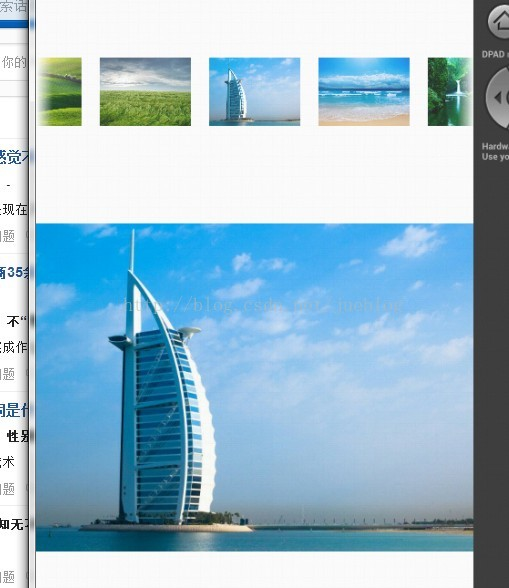
Android 使用Gallery组件实现图片播放预览
Gallery(画廊)扩展了LayoutParams,以此提供可以容纳当前的转换信息和先前的位置转换信息的场所。
Activity
package com.app.test01;

import com.app.adapter.ImageAdapter;

import android.app.Activity;

import android.os.Bundle;

import android.view.View;

import android.widget.AdapterView;

import android.widget.Gallery;

import android.widget.ImageView;

public class GalleryTest extends Activity{

    Gallery gallery;

    ImageView imagedemo;

    ImageAdapter iAdapter = new ImageAdapter(this);

    @Override

    protected void onCreate(Bundle savedInstanceState) {

        // TODO Auto-generated method stub

        super.onCreate(savedInstanceState);

        setContentView(R.layout.activity_gallery);

        gallery = (Gallery) findViewById(R.id.gallery1);

        imagedemo = (ImageView) findViewById(R.id.imagedemo);

        gallery.setAdapter(iAdapter);

        gallery.setOnItemClickListener(new AdapterView.OnItemClickListener() {

            @Override

            public void onItemClick(AdapterView<?> parent, View view,

                    int position, long id) {

                // TODO Auto-generated method stub

                Integer[] iViews = iAdapter.getmImageIds();

                imagedemo.setImageDrawable(getResources().getDrawable(iViews[position]));

            }

        });

    }

}
BaseAdapter适配器
package com.app.adapter;

import com.app.test01.R;

import android.content.Context;

import android.content.res.TypedArray;

import android.view.View;

import android.view.ViewGroup;

import android.widget.BaseAdapter;

import android.widget.Gallery;

import android.widget.ImageView;

public class ImageAdapter extends BaseAdapter {

    private Context mContext;

    public ImageAdapter(Context c) {

        mContext = c;

    }

    public int getCount() {

        return mImageIds.length;

    }

    public Object getItem(int position) {

        return position;

    }

    public long getItemId(int position) {

        return position;

    }

    public View getView(int position, View convertView, ViewGroup parent) {

        ImageView i = new ImageView(mContext);

        i.setImageResource(mImageIds[position]);

        i.setLayoutParams(new Gallery.LayoutParams(,));

        return i;

    }

    public Integer[] getmImageIds() {

        return mImageIds;

    }

    public void setmImageIds(Integer[] mImageIds) {

        this.mImageIds = mImageIds;

    }

    private Integer[] mImageIds = {

            R.drawable.image01,

            R.drawable.image02,

            R.drawable.image03,

            R.drawable.image04,

            R.drawable.image05,

            R.drawable.image06,

            R.drawable.image07,

            R.drawable.image08,

            R.drawable.image09,

            R.drawable.image01,

            R.drawable.image02,

            R.drawable.image03,

            R.drawable.image04,

            R.drawable.image05,

            R.drawable.image06,

            R.drawable.image07,

            R.drawable.image08,

            R.drawable.image09,

    };

}
XML布局文件
<?xml version="1.0" encoding="utf-8"?>

<LinearLayout xmlns:android="http://schemas.android.com/apk/res/android"

    android:layout_width="match_parent"

    android:layout_height="match_parent"

    android:orientation="vertical" >

    <Gallery

        android:id="@+id/gallery1"

        android:layout_width="match_parent"

        android:layout_height="wrap_content"

        android:layout_marginTop="50dp" />

    <RelativeLayout

        android:layout_width="match_parent"

        android:layout_height="match_parent"

        android:gravity="center">

        <ImageView

            android:id="@+id/imagedemo"

            android:layout_width="wrap_content"

            android:layout_height="wrap_content"

            android:src="@drawable/image01" />

    </RelativeLayout>

</LinearLayout>
Android 使用Gallery组件实现图片播放预览的更多相关文章
- Android 举例说明自己的定义Camera图片和预览,以及前后摄像头切换
如何调用本地图片,并调用系统拍摄的图像上一博文解释(http://blog.csdn.net/a123demi/article/details/40003695)的功能. 而本博文将通过实例实现自己定 ...
- 巧用weui.gallery(),点击图片后预览图片
要在页面需要加载的JS文件: <script src="../js/libs/weui.min.js"></script> 可以去weui的文档中下载,这是 ...
- 图片本地预览 flash html5
dataURI 一种能够在页面嵌入外部资源的URI方案.能够降低图片或者样式表的http请求数量,提高效率. ie8把dataURI 的属性值限制在32k以内. 图片本地预览: 由于安全原因,通过fi ...
- jQuery Lightbox图片放大预览
简介:jQuery Lightbox图片放大预览代码是一款可以在用户点击页面中的小图片时,将该图片的高清版本以Lightbox的方式放大显示在页面的中间,提高用户的体验度. 效果展示 http://h ...
- js实现FileUpload选择图片后预览功能
当asp.net的FileUpload选择一个图片后不需要上传就能显示出图片的预览功能, 代码: <%@ Page Language="C#" AutoEventWireup ...
- 微信小程序图片放大预览
需求:当点击图片时,当前图片放大预览,且可以左右滑动 实现方式:使用微信小程序图片预览接口 我们可以看到api需要两个参数,分别通过下面的data-list和data-src来传到js中 wxml代码 ...
- node.js平台下,cropper.js实现图片裁剪预览并转换为base64发送至服务端。
一 .准备工作 1.首先需要先下载cropper,常规使用npm,进入项目路径后执行以下命令: npm install cropper 2. cropper基于jquery,在此不要忘记引入jq,同时 ...
- Android Camera2采集摄像头原始数据并手动预览
Android Camera2采集摄像头原始数据并手动预览 最近研究了一下android摄像头开发相关的技术,也看了Google提供的Camera2Basic调用示例,以及网上一部分代码,但都是在Te ...
- iOS HTML图片本地预览
引言 相信用过苹果手机的童鞋,会发现很多新闻类的应用,都可以实现HTML图片本地预览,那么这是如何实现的呢?本文将深入阐述其中的原理. 关于此功能,我还实现了一个DEMO,大家可以点击此访问更详细内容 ...
随机推荐
- sass08 if while for each
scss @function getzIndex($layer: default){ $zindexMap: (default: 1, modal: 1000, dropdown: 500, grid ...
- bzoj1026: [SCOI2009]windy数(传说你是数位DP)
1026: [SCOI2009]windy数 题目:传送门 题解: 其实之前年少无知的时候好像A过...表示当时并不知道什么数位DP 今天回来深造一发... 其实如果对这个算法稍有了解...看到这题的 ...
- springboot 测试类,项目使用shiro时报错UnavailableSecurityManagerException
大概的问题就是,正常运行项目是没有问题的 使用测试类是,加载不了shiro的securityManager,主要导致不是很清楚,望告知, 解决方法 @Resource org.apache.shiro ...
- centos 服务器配置注意项
Mysql 出现Table‘xxx’is read only问题 Mysql数据库在由Mssql数据库导入数据文件后出现“ERROR 1036 (HY000): Table 'xxxx' is rea ...
- 安卓开发--HttpClient
package com.zx.httpclient01; import android.app.Activity; import android.os.Bundle; import android.v ...
- 单表的更新UPDATE和删除记录DELETE(二十六)
当把记录写成功之后,也许我们还会如下操作.比如,记录在书写的过程中字段是错误的.或者,我们想改下字段值.那么,我们需要update关键字. update分为单表更新和多表更新. 一.UPDATE语句 ...
- 为什么在input中加了display:inline;再加宽,还有作用?
以前一直一位input是个行内元素,但是,行内元素的特性就是没有宽高的概念,元素多高,多宽,全凭内容撑起来的. 但是今天写了个demo,用chrome控制台显示:display:inline-bloc ...
- hdu1864/2844/2159 背包基础题
hdu1864 01背包 题目链接 题目大意:一堆数,找到一个最大的和满足这个和不超过Q要学会分析复杂度! #include <cstdio> #include <cstring&g ...
- caffe命令及其参数解析
caffe的c++主程序(caffe.cpp)放在根目录下的tools文件夹内, 当然还有一些其它的功能文件,如:convert_imageset.cpp, train_net.cpp, test_n ...
- JavaScript知识复习
JavaScript 数据类型 原始数据类型: number string boolean null undefined 对象:object: Function Array Date... 共有六种数 ...