
Jmeter之BeanShell 断言
作者:季沐测试笔记
原文地址:https://www.cnblogs.com/testero/p/15436864.html
博客主页:https://www.cnblogs.com/testero
1 BeanShell 断言之实例介绍
1.1 假设当前有个判断该用户是否为新用户的接口,返回的数据格式为以下内容:
{

	"success": true,

	"code": 0,

	"msg": "success",

	"data": {

		"newUser": true,

		"invitationCode": null

	},

	"total": 0

}
当用户为新用户时,newUser的值为true
当用户已是老用户时,newUser的值为false
1.2 假设有两为用户:15293561001为老用户,15293561002为新用户,现需要对改接口返回的数据进行验证,看是否达到预期效果,在Jmeter断言中选择BeanShell 断言

BeanShell中的脚本内容的验证就是根据用户判断newUser的值是否正确,这里会用到BeanShell断言的一些语法,只需要判断下后定义下断言失败或是成功即可,断言内容为以下内容
import com.alibaba.fastjson.JSONObject;

import com.alibaba.fastjson.JSON;

		prev.setDataEncoding("UTF-8");

		String result = prev.getResponseDataAsString();

		String result = prev.getResponseDataAsString();

		System.out.println("------------------------------------------------------");

		JSONObject response = JSON.parseObject(result);

		System.out.println("response为"+response);

		JSONObject data = (JSONObject) response.get("data");

		System.out.println("data为"+data);

		System.out.println("mobile为"+"${mobile}");

		System.out.println("newUser为"+data.get("newUser"));

	       	if ( "${mobile}" == "15293561001") {

	            	if (data.get("newUser").toString().equals("false")){

	                	Failure = false;

	                	FailureMessage = "断言成功";

	            	}else {

	                	Failure = true;

	                	FailureMessage = "断言失败,newUser为"+data.get("newUser");

	            	}

	        	}else if ("${mobile}" == "15293561002"){

	            	if (data.get("newUser").toString().equals("true")){

	                	Failure = false;

	                	FailureMessage = "断言成功";

	            	}else {

	                	Failure = true;

	                	FailureMessage = "断言失败,newUser为"+data.get("newUser");

	            	}

	        	}
断言中15293561001判断的newUser为false,15293561002判断的newUser为true,该断言应该完全通过,循环请求该接口,察看结果树
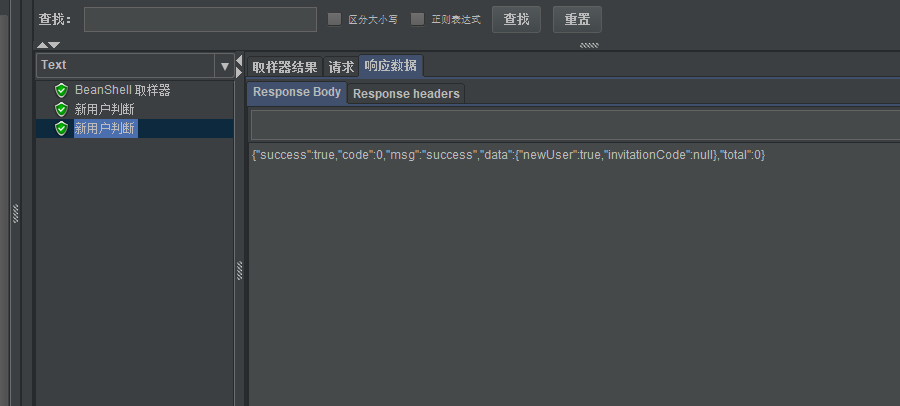
两条数据都是断言通过
下面我们将15293561002的newUser断言处改为false,执行效果如下
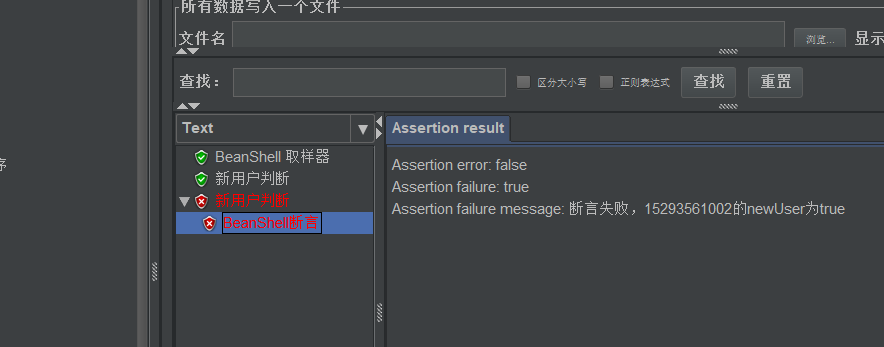
可以看到显示出了之前定义的断言失败的信息和接口返回的该字段的实际结果。
2 断言语法介绍
示例:
if (data.get("newUser").toString().equals("true")){

		Failure = false;

		FailureMessage = "断言成功";

	}else {

		Failure = true;

	    FailureMessage = "断言失败,newUser为"+data.get("newUser");

	}
以上断言信息中Failrue用来标识断言失败,Failure = false;时表示断言成功
FailureMessage标识断言失败的原因
Jmeter之BeanShell 断言的更多相关文章
- 记录jmeter使用beanshell断言获取复杂的json字符串参数值
实战示例 测试场景 电商系统经常会涉及到商品的库存数量的压测,在用户下单前需要先做库存余量的判断,当余量不足时用户无法下单,保证商品的有效售卖 库存余量查询响应结果 响应结果一般是json字符串的形式 ...
- JMeter中BeanShell断言使用一
Jmeter Ant Task如何让beanshell断言失败的详细信息展示在report里面 首先必须给beanshell断言添加FailureMessage if(${TotalClient_SS ...
- jmeter之beanshell断言---数据处理
在做接口测试时,对响应数据的校验是非常重要的部分:在使用Jmeter进行接口测试时,有多种respone校验方式,比如响应断言.BeanShell断言等等,BeanShell断言可以自定义断言,自由灵 ...
- jmeter使用BeanShell断言
1. 首先存储一个接口的响应结果,如在http请求的BeanShell PostProcessor: import java.io.UnsupportedEncodingException; Syst ...
- Jmeter之BeanShell断言使用
1.Bean Shell常用内置变量 JMeter在它的BeanShell中内置了变量,用户可以通过这些变量与JMeter进行交互,其中主要的变量及其使用方法如下: log:用来记录日志文件,写入到j ...
- 『动善时』JMeter基础 — 31、JMeter中BeanShell断言详解
目录 1.BeanShell简介 2.Beanshell的内置变量和方法 3.BeanShell断言界面详解 4.BeanShell断言的使用 (1)测试计划内包含的元件 (2)登陆接口请求界面内容 ...
- jmeter之beanshell断言实例
.首先储存一个接口的响应结果,比如在http请求的后面添加beanshell后置处理器(BeanShell PostProcessor)来储存http请求的响应结果: import org.json. ...
- jmeter中beanshell断言的使用
简单使用beanshell的内容,进行测试内容的判断 这里通过断言内容,修改if的条件,达到发送警报邮件的功能 beanshell 代码如下: SampleResult 等效于 prev lo ...
- JMeter之BeanShell断言---获取时间戳
1.创建线程组,创建一个BeanShell Sampler,在其中编写BeanShell脚本. 2.在Jmeter中,可以利用${__time(,)}时间戳函数来获取十位的时间戳,如: vars.pu ...
随机推荐
- 安装和配置CloudWatchAgent
文章原文 使用 CloudWatch 代理收集指标和日志 下载 CloudWatch 代理软件包 sudo yum install amazon-cloudwatch-agent 点击查看其他平台软件 ...
- 20210816 你相信引力吗,marshland,party?,半夜
考场 第一眼都不可做 T1 长得就像单调栈/单调队列,推了推性质发现优弧.劣弧都合法的点对很好处理,其他情况只在一种情况合法,那么开两个单调队列分别统计距离 \(\le\frac2n,>\fra ...
- 一篇文章搞懂Nginx
Nginx 的产生 Nginx 同 Apache 一样都是一种 Web 服务器.基于 REST 架构风格,以统一资源描述符(Uniform Resources Identifier)URI 或者统一资 ...
- python 给多个变量赋值
# assign values directly a = b = 'hello' a, b = 1, 2 print(b, type(b)) assert a == 1 and b == 2 # as ...
- ubuntu14.04 安装MySQL 5.7
ubuntu14.04 默认在线安装MySQL 5.5 1) wget http://dev.mysql.com/get/mysql-apt-config_0.7.3-1_all.deb 2) dpk ...
- css对角渐变
html: <div class="hh"> </div> css: .hh{ width: 500px; height: 500px; backgroun ...
- python3.x内置函数
函数 返回值类型 函数详情 abs(x) int|float 求绝对值,若是复数则返回复数的模 all(iterable) bool 若所有元素为真则返回True(非0,非空,非None) any(i ...
- url传参和解决中文乱码
在A页面把参数传给B页面 index.html?name="张三" 在B页面接收(js) function getQueryString(name) { var result = ...
- TypeScript与面向对象
目录 1.引 2.类(class) 3.构造函数和this 4.继承 5.super 6.抽象类 7.接口 8.属性的封装 9.泛型 1.引 简而言之就是程序之中所有的操作都需要通过对象来完成.一切操 ...
- win7任务计划提示”该任务映像已损坏或已篡改“
打开任务计划,弹出了下面的对话框[该任务映像已损坏或已篡改.(异常来自HRESULT:0x80041321)] 首先你以管理员的身份运行cmd命令,打开运行窗口 输入:chcp 437,并回车,回车后 ...