
Applescript快速入门及OmniFocus每日md报告开发
本篇主要记录 Applescript 基础语法,以及利用 applescript 生成 omnifocus 每日报告
从 windows 转换到 macos,最近一直在不断折腾,这两天浏览 github 过程中,看到 omnifocus 可以搭配 applescript 开发出一些自动化脚本,因此想开发一个 omnifocus 每日生成 Markdown 报告的脚本。
Applescript 快速入门
脚本编写 Eg.
applescript 最大的特点就是语法简单,编写一个清理废纸篓的脚本如下:
tell application "Finder"

    empty the trash

end tell
变量 及 运算
变量的赋值和运算方法如下:
-- 变量赋值

set width to 8

set height to 9

-- 变量运算

set area to width * height

-- 支持运算符

-- + - * / ^;
文本处理
文本处理的方法同样简单易懂
set str1 to ""
set str2 to "test"
set result to "YK"
-- 拼接
set resultingString to nameOfActress & actressRating
-- 长度
set theLength to the length of "Neal"
-- 类型转换
set strToNumber to "16" as number
set numToStr to 12 as string
弹窗
set stringToBeDisplayed to "say hi"

display dialog "stringToBeDisplayed"

display dialog stringToBeDisplayed
数据类型:list
set exampleList to {1,2,3,"hahah",9}
-- 列表拼接
同样用 & 操作符
-- 变更元素
set item 2 of theList to "yang"
set the second item of theList to "yang"
set the 2nd item of theList to "yang"
-- 取全部列表
get exampleList
-- 取最后一个元素
set valueOfLastItem to item -1 of myList
-- 一次取多个元素
set shortList to items 2 through 5 of myList
-- 翻转数组
set reversedList to reverse of myList
-- 获取数组的长度
set theListLength to the length of {"ds",1,2,3}
set theListLength to the count of {"ds",1,2,3}
-- 随机取数
set x to some item of {1,2,3}
-- 自动类型转换
set myList to {"a"}
set myString to "b"
set result to myList & myStringls
set itemized to every character to "Nealyang"
-- 切分字符串时,可以自定义delimiters
set AppleScript's text item delimiters to " "
set AppleScript's text item delimiters to oldDelimiters
注释
-- 注释一行

# 注释一行

(xxx) 注释多行
条件语句
set ageEntered to 73

set myAge to 24

if ageEntered is myAge then

    display dialog "You are as old as I as"

end if

say "this sentence is spoken anyway"
错误捕获
try

    set x to 1 / 0

on error

    display dialog "Error:" & the error_number & "." & the error_message buttons {"OK"}

end try
路径
路径分隔符用 :
函数
可定义需要参数和不需要参数的函数定义
on test(la)

    display dialog lala

end test
至此,AppleScript 的基本语法已逐一学习,下面就利用上面的知识开(gai)发(xie)一个 OmniFocus 每日生成 report 的脚本,并利用 crontab 布置成定时任务每日执行。
OmniFocus 每日 Report 脚本
脚本生成的 Markdown 效果如下:
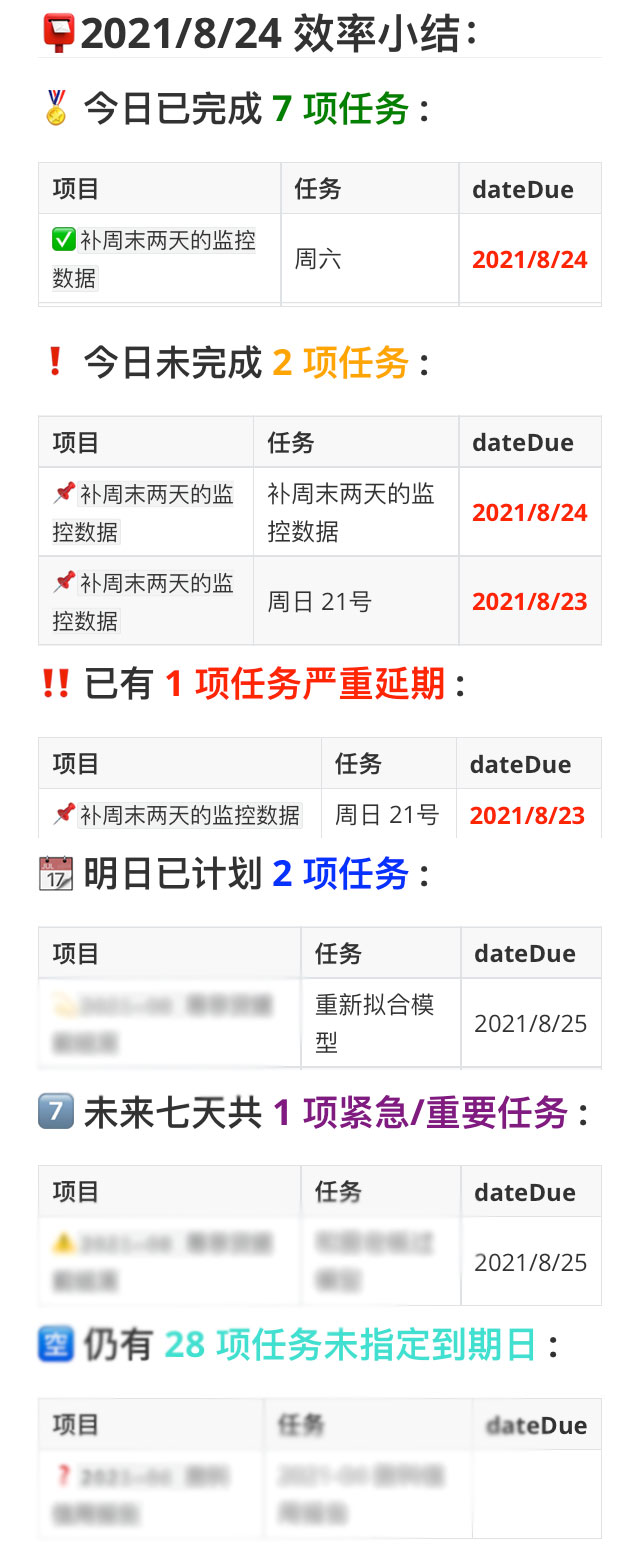
总体框架参考了https://github.com/mygeekdaddy/OF-Markdown-Task-List,细节上根据需求更改了 report 的结构
每日 report 配合检查能更好的对 GTD 进行实践
更改后的 AppleScript 如下:
set CurrDatetxt to short date string of date (short date string of (current date))

set dateYeartxt to year of (current date) as integer

if (month of (current date) as integer) < 10 then

	set dateMonthtxt to "0" & (month of (current date) as integer)

else

	set dateMonthtxt to month of (current date) as integer

end if

if (day of (current date) as integer) < 10 then

	set dateDaytxt to "0" & (day of (current date) as integer)

else

	set dateDaytxt to day of (current date) as integer

end if

set str_date to "" & dateYeartxt & "-" & dateMonthtxt & "-" & dateDaytxt

set theFilePath to "Macintosh HD:Users:Insomnia:Desktop:效率小结:小结" & str_date & ".md"

set due_Tasks to my OmniFocus_task_list()

my write_File(theFilePath, due_Tasks)

on OmniFocus_task_list()

	set CurrDate to date (short date string of (current date))

	set TomDate to date (short date string of ((current date) + days))

	set TomTomDate to date (short date string of ((current date) + days * 2))

	set Tom7Date to date (short date string of ((current date) + days * 7))

	set CurrDatetxt to short date string of date (short date string of (current date))

	set bigReturn to return & return

	set smallReturn to return

	set strText to "## " & CurrDatetxt & " 效率小结:" & smallReturn

	tell application "OmniFocus"

		-- 1. 列出今日已完成的任务

		tell default document

			set refDueTaskList to a reference to (flattened tasks where (completion date > (CurrDate) and completion date ≤ TomDate and completed = true))

			set {lstName, lstProject, lstContext, lstDueDate} to {name, name of its containing project, name of its primary tag, due date} of refDueTaskList

			set strText to strText & bigReturn & "###  今日已完成 <span style="\"color:green\"">" & length of lstName & " 项任务 </span>" & ":" & bigReturn

			set strText to strText & "|项目|任务|dateDue|" & smallReturn & "|--|--|--|" & smallReturn

			repeat with iTask from 1 to count of lstName

				set {strName, varProject, varContext, varDueDate} to {item iTask of lstName, item iTask of lstProject, item iTask of lstContext, item iTask of lstDueDate}

				if (varDueDate < (current date)) then

					set strDueDate to "**<span style="\"color:red\"">" & short date string of varDueDate & "</span>**"

				else

					try

						set strDueDate to short date string of varDueDate

					on error

						set strDueDate to " " as string

					end try

				end if

				set strText to strText & "|" & "`" & varProject & "`" & "|" & "  " & strName & "  " & "|" & strDueDate & "|" & smallReturn

			end repeat

		end tell

		-- 2. 列出今日未完成的任务

		tell default document

			set refDueTaskList to a reference to (flattened tasks where due date ≤ TomDate and completed = false)

			set {lstName, lstProject, lstContext, lstDueDate} to {name, name of its containing project, name of its primary tag, due date} of refDueTaskList

			set strText to strText & bigReturn & "### ️ 今日未完成 <span style="\"color:orange\"">" & length of lstName & " 项任务 </span>" & ":" & bigReturn

			set strText to strText & "|项目|任务|dateDue|" & smallReturn & "|--|--|--|" & smallReturn

			repeat with iTask from 1 to count of lstName

				set {strName, varProject, varContext, varDueDate} to {item iTask of lstName, item iTask of lstProject, item iTask of lstContext, item iTask of lstDueDate}

				if (varDueDate < (current date)) then

					set strDueDate to "**<span style="\"color:red\"">" & short date string of varDueDate & "</span>**"

				else

					try

						set strDueDate to short date string of varDueDate

					on error

						set strDueDate to " " as string

					end try

				end if

				set strText to strText & "|" & "`" & varProject & "`" & "|" & "  " & strName & "  " & "|" & strDueDate & "|" & smallReturn

			end repeat

		end tell

		-- 3. 列出过期的任务

		tell default document

			set refDueTaskList to a reference to (flattened tasks where due date < CurrDate and completed = false)

			set {lstName, lstProject, lstContext, lstDueDate} to {name, name of its containing project, name of its primary tag, due date} of refDueTaskList

			set strText to strText & bigReturn & "### ️ 已有 <span style="\"color:red\"">" & length of lstName & " 项任务严重延期 </span>" & ":" & bigReturn

			set strText to strText & "|项目|任务|dateDue|" & smallReturn & "|--|--|--|" & smallReturn

			repeat with iTask from 1 to count of lstName

				set {strName, varProject, varContext, varDueDate} to {item iTask of lstName, item iTask of lstProject, item iTask of lstContext, item iTask of lstDueDate}

				if (varDueDate < (current date)) then

					set strDueDate to "**<span style="\"color:red\"">" & short date string of varDueDate & "</span>**"

				else

					try

						set strDueDate to short date string of varDueDate

					on error

						set strDueDate to " " as string

					end try

				end if

				set strText to strText & "|" & "`" & varProject & "`" & "|" & "  " & strName & "  " & "|" & strDueDate & "|" & smallReturn

			end repeat

		end tell

		-- 4. 列出明日已计划的任务

		tell default document

			set refDueTaskList to a reference to (flattened tasks where due date > TomDate and due date ≤ TomTomDate and completed = false)

			set {lstName, lstProject, lstContext, lstDueDate} to {name, name of its containing project, name of its primary tag, due date} of refDueTaskList

			set strText to strText & bigReturn & "###  明日已计划 <span style="\"color:blue\"">" & length of lstName & " 项任务 </span>" & ":" & bigReturn

			set strText to strText & "|项目|任务|dateDue|" & smallReturn & "|--|--|--|" & smallReturn

			repeat with iTask from 1 to count of lstName

				set {strName, varProject, varContext, varDueDate} to {item iTask of lstName, item iTask of lstProject, item iTask of lstContext, item iTask of lstDueDate}

				if (varDueDate < (current date)) then

					set strDueDate to "**<span style="\"color:red\"">" & short date string of varDueDate & "</span>**"

				else

					try

						set strDueDate to short date string of varDueDate

					on error

						set strDueDate to " " as string

					end try

				end if

				set strText to strText & "|" & "`" & varProject & "`" & "|" & "  " & strName & "  " & "|" & strDueDate & "|" & smallReturn

			end repeat

		end tell

		-- 5. 列出未来七天的紧急和重要的任务

		tell default document

			set refDueTaskList to a reference to (flattened tasks where due date ≤ Tom7Date and completed = false)

			set {lstName, lstProject, lstContext, lstDueDate} to {name, name of its containing project, name of its primary tag, due date} of refDueTaskList

			set icount to 0

			repeat with iTask from 1 to count of lstName

				set varContext to item iTask of lstContext

				if varContext = "*Important" or varContext = "+Urgent" then

					set icount to icount + 1

				end if

			end repeat

			set strText to strText & bigReturn & "### 7️⃣ 未来七天共 <span style="\"color:purple\"">" & icount & " 项**紧急/重要**任务 </span>" & ":" & bigReturn

			set strText to strText & "|项目|任务|dateDue|" & smallReturn & "|--|--|--|" & smallReturn

			repeat with iTask from 1 to count of lstName

				set {strName, varProject, varContext, varDueDate} to {item iTask of lstName, item iTask of lstProject, item iTask of lstContext, item iTask of lstDueDate}

				if varContext = "*Important" or varContext = "+Urgent" then

					if (varDueDate < (current date)) then

						set strDueDate to "**<span style="\"color:red\"">" & short date string of varDueDate & "</span>**"

					else

						try

							set strDueDate to short date string of varDueDate

						on error

							set strDueDate to " " as string

						end try

					end if

					set strText to strText & "|" & "️`" & varProject & "`" & "|" & "  " & strName & "  " & "|" & strDueDate & "|" & smallReturn

				end if

			end repeat

		end tell

		-- 6. 列出未指定日期且未完成的任务

		tell default document

			set refDueTaskList to a reference to (flattened tasks where due date = missing value and completed = false)

			set {lstName, lstProject, lstContext, lstDueDate} to {name, name of its containing project, name of its primary tag, due date} of refDueTaskList

			set strText to strText & bigReturn & "###  仍有 <span style="\"color:turquoise\"">" & length of lstName & " 项任务未指定到期日 </span>" & ":" & bigReturn

			set strText to strText & "|项目|任务|dateDue|" & smallReturn & "|--|--|--|" & smallReturn

			repeat with iTask from 1 to count of lstName

				set {strName, varProject, varContext, varDueDate} to {item iTask of lstName, item iTask of lstProject, item iTask of lstContext, item iTask of lstDueDate}

				if (varDueDate < (current date)) then

					set strDueDate to "**<span style="\"color:red\"">" & short date string of varDueDate & "</span>**"

				else

					try

						set strDueDate to short date string of varDueDate

					on error

						set strDueDate to " " as string

					end try

				end if

				set strText to strText & "|" & "`" & varProject & "`" & "|" & "  " & strName & "  " & "|" & strDueDate & "|" & smallReturn

			end repeat

		end tell

	end tell

	strText

end OmniFocus_task_list

--Export Task list to .MD file

on write_File(theFilePath, due_Tasks)

	set theText to due_Tasks

	set theFileReference to open for access theFilePath with write permission

	write theText to theFileReference as «class utf8»

	close access the theFileReference

end write_File

tell application "Typora"

	open file theFilePath

end tell
参考资料
https://segmentfault.com/a/1190000011273388
Applescript快速入门及OmniFocus每日md报告开发的更多相关文章
- AppleScript 快速入门
AppleScript 快速入门 AppleScript 顾名思义是苹果开发的一套脚本语言,利用 AppleScript 在 macOS 系统上可以对其他程序进行操作,点击按钮.发送消息.模拟自动化执 ...
- 快速入门系列--MVC--07与HTML5移动开发的结合
现在移动互联网的盛行,跨平台并兼容不同设备的HTML5越来越盛行,很多公司都在将自己过去的非HTML5网站应用渐进式的转化为HTML5应用,使得一套代码可以兼容不同的物理终端设备和浏览器,极大的提高了 ...
- 程序员带你十天快速入门Python,玩转电脑软件开发(四)
本系列文章立志于从一个已经习得一门编程语言的基础之上,全面介绍Python的相关开发过程和相关经验总结.本篇文章主要是基于上一篇的程序员带你十天快速入门Python,玩转电脑软件开发(三)的基础之上, ...
- 程序员带你十天快速入门Python,玩转电脑软件开发(三)
声明:本次教程主要适用于已经习得一门编程语言的程序员.想要学习第二门语言.有梦想,立志做全栈攻城狮的你 . 如果是小白,也可以学习本教程.不过可能有些困难.如有问题在文章下方进行讨论.或者添加QQ群5 ...
- 程序员带你十天快速入门Python,玩转电脑软件开发(二)
关注今日头条-做全栈攻城狮,学代码也要读书,爱全栈,更爱生活.提供程序员技术及生活指导干货. 如果你真想学习,请评论学过的每篇文章,记录学习的痕迹. 请把所有教程文章中所提及的代码,最少敲写三遍,达到 ...
- 程序员带你十天快速入门Python,玩转电脑软件开发(一)
关注今日头条-做全栈攻城狮,学代码也要读书,爱全栈,更爱生活.提供程序员技术及生活指导干货. 如果你真想学习,请评论学过的每篇文章,记录学习的痕迹. 请把所有教程文章中所提及的代码,最少敲写三遍,达到 ...
- AndroidStudio快速入门四:打造你的开发工具,settings必备
http://blog.csdn.net/jf_1994/article/details/50085825 前言:这里是使用AS的基本设置,适合新入手的朋友阅读,将这里介绍的设置完基本使用无忧啦. 1 ...
- 快速入门PaddleOCR,并试用其开发一个搜题小工具
介绍 PaddleOCR 是一个基于百度飞桨的OCR工具库,包含总模型仅8.6M的超轻量级中文OCR,单模型支持中英文数字组合识别.竖排文本识别.长文本识别.同时支持多种文本检测.文本识别的训练算法. ...
- 快速入门系列--MVC--01概述
虽然使用MVC已经不少年,相关技术的学习进行了多次,但是很多技术思路的理解其实都不够深入.其实就在MVC框架中有很多设计模式和设计思路的体现,例如DependencyResolver类就包含我们常见的 ...
随机推荐
- Mybatis的分页插件com.github.pagehelper
1. 需要引入PageHelper的jar包 如果没有使用maven,那直接把jar包导入到lib文件夹下即可,这个PageHelper插件在github上有开源, 地址为:https://githu ...
- 浅谈对typora的使用
内容概要 - 什么是typora - typora的具体使用 目录 内容概要 - 什么是typora - typora的具体使用 1. 什么是typora 2.typora的具体使用 1.标题级别 2 ...
- 『学了就忘』Linux基础命令 — 27、搜索操作相关命令
目录 1.whereis命令 2.which命令 3.locate命令 1.whereis命令 whereis是搜索系统命令的命令,也就是说,whereis命令不能搜索普通文件,而只能搜索系统命令. ...
- 设计模式学习-使用go实现建造者模式
建造者模式 定义 适用范围 与工厂模式的区别 优点 缺点 参考 建造者模式 定义 Builder 模式,中文翻译为建造者模式或者构建者模式,也有人叫它生成器模式. 建造者模式(Builder Patt ...
- Linux&c 文件操作,线程进程控制,网络编程,简单知识点梳理
一:文件操作 在linux下,一切皆文件,目录是文件,称为目录文件,内容是该目录的目录项(但是目录只有内核可以编辑,超级用户也不可以编辑),设备也是设备文件,在/dev存放的就是一些设备文件,linu ...
- Jackson & fastJson的使用
Jackson import lombok.Data; @Data public class Student { private Long id; private String name; priva ...
- Charles抓包 mock数据和rewrite功能
一.mock数据 mock:在后端返回异常或需要=改前端展示的数据时可以模拟返回的response 1.1 抓到接口后 右击保存response到本地,后缀改成.json打开可以看到是把json保存下 ...
- K8S使用NodePort类型Service
1.使用nodetype类型 1.1.第一种类型创建:直接在yaml中标记是nodePort apiVersion: v1 kind: Service metadata: name: nginx-se ...
- 生产服务GC调优实践基本流程总结
Photo by Pixabay from Pexels 本文作者:夜色微光 - 博客园 (cnblogs.com) 前言 对Java虚拟机进行性能调优是一个非常宽泛的话题,在实践上也是非常棘手的过程 ...
- [loj3176]景点划分
不妨设$a\le b\le c$,那么相当于要找到两个大小至少为$a$和$b$的连通块(连通块可以通过删除度最小的点变小) 以一个点为根建出dfs树并对以下情况分类讨论: 1.存在一个节点满足$\ma ...