
PhpSpreadsheet的简单使用
由于PHPExcel已经不再维护,PhpSpreadsheet是PHPExcel的下一个版本。PhpSpreadsheet是一个用纯PHP编写的库,并引入了命名空间,PSR规范等。这里简单介绍下PhpSpreadsheet的导入导出功能。
1、安装
- 使用composer安装:
composer require phpoffice/phpspreadsheet
- GitHub下载:
https://github.com/PHPOffice/PhpSpreadsheet
2、excel文件导出
/**

 * excel文件导出

 */

function export()

{

    require_once __DIR__ . '/vendor/autoload.php';

    $data = [

        ['title1' => '111', 'title2' => '222'],

        ['title1' => '111', 'title2' => '222'],

        ['title1' => '111', 'title2' => '222']

    ];

    $title = ['第一行标题', '第二行标题'];

    // Create new Spreadsheet object

    $spreadsheet = new \PhpOffice\PhpSpreadsheet\Spreadsheet();

    $sheet = $spreadsheet->getActiveSheet();

    // 方法一,使用 setCellValueByColumnAndRow

    //表头

    //设置单元格内容

    foreach ($title as $key => $value) {

        // 单元格内容写入

        $sheet->setCellValueByColumnAndRow($key + 1, 1, $value);

    }

    $row = 2; // 从第二行开始

    foreach ($data as $item) {

        $column = 1;

        foreach ($item as $value) {

            // 单元格内容写入

            $sheet->setCellValueByColumnAndRow($column, $row, $value);

            $column++;

        }

        $row++;

    }

    // 方法二,使用 setCellValue

    //表头

    //设置单元格内容

    $titCol = 'A';

    foreach ($title as $key => $value) {

        // 单元格内容写入

        $sheet->setCellValue($titCol . '1', $value);

        $titCol++;

    }

    $row = 2; // 从第二行开始

    foreach ($data as $item) {

        $dataCol = 'A';

        foreach ($item as $value) {

            // 单元格内容写入

            $sheet->setCellValue($dataCol . $row, $value);

            $dataCol++;

        }

        $row++;

    }

    // Redirect output to a client’s web browser (Xlsx)

    header('Content-Type: application/vnd.openxmlformats-officedocument.spreadsheetml.sheet');

    header('Content-Disposition: attachment;filename="01simple.xlsx"');

    header('Cache-Control: max-age=0');

    // If you're serving to IE 9, then the following may be needed

    header('Cache-Control: max-age=1');

    // If you're serving to IE over SSL, then the following may be needed

    header('Expires: Mon, 26 Jul 1997 05:00:00 GMT'); // Date in the past

    header('Last-Modified: ' . gmdate('D, d M Y H:i:s') . ' GMT'); // always modified

    header('Cache-Control: cache, must-revalidate'); // HTTP/1.1

    header('Pragma: public'); // HTTP/1.0

    $writer = \PhpOffice\PhpSpreadsheet\IOFactory::createWriter($spreadsheet, 'Xlsx');

    $writer->save('php://output');

    exit;

}
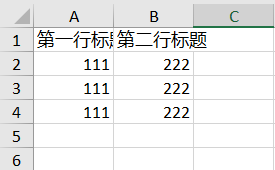
结果:
3、excel文件保存到本地
/**

 * excel文件保存到本地

 */

function save()

{

    require_once __DIR__ . '/vendor/autoload.php';

    $data = [

        ['title1' => '111', 'title2' => '222'],

        ['title1' => '111', 'title2' => '222'],

        ['title1' => '111', 'title2' => '222']

    ];

    $title = ['第一行标题', '第二行标题'];

    // Create new Spreadsheet object

    $spreadsheet = new \PhpOffice\PhpSpreadsheet\Spreadsheet();

    $sheet = $spreadsheet->getActiveSheet();

    //表头

    //设置单元格内容

    $titCol = 'A';

    foreach ($title as $key => $value) {

        // 单元格内容写入

        $sheet->setCellValue($titCol . '1', $value);

        $titCol++;

    }

    $row = 2; // 从第二行开始

    foreach ($data as $item) {

        $dataCol = 'A';

        foreach ($item as $value) {

            // 单元格内容写入

            $sheet->setCellValue($dataCol . $row, $value);

            $dataCol++;

        }

        $row++;

    }

    // Save

    $writer = \PhpOffice\PhpSpreadsheet\IOFactory::createWriter($spreadsheet, 'Xlsx');

    $writer->save('01simple.xlsx');

}
4、读取excel文件内容
/**

 * 读取excel文件内容

 */

function read()

{

    require_once __DIR__ . '/vendor/autoload.php';

    $inputFileName = dirname(__FILE__) . '/01simple.xlsx';

    $spreadsheet = \PhpOffice\PhpSpreadsheet\IOFactory::load($inputFileName);

    // 方法二

    $sheetData = $spreadsheet->getActiveSheet()->toArray(null, true, true, true);

    return $sheetData;

}
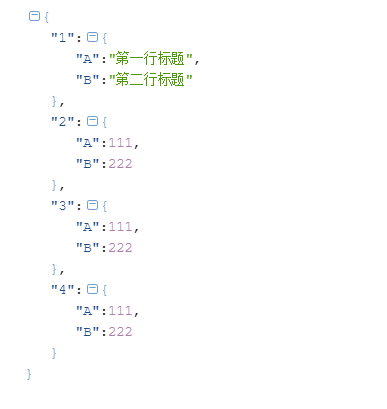
结果:
可能出现的问题:
1、Fatal error: Uncaught Error: Class 'PhpOffice\PhpSpreadsheet\Spreadsheet' not found
这是因为没有自动加载。可以手动引入加载文件。
require_once __DIR__ . '/vendor/autoload.php';
或者:
require_once __DIR__ . '/vendor/phpoffice/phpspreadsheet/src/Bootstrap.php';
2、Fatal error: Interface 'Psr\SimpleCache\CacheInterface' not found
这是因为没有psr文件,缺少simple-cache模块。如果使用composer安装的话会自动生成。没有的话可以手动下载。
GitHub下载地址:https://github.com/php-fig/simple-cache/releases
PhpSpreadsheet的简单使用的更多相关文章
- 使用PhpSpreadsheet将Excel导入到MySQL数据库
本文以导入学生成绩表为例,给大家讲解使用PhpSpreadsheet将Excel导入的MySQL数据库. 准备 首先我们需要准备一张MySQL表,表名t_student,表结构如下: CREATE T ...
- phpspreadsheet开发手记
坑安装简单示例通过模板来生成文件释放内存单元格根据索引获取英文列设置值合并单元格居中显示宽度设置批量设置单元格格式直接输出下载自动计算列宽函数formula单元格变可点击的超链 PhpSpreadsh ...
- PhpSpreadsheet如何读取excel文件
PhpSpreadsheet如何读取excel文件 一.总结 一句话总结:万能的百度,直接搜代码就好,绝对有,毕竟github上面4000+的关注,说明很多人用了这个,使用照着demo倒是异常简单 二 ...
- [thinkphp使用phpspreadsheet时出现]Cannot redeclare xxxxxx() (previously declared in C:\WWW\xxx.xxx:xxx)
[thinkphp使用phpspreadsheet时出现]Cannot redeclare xxxxxx() (previously declared in C:\WWW\xxx.xxx:xxx) 一 ...
- Laravel Excel安装及最简单使用
官网:https://docs.laravel-excel.com/ 1.安装 1.1.安装要求: PHP: ^7.0 Laravel: ^5.5 PhpSpreadsheet: ^1.6 ...
- php读写excel —— PhpSpreadsheet组件
前言 PhpSpreadsheet是一个纯PHP类库,它提供了一组类,允许您从不同的电子表格文件格式(如Excel和LibreOffice Calc)读取和写入.用PHP读取Excel.CSV文件 还 ...
- PhpSpreadsheet 导出特定格式 — 广告请款单
需求说明 最近需要实现一个导出这种格式的Excel表单,之前都有用过导出Excel的功能,但大都是表头+数据的形式,只用于获取数据,没有太多样式要求,不用合并单元格.合并居中等,也不用对每一行数据特异 ...
- phpspreadsheet
2019-5-9 8:20:07 星期四 昨天在看PHPExcel的时候, github上作者说已经停止更新了, 推荐使用phpspreadsheet, 查看了一下官方文档, 功能还挺强大的, 可以读 ...
- phpspreadsheet 中文文档(七)技巧和诀窍
2019年10月11日14:08:35 以下页面为您提供了一些使用广泛的PhpSpreadsheet食谱.请注意,这些文件没有提供有关特定PhpSpreadsheet API函数的完整文档,而只是一个 ...
随机推荐
- 【重温基础】11.Map和Set对象
本文是 重温基础 系列文章的第十一篇. 今日感受:注意身体,生病花钱又难受. 系列目录: [复习资料]ES6/ES7/ES8/ES9资料整理(个人整理) [重温基础]1.语法和数据类型 [重温基础]2 ...
- Java并发编程系列-(6) Java线程池
6. 线程池 6.1 基本概念 在web开发中,服务器需要接受并处理请求,所以会为一个请求来分配一个线程来进行处理.如果每次请求都新创建一个线程的话实现起来非常简便,但是存在一个问题:如果并发的请求数 ...
- ACM-ICPC 2018 徐州赛区网络预赛 H. Ryuji doesn't want to study (线段树)
Ryuji is not a good student, and he doesn't want to study. But there are n books he should learn, ea ...
- IPFS学习-哈希
Hashes 哈希函数是接受一些任意输入并返回固定长度值的函数.具体值取决于所使用的给定哈希算法,例如SHA-1(GIT在使用),SHA-256,或者是BLAKE2,但是给予一个输入使用哈希算法总是返 ...
- 无法Google的解决方案
献给新入开发行业的小伙伴. 本文不会事无巨细的讲解每一个细节,只是为读者提供一个路线图,并提供相应的参考资料. 为了更高效的解决各种技术问题,有时不得不到墙外去寻找解决方案.每个开发者效率高了,宏观来 ...
- CentOS 7 离线环境安装nginx时报错:./configure: error: C compiler cc is not found
先说解决方法: 在nginx目录下,查看objs/autoconf.err文件,该文件记录了具体的错误信息 vi objs/autoconf.err 一般就是缺少一些文件,因为我的gcc.g++也是离 ...
- 传统js和jsx与ts和tsx的区别
一.从定义文件格式方面说 1.传统的开发模式可以定义js文件或者jsx文件2.利用ts开发定义的文件格式tsx二.定义state的状态来说 1.传统的方式直接在构造函数中使用 constructor( ...
- C语言函数调用过程,汇编角度查看
C语言函数调用过程,汇编角度查看 把函数的参数按照调用约定压栈或者存储到寄存器中 调用要使用的函数,先把调用者的地址入栈,方便回来 跳转到函数 把函数使用到的一些寄存器压栈,避免修改寄存器的值 执行函 ...
- ELK:ElasticSearch中有数据,Kibana查询不到数据
ElasticSearch中有数据,Kibana查询不到数据 多数原因就是Linux的时区问题, 在linux输入date查看当前时间是否根本地相对应,不对应那么你就来对了, 解决方案一. 这个选择的 ...
- Mvc导入
[HttpPost] public void Import() { //获取文件 HttpPostedFileBase fileBase = Request.Files["file" ...