
alluxio源码解析-rpc调用概述-client和worker之间的block模块的通讯架构(netty版本)(3)
(1.8版本)client和worker之间的block模块的通讯架构
block作为alluxio文件读取或者存储的最小基本单位,都是通过BlockOutStream和BlockInputtream实现的
其中具体的数据包传输有Short circuit和netty两种实现:
- Short circuit:通过本地的ramdisk传输和netty传输
- tcp传输:只通过netty传输
输入流代码中,关于两种实现的选择逻辑:
 1 public static BlockInStream create(FileSystemContext context, BlockInfo info,

 2     WorkerNetAddress dataSource, BlockInStreamSource dataSourceType, InStreamOptions options)

 3     throws IOException {

 4   URIStatus status = options.getStatus();

 5   OpenFileOptions readOptions = options.getOptions();

 6

 7   boolean promote = readOptions.getReadType().isPromote();

 8

 9   long blockId = info.getBlockId();

10   long blockSize = info.getLength();

11

12   // Construct the partial read request

13   Protocol.ReadRequest.Builder builder =

14       Protocol.ReadRequest.newBuilder().setBlockId(blockId).setPromote(promote);

15   // Add UFS fallback options

16   builder.setOpenUfsBlockOptions(options.getOpenUfsBlockOptions(blockId));

17

18   boolean shortCircuit = Configuration.getBoolean(PropertyKey.USER_SHORT_CIRCUIT_ENABLED);

19   boolean sourceSupportsDomainSocket = NettyUtils.isDomainSocketSupported(dataSource);

20   boolean sourceIsLocal = dataSourceType == BlockInStreamSource.LOCAL;

21

22   // Short circuit

23   if (sourceIsLocal && shortCircuit && !sourceSupportsDomainSocket) {

24     LOG.debug("Creating short circuit input stream for block {} @ {}", blockId, dataSource);

25     try {

26       return createLocalBlockInStream(context, dataSource, blockId, blockSize, options);

27     } catch (NotFoundException e) {

28       // Failed to do short circuit read because the block is not available in Alluxio.

29       // We will try to read via netty. So this exception is ignored.

30       LOG.warn("Failed to create short circuit input stream for block {} @ {}. Falling back to "

31           + "network transfer", blockId, dataSource);

32     }

33   }

34

35   // Netty

36   LOG.debug("Creating netty input stream for block {} @ {} from client {} reading through {}",

37       blockId, dataSource, NetworkAddressUtils.getClientHostName(), dataSource);

38   return createNettyBlockInStream(context, dataSource, dataSourceType, builder.buildPartial(),

39       blockSize, options);

40 }
输出流代码中,关于两种实现的选择逻辑:
 1 /**

 2      * @param context the file system context

 3      * @param blockId the block ID

 4      * @param blockSize the block size in bytes

 5      * @param address the Alluxio worker address

 6      * @param options the out stream options

 7      * @return the {@link PacketWriter} instance

 8      */

 9     public static PacketWriter create(FileSystemContext context, long blockId, long blockSize,

10         WorkerNetAddress address, OutStreamOptions options) throws IOException {

11       if (CommonUtils.isLocalHost(address) && Configuration

12           .getBoolean(PropertyKey.USER_SHORT_CIRCUIT_ENABLED) && !NettyUtils

13           .isDomainSocketSupported(address)) {

14         LOG.debug("Creating short circuit output stream for block {} @ {}", blockId, address);

15         return LocalFilePacketWriter.create(context, address, blockId, options);

16       } else {

17         LOG.debug("Creating netty output stream for block {} @ {} from client {}", blockId, address,

18             NetworkAddressUtils.getClientHostName());

19         return NettyPacketWriter

20             .create(context, address, blockId, blockSize, Protocol.RequestType.ALLUXIO_BLOCK,

21                 options);

22       }

23     }
short-circuit策略
针对block的的创建/摧毁,通过netty进行网络通讯
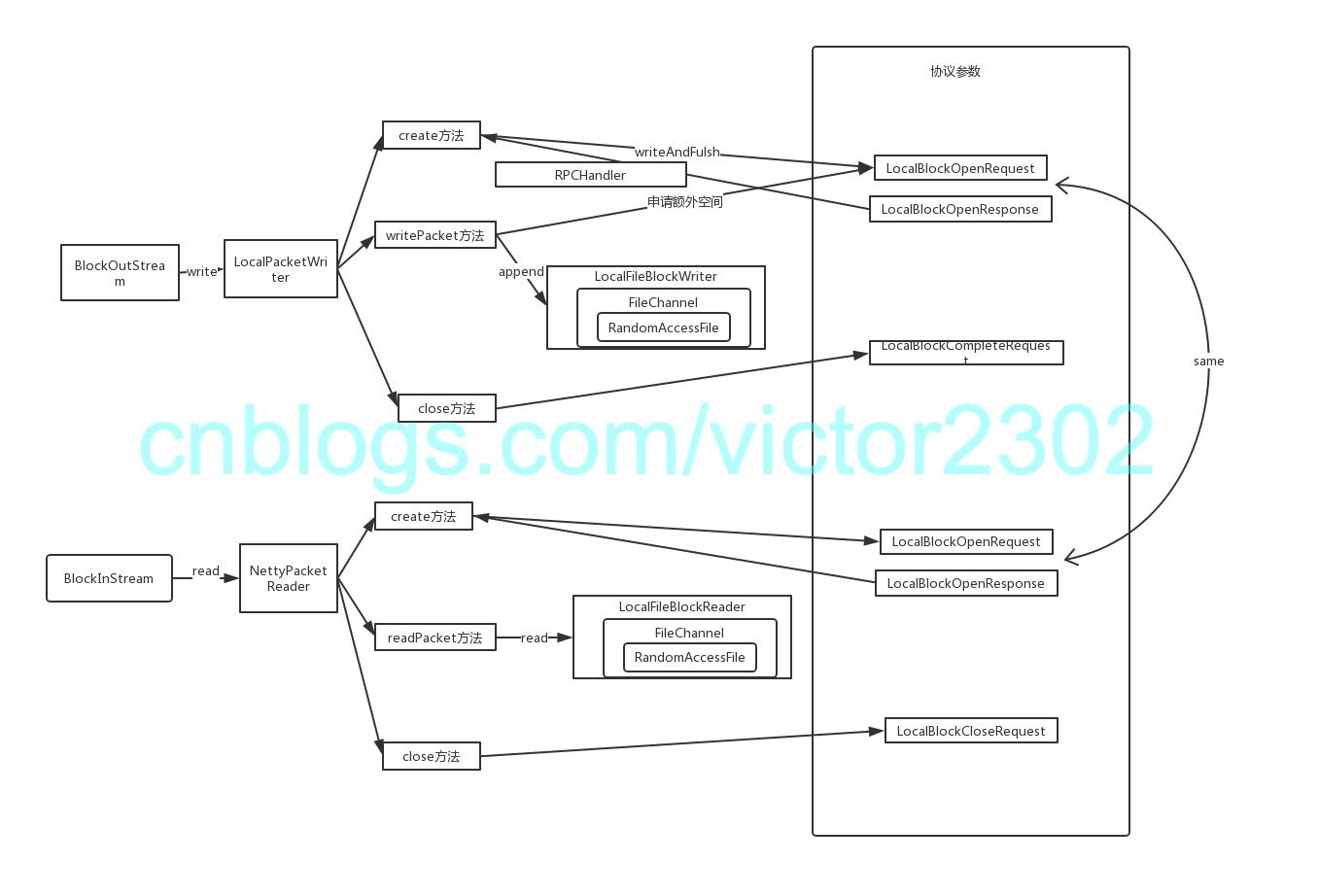
针对block的实际内容,直接通过ramdisk写到本地,避免了使用netty进行网络通讯,
short-circuit通讯-客户端:
下图是Netty版本的客户端+LocalFileBlockWriter+LocalFileBlockReader调用过程
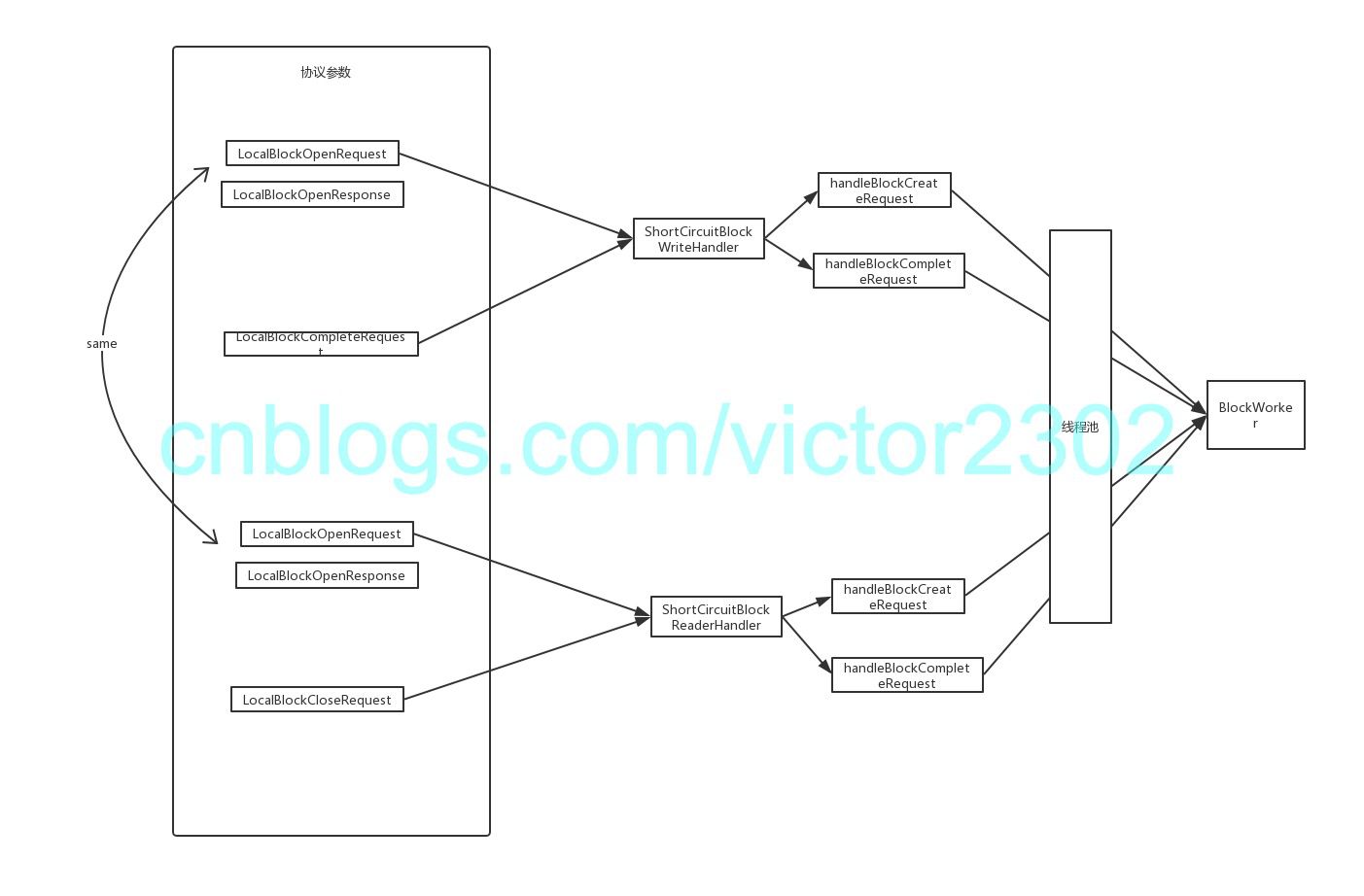
short-circuit通讯-服务端:
下图是Netty版本的服务端调用
非short-circuit
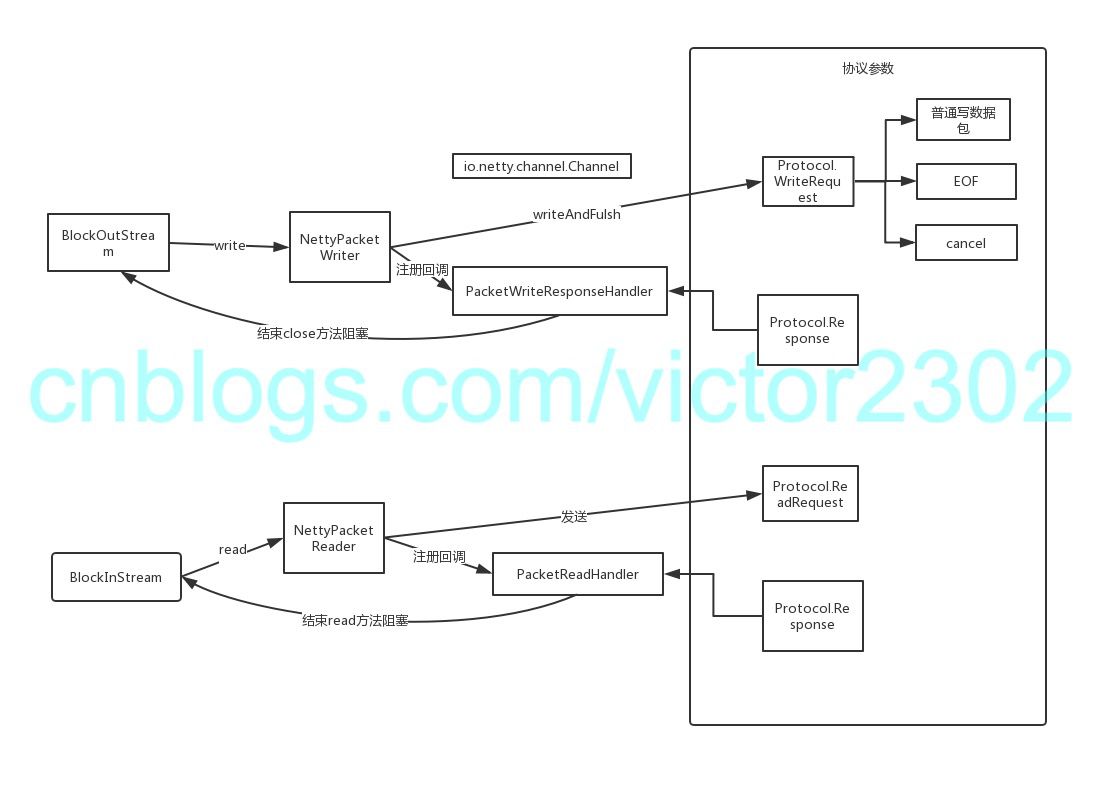
非short-circuit通讯-客户端:
下图是Netty版本的客户端调用过程
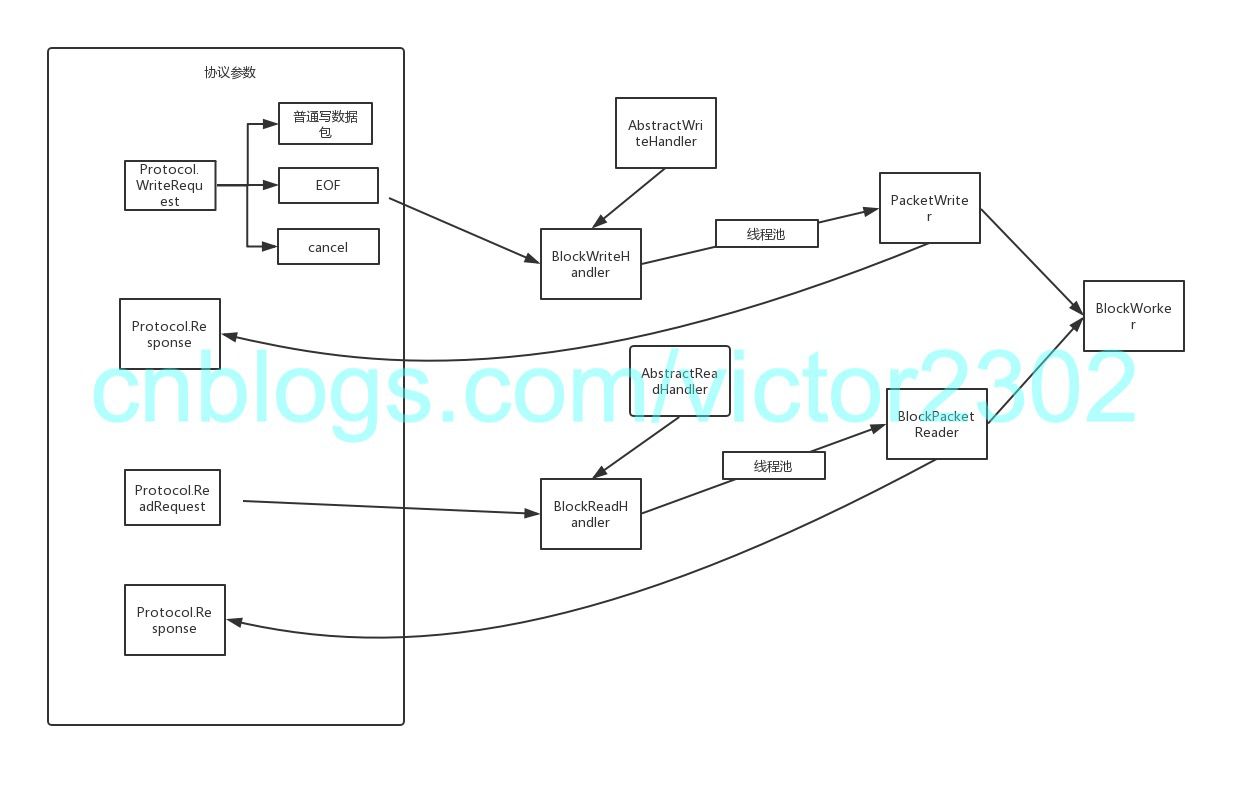
非short-circuit通讯-服务端:
下图是Netty版本的服务端调用
下一篇将介绍BlockWorker相关的功能
alluxio源码解析-rpc调用概述-client和worker之间的block模块的通讯架构(netty版本)(3)的更多相关文章
- alluxio源码解析-rpc调用概述(1)
alluxio中几种角色以及角色之间的rpc调用: 作为分布式架构的文件缓存系统,rpc调用必不可少 client作为客户端 master提供thrift rpc的服务,管理以下信息: block信息 ...
- [源码解析] 并行分布式框架 Celery 之 worker 启动 (1)
[源码解析] 并行分布式框架 Celery 之 worker 启动 (1) 目录 [源码解析] 并行分布式框架 Celery 之 worker 启动 (1) 0x00 摘要 0x01 Celery的架 ...
- [源码解析] 并行分布式框架 Celery 之 worker 启动 (2)
[源码解析] 并行分布式框架 Celery 之 worker 启动 (2) 目录 [源码解析] 并行分布式框架 Celery 之 worker 启动 (2) 0x00 摘要 0x01 前文回顾 0x2 ...
- alluxio源码解析-层次化存储(4)
层次化存储-特性介绍: https://www.alluxio.org/docs/1.6/cn/Tiered-Storage-on-Alluxio.html 引入分层存储后,Alluxio管理的数据块 ...
- alluxio源码解析-netty部分(2)
netty简介 Netty是 一个异步事件驱动的网络应用程序框架,用于快速开发可维护的高性能协议服务器和客户端. netty作为alluxio中重要的通讯组件 在常见的客户端上传,下载中,都会有n ...
- [源码解析] 并行分布式任务队列 Celery 之 消费动态流程
[源码解析] 并行分布式任务队列 Celery 之 消费动态流程 目录 [源码解析] 并行分布式任务队列 Celery 之 消费动态流程 0x00 摘要 0x01 来由 0x02 逻辑 in komb ...
- DataX 3.0 源码解析一
源码解析 基本调用类分析 任务启动由python脚本新建进程进行任务执行,后续执行由Java进行,以下将对java部分进行分 其中的调用原理机制. Engine 首先入口类为com.alibaba.d ...
- 【源码解析】BlockManager详解
1 Block管理模块的组件和功能 BlockManager:BlockManager源码解析 Driver和Executor都会创建 Block的put.get和remove等操作的实际执行者 Bl ...
- 【源码解析】凭什么?spring boot 一个 jar 就能开发 web 项目
问题 为什么开发web项目,spring-boot-starter-web 一个jar就搞定了?这个jar做了什么? 通过 spring-boot 工程可以看到所有开箱即用的的引导模块 spring- ...
随机推荐
- python generator与coroutine
python generator与coroutine 协程 简单介绍 协程,又称微线程,纤程,英文名Coroutine.协程是一种用户态的轻量级线程,又称微线程.协程拥有自己的寄存器上下文和栈,调度 ...
- 【全网首发】使用vs2017+qt5.12.4编译64位debug和release的qgis3.4.9
一.摘要: 搜索网络没有发现一篇文章完整的介绍如何编译qgis3.4.x的debug版本,官方的指导也长时间不再更新. 所以前前后后花了4天搞定qgis的debug编译,并成功运行,废话不多说,直接上 ...
- P2344 奶牛抗议 离散化+前缀和+动态规划+树状数组
[题目背景] Generic Cow Protests, 2011 Feb [题目描述] 约翰家的N 头奶牛正在排队游行抗议.一些奶牛情绪激动,约翰测算下来,排在第i 位的奶牛的理智度为Ai,数字可正 ...
- java算法题每日一练01,java入门简单算法题小练
1.给数组做反序 public class Ak01 { public static void main(String[] args) { int[] a = new int[]{22,48,41,2 ...
- [原创]自动化部署K8S(v1.10.11)集群
标准运维实现自动化部署K8S集群主要分两步,第一步是部署gse-agent,拱第二步执行部署. 第一步:部署gse-agent.如下: 第二步:部署k8s集群.主要通过作业平台分为5小步执 ...
- Python入门基础(8)
上一篇介绍了一些python中函数的基本用法,那么,现在就来谈一谈python中的一些内置函数吧 python中的内置函数 1.map()函数 map()函数接受两个参数值,一个是函数,一个是Iter ...
- 《VR入门系列教程》之13---相机与立体渲染
相机.透视图.视口.投影 渲染好的场景都需要一个可以供用户查看的视图,我们通常在3D场景中用相机来提供这种需求.相机相对场景有位置和方向,就像我们生活中的相机一样,它也提供透视图查看方式,这种 ...
- python课堂整理13---函数的作用域及匿名函数
name = 'alex' def foo(): name = 'jinling' def bar(): print(name) return bar a = foo() print(a) 阅读上述代 ...
- Docker volume speed up npm install
上一节决定在Jenkins中采用Docker作为构建环境,于是就可以为所欲为的使用各种node版本编译我们的项目.解决了版本切换问题.然而,Docker设计的目的就是纯净的执行环境,因此每次运行doc ...
- z-index不起作用
摘录自 https://blog.csdn.net/apple_01150525/article/details/76546367 z-index无效的情况,一共有三种:1.父标签 position属 ...