
Tomcat源码分析 (四)----- Pipeline和Valve
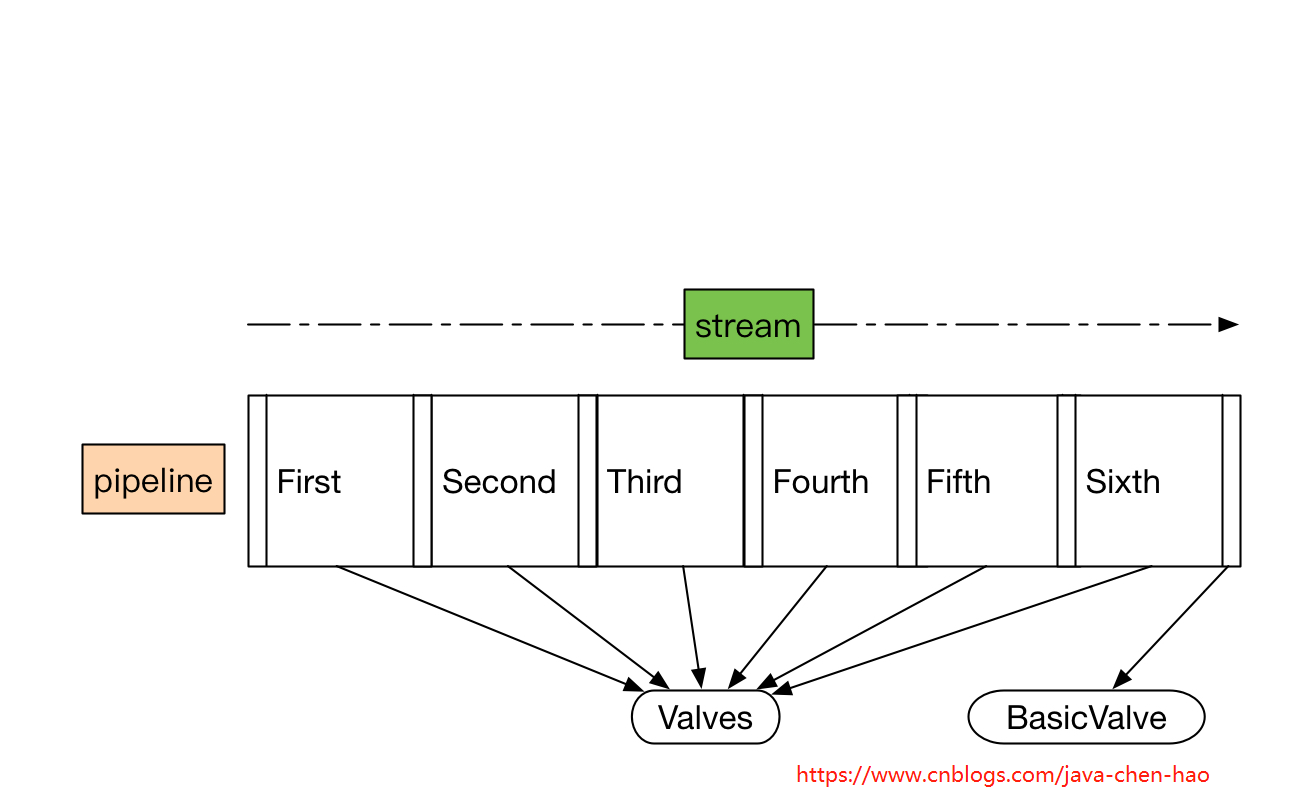
在 Tomcat源码分析 (二)----- Tomcat整体架构及组件 中我们简单分析了一下Pipeline和Valve,并给出了整体的结构图。而这一节,我们将详细分析Tomcat里面的源码。
Valve
Valve作为一个个基础的阀门,扮演着业务实际执行者的角色。我们看看Valve这个接口有哪些方法。
public interface Valve {

    // 获取下一个阀门

    public Valve getNext();

    // 设置下一个阀门

    public void setNext(Valve valve);

    // 后台执行逻辑,主要在类加载上下文中使用到

    public void backgroundProcess();

    // 执行业务逻辑

    public void invoke(Request request, Response response)

        throws IOException, ServletException;

    // 是否异步执行

    public boolean isAsyncSupported();

}
Contained
ValveBase、Pipeline及其他相关组件都实现了Contained接口,我们看看这个接口有哪些方法。很简单,就是get/set容器操作。
public interface Contained {

    /**

     * Get the {@link Container} with which this instance is associated.

     *

     * @return The Container with which this instance is associated or

     *         <code>null</code> if not associated with a Container

     */

    Container getContainer();

    /**

     * Set the <code>Container</code> with which this instance is associated.

     *

     * @param container The Container instance with which this instance is to

     *  be associated, or <code>null</code> to disassociate this instance

     *  from any Container

     */

    void setContainer(Container container);

}
ValveBase
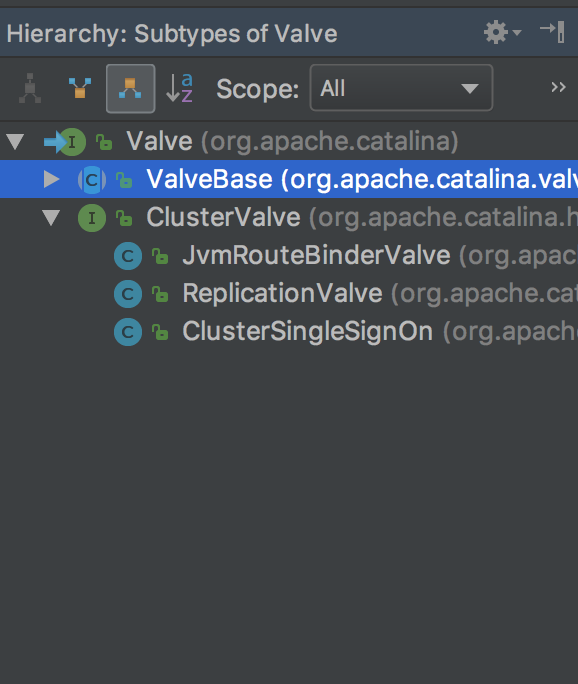
从Valve的类层次结构,我们发现几乎所有Valve都继承了ValveBase这个抽象类,所以这儿我们需要分析一下它。
public abstract class ValveBase extends LifecycleMBeanBase implements Contained, Valve {

    // 国际化管理器,可以支持多国语言

    protected static final StringManager sm = StringManager.getManager(ValveBase.class);

    //------------------------------------------------------ Instance Variables

    // 无参构造方法,默认不支持异步

    public ValveBase() {

        this(false);

    }

    // 有参构造方法,可传入异步支持标记

    public ValveBase(boolean asyncSupported) {

        this.asyncSupported = asyncSupported;

    }

    //------------------------------------------------------ Instance Variables

    // 异步标记

    protected boolean asyncSupported;

    // 所属容器

    protected Container container = null;

    // 容器日志组件对象

    protected Log containerLog = null;

    // 下一个阀门

    protected Valve next = null;

    //-------------------------------------------------------------- Properties

    // 获取所属容器

    @Override

    public Container getContainer() {

        return container;

    }

    // 设置所属容器

    @Override

    public void setContainer(Container container) {

        this.container = container;

    }

    // 是否异步执行

    @Override

    public boolean isAsyncSupported() {

        return asyncSupported;

    }

    // 设置是否异步执行

    public void setAsyncSupported(boolean asyncSupported) {

        this.asyncSupported = asyncSupported;

    }

    // 获取下一个待执行的阀门

    @Override

    public Valve getNext() {

        return next;

    }

    // 设置下一个待执行的阀门

    @Override

    public void setNext(Valve valve) {

        this.next = valve;

    }

    //---------------------------------------------------------- Public Methods

    // 后台执行,子类实现

    @Override

    public void backgroundProcess() {

        // NOOP by default

    }

    // 初始化逻辑

    @Override

    protected void initInternal() throws LifecycleException {

        super.initInternal();

        // 设置容器日志组件对象到当前阀门的containerLog属性

        containerLog = getContainer().getLogger();

    }

    // 启动逻辑

    @Override

    protected synchronized void startInternal() throws LifecycleException {

        setState(LifecycleState.STARTING);

    }

    // 停止逻辑

    @Override

    protected synchronized void stopInternal() throws LifecycleException {

        setState(LifecycleState.STOPPING);

    }

    // 重写toString,格式为[${containerName}]

    @Override

    public String toString() {

        StringBuilder sb = new StringBuilder(this.getClass().getName());

        sb.append('[');

        if (container == null) {

            sb.append("Container is null");

        } else {

            sb.append(container.getName());

        }

        sb.append(']');

        return sb.toString();

    }

    // -------------------- JMX and Registration  --------------------

    // 设置获取MBean对象的keyProperties,格式如:a=b,c=d,e=f...

    @Override

    public String getObjectNameKeyProperties() {

        StringBuilder name = new StringBuilder("type=Valve");

        Container container = getContainer();

        name.append(container.getMBeanKeyProperties());

        int seq = ;

        // Pipeline may not be present in unit testing

        Pipeline p = container.getPipeline();

        if (p != null) {

            for (Valve valve : p.getValves()) {

                // Skip null valves

                if (valve == null) {

                    continue;

                }

                // Only compare valves in pipeline until we find this valve

                if (valve == this) {

                    break;

                }

                if (valve.getClass() == this.getClass()) {

                    // Duplicate valve earlier in pipeline

                    // increment sequence number

                    seq ++;

                }

            }

        }

        if (seq > ) {

            name.append(",seq=");

            name.append(seq);

        }

        String className = this.getClass().getName();

        int period = className.lastIndexOf('.');

        if (period >= ) {

            className = className.substring(period + );

        }

        name.append(",name=");

        name.append(className);

        return name.toString();

    }

    // 获取所属域,从container获取

    @Override

    public String getDomainInternal() {

        Container c = getContainer();

        if (c == null) {

            return null;

        } else {

            return c.getDomain();

        }

    }

}
Pipeline
Pipeline作为一个管道,我们可以简单认为是一个Valve的集合,内部会对这个集合进行遍历,调用每个元素的业务逻辑方法invoke()。
是不是这样呢?我们还是分析一下源码,先看看接口定义。
public interface Pipeline {

    // ------------------------------------------------------------- Properties

    // 获取基本阀门

    public Valve getBasic();

    // 设置基本阀门

    public void setBasic(Valve valve);

    // --------------------------------------------------------- Public Methods

    // 添加阀门

    public void addValve(Valve valve);

    // 获取阀门数组

    public Valve[] getValves();

    // 删除阀门

    public void removeValve(Valve valve);

    // 获取首个阀门

    public Valve getFirst();

    // 管道内所有阀门是否异步执行

    public boolean isAsyncSupported();

    // 获取管道所属的容器

    public Container getContainer();

    // 设置管道所属的容器

    public void setContainer(Container container);

    // 查找非异步执行的所有阀门,并放置到result参数中,所以result不允许为null

    public void findNonAsyncValves(Set<String> result);

}
StandardPipeline
接着我们分析一下Pipeline唯一的实现StandardPipeline。代码很长,但是都很简单。
public class StandardPipeline extends LifecycleBase

        implements Pipeline, Contained {

    private static final Log log = LogFactory.getLog(StandardPipeline.class);

    // ----------------------------------------------------------- Constructors

    // 构造一个没有所属容器的管道

    public StandardPipeline() {

        this(null);

    }

    // 构造一个有所属容器的管道

    public StandardPipeline(Container container) {

        super();

        setContainer(container);

    }

    // ----------------------------------------------------- Instance Variables

    /**

     * 基本阀门,最后执行的阀门

     */

    protected Valve basic = null;

    /**

     * 管道所属的容器

     */

    protected Container container = null;

    /**

     * 管道里面的首个执行的阀门

     */

    protected Valve first = null;

    // --------------------------------------------------------- Public Methods

    // 是否异步执行,如果一个阀门都没有,或者所有阀门都是异步执行的,才返回true

    @Override

    public boolean isAsyncSupported() {

        Valve valve = (first!=null)?first:basic;

        boolean supported = true;

        while (supported && valve!=null) {

            supported = supported & valve.isAsyncSupported();

            valve = valve.getNext();

        }

        return supported;

    }

    // 查找所有未异步执行的阀门

    @Override

    public void findNonAsyncValves(Set<String> result) {

        Valve valve = (first!=null) ? first : basic;

        while (valve != null) {

            if (!valve.isAsyncSupported()) {

                result.add(valve.getClass().getName());

            }

            valve = valve.getNext();

        }

    }

    // ------------------------------------------------------ Contained Methods

    // 获取所属容器

    @Override

    public Container getContainer() {

        return (this.container);

    }

    // 设置所属容器

    @Override

    public void setContainer(Container container) {

        this.container = container;

    }

    // 初始化逻辑,默认没有任何逻辑

    @Override

    protected void initInternal() {

        // NOOP

    }

    // 开始逻辑,调用所有阀门的start方法

    @Override

    protected synchronized void startInternal() throws LifecycleException {

        // Start the Valves in our pipeline (including the basic), if any

        Valve current = first;

        if (current == null) {

            current = basic;

        }

        while (current != null) {

            if (current instanceof Lifecycle)

                ((Lifecycle) current).start();

            current = current.getNext();

        }

        setState(LifecycleState.STARTING);

    }

    // 停止逻辑,调用所有阀门的stop方法

    @Override

    protected synchronized void stopInternal() throws LifecycleException {

        setState(LifecycleState.STOPPING);

        // Stop the Valves in our pipeline (including the basic), if any

        Valve current = first;

        if (current == null) {

            current = basic;

        }

        while (current != null) {

            if (current instanceof Lifecycle)

                ((Lifecycle) current).stop();

            current = current.getNext();

        }

    }

    // 销毁逻辑,移掉所有阀门,调用removeValve方法

    @Override

    protected void destroyInternal() {

        Valve[] valves = getValves();

        for (Valve valve : valves) {

            removeValve(valve);

        }

    }

    /**

     * 重新toString方法

     */

    @Override

    public String toString() {

        StringBuilder sb = new StringBuilder("Pipeline[");

        sb.append(container);

        sb.append(']');

        return sb.toString();

    }

    // ------------------------------------------------------- Pipeline Methods

    // 获取基础阀门

    @Override

    public Valve getBasic() {

        return (this.basic);

    }

    // 设置基础阀门

    @Override

    public void setBasic(Valve valve) {

        // Change components if necessary

        Valve oldBasic = this.basic;

        if (oldBasic == valve)

            return;

        // Stop the old component if necessary

        // 老的基础阀门会被调用stop方法且所属容器置为null

        if (oldBasic != null) {

            if (getState().isAvailable() && (oldBasic instanceof Lifecycle)) {

                try {

                    ((Lifecycle) oldBasic).stop();

                } catch (LifecycleException e) {

                    log.error("StandardPipeline.setBasic: stop", e);

                }

            }

            if (oldBasic instanceof Contained) {

                try {

                    ((Contained) oldBasic).setContainer(null);

                } catch (Throwable t) {

                    ExceptionUtils.handleThrowable(t);

                }

            }

        }

        // Start the new component if necessary

        // 新的阀门会设置所属容器,并调用start方法

        if (valve == null)

            return;

        if (valve instanceof Contained) {

            ((Contained) valve).setContainer(this.container);

        }

        if (getState().isAvailable() && valve instanceof Lifecycle) {

            try {

                ((Lifecycle) valve).start();

            } catch (LifecycleException e) {

                log.error("StandardPipeline.setBasic: start", e);

                return;

            }

        }

        // Update the pipeline

        // 替换pipeline中的基础阀门,就是讲基础阀门的前一个阀门的next指向当前阀门

        Valve current = first;

        while (current != null) {

            if (current.getNext() == oldBasic) {

                current.setNext(valve);

                break;

            }

            current = current.getNext();

        }

        this.basic = valve;

    }

    // 添加阀门

    @Override

    public void addValve(Valve valve) {

        // Validate that we can add this Valve

        // 设置所属容器

        if (valve instanceof Contained)

            ((Contained) valve).setContainer(this.container);

        // Start the new component if necessary

        // 调用阀门的start方法

        if (getState().isAvailable()) {

            if (valve instanceof Lifecycle) {

                try {

                    ((Lifecycle) valve).start();

                } catch (LifecycleException e) {

                    log.error("StandardPipeline.addValve: start: ", e);

                }

            }

        }

        // Add this Valve to the set associated with this Pipeline

        // 设置阀门,将阀门添加到基础阀门的前一个

        if (first == null) {

            first = valve;

            valve.setNext(basic);

        } else {

            Valve current = first;

            while (current != null) {

                if (current.getNext() == basic) {

                    current.setNext(valve);

                    valve.setNext(basic);

                    break;

                }

                current = current.getNext();

            }

        }

        container.fireContainerEvent(Container.ADD_VALVE_EVENT, valve);

    }

    // 获取阀门数组

    @Override

    public Valve[] getValves() {

        ArrayList<Valve> valveList = new ArrayList<>();

        Valve current = first;

        if (current == null) {

            current = basic;

        }

        while (current != null) {

            valveList.add(current);

            current = current.getNext();

        }

        return valveList.toArray(new Valve[0]);

    }

    // JMX方法,在此忽略

    public ObjectName[] getValveObjectNames() {

        ArrayList<ObjectName> valveList = new ArrayList<>();

        Valve current = first;

        if (current == null) {

            current = basic;

        }

        while (current != null) {

            if (current instanceof JmxEnabled) {

                valveList.add(((JmxEnabled) current).getObjectName());

            }

            current = current.getNext();

        }

        return valveList.toArray(new ObjectName[0]);

    }

    // 移除阀门

    @Override

    public void removeValve(Valve valve) {

        Valve current;

        if(first == valve) {

            // 如果待移出的阀门是首个阀门,则首个阀门的下一个阀门变成首个阀门

            first = first.getNext();

            current = null;

        } else {

            current = first;

        }

        // 遍历阀门集合,并进行移除

        while (current != null) {

            if (current.getNext() == valve) {

                current.setNext(valve.getNext());

                break;

            }

            current = current.getNext();

        }

        if (first == basic) first = null;

        // 设置阀门所属容器为null

        if (valve instanceof Contained)

            ((Contained) valve).setContainer(null);

        // 调用待移除阀门的stop方法和destroy方法,并触发移除阀门事件

        if (valve instanceof Lifecycle) {

            // Stop this valve if necessary

            if (getState().isAvailable()) {

                try {

                    ((Lifecycle) valve).stop();

                } catch (LifecycleException e) {

                    log.error("StandardPipeline.removeValve: stop: ", e);

                }

            }

            try {

                ((Lifecycle) valve).destroy();

            } catch (LifecycleException e) {

                log.error("StandardPipeline.removeValve: destroy: ", e);

            }

        }

        container.fireContainerEvent(Container.REMOVE_VALVE_EVENT, valve);

    }

    // 获取首个阀门,如果阀门列表为null,返回基础阀门

    @Override

    public Valve getFirst() {

        if (first != null) {

            return first;

        }

        return basic;

    }

}
总结
通过上面的代码分析,我们发现了几个关键的设计模式:
- 模板方法模式,父类定义框架,子类实现
- 责任链模式,就是这儿的管道/阀门的实现方式,每个阀门维护一个next属性指向下一个阀门
Tomcat源码分析 (四)----- Pipeline和Valve的更多相关文章
- Tomcat 源码分析(转)
本文转自:http://blog.csdn.net/haitao111313/article/category/1179996 Tomcat源码分析(一)--服务启动 1. Tomcat主要有两个组件 ...
- Tomcat源码分析之—具体启动流程分析
从Tomcat启动调用栈可知,Bootstrap类的main方法为整个Tomcat的入口,在init初始化Bootstrap类的时候为设置Catalina的工作路径也就是Catalina_HOME信息 ...
- Tomcat源码分析--转
一.架构 下面谈谈我对Tomcat架构的理解 总体架构: 1.面向组件架构 2.基于JMX 3.事件侦听 1)面向组件架构 tomcat代码看似很庞大,但从结构上看却很清晰和简单,它主要由一堆组件组成 ...
- Tomcat源码分析
前言: 本文是我阅读了TOMCAT源码后的一些心得. 主要是讲解TOMCAT的系统框架, 以及启动流程.若有错漏之处,敬请批评指教! 建议: 毕竟TOMCAT的框架还是比较复杂的, 单是从文字上理解, ...
- Tomcat源码分析——请求原理分析(下)
前言 本文继续讲解TOMCAT的请求原理分析,建议朋友们阅读本文时首先阅读过<TOMCAT源码分析——请求原理分析(上)>和<TOMCAT源码分析——请求原理分析(中)>.在& ...
- Tomcat源码分析——请求原理分析(中)
前言 在<TOMCAT源码分析——请求原理分析(上)>一文中已经介绍了关于Tomcat7.0处理请求前作的初始化和准备工作,请读者在阅读本文前确保掌握<TOMCAT源码分析——请求原 ...
- Tomcat源码分析——请求原理分析(上)
前言 谈起Tomcat的诞生,最早可以追溯到1995年.近20年来,Tomcat始终是使用最广泛的Web服务器,由于其使用Java语言开发,所以广为Java程序员所熟悉.很多人早期的J2EE项目,由程 ...
- Tomcat源码分析(二)------ 一次完整请求的里里外外
Tomcat源码分析(二)------ 一次完整请求的里里外外 前几天分析了一下Tomcat的架构和启动过程,今天开始研究它的运转机制.Tomcat最本质就是个能运行JSP/Servlet的Web ...
- tomcat源码--springboot整合tomcat源码分析
1.测试代码,一个简单的springboot web项目:地址:https://gitee.com/yangxioahui/demo_mybatis.git 一:tomcat的主要架构:1.如果我们下 ...
随机推荐
- Nginx+Tomat8负载后,利用Redis实现Tomcat8的session共享
网上相应的文章应该都介绍,这里只特别记录下笔者在实操的过程出现的问题.此文件只针对tomcat 8 版本,之前版本可略过. tomcat 8 中的context.xml文件修改,增加以下配置. Jav ...
- 20131221-Dom练习-第二十六天(未完)
[1] //总结,写代码,一要动脑,理解用脑 //二要练,要动手,要有用身体记忆代码的觉悟,记忆用手 //三学编程最快的方法是,直接接触代码,用脑,用手接触代码 //面向对象的编码方式,对象还是对象, ...
- [原创]Greenplum数据库集群实践
GreenPlum实践 ============================================== 目录: 一.安装环境准备 二.GP数据库安装 三.集群添加standby节点 四. ...
- C#3.0新增功能09 LINQ 基础04 基本 LINQ 查询操作
连载目录 [已更新最新开发文章,点击查看详细] 本篇介绍 LINQ 查询表达式和一些在查询中执行的典型操作. 获取数据源 在 LINQ 查询中,第一步是指定数据源. 和大多数编程语言相同,在使用 ...
- 通信模型socket
I/O的概念 操作系统的分为socket的I/O还有用户界面的输入输出,一般一个输入操作分为两个不同的阶段,1)等待数据准备好:2)从内核向进程复制数据 从理论上来讲,阻塞I/O.非阻塞I/O.复用I ...
- 嵌套&匿名&高阶函数
嵌套&匿名&高阶函数 嵌套函数 函数可以嵌套定义并调用函数 name = "小明" def change(): name = "小明,你好" d ...
- PHP与ECMAScript_7_流程控制
PHP ECMAScript 顺序结构 默认从上到下依次执行 默认从上到下依次执行 分支结构 if / switch if / switch 循环结构 for / while / do-w ...
- HDU 多校 第三场 Fansblog
代码千万条,规范第一条 训练赛的时候打表找规律,发现答案是1/(st-pre-1)!,奈何用错了模板,一直TLE到比赛结束,一直以为是卡什么输入输出或者是两个素数相差太大导致复杂度过高,读入优化啥的都 ...
- Java 内存模型详解
概述 Java的内存模型(Java Memory Model )简称JMM.首先应该明白,Java内存模型是一个规范,主要规定了以下两点: 规定了一个线程如何以及何时可以看到其他线程修改过后的共享变量 ...
- centos7主机间免密登录、复制文件
下面实例为三个节点间 1.分别在三个节点设置域名映射 vi /etc/hosts 在文件末尾追加 192.168.10.121 node1 192.168.10.122 node2 192.168. ...