
Pandas学习(二)——双色球开奖数据分析
学习笔记汇总
Pandas学习(一)–数据的导入
pandas学习(二)–双色球数据分析
pandas学习(三)–NAB球员薪资分析
pandas学习(四)–数据的归一化
pandas学习(五)–pandas学习视频
本章主要利用双色球开奖数据来学习pandas的DataFrame数据选取,Series的统计功能,以及matplotlib画柱状图。
ball.py
# -*- coding: utf-8 -*-

import pandas as pd

import numpy as np

import matplotlib.pyplot as plt

from utils import *

HISTORY_NUM = "079"  # 历史同期

HEAD_NUM = 30  # 近30期

plt.rcParams['font.sans-serif'] = ['SimHei']  # 用来正常显示中文标签

plt.rcParams['axes.unicode_minus'] = False  # 用来正常显示负号

# read data

data_sheet = 'ssqexcle_result.xls'

all_data = pd.read_excel(data_sheet, parse_cols=(0, 2, 3, 4, 5, 6, 7, 8))

all_data['index'] = all_data['index'].astype(np.str)

#统计历史数据

history_data = all_data[[x.endswith(HISTORY_NUM) for x in all_data['index']]].copy()

history_red_ball = history_data.iloc[:, 1:7]

history_blue_ball = history_data.iloc[:, 7]

count_red_ball = history_red_ball.stack().value_counts()

count_blue_ball = history_blue_ball.value_counts()

# 画图

plt.figure(1)

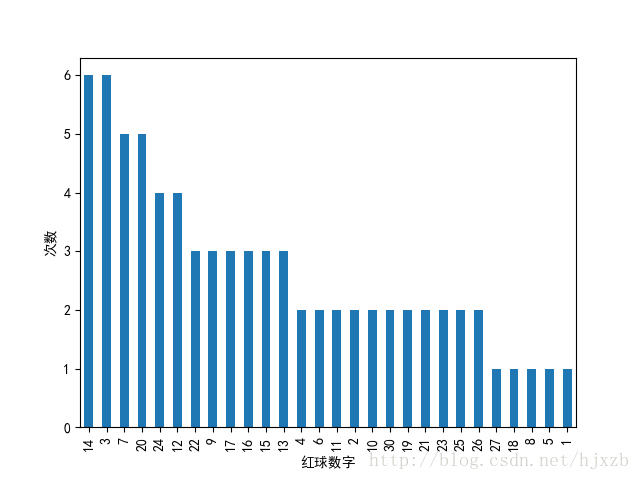
count_red_ball.plot(kind='bar', align='center')

plt.xlabel("红球数字")

plt.ylabel("次数")

plt.show()

plt.figure(2)

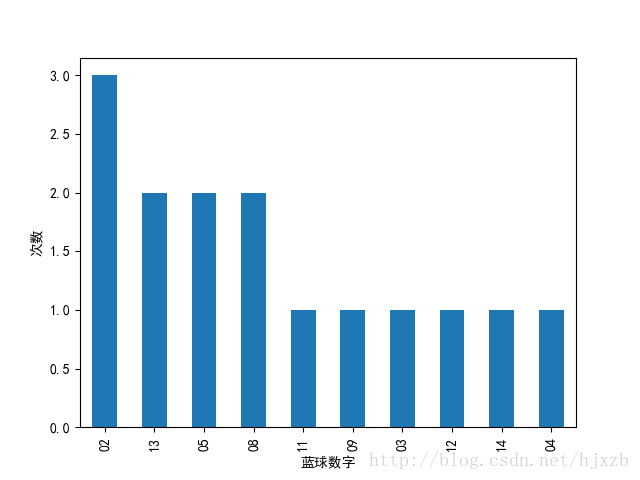
count_blue_ball.plot(kind='bar', align='center')

plt.xlabel("蓝球数字")

plt.ylabel("次数")

plt.show()

#统计近n期数据

head_n_data = all_data.head(HEAD_NUM).copy()

head_n_red_ball = head_n_data.iloc[:, 1:7]

head_n_blue_ball = head_n_data.iloc[:, 7]

odd_even_dict = calculate_odd_vs_even(head_n_red_ball) #计算奇偶比

print(odd_even_dict)

#计算3区比

result = cal_3distance_times(all_data.iloc[:, 1:7])

print(result)

# 统计红球2连号出现次数

result = cal_2sequence_num_times(all_data.iloc[:, 1:7])

print(result)

# 统计红球3连号出现次数

result = cal_3sequence_num_times(all_data.iloc[:, 1:7])

print(result)

#统计2个球组合出现的频次

result = cal_2combination_times(all_data.iloc[:, 1:7])

print(result)

#统计3个红球组合出现的频次

result = cal_3combination_times(all_data.iloc[:, 1:7])

print(result)
utils.py
# -*- coding: utf-8 -*-

def calculate_odd_vs_even(dataframe):

    # 计算奇偶比

    result_dict = {}

    for index, row in dataframe.iterrows():

        odd = 0  # 奇数

        even = 0  # 偶数

        for x in row:

            if x & 1:

                odd += 1

            else:

                even += 1

        key = "%s:%s" % (str(odd), str(even))

        if key in result_dict:

            result_dict[key] += 1

        else:

            result_dict[key] = 1

    return result_dict

def cal_2sequence_num_times(dataframe):

    """

    计算红球2连号出现的频次

    """

    result_dict = {}

    for index, row in dataframe.iterrows():

        a = 1

        while a < 33:

            if (a in row.values) and (a + 1 in row.values):

                key = "%s:%s" % (str(a), str(a + 1))

                if key in result_dict:

                    result_dict[key] += 1

                else:

                    result_dict[key] = 1

            a += 1

    return sorted(result_dict.items(), key=lambda item: item[1])

def cal_3sequence_num_times(dataframe):

    """

    计算红球3连号出现的频次

    """

    result_dict = {}

    for index, row in dataframe.iterrows():

        a = 1

        while a < 32:

            if (a in row.values) and (a + 1 in row.values) and (a + 2 in row.values):

                key = "%s:%s:%s" % (str(a), str(a + 1), str(a + 2))

                if key in result_dict:

                    result_dict[key] += 1

                else:

                    result_dict[key] = 1

            a += 1

    return sorted(result_dict.items(), key=lambda item: item[1])

def cal_3distance_times(dataframe):

    """

    计算红球的3区比

    """

    result_dict = {}

    for index, row in dataframe.iterrows():

        little = 0  # 小区

        middle = 0  # 中区

        big = 0  # 大区

        for x in row.values:

            if x <= 11:

                little += 1

            elif x <= 22:

                middle += 1

            else:

                big += 1

        key = "%s:%s:%s" % (str(little), str(middle), str(big))

        if key in result_dict:

            result_dict[key] += 1

        else:

            result_dict[key] = 1

    return sorted(result_dict.items(), key=lambda item: item[1])

def cal_2combination_times(dataframe):

    """

    计算红球2个球组合出现的频次

    """

    result_dict = {}

    for index, row in dataframe.iterrows():

        for a in range(6):

            for b in range(a + 1, 6):

                key = "%s:%s" % (str(row.values[a]), str(row.values[b]))

                if key in result_dict:

                    result_dict[key] += 1

                else:

                    result_dict[key] = 1

    return sorted(result_dict.items(), key=lambda item: item[1])

def cal_3combination_times(dataframe):

    """

    计算红球3个球组合出现的频次

    """

    result_dict = {}

    for index, row in dataframe.iterrows():

        for a in range(6):

            for b in range(a + 1, 6):

                for c in range(b + 1, 6):

                    key = "%s:%s:%s" % (str(row.values[a]), str(row.values[b]), str(row.values[c]))

                    if key in result_dict:

                        result_dict[key] += 1

                    else:

                        result_dict[key] = 1

    return sorted(result_dict.items(), key=lambda item: item[1])
获取出来的历史数据如下所示:
        index  red1  red2  red3  red4  red5  red6 blue

20    2017079     3     7    14    23    25    27   08

173   2016079     1     3    10    12    24    28   02

327   2015079     9    14    15    20    26    32   11

479   2014079     2     7    16    22    27    28   02

633   2013079     7    13    17    19    22    26   13

787   2012079     6     7    12    24    30    33   12

940   2011079     3    14    15    16    24    29   05

1093  2010079     8    11    12    14    18    22   02

1247  2009079     2     9    16    21    30    31   13

1401  2008079     3     4     5    10    20    32   09

1554  2007079     3     4    14    20    21    25   14

1708  2006079     6    11    13    17    20    32   08

1861  2005079     3     9    20    24    25    28   05

1983  2004079     7    13    14    17    19    30   03

2072  2003079    12    15    22    23    26    31   04
画出来的 图如下所示:
1、红球历史数据次数统计图
2、蓝球历史数据次数统计图
数据以及代码下载地址:链接:http://pan.baidu.com/s/1c1OdNs0 密码:87k6
欢迎python爱好者加入:学习交流群 667279387
Pandas学习(二)——双色球开奖数据分析的更多相关文章
- python3.4学习笔记(十四) 网络爬虫实例代码,抓取新浪爱彩双色球开奖数据实例
python3.4学习笔记(十四) 网络爬虫实例代码,抓取新浪爱彩双色球开奖数据实例 新浪爱彩双色球开奖数据URL:http://zst.aicai.com/ssq/openInfo/ 最终输出结果格 ...
- python 爬虫爬取历年双色球开奖信息
目前写的这些爬虫都是些静态网页,对于一些高级网页(像经过JS渲染过的页面),目前技术并不能解决,自己也是在慢慢学习过程中,如有错误,欢迎指正: 对面前端知识本人并不懂,过程中如果涉及到前端知识,也是百 ...
- numpy、pandas学习二
#numpy中arrary与pandas中series.DataFrame区别#arrary生成数组,无索引.列名:series有索引,且仅能创建一维数组:DataFrame有索引.列名import ...
- 用Python爬取双色球开奖信息,了解一下
1工具 2具体方法 1.使用python2.7编写爬取脚本 这里除了正常的爬取操作,还增加了独立的参数设定.如果没有参数,爬取的数据就在当前目录下:如果有参数,可以设定保存目录.保存文件名后缀 ...
- 第一个Python程序 | 机选彩票号码+爬取最新开奖号码
(机选彩票号码+爬取最新开奖号码 | 2021-04-21) 学习记录,好记不如烂笔头 这个程序作用是<机选三种彩票类型的号码> 程序内包含功能有如下: 自动获取最新的三种彩票的开奖号码 ...
- 中国福利彩票,牛B,开奖和数据传输有什么关系?
昨天,由中国教育电视台直播的福利彩票“双色球”15011期开奖,在没有事先预告的情况下突然取消.晚上11点40分左右,中国福利彩票发行管理中心唯一指定网络信息发布媒体——中彩网官方微博出乎意料地在网上 ...
- python爬虫学习之使用XPath解析开奖网站
实例需求:运用python语言爬取http://kaijiang.zhcw.com/zhcw/html/ssq/list_1.html这个开奖网站所有的信息,并且保存为txt文件. 实例环境:pyth ...
- python爬虫学习之使用BeautifulSoup库爬取开奖网站信息-模块化
实例需求:运用python语言爬取http://kaijiang.zhcw.com/zhcw/html/ssq/list_1.html这个开奖网站所有的信息,并且保存为txt文件和excel文件. 实 ...
- 【转】Pandas学习笔记(二)选择数据
Pandas学习笔记系列: Pandas学习笔记(一)基本介绍 Pandas学习笔记(二)选择数据 Pandas学习笔记(三)修改&添加值 Pandas学习笔记(四)处理丢失值 Pandas学 ...
随机推荐
- 基于c/s架构的远程登陆服务的步骤。
1:上/下位机安装相应的服务程序.(确保内核支持该服务)2:上位机(作为服务器端)配置能够给下位机访问目录的所在地,及其读写权限.3:在/dev目录下创建该服务其所需要使用的虚拟文件设备,同时按照该服 ...
- Docker(二) Dockerfile 使用介绍
前言 图解Docker 镜像.容器和 Dockerfile 的关系: 一.Dockerfile的概念 Docker 镜像是一个特殊的文件系统,除了提供容器运行时所需的程序.库.资源.配置等文件外,还包 ...
- Spring Boot2 系列教程(二十四)Spring Boot 整合 Jpa
Spring Boot 中的数据持久化方案前面给大伙介绍了两种了,一个是 JdbcTemplate,还有一个 MyBatis,JdbcTemplate 配置简单,使用也简单,但是功能也非常有限,MyB ...
- 五分钟学会HTML5的WebSocket协议
1.背景 很多网站为了实现推送技术,所用的技术都是Ajax轮询.轮询是在特定的的时间间隔由浏览器对服务器发出HTTP请求,然后由服务器返回最新的数据给客户端的浏览器.这种传统的模式带来很明显的缺点 ...
- 力扣(LeetCode)旋转字符串 个人题解
给定两个字符串, A 和 B. A 的旋转操作就是将 A 最左边的字符移动到最右边. 例如, 若 A = 'abcde',在移动一次之后结果就是'bcdea' .如果在若干次旋转操作之后,A 能变成B ...
- iOS UIView x Android View
- Vue packages version mismatch版本问题的解决
今天下载了一个vue项目,npm run dev 时发现报错,错误信息入下: error in .src/components/mobile/SeniorDetail.vue Module build ...
- (三十八)golang--json(对切片、map、结构体进行序列化)
JSON(javascript object notation)是一种轻量级的数据交换格式,易于人阅读和编写,同时也易于机器解析和生成.key-val JSON是在2001年开始推广的数据格式,目前已 ...
- odoo12 修行基础篇之 添加明细字段 (二)
前一篇介绍了如何在视图和表单中添加字段.本节内容,我们讨论下如何在明细中加字段. 我想在销售页面明细中增加税额字段,这在表sale.order.line中已经存在,在此仅用来演示. odoo的明细一般 ...
- SpringBoot学习(六)—— springboot快速整合RabbitMQ
目录 Rabbit MQ消息队列 简介 Rabbit MQ工作模式 交换机模式 引入RabbitMQ队列 代码实战 Rabbit MQ消息队列 @ 简介 优点 erlang开发,并发能力强. 社区活跃 ...