
git安装和项目上传到GitHub
重装系统后,Git安装也要来重来
下载
国内下载地址:https://npm.taobao.org/mirrors/git-for-windows
安装忽略
生成密钥
输入然后都是下一步,生成密钥,生成的在C:\Users\Admin\.ssh
ssh-keygen -t rsa -C "email@qq.com"
进入C:\Users\Admin\.ssh 打开git 代理输入
ssh-agent bash
然后
ssh-add ~/.ssh/id_rsa
复制,粘贴到github账号ssh密钥里
clip < ~/.ssh/id_rsa.pub
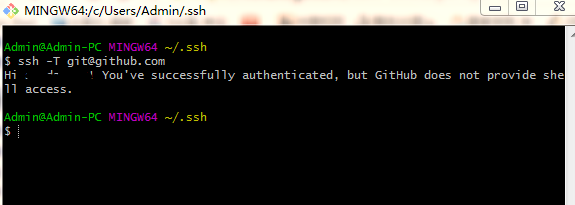
检查连接
ssh -T git@github.com
成功连接如图
上传项目
cd方式进入目录

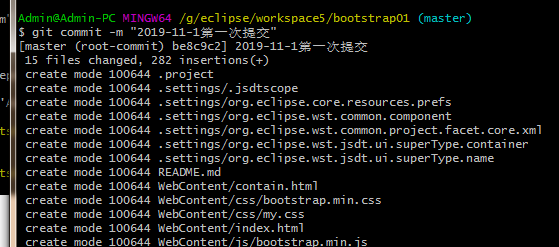
提交注释和配置用户
git commit -m "first commit"
  git config --global user.email "you@example.com"

  git config --global user.name "Your Name"
Config file location

    --global              use global config file

    --system              use system config file

    --local               use repository config file

    --worktree            use per-worktree config file

    -f, --file <file>     use given config file

    --blob <blob-id>      read config from given blob object

Action

    --get                 get value: name [value-regex]

    --get-all             get all values: key [value-regex]

    --get-regexp          get values for regexp: name-regex [value-regex]

    --get-urlmatch        get value specific for the URL: section[.var] URL

    --replace-all         replace all matching variables: name value [value_regex]

    --add                 add a new variable: name value

    --unset               remove a variable: name [value-regex]

    --unset-all           remove all matches: name [value-regex]

    --rename-section      rename section: old-name new-name

    --remove-section      remove a section: name

    -l, --list            list all

    -e, --edit            open an editor

    --get-color           find the color configured: slot [default]

    --get-colorbool       find the color setting: slot [stdout-is-tty]

Type

    -t, --type <>         value is given this type

    --bool                value is "true" or "false"

    --int                 value is decimal number

    --bool-or-int         value is --bool or --int

    --path                value is a path (file or directory name)

    --expiry-date         value is an expiry date

Other

    -z, --null            terminate values with NUL byte

    --name-only           show variable names only

    --includes            respect include directives on lookup

    --show-origin         show origin of config (file, standard input, blob, command line)

    --default <value>     with --get, use default value when missing entry

代码关联到github
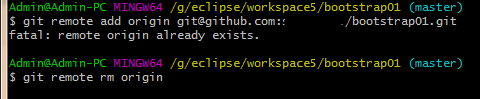
git remote add origin git@github.com:sunday123/bootstrap01.git
如果出现

就删掉远程的
git remote rm origin
提交
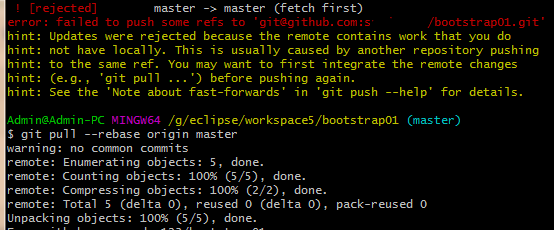
git push -u origin master
可能报错
 ! [rejected]        master -> master (fetch first)

error: failed to push some refs to 'git@github.com:s....'
用下面上传
git pull --rebase origin master
再
git push --set-upstream origin master
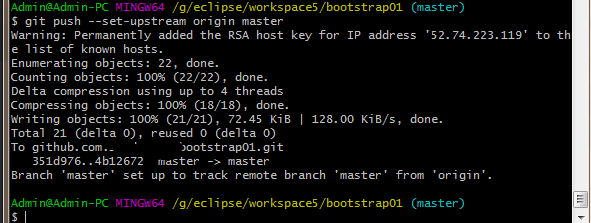
大功告成
git安装和项目上传到GitHub的更多相关文章
- GIT将本地项目上传到Github(两种简单、方便的方法)
GIT将本地项目上传到Github(两种简单.方便的方法) 一.第一种方法: 首先你需要一个github账号,所有还没有的话先去注册吧! https://github.com/ 我们使用git需要先安 ...
- 使用Git将本地项目上传到Github操作详解
Git的安装就不说了. 一.建本地仓库 1.第一步:我们需要先创建一个本地的版本库(其实也就是一个文件夹). 你可以直接右击新建文件夹,也可以右击打开Git bash命令行窗口通过命令来创建. 反正就 ...
- idea git 把本地项目上传到github上
创建一个项目,在项目文件夹下执行以下命令 第二种方法: 先在idea上创建一个项目 注意以上只是在本地建立了本地仓库,代码都放在本地仓库. 现在上传到github上 到此才上传成功
- 从零开始使用git将本地项目上传到GitHub
直接进入主题 1. 注册GitHub(官网:https://github.com/),打开官网,右上角点击sign up注册按钮,进入注册界面,根据提示填写信息注册.
- 使用git工具将项目上传到github
注册github账号 https://github.com/ 安装git工具: https://git-for-windows.github.io/ 上面的准备工作完成后,现在开始操作. 一.进入gi ...
- Git将本地项目上传到GitHub
本文转载于:https://segmentfault.com/a/1190000011909294 https://www.cnblogs.com/cxk1995/p/5800196.html 我们使 ...
- 如何用命令将本地项目上传到github
一.Git终端软件安装 1.下载windows上git终端,类似shell工具,下载地址:http://msysgit.github.io/ 2.安装方法,打开文件,一路点击Next即可 3.安装完成 ...
- mac下安装git,并将本地的项目上传到github
mac下安装git 安装过程: 1.下载Git installer http://git-scm.com/downloads 2.下载之后打开,双击.pkg安装 3.打开终端,使用git --vers ...
- 如何通过Git GUI将自己本地的项目上传至Github
最近在学习node.js和react,顺便复习了下AngluarJS相关的东西,写了些小demo想放在GitHub上,之前仅限于只申请了GitHub账号从没用过,今天花半天时间查资料认真学习Githu ...
随机推荐
- ASP.NET中使用附文本框插件
使用附文本选项框插件步骤 Newtonsoft.Json 改变js的配置文件的url 最后一定要关闭页面中的 ValidateRequest=false
- Git - Git推送本地分支到远程分支报错(! [rejected] non-fast-forward)的解决办法
一般都是冲突造成的,解决方案执行如下命令(dev为分支名称): git fetch origin dev #获取远程 dev 分支的修改 git merge origin dev #合并 ...
- 网络编程~~~osi五层协议
物理层 / 数据链路层 / 网络层 / 传输层 / 应用层(表示层/会话层) 一 物理层 物理层指的就是网线,光纤, 双绞线等物理传输介质 物理层发送的是数据(比特流) 二 数据链路层 数据链路层对数 ...
- 10g+: Transportable Tablespaces Across Different Platforms (Doc ID 243304.1)
10g+: Transportable Tablespaces Across Different Platforms (Doc ID 243304.1) APPLIES TO: Oracle Data ...
- RMAN 'Duplicate From Active Database' Feature in Oracle11g (Doc ID 452868.1)
RMAN 'Duplicate From Active Database' Feature in Oracle11g (Doc ID 452868.1) APPLIES TO: Oracle Data ...
- Centos 静态网络配置
cat /etc/sysconfig/network-scripts/ifcfg-ens33 DEFROUTE="yes" IPV4_FAILURE_FATAL="no& ...
- linux 判断文件夹或文件是否存在
文件夹不存在则创建 if [ ! -d "/data/" ];then mkdir /data else echo "文件夹已经存在" fi 文件存在则删除 i ...
- 使用canal增量同步mysql数据库信息到ElasticSearch
本文介绍如何使用canal增量同步mysql数据库信息到ElasticSearch.(注意:是增量!!!) 1.简介 1.1 canal介绍 Canal是一个基于MySQL二进制日志的高性能数据同步系 ...
- 基于 Swoole 的轻量级框架 CabalPHP
CabalPHP CabalPHP 是一个基于Swoole的轻量.高效.全异步开源框架. 亮点 全异步单机超高性能,轻松分布式部署 支持HTTP.TCP.websocket等多种协议 完善数据库引擎, ...
- 对systemV和systemd的简单理解(服务方面)
在CentOS7(RHEL7)以后,服务从原来的由systemV管理机制升级到了systemd. 在sysV中,所有的服务脚本都放在/etc/rc.d/init.d/中,可以使用/etc/rc.d/i ...