
iOS_SN_Socket - AsyncSocket
转载文章,原地址:http://yimouleng.com/2015/02/04/Socket-AsyncSocket/
一、前言
公司的项目用到了Socket编程,之前在学习的过程当中,用到的更多的还是http请求的方式。但是既然用到了就必须学习一下,所以就在网上找一些例子,然后想自己写一个demo。可是发现很多写iOS Socket的博客并没有很详细的说明,也可能是大神们觉得其他东西都浅显易懂。
自己专研了一下,将自己的一些理解总结出来,一方面整理自己的学习思路,另一方面,为一些和我有同样困惑的小伙伴们,稍做指引。
二、AsyncSocket介绍
1⃣️iOS中Socket编程的方式有哪些?
-BSD Socket
BSD Socket 是UNIX系统中通用的网络接口,它不仅支持各种不同的网络类型,而且也是一种内部进程之间的通信机制。而iOS系统其实本质就是UNIX,所以可以用,但是比较复杂。
-CFSocket
CFSocket是苹果提供给我们的使用Socket的方式,但是用起来还是会不太顺手。当然想使用的话,可以细细研究一下。
-AsyncSocket
这次博客的主讲内容,也是我们在开发项目中经常会用到的。
2⃣️为什么选择AsyncSocket?
iphone的CFNetwork编程比较艰深。使用AsyncSocket开源库来开发相对较简单,帮助我们封装了很多东西。
三、AsyncSocket详解
1⃣️说明
在我们开发当中,我们主要的任务是开发客户端。所以详解里主要将客户端的整个连接建立过程,以及在说明时候回调哪些函数。在后面的示例代码中,也会给出服务器端的简单开发。
2⃣️过程详解
1.建立连接
- (int)connectServer:(NSString *)hostIP port:(int)hostPort
2.连接成功后,会回调的函数
- (void)onSocket:(AsyncSocket )sock didConnectToHost:(NSString )host port:(UInt16)port
3.发送数据
- (void)writeData:(NSData *)data withTimeout:(NSTimeInterval)timeout tag:(long)tag;
4.接受数据
-(void)onSocket:(AsyncSocket )sock didReadData:(NSData )data withTag:(long)tag
5.断开连接
- (void)onSocket:(AsyncSocket )sock willDisconnectWithError:(NSError )err
- (void)onSocketDidDisconnect:(AsyncSocket *)sock
主要就是上述的几个方法,只是说在真正开发当中,很可能我们在收发数据的时候,我们收发的数据并不仅仅是一个字符串包装成NSData即可,我们很可能会发送结构体等类型,这个时候我们就需要和服务器端的人员协作来开发:定义怎样的结构体。
四、AsyncSocket示例
客户端代码
#import “ViewController.h“

#define SRV_CONNECTED 0
#define SRV_CONNECT_SUC 1
#define SRV_CONNECT_FAIL 2
#define HOST_IP @”192.168.83.40”
#define HOST_PORT 8008

@interface ViewController ()
{
    NSString _content;
}
-(int) connectServer: (NSString ) hostIP port:(int) hostPort;
-(void)showMessage:(NSString ) msg;
@end

@implementation ViewController

@synthesize clientSocket,tbInputMsg,lblOutputMsg;

#pragma mark - view lifecycle
- (void)viewDidLoad
{
    [super viewDidLoad];

    [self connectServer:HOST_IP port:HOST_PORT];
}
- (void)viewDidUnload
{
    [super viewDidUnload];
    [clientSocket release], clientSocket = nil;
    [tbInputMsg release], tbInputMsg = nil;
    [lblOutputMsg release], lblOutputMsg = nil;
}

- (int)connectServer:(NSString )hostIP port:(int)hostPort
{
    if (clientSocket == nil)
    {
        // 在需要联接地方使用connectToHost联接服务器
        clientSocket = [[AsyncSocket alloc] initWithDelegate:self];
        NSError err = nil;
        if (![clientSocket connectToHost:hostIP onPort:hostPort error:&err])
        {
            NSLog(@”Error %d:%@“, err.code, [err localizedDescription]);

            UIAlertView alert = [[UIAlertView alloc] initWithTitle:[@”Connection failed to host“ stringByAppendingString:hostIP] message:[NSString stringWithFormat:@”%d:%@“,err.code,err.localizedDescription] delegate:self cancelButtonTitle:@”OK“ otherButtonTitles:nil];
            [alert show];
            [alert release];
            return SRV_CONNECT_FAIL;
        } else {
            NSLog(@”Connected!“);
            return SRV_CONNECT_SUC;
        }
    }
    else {
        return SRV_CONNECTED;
    }
}

#pragma mark - IBAction
// 发送数据
- (IBAction) sendMsg:(id)sender
{
    NSString inputMsgStr = tbInputMsg.text;
    NSString  content = [inputMsgStr stringByAppendingString:@”\r\n“];
    NSLog(@”%@“,content);
    NSData data = [content dataUsingEncoding:NSUTF8StringEncoding];
    // NSData data = [content dataUsingEncoding:NSISOLatin1StringEncoding];
    [clientSocket writeData:data withTimeout:-1 tag:0];
}
// 连接/重新连接
- (IBAction) reconnect:(id)sender
{
    int stat = [self connectServer:HOST_IP port:HOST_PORT];
    switch (stat) {
        case SRV_CONNECT_SUC:
            [self showMessage:@”connect success“];
            break;
        case SRV_CONNECTED:
            [self showMessage:@”It’s connected,don’t agian“];
            break;
        default:
            break;
    }
}
- (void)showMessage:(NSString )msg
{
    UIAlertView  alert = [[UIAlertView alloc]initWithTitle:@”Alert!“
                                                    message:msg
                                                   delegate:nil
                                          cancelButtonTitle:@”OK“
                                          otherButtonTitles:nil];
    [alert show];
    [alert release];
}
- (IBAction)textFieldDoneEditing:(id)sender
{
    [tbInputMsg resignFirstResponder];
}
- (IBAction)backgroundTouch:(id)sender
{
    [tbInputMsg resignFirstResponder];
}

#pragma mark socket delegate
- (void)onSocket:(AsyncSocket )sock didConnectToHost:(NSString )host port:(UInt16)port
{
    [clientSocket readDataWithTimeout:-1 tag:0];
}

- (void)onSocket:(AsyncSocket )sock willDisconnectWithError:(NSError )err
{
    NSLog(@”Error“);
}

- (void)onSocketDidDisconnect:(AsyncSocket )sock
{
    NSString msg = @”Sorry this connect is failure“;
    [self showMessage:msg];
    [msg release];
    clientSocket = nil;
}

- (void)onSocketDidSecure:(AsyncSocket )sock
{
}

// 接收到数据(可以通过tag区分)
-(void)onSocket:(AsyncSocket )sock didReadData:(NSData )data withTag:(long)tag
{
    NSString aStr = [[NSString alloc] initWithData:data encoding:NSUTF8StringEncoding];
    _content = lblOutputMsg.text;
    NSLog(@”Hava received datas is :%@“,aStr);
    NSString newStr = [NSString stringWithFormat:@”\n%@“, aStr];
    lblOutputMsg.text = [_content stringByAppendingString:newStr];
    [aStr release];
    [clientSocket readDataWithTimeout:-1 tag:0];
}

@end
服务器端代码
#import “SocketView.h“
#import “AsyncSocket.h“

#define WELCOME_MSG  0
#define ECHO_MSG     1

#define FORMAT(format, …) [NSString stringWithFormat:(format), ##VA_ARGS]

@interface SocketView (PrivateAPI)
- (void)logError:(NSString )msg;
- (void)logInfo:(NSString )msg;
- (void)logMessage:(NSString )msg;
@end

@implementation SocketView

// 初始化
- (void)awakeFromNib
{
    listenSocket = [[AsyncSocket alloc] initWithDelegate:self];
    [listenSocket setRunLoopModes:[NSArray arrayWithObject:NSRunLoopCommonModes]];

    connectedSockets = [[NSMutableArray alloc] initWithCapacity:1];
    isRunning = NO;

    [logView setString:@””];
    // [portField setString:@”8080”];
}

- (IBAction)startStop:(id)sender
{
    if(!isRunning)
    {
        int port = [portField intValue];

        if(port < 0 || port > 65535)
        {
            port = 0; // 会随即取端口
        }

        NSError error = nil;
        if(![listenSocket acceptOnPort:port error:&error])
        {
            [self logError:FORMAT(@”Error starting server: %@“, error)];
            return;
        }

        [self logInfo:FORMAT(@”Echo server started on port %hu“, [listenSocket localPort])];
        isRunning = YES;

        [portField setEnabled:NO];
        [startStopButton setTitle:@”Stop“];
    }
    else
    {
        // Stop accepting connections
        [listenSocket disconnect];

        // Stop any client connections
        int i;
        for(i = 0; i < [connectedSockets count]; i++)
        {
            // Call disconnect on the socket,
            // which will invoke the onSocketDidDisconnect: method,
            // which will remove the socket from the list.
            [[connectedSockets objectAtIndex:i] disconnect];
        }

        [self logInfo:@”Stopped Echo server“];
        isRunning = false;

        [portField setEnabled:YES];
        [startStopButton setTitle:@”Start“];
    }
}

- (void)scrollToBottom
{
    NSScrollView scrollView = [logView enclosingScrollView];
    NSPoint newScrollOrigin;

    if ([[scrollView documentView] isFlipped])
        newScrollOrigin = NSMakePoint(0.0, NSMaxY([[scrollView documentView] frame]));
    else
        newScrollOrigin = NSMakePoint(0.0, 0.0);

    [[scrollView documentView] scrollPoint:newScrollOrigin];
}

- (void)logError:(NSString )msg
{
    NSString paragraph = [NSString stringWithFormat:@”%@\n“, msg];

    NSMutableDictionary attributes = [NSMutableDictionary dictionaryWithCapacity:1];
    [attributes setObject:[NSColor redColor] forKey:NSForegroundColorAttributeName];

    NSAttributedString as = [[NSAttributedString alloc] initWithString:paragraph attributes:attributes];
    [as autorelease];

    [[logView textStorage] appendAttributedString:as];
    [self scrollToBottom];
}

- (void)logInfo:(NSString )msg
{
    NSString paragraph = [NSString stringWithFormat:@”%@\n“, msg];

    NSMutableDictionary attributes = [NSMutableDictionary dictionaryWithCapacity:1];
    [attributes setObject:[NSColor purpleColor] forKey:NSForegroundColorAttributeName];

    NSAttributedString as = [[NSAttributedString alloc] initWithString:paragraph attributes:attributes];
    [as autorelease];

    [[logView textStorage] appendAttributedString:as];
    [self scrollToBottom];
}

- (void)logMessage:(NSString )msg
{
    NSString paragraph = [NSString stringWithFormat:@”%@\n“, msg];

    NSMutableDictionary attributes = [NSMutableDictionary dictionaryWithCapacity:1];
    [attributes setObject:[NSColor blackColor] forKey:NSForegroundColorAttributeName];

    NSAttributedString as = [[NSAttributedString alloc] initWithString:paragraph attributes:attributes];
    [as autorelease];

    [[logView textStorage] appendAttributedString:as];
    [self scrollToBottom];
}

- (void)onSocket:(AsyncSocket )sock didAcceptNewSocket:(AsyncSocket )newSocket
{
    [connectedSockets addObject:newSocket];
}

// 客户连接成功!
- (void)onSocket:(AsyncSocket )sock didConnectToHost:(NSString )host port:(UInt16)port
{
    [self logInfo:FORMAT(@”Accepted client %@:%hu“, host, port)];

    NSString welcomeMsg = @”恭喜您,已经通过scoket连接上服务器!“;
    NSData welcomeData = [welcomeMsg dataUsingEncoding:NSUTF8StringEncoding];

    [sock writeData:welcomeData withTimeout:-1 tag:WELCOME_MSG];

    // We could call readDataToData:withTimeout:tag: here - that would be perfectly fine.
    // If we did this, we’d want to add a check in onSocket:didWriteDataWithTag: and only
    // queue another read if tag != WELCOME_MSG.
}

- (void)onSocket:(AsyncSocket )sock didWriteDataWithTag:(long)tag
{
   [sock readDataToData:[AsyncSocket CRLFData] withTimeout:-1 tag:0];
}
// 接收到数据
- (void)onSocket:(AsyncSocket )sock didReadData:(NSData )data withTag:(long)tag
{
    NSData strData = [data subdataWithRange:NSMakeRange(0, [data length] - 2)];
    NSString recvMsg = [[[NSString alloc] initWithData:strData encoding:NSUTF8StringEncoding] autorelease];
    if(recvMsg)
    {
        [self logMessage:recvMsg];
    }
    else
    {
        [self logError:@”Error converting received data into UTF-8 String“];
    }
    NSString backStr = nil;
    for (AsyncSocket socket in connectedSockets) {
        if ([sock isEqualTo:socket]) {
            backStr = [NSString stringWithFormat:@”我说: %@“,recvMsg];
        } else {
            backStr = [NSString stringWithFormat:@”他说: %@“,recvMsg];
        }
    }

    // 回发数据
    NSData backData = [backStr dataUsingEncoding:NSUTF8StringEncoding];
    [sock writeData:backData withTimeout:-1 tag:ECHO_MSG];
}

- (void)onSocket:(AsyncSocket )sock willDisconnectWithError:(NSError )err
{
    [self logInfo:FORMAT(@”Client Disconnected: %@:%hu“, [sock connectedHost], [sock connectedPort])];
}

- (void)onSocketDidDisconnect:(AsyncSocket *)sock
{
    [connectedSockets removeObject:sock];
}

@end
界面搭建
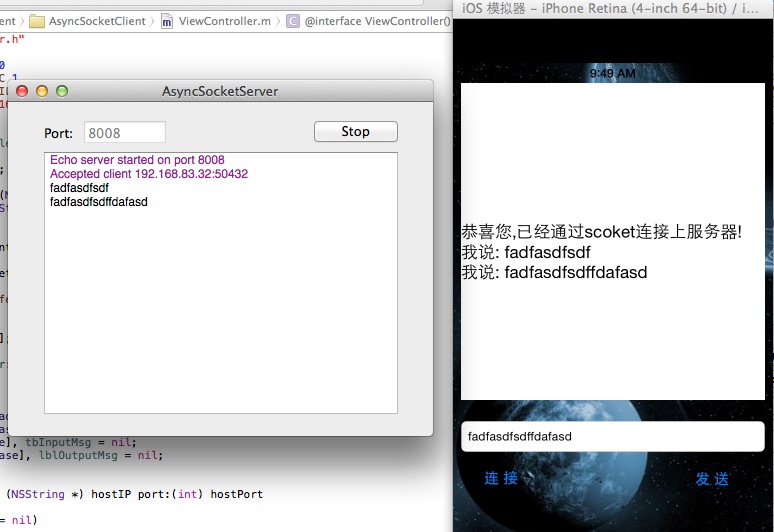
iOS_SN_Socket - AsyncSocket的更多相关文章
- IOS使用Asyncsocket进行socket编程
iphone的标准推荐CFNetwork C库编程.但是编程比较烦躁.在其它OS往往用类来封装的对Socket函数的处理.比如MFC的CAsysncSocket.在iphone也有类似于开源项目.co ...
- IOS AsyncSocket
导入AsyncSocket.h AsyncSocket.m AsyncUdpSocket.h AsyncUdpSocket.m 以及 CFNetWork.framework async ...
- iOS socket编程 第三方库 AsyncSocket(GCDAsyncSocket)
Socket描述了一个IP.端口对.它简化了程序员的操作,知道对方的IP以及PORT就可以给对方发送消息,再由服务器端来处理发送的这些消息.所以,Socket一定包含了通信的双发,即客户端(Clien ...
- AsyncSocket的使用
AsyncSocket使用流程 安装AsyncSocket 拷贝AsyncSocket类到项目 使用AsyncSocket set delegate @interface NetWork : NSOb ...
- AsyncSocket 使用
今天使用AsyncSocket模拟及时通信,在这里记录一下,免得以后自己又犯相同的错误 1>创建客户端和服务器socket /** * 设置socket */ - (void)setupSock ...
- iOS开发之AsyncSocket使用教程
用socket可以实现像QQ那样发送即时消息的功能.客户端和服务端需要建立长连接,在长连接的情况下,发送消息.客户端可以发送心跳包来检测长连接. 在iOS开发中使用socket,一般都是用第三方库As ...
- AsyncSocket的长连接使用
使用背景:需要跟服务器长期保持连接进行即时通讯:还有在跟智能硬件建立实时链接进行同步智能硬件的状态等,最近我就做项目就碰到需要实时更新智能硬件的状态(比如智能硬件的电量,以及其它工作状态),跟智能硬件 ...
- AsyncSocket长连接棒包装问题解决
project正在使用长连接快来server沟通.因此,指定我们的协议前两个字节为数据长度来区分数据包 app这边数据有两种传输形式: 1.app主动请求所须要的数据: 2.app异步接收来自服务端的 ...
- iOS开发之即时通讯之Socket(AsyncSocket)
1.AsyncSocket介绍 如果需要在项目中像QQ微信一样做到即时通讯,必须使用socket通讯. iOS中Socket编程的方式: BSD Socket: BSD Socket 是UNIX系统中 ...
随机推荐
- POJ2976 Dropping tests(二分+精度问题)
---恢复内容开始--- POJ2976 Dropping tests 这个题就是大白P144页的一个变形,二分枚举x,对a[i]-x*b[i]从大到小进行排序,选取前n-k个判断和是否大于等于0,若 ...
- JavaScript高级程序设计第20章JSON 笔记 (学习笔记)
第二十章 JSON 1.Json 可以表示三种类型的值: 1.简单值: 表示数值:5 表示字符串:“hello wrold”注表示字符串时必须使用双引号 2.对象: {“name”:“mi”,”ag ...
- JavaScript加密解密压缩工具
<script> a=62; function encode() { var code = document.getElementById('code').value; code = co ...
- Ubuntu与Ubuntu系统之间的mount挂载
1.被挂载机 1>安装Ubuntu nfs apt-get install nfs-kernel-server 2>配置/etc/exports Ubuntu nfs允许挂载的目录及权限在 ...
- 《python基础教程》笔记之 更加抽象
方法.函数和特性 函数和方法的区别在于self参数,方法(绑定方法)将它们的第一个参数帮顶到所属的实例上,因此这个参数可以不必提供.可以将特性绑定到一个普通函数上,这样就不会有特殊的self参数了,换 ...
- (摘)DataGuard物理standby管理 - 主备切换
DataGuard物理standby管理 - 主备切换 Dataguard的切换分为两种,switchover和failover. switchover一般用于数据库或硬件升级,这时只需要较短时间中断 ...
- Android应用程序窗口(Activity)的窗口对象(Window) 的创建过程分析
每一个Activity组件都有一个关联的ContextImpl对象,同时,它还关联有一个Window对象,用来描述一个具体的应用程序窗口. 每一个Activity组件都有一个关联的ContextImp ...
- hdu 七夕节
#include <cstdio> #include <cstring> #include <algorithm> #define maxn 500000 usin ...
- 这样就算会了PHP么?-4
数组初步 <?php $ereg = 'tm'; $str = 'hello,tm,Tm,tM,TM.'; $rep_str = eregi_replace($ereg, 'TM', $str) ...
- 工控主板对ISO7816智能卡标准的支持
ISO7816是一套协议标准,这套协议不仅规定了智能IC卡的机械电气特性,而且还规定了智能IC卡的应用方法.智能IC卡的主要用途可归为身份识别.支付安全.加密/解密和信息存储四个方面.智能IC卡已经广 ...